
Affordable FPV goggles can get you flying without a premium headset, but the cheapest option is not always the best value. Video-system compatibility matters more than screen size or advertised resolution.
These 10 picks span entry-level analog headsets, camera-and-transmitter bundles, and digital options. Use the guide below to narrow them down before you buy.
Best 10 Budget Fpv Goggles Picks for 2026
Best Budget Digital HD
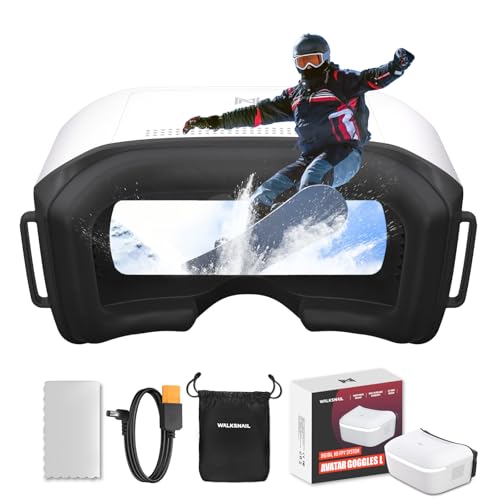
- 1080p/60fps 4.5-inch LCD
- Head tracking with PPM output
- Walksnail Avatar HD only
Best For: Pilots building around Walksnail Avatar HD
Best Analog Goggles With DVR

- 5-inch 800×480 LCD
- 40-channel auto-search
- Built-in DVR recording
Best For: Beginners flying 5.8GHz analog FPV
Best Simple Outdoor Display

- 4.3-inch 480×272 screen
- 48-channel auto-search
- Stated 500 cd/m² brightness
Best For: Basic outdoor RC viewing on 5.8GHz
Best Camera-and-Goggle Bundle

- 700TVL, 170-degree camera
- 5.8GHz 40-channel transmitter
- Verify included goggles and display specs
Best For: Beginners outfitting an RC vehicle with FPV
Lightweight Pick
BONKZEBU 3-Inch Analog FPV Goggles

- 183 g compact headset
- Dual-antenna, 40-channel receiver
- USB-charged 1,200 mAh battery
Best For: Portable analog FPV viewing
Auto-Search Pick

- 40-channel auto-search
- Dual antennas for reception
- 180 g with a 3-inch screen
Best For: Simple analog channel finding
Camera Combo Pick

- Headset, camera, and VTX included
- Onboard DVR
- MicroSD card sold separately
Best For: A bundled FPV viewing and camera setup
Modular Analog Pick

- 1136×640 display with 50° FOV
- Replaceable receiver-module design
- PAL/NTSC DVR and Type-C charging
Best For: Analog pilots seeking module flexibility
Dual-Antenna Analog Pick

- 5-inch 800×480 screen
- Dual antennas and auto-search
- Built-in DVR recording
Best For: Analog flying with simple channel search
DJI Digital Pick

- 1080p 60Hz screen with 54° FOV
- DJI O4 digital video transmission
- Glasses-friendly interior
Best For: Compatible DJI Avata 2 or Neo pilots
Best Budget Digital HD – CADDXFPV Walksnail Goggles L
Among budget FPV goggles for pilots building around Walksnail Avatar HD, the Goggles L offer a 1080p/60fps view on a 4.5-inch LCD. They are a digital option for someone who wants a clearer feed than analog goggles provide.
Best For: Pilots using Walksnail Avatar HD air units who want digital video and head tracking for compatible fixed-wing or RC setups.
Pros:
- 1080p/60fps display and up to 50Mbps video bitrate.
- Nine-axis head tracking with PPM output for compatible equipment.
- Built-in DVR supports Micro SD cards up to 256GB; 2S–6S battery input adds power flexibility.
Cons:
- Receives only Walksnail Avatar HD video, not analog signals, and has no HDMI input.
- External battery and Micro SD card are not included.
These make sense if you already fly Avatar HD or plan to adopt it. Check your air unit before buying; the digital display will not work with an existing analog VTX.
Best Analog Goggles With DVR – SoloGood EV800D
If you are shopping for budget FPV goggles for a 5.8GHz analog setup, the SoloGood EV800D combines a 5-inch 800×480 screen, 40-channel auto-searching, and DVR recording. Its dual-antenna design and built-in battery make it a practical all-in-one choice for getting started.
Best For: Analog FPV beginners who want a larger screen, channel scanning, and onboard recording.
Pros:
- 40-channel RaceBand receiver automatically searches for a signal.
- Built-in DVR records at up to 720×576 resolution.
- 5-inch display and dual antennas are included.
Cons:
- 800×480 display is not an HD digital feed.
- Supplied specifications give inconsistent battery-capacity and runtime figures, so verify them before purchase.
Choose the EV800D for its useful analog features rather than for image sharpness. A fast C10 card is recommended in the supplied notes for full-frame DVR recording.
Best Simple Outdoor Display – 4.3-Inch 48CH FPV Goggles
These budget FPV goggles keep the listed feature set straightforward: a 4.3-inch 480×272 display, 5.8GHz 48-channel auto-searching, and a stated 500 cd/m² brightness for outdoor use. They are worth considering if a basic screen and quick channel finding matter more to you than a high-resolution image.
Best For: RC pilots seeking basic 5.8GHz goggles with a bright screen and automatic channel search.
Pros:
- 48-channel auto-searching simplifies finding a transmission.
- Stated 500 cd/m² display brightness is geared toward outdoor use.
- 4.3-inch screen has a listed 2.8× magnification.
Cons:
- 480×272 resolution is modest.
- Supplied notes do not establish DVR capability or battery runtime.
The appeal is its basic viewing setup, not a long list of extras. Confirm the receiver matches your transmitter and check the missing power details before ordering.
Best Camera-and-Goggle Bundle – RunCam Spotter V2 Kit
For buyers comparing budget FPV goggles who also need a camera and transmitter, this RunCam package lists a Spotter V2 Micro all-in-one camera with a 5.8GHz 40-channel transmitter. The supplied notes also describe goggles with dual antennas and auto-search, though they do not specify the goggle display resolution.
Best For: Beginners adding a camera-and-goggle FPV setup to an RC car, boat, plane, or drone.
Pros:
- Listed 700TVL camera has a 170-degree field of view.
- Integrated 5.8GHz transmitter offers selectable 20–200mW output and 40 channels.
- Camera includes a microphone and on-screen display; goggles are described with dual antennas and auto-search.
Cons:
- Goggle screen size, resolution, and runtime are not provided in the supplied notes.
- Supplied component details explicitly name the transmitter but do not clearly itemize everything in the bundle.
This is most interesting as a potential starter bundle, not as a display upgrade. Verify the exact included components and goggle specifications before buying.
Lightweight Pick – BONKZEBU 3-Inch Analog FPV Goggles
If you want budget fpv goggles that are easy to carry, this BONKZEBU headset weighs 183 g and pairs a 3-inch, 480 × 320 screen with a built-in 5.8 GHz receiver. Its dual antennas and one-key channel search keep setup straightforward for compatible analog FPV gear.
Best For: Pilots who prioritize a lightweight headset and simple 40-channel analog reception.
Pros:
- 183 g design is compact for transport.
- Dual antennas and auto-search cover 40 channels, including RaceBand.
- Built-in 1,200 mAh battery charges over USB.
Cons:
- 480 × 320 screen resolution is modest.
- Although the title mentions DVR, the notes only confirm AV output for connecting an external DVR.
This is a practical choice when portability matters more than screen resolution. Check the recording setup carefully if DVR capability is essential.
Auto-Search Pick – Xiangtat 5.8 GHz FPV Goggles
These budget fpv goggles focus on straightforward analog reception: a 5.8 GHz, 40-channel receiver offers auto-search, while dual antennas support signal reception. The 3-inch, 480 × 320 screen and 180 g listed weight make this a compact viewing option.
Best For: Analog FPV users who want automatic channel finding in a lightweight headset.
Pros:
- Auto-search covers 40 channels, including RaceBand.
- Dual antennas are included for reception.
- Supports external video input and AV signal output.
Cons:
- The 3-inch display may feel small if you prefer a larger viewing area.
- At 480 × 320, display detail is limited.
Choose this one for its channel-search convenience and compact size. The supplied notes list DVR recording as a feature but give few details about how it works, so verify that function before buying for recording.
Camera Combo Pick – Fat Shark Recon Echo DVR Kit
For shoppers comparing budget fpv goggles who also need FPV video hardware, the Fat Shark Recon Echo bundles a headset with a micro camera and video transmitter. It has an onboard DVR, making it a more complete starter package than a goggles-only listing.
Best For: RC helicopter or quadcopter users who want goggles, a camera, and a transmitter together.
Pros:
- Includes a micro FPV camera and video transmitter.
- Onboard DVR supports recording.
- Headband, linear antenna, and cleaning cloth are included.
Cons:
- MicroSD card for the DVR is not included.
- The supplied notes do not specify display resolution or receiver channel coverage.
This kit stands out for what comes in the box, rather than for documented screen or receiver specifications. Factor in a MicroSD card if you plan to record.
Modular Analog Pick – Directfpv Fox Pro
The Directfpv Fox Pro is worth considering when shopping for budget fpv goggles if you want a replaceable receiver-module design rather than a fixed setup. Its listed 1136×640 display, 50° field of view, and onboard DVR cover the essentials for analog flying.
Best For: Analog pilots who want flexibility across supported receiver modules.
Pros:
- Replaceable design supports 1.3G, 2.4G, 4.9G, and 5.8G frequency modules.
- DVR records PAL or NTSC video to a Class 10+ TF card up to 64GB.
- Type-C charging and protection circuitry support its single-18650 power setup.
Cons:
- Receiver-module compatibility does not mean every module is included; confirm what comes with the listing.
- The supplied display details conflict: the title says 4.3 inches, while the notes say 4 inches.
Choose this for its module flexibility and recording features, but verify the screen size and receiver-module contents before buying.
For shoppers comparing budget fpv goggles for analog drones or RC vehicles, this EV800D listing combines a 5-inch 800×480 screen with dual-antenna reception, channel auto-search, and DVR recording.
Best For: Analog FPV users who want built-in channel search and flight recording.
Pros:
- Dual-antenna reception is designed for a steadier signal.
- Auto-search simplifies finding a channel.
- Built-in DVR, external video input, and headphone audio output add versatility.
Cons:
- The 800×480 display is lower resolution than the other two goggles listed here.
- At a listed 393 g, weight may matter if you prefer lighter headwear.
This is a practical analog option when easy tuning and recording matter more to you than screen resolution.
If your search for budget fpv goggles is really about finding an option for a compatible DJI setup, Goggles N3 offer a 1080p, 60Hz screen with a 54° field of view. Unlike the analog options above, they use DJI O4 digital transmission.
Best For: Pilots using DJI Avata 2 or DJI Neo who want a glasses-friendly digital headset.
Pros:
- 1080p/60fps video feed via DJI O4 transmission, with a stated latency as low as 31 ms.
- Interior accommodates glasses without diopter adjustments or lens installation.
- Up to 2.7 hours of stated operating time on a full charge.
Cons:
- Compatibility is limited to the listed DJI aircraft and controllers; it does not work with RC Motion 2, FPV Remote Controller 2, RC-N3, or RC 2.
- DJI RC Motion 3 features require that compatible controller, which is not listed among the included components.
Pick the N3 for a supported DJI digital setup, not as a general-purpose replacement for analog 5.8G goggles. Check aircraft and controller compatibility first.
How We Picked the Best Budget Fpv Goggles
We organized these picks around the decisions that matter most to buyers: analog versus digital compatibility, display size, DVR availability, included accessories, and likely ease of use. The list includes compact and box-style goggles, bundles, and digital headsets. A product name alone cannot confirm comfort, receiver performance, or compatibility with every aircraft, so check current specifications before ordering.
Quick Comparison: Which Type Fits Your Setup?
- Entry-level analog goggles: A starting point if your drone or camera transmits standard 5.8 GHz analog video. Check channel support and whether a receiver and antenna are included.
- Analog goggles with DVR: Useful if you want to review flights or locate a downed drone. Recording quality may differ from what you see live.
- Camera-and-transmitter bundles: Convenient for a first build or RC project, provided the included parts suit your vehicle and power supply.
- Digital goggles: Consider the Walksnail or DJI options only after confirming support for your aircraft and video equipment. They are not interchangeable with ordinary analog transmitters.
Key Buying Factors for Budget Fpv Goggles
Start with Video Compatibility
Match the goggles to the video transmitter on your drone. A 5.8 GHz analog receiver will not decode Walksnail or DJI digital video, and digital headsets generally require equipment from their supported ecosystem. Frequency and channel counts are not substitutes for checking the actual video standard.
Prioritize Reception Over Display Claims
A larger or higher-resolution screen cannot repair a weak video signal. Look at the receiver configuration, antenna connections, and included antennas. If you fly around obstacles, consider whether the headset lets you upgrade antennas or otherwise improve reception. Treat advertised screen resolution as one factor, not a promise of clearer footage.
Check Fit, Power, and Extras
Box goggles often provide a roomy view, but face shape, glasses clearance, weight, and focus needs affect comfort. Check battery type and expected runtime, charging method, and whether replacement straps or face padding are available. If DVR, head tracking, or a camera bundle matters to you, verify exactly what is included rather than relying on a shortened listing title.
Who Should Buy Which Budget Fpv Goggles?
First-time analog pilots should start with a compatible, ready-to-use headset and favor simple controls over extra specifications. Pilots who want flight footage should shortlist the DVR-equipped models and confirm recording media requirements. Space-conscious flyers may prefer a compact 3-inch headset, while those who value a larger viewing area can consider 4.3- or 5-inch models.
DIY builders may find a camera-and-transmitter bundle convenient, but should check its wiring and voltage requirements. Digital-system owners should choose goggles specifically supported by their Walksnail or DJI equipment. Among Budget Fpv Goggles, the best value is the model that connects to your aircraft reliably and feels comfortable enough to wear for a full session—not necessarily the one with the longest feature list.