
A dash cam with ADAS can record an incident while offering on-screen or audible driving alerts. The useful choice depends on more than a 4K label: camera placement, rear coverage, nighttime clarity, and alert behavior all matter.
These 10 options span conventional front-and-rear cameras, a mirror-style model, and setups with added connectivity or parking features. Use the guide below to narrow down what is worth paying for.
Best 10 Dash Cam with Adas Picks for 2026
Best Parking Kit Bundle

- 4K front and 2K swiveling rear camera
- Hardwire kit and 64GB card included
- ADAS alerts plus GPS and dual-band Wi-Fi
Best For: Drivers seeking bundled parking surveillance and flexible rear-camera placement
Best Mirror-Style Pick
WOLFBOX G850 PRO Mirror Dash Cam

- 12-inch mirror-mounted touch display
- ADAS and blind-spot detection
- Voice control and included 64GB card
Best For: Drivers wanting a mirror display with additional blind-spot alerts
Best Remote-Access Option

- 4K front and 1080P rear STARVIS 2 recording
- ADAS and Wi-Fi 6 connectivity
- Optional kit unlocks 4G remote access
Best For: Drivers prioritizing night footage and optional remote monitoring
Best Straightforward 4K Pick
70mai A800S Front and Rear Dash Cam

- 4K front and 1080P secondary recording
- Spoken lane and forward-collision alerts
- Parking mode requires separate UP03 kit
Best For: Drivers wanting familiar 4K dual-camera recording with ADAS alerts
Best for Larger Vehicles
Juscar Rotating 4K Front and Rear Dash Cam
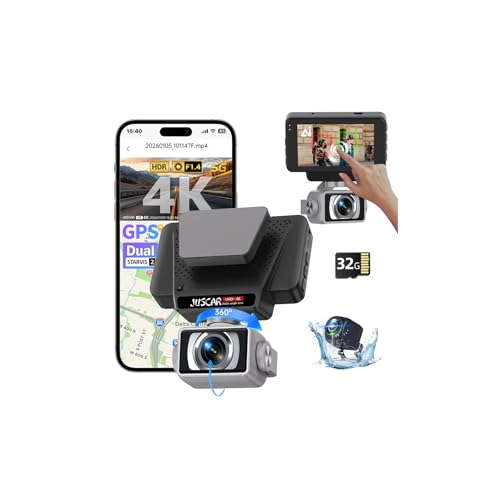
- Front ADAS and rear blind-spot alerts
- Waterproof rear camera with two mounting options
- Rotating 4K front lens; 1080p rear
Best For: Truck, RV, and SUV drivers seeking flexible camera placement
Best Dual-4K Coverage
TQZNK C16 Front and Rear Dash Cam

- 4K recording at both front and rear
- Forward-collision and lane-departure voice alerts
- 64GB card, GPS, and supercapacitor included
Best For: Drivers prioritizing resolution on both cameras
Best for Flexible Power
4K GPS Front and Rear Dash Cam

- Advertised blind-spot and lane-change alerts
- Split car charger and USB-C cable included
- Parking monitoring needs an ACC hardwire kit
Best For: Drivers seeking flexible supplied power connections
Best for Hot Climates

- Supercapacitor rated -22°F to 158°F
- 170° front and 160° rear coverage
- 64GB card included
Best For: Drivers seeking temperature tolerance and wide coverage
Best for Lane-Change Alerts

- ADAS, BSD, and LCA alerts
- 4K front and 1080p rear recording
- GPS and Viidure app access
Best For: Drivers seeking lane-change and blind-spot alerts
Best for Expandable Storage
Biuone 4K Front and Rear Dash Cam

- Supports cards up to 512GB
- 32GB card included
- Parking mode requires ACC hardwire kit
Best For: Drivers seeking ample storage and GPS logging
Best Parking Kit Bundle – BOTSLAB G980H Dual Dash Cam
If you want a dash cam with ADAS and parking surveillance without buying a separate hardwire kit, the BOTSLAB G980H is a practical choice. It pairs a 4K front camera with a 2K rear camera that can swivel to record behind the car or inside it.
Best For: Drivers who want ADAS alerts and a ready-to-install parking-monitoring bundle.
Pros:
- Includes a hardwire kit and 64GB microSD card.
- ADAS alerts cover pedestrians, lane deviation, following distance, and more.
- Swiveling rear camera offers a choice of rear-road or cabin coverage.
Cons:
- Rear camera cannot cover the cabin and road behind simultaneously.
- Listed microSD support tops out at 64GB.
The included accessories make this a convenient package, particularly if parking coverage matters. Choose the rear camera’s direction based on which view you need most.
Best Mirror-Style Pick – WOLFBOX G850 PRO Mirror Dash Cam
The WOLFBOX G850 PRO is a dash cam with ADAS for drivers who prefer a rearview-mirror display over a separate windshield screen. Its 12-inch touch display combines forward alerts with blind-spot detection and rear collision alerts.
Best For: Drivers who want mirror-mounted recording, blind-spot warnings, and voice controls.
Pros:
- ADAS includes forward collision, lane departure, pedestrian, and following-distance alerts.
- Blind-spot detection adds alerts related to lane changes.
- Includes a 64GB card and supports voice commands for common actions.
Cons:
- The 12-inch mirror display may not suit drivers who prefer a compact dash cam.
- Rear recording is listed at 1080P rather than the front camera’s higher resolution.
This model makes the most sense if you will use its large touch display and expanded warning features. Note that the supplied specifications describe front recording inconsistently, listing both 2160P and 2560 × 1440 in the product notes.
Best Remote-Access Option – 70mai A810S 4K Dual Dash Cam
The 70mai A810S is a dash cam with ADAS that prioritizes nighttime footage and connected features. It records 4K video up front and 1080P at the rear using Sony STARVIS 2 sensors, while Wi-Fi 6 helps with app access and video transfers.
Best For: Drivers who want strong low-light specifications and the option to add remote vehicle monitoring.
Pros:
- Dual STARVIS 2 sensors and HDR-focused features support low-light recording.
- ADAS provides lane-departure and forward-collision warnings.
- Optional 4G setup enables live viewing, vehicle location checks, and event alerts through the app.
Cons:
- Parking mode requires a hardwire kit.
- 4G remote access requires the optional UP05 hardwire kit.
It is a compelling option if footage quality and future connectivity matter more than getting every feature out of the box. Budget for the required accessories if parking or 4G monitoring is central to your plans.
Best Straightforward 4K Pick – 70mai A800S Front and Rear Dash Cam
The 70mai A800S is a dash cam with ADAS for drivers who want 4K front recording, a 1080P second camera, and familiar everyday features. Voice alerts cover lane drift and potential forward collisions, while the G-sensor can lock footage after an abrupt event.
Best For: Drivers seeking a conventional dual-camera setup with 4K front video and spoken driving alerts.
Pros:
- 4K front recording uses a Sony IMX415 sensor and an F1.8 lens.
- Rear camera can be positioned to capture the road behind or the cabin.
- Dual-band Wi-Fi supports footage management and app-based firmware updates.
Cons:
- 24-hour parking surveillance requires a separately purchased UP03 hardwire kit.
- The second camera records one selected view—rear road or cabin—not both at once.
This is a sensible fit if you value straightforward recording and ADAS voice prompts over remote-access extras. Factor the hardwire kit into the total cost if parked-vehicle coverage is essential.
Best for Larger Vehicles – Juscar Rotating 4K Front and Rear Dash Cam
If you want a dash cam with ADAS for a truck, RV, or SUV, this Juscar model pairs 4K front and 1080p rear recording with front driving alerts and rear blind-spot warnings. Its rotating front camera and waterproof rear camera offer more placement flexibility than a conventional fixed-lens setup.
Best For: Drivers of larger vehicles who want rear-camera mounting options and alerts from both directions.
Pros:
- Front ADAS provides tailgating and pedestrian warnings; rear BSD alerts to vehicles approaching from behind.
- Waterproof rear camera can mount inside the rear windshield or below the rear bumper and supports an automatic reversing display.
- Includes GPS, app access over 5.8GHz Wi-Fi, a 3-inch touchscreen, and a 32GB card.
Cons:
- Rear recording is 1080p rather than 4K.
- Drivers who only need standard forward and rearward footage may not use the rotating lens or external rear-mount option.
The flexible camera placement is its strongest reason to choose it; weigh that versatility against the lower-resolution rear channel.
Best Dual-4K Coverage – TQZNK C16 Front and Rear Dash Cam
For shoppers prioritizing resolution, this dash cam with ADAS records in 4K at both the front and rear. Its voice alerts cover forward collision, lane departure, and the vehicle ahead starting to move, while GPS logs speed, route, and location.
Best For: Drivers who want high-resolution footage from both cameras alongside basic forward-facing driving alerts.
Pros:
- Dual 4K recording with 170° front and 160° rear fields of view.
- Starlight night vision and WDR help handle low light and contrasting brightness.
- Includes a 64GB card, dual-band Wi-Fi, GPS, and a heat-resistant supercapacitor.
- Offers time-lapse, motion-triggered, and collision-triggered parking recording options.
Cons:
- Listed ADAS alerts are forward-facing; rear blind-spot detection is not specified.
- Parking-mode wiring requirements are not specified in the supplied details.
Choose this model if rear video detail matters as much as front video detail. Its ADAS feature set is useful, but it should not be mistaken for rear blind-spot monitoring.
Best for Flexible Power – 4K GPS Front and Rear Dash Cam
This dash cam with ADAS combines 4K front and 1080p rear recording with advertised blind-spot detection and lane-change assist alerts. It is also worth a look if your vehicle’s power outlets are awkward: the supplied split car charger and USB-C cable give you two connection options.
Best For: Drivers who want ADAS alerts, phone-based footage access, and a choice of supplied power connections.
Pros:
- 170° front and 140° rear views, with 4K front recording and 1080p rear recording.
- Built-in GPS logs location, speed, and route; 5.8GHz Wi-Fi connects to the Viidure app.
- Includes a 32GB card, a split car charger, and a USB-C cable.
Cons:
- Rear footage is limited to 1080p.
- 24-hour parking monitoring requires an ACC hardwire kit.
The included power accessories are a practical differentiator. Budget for the separate hardwire kit if parked-vehicle monitoring is a priority.
Best for Hot Climates – TQZNK 4K Dual Dash Cam
If you want a dash cam with ADAS that can handle temperature swings, this front-and-rear model pairs a supercapacitor with a claimed operating range of -22°F to 158°F. It also offers GPS and driver alerts alongside its dual-camera recording.
Best For: Drivers who prioritize heat tolerance, wide road coverage, and an included memory card.
Pros:
- 170° front and 160° rear viewing angles help cover more of the road.
- ADAS includes forward-car-start, collision, and lane-departure alerts.
- Includes a pre-inserted 64GB card and dual-band Wi-Fi for app access.
Cons:
- Parking-monitoring features may require a separate power setup; confirm installation requirements before buying.
- The notes describe 4K front-and-rear recording but do not clearly specify each camera’s separate resolution.
The supercapacitor is the standout reason to choose this model; verify the recording modes and parking-power requirements if those features will drive your decision.
Best for Lane-Change Alerts – 4K Dual Dash Cam with BSD
For drivers comparing a dash cam with ADAS, this model adds advertised blind-spot detection (BSD) and lane-change assistance (LCA) to its lane-departure and distance alerts. It records 4K at the front and 1080p at the rear.
Best For: Drivers who want more types of driving alerts alongside front-and-rear footage.
Pros:
- Combines ADAS, BSD, and LCA alerts.
- Records at 4K front and 1080p rear, with 150° and 120° viewing angles.
- Built-in GPS records route, speed, and location; Wi-Fi supports Viidure app access.
Cons:
- Rear recording is 1080p rather than 4K.
- The notes do not specify the power or installation requirements for parked-car monitoring.
Its broader alert set distinguishes it from a basic ADAS dash cam, but treat the warnings as driving aids—not substitutes for checking mirrors and surroundings.
Best for Expandable Storage – Biuone 4K Front and Rear Dash Cam
This dash cam with ADAS suits drivers who want room to store more footage: it includes a 32GB card and supports cards up to 512GB. Its 4K front and 1080p rear cameras also pair with built-in GPS and 5.8GHz Wi-Fi.
Best For: Drivers who want expandable storage and are willing to hardwire the camera for parking surveillance.
Pros:
- Supports memory cards up to 512GB and includes a 32GB card.
- 170° front and 140° rear lenses capture wide views.
- ADAS alerts cover lane-departure and blind-spot risks; GPS logs routes and speed.
Cons:
- Parking surveillance requires an ACC hardwire kit.
- Rear recording is limited to 1080p according to the stated specifications.
The storage capacity makes this a practical pick for drivers who want longer recording intervals between file management. Budget for the hardwire kit if parked-car coverage matters.
How We Picked the Best Dash Cam with Adas
We compared the selected models by their listed camera coverage, resolution, ADAS features, night-vision claims, parking options, connectivity, and installation needs. A specification is a starting point, not a guarantee of real-world performance: we did not treat a 4K label or an AI claim as proof of sharper footage or more reliable warnings. Check current listings for the exact camera bundle, included memory card, and required accessories before ordering.
Quick Comparison: Which Setup Fits?
For a straightforward installation, start with a conventional front-and-rear model with the alerts you actually want. The WOLFBOX G850 PRO is the mirror-style option for drivers who prefer a display over the existing rearview mirror; confirm that it fits your vehicle and does not obstruct controls. BOTSLAB lists a hardwire kit for parking monitoring, while the 70mai models emphasize features such as STARVIS imaging, app connectivity, or—in one listing—4G LTE remote access. Several other selections advertise 4K recording and ADAS at different price points; compare their rear-camera resolution, accessories, and support terms rather than assuming the similar names mean identical hardware.
Key Buying Factors for a Dash Cam with Adas
Alerts That Help Rather Than Distract
ADAS can include forward-collision, lane-departure, or vehicle-movement warnings; BSD and lane-change alerts are separate features on some models. Confirm which alerts a specific unit supports and whether sensitivity and sound can be adjusted. Camera-based warnings depend on mounting, calibration, visibility, and road markings. They are supplemental prompts, not a substitute for mirrors, attention, or a vehicle’s safety systems.
Footage and Coverage
Look beyond the front camera’s advertised resolution. Check whether a dual-camera setup records at the stated quality with both cameras running, and consider the rear camera’s view through tinted glass. Sensor and night-vision claims may be useful clues, but sample daytime and nighttime footage is more revealing. A wide view captures more context, though distant details may appear smaller.
Parking Power, Storage, and Connectivity
Parking surveillance often requires a compatible hardwire kit, constant-power connection, or separate accessory. Verify low-voltage protection and any installation requirements. Check supported microSD capacity and card type; high-resolution dual recording can use space quickly. Wi-Fi helps transfer clips nearby, whereas LTE remote access may require additional hardware, a data plan, or a subscription. GPS can add location and speed data, which may not suit every privacy preference.
Who Should Buy Which Dash Cam with Adas?
Choose a basic front-and-rear model if your priority is recording both directions without paying for remote features. Consider a mirror cam if you want a large integrated display and your car has a suitable mounting position. For frequent overnight parking, prioritize a verified parking mode and the power setup to run it. If you regularly drive after dark, weigh real sample footage more heavily than resolution alone. Pick LTE only if remote notifications justify its ongoing costs. Whatever you buy, position the camera legally, set alert sensitivity before relying on it, and periodically check that both cameras are recording.