
The right conference-room TV mount does more than keep a display off the floor. It helps attendees see presentations clearly, supports cleaner cable management, and keeps expensive screens securely positioned for meetings, training, and video calls.
This roundup compares 10 options for different room layouts and display requirements, from heavy-duty mounts for large screens to adjustable brackets and multi-screen video wall systems. Use the buying guide below to narrow your choice by TV size, wall construction, viewing angle, and installation needs.
Best 10 TV Wall Mounts for Conference Rooms Picks for 2026
Best Heavy-Duty Pick

- Supports TVs from 60 to 120 inches and up to 264 pounds
- Fits dual wood studs plus concrete or brick walls
- Articulates, levels, manages cables, and retracts to 3 inches
Best For: Extra-large conference-room displays requiring high weight capacity
Best Conference Camera Mount

- Positions MeetUp above or below a flat-panel display
- Uses multiple holes and a VESA-standard pattern
- Designed for displays up to 55 inches; an XL version reaches 90 inches
Best For: MeetUp-equipped conference rooms needing integrated camera placement
Best Midrange Full-Motion Mount
USX Mount Full Motion TV Wall Mount

- Fits many 42- to 90-inch TVs up to 132 pounds
- Offers tilt, swivel, and post-installation leveling
- Retracts to 2.40 inches and extends to 16.49 inches
Best For: Conference rooms needing flexible positioning for a single large display
Best Multi-Display Kit
J-Tech Digital 2x3 Video Wall Mount Kit

- Builds a 2x3 wall for six 37- to 65-inch displays
- Supports up to 154 pounds per display
- Includes tilt, leveling, and pop-out adjustment arms
Best For: Conference rooms needing a six-screen video wall
Best Low-Profile Pick

- Fits 37–80-inch TVs up to 130 pounds
- 10-degree tool-free tilt
- 1.9-inch low-profile design
Best For: Single-display conference rooms needing a slim installation
Best Flexible Viewing
USX MOUNT Full-Motion TV Wall Mount

- Swivels up to 45 degrees
- Tilts from +5 to -15 degrees
- Extends 15.16 inches for viewing flexibility
Best For: Rooms where attendees view the screen from varied angles
Best for Triple Displays
VIVO Pop-Out 1x3 Video Wall Mount
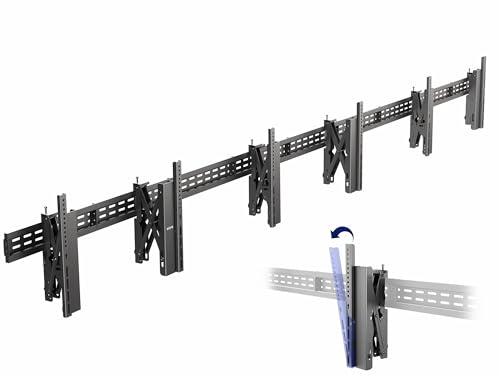
- Holds three 37–65-inch TVs
- Up to 462-pound total capacity on concrete
- Pop-out brackets ease cable access
Best For: Conference rooms needing a three-screen video wall
Best Heavy-Duty Full-Motion Pick

- Supports 42-90-inch TVs up to 132 pounds
- ±50° swivel, tilt, and post-install leveling
- Extends 16.6 inches and retracts to 3 inches
Best For: Large conference-room displays needing adjustable viewing angles
Best Low-Profile Tilt Pick
Monoprice Commercial Tilt TV Mount
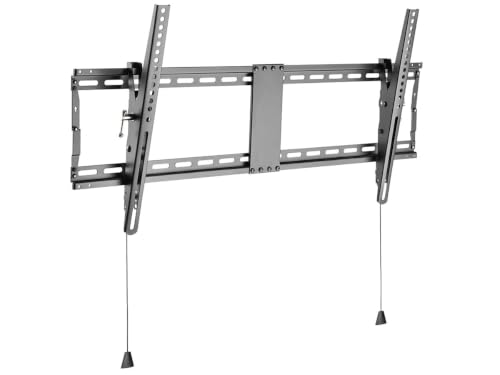
- Holds TVs up to 154 pounds
- Fits 43-90-inch flat or curved displays
- Supports VESA patterns up to 800x400
Best For: Elevated displays in fixed conference-room installations
Best Easy-Adjust Full-Motion Pick

- Supports 37-90-inch TVs up to 165 pounds
- 60° swivel with quick tilt and ±3° leveling
- Retracts to 2.75 inches with cable straps
Best For: High-capacity conference rooms needing frequent angle adjustments
Best Heavy-Duty Pick – VIVO 2-Stud TV Wall Mount
For conference rooms using an extra-large display, the VIVO 2-Stud TV Wall Mount combines a 264-pound capacity with broad screen and VESA compatibility. Its articulating design can help position a large screen for different seating areas while keeping the installation relatively close to the wall when retracted.
Best For: Large conference-room TVs from 60 to 120 inches that need substantial weight support and adjustable viewing angles.
Pros:
- Supports 60- to 120-inch flat or curved TVs weighing up to 264 pounds.
- Works with dual wood studs or concrete and brick walls.
- Offers tilt, swivel, leveling adjustment, cable management, and a 3-inch retracted profile.
Cons:
- Its 38.3-pound mount and large-screen capacity make installation a two-person job.
- Its 27.7-inch extension may require careful planning around room traffic and wall clearance.
This is a strong option when a conference room calls for a very large display and flexible positioning. Verify the TV’s VESA pattern, wall construction, and available extension space before installation.
Best Conference Camera Mount – Logitech MeetUp TV Mount
The Logitech TV Mount for MeetUp is designed specifically for conference-room video setups. Its swing-arm design lets you position a MeetUp camera above or below a compatible flat-panel display, helping keep the camera and screen together in a clean installation.
Best For: Conference rooms using a Logitech MeetUp video-conferencing system with a flat-panel TV.
Pros:
- Allows MeetUp to mount above or below the display.
- Uses multiple mounting holes and a VESA pattern for broad flat-panel compatibility.
- Available for displays up to 55 inches, with an XL version listed for displays up to 90 inches.
Cons:
- This mount is intended for the MeetUp system rather than general TV mounting.
- The listed movement is tilt, with a maximum tilt angle of 10 degrees.
Choose this mount when camera placement is the main requirement rather than full TV articulation. Confirm your display size and VESA mounting arrangement, and select the appropriate standard or XL version.
Best Midrange Full-Motion Mount – USX Mount Full Motion TV Wall Mount
The USX Mount Full Motion TV Wall Mount is a practical choice for conference rooms with 42- to 90-inch displays. Its dual articulating arms provide tilt, swivel, and post-installation leveling, while the mount retracts close to the wall and extends when viewers need a different angle.
Best For: Medium-to-large conference-room TVs up to 132 pounds where adjustable viewing angles are useful.
Pros:
- Fits most 42- to 90-inch TVs up to 132 pounds with VESA support up to 600x400mm.
- Provides +5 to -15 degree tilt, up to 45-degree swivel, and plus-or-minus 3-degree leveling adjustment.
- Extends 16.49 inches and retracts to 2.40 inches for flexible positioning and space savings.
- Includes pre-labeled hardware bags, a bubble level, cable ties, and US-based customer service.
Cons:
- Concrete anchors are not included.
- The maximum listed screen size is 84 inches in the product details, despite the title stating 90 inches; verify compatibility before buying.
This mount offers useful motion without the extreme capacity or size range of the VIVO model. Carefully check the TV’s dimensions, VESA pattern, stud spacing, and wall type before installation.
Best Multi-Display Kit – J-Tech Digital 2×3 Video Wall Mount Kit
For conference rooms that need a multi-screen presentation or signage setup, the J-Tech Digital 2×3 Video Wall Mount Kit is built for a six-display arrangement. It supports screens from 37 to 65 inches and includes adjustable tilt, leveling, and pop-out arms to help with alignment and access.
Best For: Six-screen 2×3 video walls in conference rooms, offices, control rooms, and digital-signage installations.
Pros:
- Creates a 2×3 video wall for six displays.
- Supports 37- to 65-inch screens and up to 154 pounds per display.
- Includes adjustable tilt, leveling, and pop-out arms for installation and servicing.
- Offers a wide VESA range for display compatibility.
Cons:
- This is a specialized multi-display kit rather than a mount for one TV.
- Its 97-pound package weight and six-screen configuration require careful planning and installation.
- The listed maximum tilt angle is limited to 1.5 degrees.
This kit makes sense when a single screen is not enough and the room calls for a coordinated video wall. Confirm each display’s size, weight, VESA pattern, wall capacity, and the planned 2×3 layout before installation.
Best Low-Profile Pick – SANUS Tilting TV Wall Mount
For conference rooms using a single display, the SANUS MLT14-B1 is a practical choice among TV wall mounts for conference rooms. It fits most 37–80-inch TVs up to 130 pounds, stays just 1.9 inches from the wall, and offers tool-free tilt adjustment to help manage glare.
Best For: Professional-looking conference rooms that need a slim, fixed-style mount with modest tilt adjustment.
Pros:
- Supports 37–80-inch TVs up to 130 pounds with VESA patterns from 100×100 to 600×400.
- Tilts up to 10 degrees without tools to help reduce glare.
- Allows post-installation left-right shifting for better screen centering.
- Includes a drill template and hardware, with a three-step installation process.
Cons:
- Tilting movement is more limited than a full-motion mount.
- The supplied details do not specify swivel adjustment.
Choose this SANUS mount when a clean, close-to-wall installation matters more than repositioning the display around the room. Its broad TV compatibility, low profile, and five-year warranty make it a straightforward option for standard presentation setups.
Best Flexible Viewing – USX MOUNT Full-Motion TV Wall Mount
The USX MOUNT XML032-K is suited to conference rooms where viewers may sit at different angles. This full-motion option supports many 37–84-inch flat screens, extends up to 15.16 inches, and combines swivel, tilt, and leveling adjustments.
Best For: Multi-seat conference rooms that benefit from directing one display toward different viewing areas.
Pros:
- Supports compatible TVs up to 120 pounds with VESA patterns from 200×100 to 600x400mm.
- Swivels up to 45 degrees and tilts from +5 to -15 degrees.
- Extends 15.16 inches and retracts to 2.74 inches to balance access and space savings.
- Includes a bubble level, cable ties, and pre-labeled mounting hardware.
Cons:
- Its 2.74-inch retracted depth is less flush than a low-profile tilting mount.
- Concrete anchors are not included and must be requested separately if needed.
- The listed product details contain differing screen-size limits, so verify fit before purchase.
This mount is the more adaptable choice when conference participants are not seated directly in front of the display. Confirm the TV’s size, weight, VESA pattern, and wall construction before installation.
Best for Triple Displays – VIVO Pop-Out 1×3 Video Wall Mount
For presentation spaces that need a multi-screen setup, the VIVO MOUNT-VW65-3T is a purpose-built alternative to single-screen TV wall mounts for conference rooms. It holds three 37–65-inch TVs in landscape or portrait orientation and uses pop-out brackets for rear access to cables and ports.
Best For: Conference rooms, digital signage installations, and video walls requiring three displays.
Pros:
- Supports three screens with a combined capacity of up to 462 pounds on concrete or 330 pounds on wood studs.
- Accommodates VESA patterns from 100×100 to 600x400mm.
- Offers -5, -10, or -15-degree tilt settings plus ±3 degrees of swivel for alignment.
- Pop-out brackets simplify rear-screen access and cable management.
Cons:
- It is designed for three displays, making it excessive for a single-TV installation.
- The mount is substantially heavier than single-screen options at 54.7 pounds.
- Installation requires careful planning for wall structure, screen alignment, and spacing.
This VIVO mount makes the most sense when a three-screen video wall is part of the room design. Its capacity and modular approach provide room for a substantial display installation, while precision leveling helps create a more uniform finished layout.
Best Heavy-Duty Full-Motion Pick – Perlegear PGLF8 TV Wall Mount
For conference rooms that need flexible viewing angles, the Perlegear PGLF8 is a strong option among tv wall mounts for conference rooms. It supports 42- to 90-inch TVs up to 132 pounds and works with common VESA patterns from 200x100mm to 600x400mm. Confirm the TV, wall, and stud specifications before installation.
Best For: Large conference-room displays where presenters or attendees need to adjust the viewing angle.
Pros:
- Full-motion design offers ±50° swivel, +5°/-15° tilt, and ±3° post-install leveling.
- UL-listed construction supports TVs up to 132 pounds and is tested through 60,000 motion cycles.
- Extends 16.6 inches for access and retracts to a 3-inch profile.
- Includes a bubble level, drilling template, labeled hardware, and cable ties.
Cons:
- It is not intended for drywall alone.
- TV compatibility must be checked against the 42-90-inch, weight, and VESA limits.
- Stud spacing beyond 16 inches requires an extension bracket.
The PGLF8 combines substantial load capacity with broad adjustment, making it practical for conference rooms with changing seating positions. Its installation materials and cable-management features also support a cleaner professional setup.
Best Low-Profile Tilt Pick – Monoprice Commercial Tilt TV Mount
The Monoprice Commercial Tilt bracket is a straightforward choice among tv wall mounts for conference rooms where the display will sit above eye level. Its extra-wide, cold-rolled steel frame supports 43- to 90-inch flat or curved TVs weighing up to 154 pounds, with VESA support up to 800×400.
Best For: Fixed conference-room installations that need modest tilt adjustment and high weight capacity.
Pros:
- Supports displays up to 154 pounds, the highest listed capacity in this group.
- Fits 43- to 90-inch flat and curved screens.
- Supports broad VESA patterns from 200×200 to 800×400.
- Can be installed on brick, concrete, or wood-stud walls and includes mounting hardware.
Cons:
- Only provides tilt movement, not swivel or full-motion adjustment.
- Its maximum tilt is 12 degrees, which may offer less flexibility for varied seating layouts.
- Wall type and display compatibility still need to be verified before installation.
Choose this Monoprice mount when stability and a wide compatibility range matter more than repositioning the screen. The tilt function can help reduce glare or improve the angle for elevated installations, while the lifetime warranty adds long-term support.
Best Easy-Adjust Full-Motion Pick – monTEK HW1271BK TV Mount
The monTEK HW1271BK is designed for conference rooms that benefit from frequent screen repositioning. This full-motion mount supports 37- to 90-inch TVs up to 165 pounds, with 200x100mm to 600x400mm VESA compatibility and a quick-tilt adjustment for fast angle changes.
Best For: Conference rooms needing a high-capacity mount with quick tilt, swivel, and alignment adjustments.
Pros:
- Supports TVs up to 165 pounds and screens from 37 to 90 inches.
- Provides a 60° swivel range, +5°/-15° tilt, and ±3° leveling.
- Dual articulating arms extend 16.6 inches and retract to 2.75 inches.
- Includes pre-labeled hardware, a bubble level, clear instructions, and Velcro cable straps.
Cons:
- It is not suitable for drywall installation alone.
- VESA patterns are limited to 200x100mm through 600x400mm.
- Installation requires compatible 16-inch wood studs, concrete, or brick walls.
With its 165-pound capacity and quick-tilt knob, the monTEK is well suited to presentation spaces where the display angle may change throughout the day. Its low retracted profile and included cable straps help maintain a tidy installation.
How We Picked the Best TV Wall Mounts for Conference Rooms
We focused on mounts that suit common commercial and workplace display setups, evaluating stated TV-size ranges, weight capacities, VESA compatibility, adjustment options, and installation-oriented features. The selection includes fixed or low-profile designs, tilting brackets, full-motion arms, a dedicated video-conferencing mount, and multi-screen systems for larger presentation walls.
Because product specifications can vary by retailer or revision, confirm the current measurements and included hardware before ordering. A mount’s published capacity is only meaningful when the wall, fasteners, and installation method can support the combined load.
Quick Comparison
| Mount type | Best suited for | Main advantage |
|---|---|---|
| Fixed or low-profile | Dedicated presentation rooms | Clean appearance and minimal projection |
| Tilting | Displays mounted above eye level | Reduces glare and improves the viewing angle |
| Full motion | Flexible rooms or corner installations | Swivel, tilt, and pull-out access |
| Video wall | Multiple displays | Supports aligned, serviceable screen arrays |
Key Buying Factors for TV Wall Mounts for Conference Rooms
Screen Size, Weight, and VESA Pattern
Check the TV’s actual diagonal size, weight without the stand, and VESA mounting pattern. Choose a mount with capacity above the display’s weight rather than relying on a close match. Extra capacity is especially valuable for large commercial screens and frequent-use rooms.
Wall Structure and Hardware
Drywall alone is generally not an adequate anchor for a heavy display. Identify stud spacing, masonry, or another structural backing before installation. Two-stud mounts can help distribute weight, while wider commercial brackets may require different mounting positions or reinforced framing.
Viewing Angle and Room Layout
A tilt mount can help when the display sits high on a wall. Full-motion arms are useful when seating shifts, but they need clearance behind and beside the TV. For a boardroom with a fixed seating plan, a simpler mount may be more stable and less expensive.
Cable Access and Maintenance
Look for leveling adjustment, pop-out access, cable-routing space, and enough clearance to connect power, HDMI, network, or conferencing equipment. In a business setting, easy service access can save more time than a lower initial price.
Video Wall Alignment
Multi-screen systems require careful planning for bezel spacing, screen orientation, wall strength, and service access. Measure the combined array before drilling, and verify that every display uses compatible dimensions and mounting points.
Who Should Buy Which TV Wall Mounts for Conference Rooms?
Choose a low-profile or tilting model for a conventional conference room with one permanently positioned display. Pick a full-motion mount when participants view the screen from multiple angles or when rear-panel access matters. For a dedicated video-calling setup, a purpose-built conference-camera mount can simplify placement around compatible equipment.
For training centers, command rooms, or presentation spaces needing several screens, select a video wall kit and plan installation as a complete system. Buyers mounting especially large or heavy TVs should prioritize a high-capacity bracket, verified structural support, and professional installation when the wall or display size makes the job uncertain.