
Connecting a modern laptop, streaming device, or game console to an older projector can be frustrating when the ports do not match. The right converter bridges that gap while preserving compatible video and, when needed, routing audio separately.
We selected 10 HDMI converters for projectors covering VGA, composite AV, component video, audio extraction, and multiport use. Use the guide below to identify the connection type, power requirements, and features that best fit your setup.
Best 10 Hdmi Converters for Projectors Picks for 2026
Powered Presentation Pick
HDMI to VGA Adapter with Audio

- 1080p at 60Hz VGA output
- 3.5mm audio and USB power
- Unidirectional, plug-and-play design
Best For: HDMI devices connecting to VGA projectors with separate audio needs
Portable Office Favorite

- Compact HDMI-to-VGA conversion
- 1080p at 60Hz support
- Five-year warranty included
Best For: Presentations using compatible laptops or desktops with VGA projectors
Legacy AV Solution

- HDMI to composite RCA conversion
- PAL and NTSC support
- Integrated RCA and USB cables
Best For: Older projectors with composite RCA inputs
Team Presentation Pack

- Five adapters for bulk deployment
- 1080p video-only output
- 18-month manufacturer warranty
Best For: Schools, offices, and teams connecting HDMI devices to VGA projectors
Best Analog-to-HDMI Pick
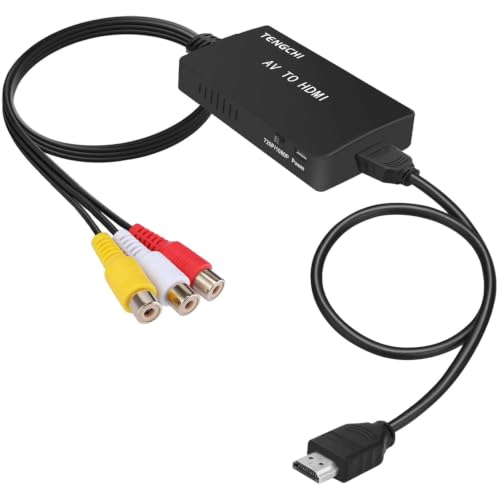
- Converts composite RCA to HDMI 1080p
- Supports multiple analog TV formats
- Requires external 5V USB power
Best For: Legacy consoles, VCRs, and DVD players
Best Laptop-to-Projector Adapter

- HDMI source to VGA projector connection
- Supports up to 1080p at 60Hz
- Compact design with 18-month warranty
Best For: Presentations using laptops and VGA projectors
Best HDMI Audio Breakout

- Extracts HDMI audio to optical or 3.5mm
- Supports stereo, 5.1, and pass-through modes
- Handles up to 4K at 30Hz
Best For: Projector setups needing separate audio output
Best for Component Sources
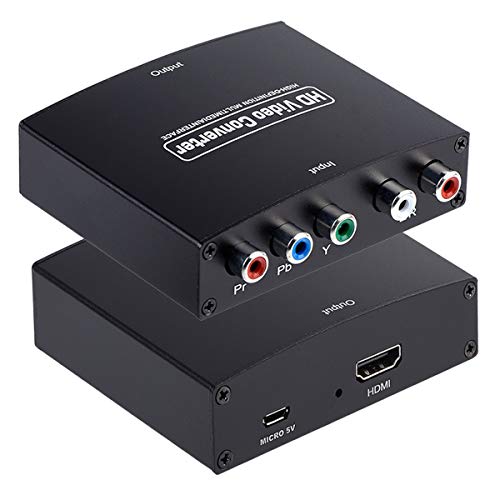
- Converts component video and analog audio to HDMI
- Supports up to 1080p/60Hz HDMI output
- Plug-and-play design for older devices
Best For: DVD players, satellite boxes, and consoles with YPbPr output
Best HDMI-to-VGA Pick
JideTech HDMI to VGA Converter

- Converts HDMI sources to VGA displays
- Supports up to 1080p Full HD
- Includes 3.5mm audio output and 5V power
Best For: HDMI devices paired with VGA projectors
Best Multiport Option
chenyang 4-in-1 HDMI Converter

- Combines HDMI, VGA, DVI, and audio connectivity
- Supports up to 1920x1080p video
- Can mirror output to two connected displays
Best For: Laptop and PC setups needing flexible projector connections
Powered Presentation Pick – HDMI to VGA Adapter with Audio
For projectors with VGA inputs, this HDMI to VGA adapter is a practical choice when you need to connect a laptop, PC, PS4, Blu-ray player, Raspberry Pi, or Xbox. It supports up to 1080p at 60Hz and adds separate audio connectivity, while its USB power input helps maintain video performance with demanding sources.
Best For: Users connecting HDMI source devices to VGA projectors who also need a 3.5mm audio connection.
Pros:
- Supports VGA output up to 1920×1080 at 60Hz.
- Includes a 3.5mm audio port and audio cable.
- USB power supply helps support stable operation.
- Plug-and-play design requires no extra driver.
Cons:
- HDMI-to-VGA only; it is not bidirectional.
- VGA cable is sold separately.
- Requires USB power for operation.
This is a well-equipped option among HDMI converters for projectors when audio support and powered operation matter. Confirm that your projector accepts VGA and plan for a separate VGA cable.
Portable Office Favorite – Moread HDMI to VGA Adapter
This compact Moread adapter is suited to presentations and everyday office setups where an HDMI laptop or desktop must connect to a VGA projector. It supports up to 1080p at 60Hz, needs a VGA cable, and uses an integrated conversion chip without requiring drivers.
Best For: Travelers, presenters, and office users who want a compact HDMI-to-VGA adapter with a long warranty.
Pros:
- Compact and lightweight for carrying in a laptop bag.
- Supports 1920×1080 at 60Hz and several lower resolutions.
- Gold-plated connector and molded strain relief support durability.
- Backed by an unconditional five-year warranty.
Cons:
- Not bidirectional.
- VGA cable is sold separately.
- Not compatible with listed low-power HDMI devices such as PS4, some MacBook models, and Apple TV.
For compatible HDMI sources, this is a straightforward and portable pick among HDMI converters for projectors. Check the source-device compatibility list carefully, especially if you plan to use a game console or Apple device.
Legacy AV Solution – HDMI to RCA Converter
This HDMI-to-AV converter is designed for older projectors, monitors, and televisions with composite RCA inputs. It converts HDMI video to RCA composite video with left/right stereo audio, supports PAL and NTSC formats, and includes an integrated RCA cable plus USB power cable.
Best For: Connecting modern HDMI sources to older composite-input projectors or other legacy displays.
Pros:
- Converts HDMI to composite RCA video and stereo audio.
- Supports both PAL and NTSC output formats.
- Integrated cables reduce the need for additional connections.
- Plug-and-play operation requires no driver.
Cons:
- Only converts HDMI to AV, not AV to HDMI.
- Requires a 5V USB power source.
- Power adapter is not included.
This model fills a different role from HDMI-to-VGA adapters and is useful when the projector has only RCA composite inputs. Expect legacy composite output rather than modern high-definition projector performance.
Team Presentation Pack – 5-Pack HDMI to VGA Adapters
This five-pack is aimed at offices, schools, and teams that regularly connect HDMI laptops or PCs to VGA projectors. The adapters provide up to 1080p video, require no drivers, and use a compact design that works well as a shared or spare presentation kit.
Best For: Bulk deployment in classrooms, offices, conference rooms, and travel kits where video-only VGA conversion is sufficient.
Pros:
- Five adapters support team and classroom deployment.
- Supports 1080p video output for presentations.
- Plug-and-play operation with no driver installation.
- Compact design and 18-month manufacturer warranty.
Cons:
- No audio output.
- HDMI-to-VGA only; conversion is not bidirectional.
- Designed for visual output rather than audio-equipped setups.
For organizations needing several HDMI converters for projectors, this pack offers a practical way to equip multiple users or keep backups available. Choose it when VGA video is the priority and separate audio is unnecessary.
Best Analog-to-HDMI Pick – RCA to HDMI Converter
For shoppers comparing hdmi converters for projectors, this RCA-to-HDMI adapter is designed for older devices with composite AV output. It converts yellow, white, and red RCA signals to HDMI output at up to 1080p, making it useful for connecting legacy consoles, VCRs, DVD players, and similar equipment to a modern projector with HDMI input.
Best For: Older gaming consoles, VHS/VCR players, DVD players, and other composite-AV sources.
Pros:
- Converts composite RCA input to HDMI 1080p output.
- Supports PAL, NTSC, SECAM, and related TV formats.
- Includes an HDMI cable, USB power cable, and one-year warranty.
Cons:
- Does not support 3D or 4K.
- Requires external 5V USB power; the power supply is not included.
- Only converts RCA to HDMI, not HDMI to AV.
This is a practical choice when the source device has composite outputs and the projector accepts HDMI. Confirm that 1080p performance is sufficient and that you have a 5V USB power source available.
Best Laptop-to-Projector Adapter – BENFEI HDMI to VGA Adapter
This compact BENFEI adapter is one of the more direct options among hdmi converters for projectors when a laptop or other HDMI source must connect to a projector with VGA input. Its built-in converter supports resolutions up to 1920×1080 at 60Hz, while the lightweight design suits presentations and portable setups.
Best For: Connecting HDMI-equipped laptops, computers, streaming devices, and game consoles to VGA projectors.
Pros:
- Supports up to 1080p at 60Hz, plus several lower resolutions.
- Compact, portable design with a gold-plated HDMI connector.
- Includes an 18-month warranty.
Cons:
- Converts HDMI to VGA only; it is not bidirectional.
- A VGA cable is required.
- Not compatible with certain low-power HDMI devices and Blu-ray players.
Choose this adapter when your projector has VGA input and your source has HDMI output. Before buying, check the source device for compatibility and make sure a separate VGA cable is available.
Best HDMI Audio Breakout – 4K HDMI Audio Extractor
For projector systems that need separate sound, this HDMI audio extractor adds audio flexibility alongside video pass-through. It extracts sound from an HDMI source to optical or 3.5mm output and supports HDMI 1.4 signals up to 4K at 30Hz, making it a specialized option among hdmi converters for projectors.
Best For: HDMI projector setups that need optical or 3.5mm audio output for a receiver, speakers, or headphones.
Pros:
- Provides optical and 3.5mm audio outputs.
- Offers 2.0CH, 5.1CH, and pass-through modes.
- Supports HDMI 1.4, HDCP 1.4, and 4K at 30Hz.
Cons:
- Does not support ARC or eARC, and a TV cannot be the input source.
- Does not support 7.1-channel audio.
- Some listed devices are limited to 1080p rather than 4K.
This extractor makes sense when the projector connection works but the audio system needs a separate output. Select the correct mode for stereo, optical 5.1, or pass-through operation, and plan to supply USB power.
Best for Component Sources – YPbPr to HDMI Converter
For shoppers comparing HDMI converters for projectors, this model is designed to connect older component-video equipment to a modern HDMI projector or display. It accepts YPbPr video and separate R/L audio, then outputs HDMI without requiring software or setup.
Best For: DVD players, satellite boxes, and consoles with YPbPr component output.
Pros:
- Converts YPbPr video and analog stereo audio to HDMI.
- Supports input formats up to 1080p and HDMI output up to 1080p/60Hz.
- Compact installation with no settings required.
Cons:
- One-way conversion only; it cannot convert HDMI to component.
- Requires a true YPbPr output, not a standard RCA interface.
- Does not directly accept HDMI-source devices.
This is a focused choice for updating a component-based home theater. Confirm your source has YPbPr and that your projector accepts the converter’s HDMI output before buying.
Best HDMI-to-VGA Pick – JideTech HDMI to VGA Converter
This JideTech adapter is one of the more targeted HDMI converters for projectors when the source has HDMI but the projector has only VGA. Its active chipset supports Full HD conversion, while a separate 3.5mm output routes extracted audio to external speakers or headphones.
Best For: HDMI laptops, PCs, media players, and other sources connected to VGA projectors.
Pros:
- Converts HDMI input to VGA output at resolutions up to 1080p.
- Provides a 3.5mm audio output for external audio equipment.
- External 5V power supports stable operation and compatibility.
- Suitable for projectors, conference rooms, classrooms, and legacy displays.
Cons:
- One-way HDMI-to-VGA conversion; it does not support VGA to HDMI.
- VGA carries video only, so audio requires a separate connection.
- Requires 5V DC power.
Choose this model when your projector’s limitation is its VGA input rather than the HDMI source. Its separate audio output is useful, but plan for an external speaker or other audio destination.
Best Multiport Option – chenyang 4-in-1 HDMI Converter
For flexible projector setups, this chenyang dongle combines HDMI, VGA, DVI, and audio-related connectivity in one adapter. It supports Full HD video and can connect multiple display outputs, although connected displays show the same image rather than separate content.
Best For: Laptop or PC users who need HDMI-to-VGA connectivity plus additional display and audio options.
Pros:
- Offers a multiport design with HDMI, VGA, DVI, and audio support.
- Supports video resolutions up to 1920x1080p.
- Can connect VGA and HDMI simultaneously with mirrored images.
- Supports external 5V power for higher-power devices or low-battery situations.
Cons:
- Connected external monitors display the same image rather than independent screens.
- VGA does not transmit audio, so external speakers and an audio cable may be needed.
- HDMI and DP cannot be connected simultaneously according to the supplied notes.
This is a practical choice if you value connection flexibility more than a simple single-purpose adapter. Check your intended port combination and audio routing before using it with a projector.
How We Picked These Hdmi Converters for Projectors
We focused on converters that address common projector connection problems rather than treating every adapter as interchangeable. The selection includes HDMI-to-VGA models for older computer projectors, HDMI-to-AV options for composite inputs, reverse-direction RCA and component converters, and devices that separate HDMI audio for speakers or headphones.
We also considered stated resolution support, power requirements, audio availability, connector direction, compatibility with common source devices, and practical features such as multiple outputs or included cables. A converter cannot add capabilities that the projector does not support, so matching the product’s input and output direction is essential.
Quick Comparison
- For VGA projectors: Choose an HDMI-to-VGA adapter, preferably with USB power and a 3.5mm audio output if the projector lacks speakers.
- For composite AV inputs: Use an HDMI-to-RCA converter supporting the projector’s PAL or NTSC format.
- For older RCA sources: A reverse RCA-to-HDMI converter is the appropriate choice for sending legacy video to a modern display.
- For component inputs: Select a YPbPr-to-HDMI converter when the source uses red, green, and blue video connectors.
- For separate sound: An HDMI audio extractor can send video to the projector while routing sound through optical or 3.5mm equipment.
Key Buying Factors for Hdmi Converters for Projectors
Match the Signal Direction
Check both ends before buying. HDMI-to-VGA and HDMI-to-AV models convert a modern HDMI source for an older projector. RCA-to-HDMI and component-to-HDMI products work in the opposite direction and will not substitute for them.
Check Resolution and Projector Limits
Many adapters advertise 1080p support, but the projector may accept only 720p, a computer resolution, or a specific refresh rate. Confirm the projector’s manual and be prepared to adjust the source output if the screen remains blank.
Plan for Audio
VGA and some analog video connections do not carry HDMI audio. If the converter includes a 3.5mm output, connect it to powered speakers, headphones, or the projector’s audio input. HDMI audio extractors are better when you need optical, analog, or surround-sound routing.
Consider Power and Compatibility
Active conversion usually requires USB or 5V power. Keep a suitable USB port or wall charger available, particularly when connecting laptops, game consoles, or streaming devices. HDCP restrictions may also prevent some protected content from displaying.
Who Should Buy Which Hdmi Converters for Projectors?
Office and classroom users should generally choose a powered HDMI-to-VGA model with audio output. Retro-gaming and VCR users should select an HDMI-to-AV converter only when the source is HDMI and the projector has composite inputs; use a reverse converter for the opposite setup. Home theater users who need better audio routing should consider an HDMI extractor. Users with component equipment should choose the YPbPr converter, while anyone needing flexibility across several older displays may prefer a multiport adapter.
Before ordering, compare the projector’s physical inputs, supported formats, audio path, and available power. That quick check prevents the most common compatibility mistake: buying a well-reviewed converter designed for the reverse signal direction.