
The best compact HDMI converters make it easier to connect older AV equipment, laptops, cameras, and modern HDMI displays without adding bulky hardware to your setup.
Our selection covers analog-to-HDMI conversion, USB-C and Mini HDMI connections, VGA displays, and HDMI-to-SDI workflows, with attention to compatibility, resolution, audio, and portability.
Best 10 Compact Hdmi Converters Picks for 2026
Best Retro-Console Pick
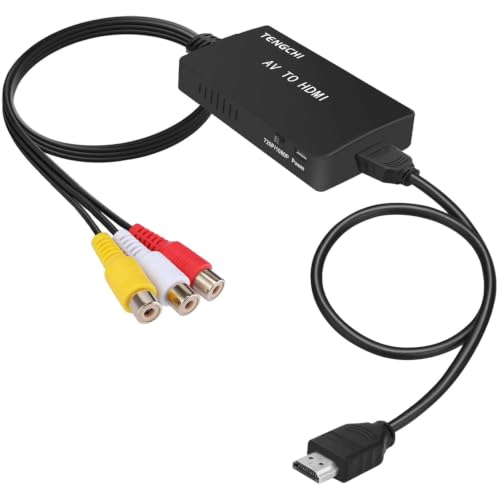
- RCA input to HDMI 1080p output
- Supports several analog TV formats
- Includes HDMI and USB cables
Best For: Connecting composite consoles and VCRs to HD displays
Best USB-C Travel Option

- Up to 4K at 60Hz
- Plug-and-play video and audio output
- Braided cable and 24-month warranty
Best For: Connecting compatible USB-C devices to HDMI displays
Best Professional Signal Converter
HDMI to SDI 3G Micro Converter

- HDMI input with dual SDI outputs
- Supports SD, HD, and 3G-SDI
- Reclocking helps preserve signal quality
Best For: Professional HDMI-to-SDI video workflows
Best Simple 1080p Adapter

- Supports up to 1080p at 60Hz
- Compact HDMI-to-VGA design
- Includes an 18-month warranty
Best For: Connecting HDMI computers to VGA monitors and projectors
Best 8K Mini Adapter
STSAUX 2-Pack Mini HDMI Adapter

- Up to 8K at 60Hz
- Plug-and-play portable design
- Two adapters with five-year warranty
Best For: Mini HDMI cameras, laptops, and Raspberry Pi Zero devices
Best VGA-to-HDMI Converter

- Converts VGA to HDMI up to 1080p
- USB audio support
- Compact design with 18-month warranty
Best For: VGA computers connecting to HDMI monitors, TVs, or projectors
Best Compact Mini HDMI Cable

- Supports 4K at 60Hz and HDR
- 8-inch braided cable design
- Gold-plated, durable connectors
Best For: Portable Mini HDMI camera, camcorder, and projector setups
Best Travel Pick

- 4K at 30Hz with 7.1-channel audio
- Lightweight design with removable keychain ring
- Driverless support across major operating systems
Best For: Portable USB-C laptop and tablet setups
Best for Legacy AV
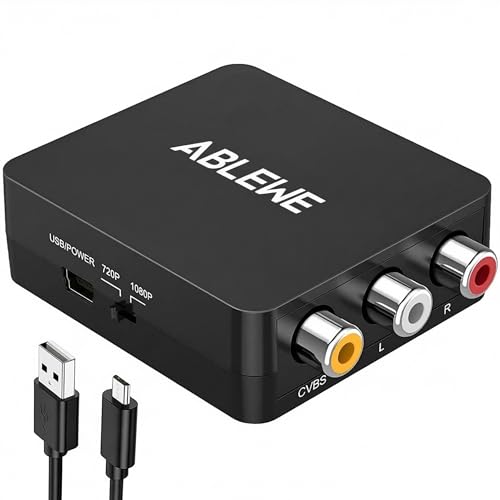
- Converts RCA composite input to 720p or 1080p HDMI
- Supports multiple PAL, NTSC, and SECAM formats
- Includes USB power cable for plug-and-play setup
Best For: VCRs, retro consoles, and DVD players
Best VGA Solution
VGA to HDMI Adapter with Audio
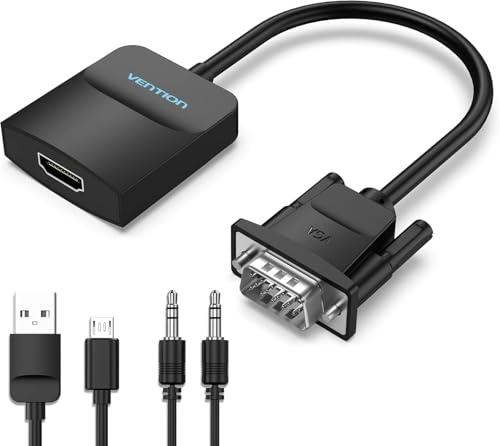
- Full HD output up to 1080p at 60Hz
- Includes micro-USB power and AUX audio cables
- Designed for VGA source to HDMI display connections
Best For: Older PCs connecting to modern HDMI displays
Best Retro-Console Pick – RCA to HDMI Converter
This compact HDMI converter is designed to connect older composite-video equipment to a modern HDMI television or monitor. It converts RCA input to HDMI 1080p output, supports multiple analog TV formats, and requires USB power during use.
Best For: PS1/PS2/PS3 consoles, VHS or VCR players, DVD players, and other devices with standard composite RCA output.
Pros:
- Converts yellow, white, and red RCA input to HDMI 1080p output.
- Supports PAL, NTSC, SECAM, and related analog TV formats.
- Includes an HDMI cable, USB power cable, and one-year warranty.
Cons:
- Does not support 3D or 4K output.
- Requires a separate 5V/1A power source; the power supply is not included.
- Works only from AV to HDMI, not HDMI to AV.
Choose this model when your priority is giving legacy RCA equipment a straightforward connection to an HD display. It is inexpensive and practical, but not intended for modern 4K setups.
Best USB-C Travel Option – USB-C to HDMI Adapter
This compact HDMI converter lets compatible USB-C laptops, tablets, and phones send video and audio to an HDMI display. It supports up to 4K at 60Hz, uses a plug-and-play design, and leaves the HDMI cable detachable through its female HDMI port.
Best For: USB-C devices with DisplayPort Alt Mode, including compatible laptops, tablets, phones, and Chromebooks.
Pros:
- Supports 4K output at 60Hz on compatible devices and displays.
- Requires no drivers or installation.
- Braided nylon construction, gold-plated connectors, and a 24-month warranty support frequent use.
Cons:
- Not every USB-C port supports video output, so device compatibility must be checked.
- Only works from USB-C to HDMI and does not support charging.
- Requires a separate HDMI cable for connection to the display.
This is a strong choice among compact HDMI converters for presentations, office setups, and travel, provided the source device supports DisplayPort Alt Mode. Its 4K/60Hz capability makes it more suitable for newer displays than basic 1080p adapters.
Best Professional Signal Converter – HDMI to SDI 3G Micro Converter
This compact HDMI converter is built for professional video workflows that need HDMI input converted to SD, HD, or 3G-SDI output. It provides dual SDI outputs, automatic format detection, and reclocking to help maintain signal quality over longer cable runs.
Best For: Professional video setups using HDMI sources with SDI-based equipment, including desktop and laptop workflows.
Pros:
- Converts HDMI Type A input to two SDI outputs.
- Supports SD, HD, and 3G-SDI standards, including NTSC, PAL, 720p, and 1080p.
- Compact 3.01-by-1.80-by-0.98-inch design weighs about 5.6 ounces.
Cons:
- Designed for HDMI-to-SDI conversion, not general-purpose consumer HDMI connections.
- Its professional SDI outputs require compatible SDI equipment and cabling.
- The supplied notes do not indicate included cables or a power adapter.
For broadcast, production, or installation work, this model offers capabilities beyond typical consumer compact HDMI converters. Its dual outputs and reclocking are particularly useful when integrating HDMI sources into SDI infrastructure.
Best Simple 1080p Adapter – HDMI to VGA Converter
This compact HDMI converter connects an HDMI-equipped computer or media device to a VGA monitor, projector, or HDTV. It supports resolutions up to 1920×1080 at 60Hz and uses a built-in conversion chip, making it useful for extending the life of older VGA displays.
Best For: Laptops, desktops, Chromebooks, Raspberry Pi systems, projectors, and monitors with VGA input.
Pros:
- Supports up to 1080p at 60Hz, plus several lower resolutions.
- Portable HDMI male-to-VGA female design fits easily in a bag or pocket.
- Gold-plated connector and molded strain relief support signal connection and durability.
- Includes an 18-month warranty.
Cons:
- One-way operation only: HDMI source to VGA display.
- Requires a separate VGA cable.
- Does not support VGA-to-HDMI conversion and may not work with listed low-power HDMI devices such as PS4 or Apple TV.
This is a practical pick when an HDMI source needs to work with an older VGA screen or projector. It is compact and affordable, but buyers should verify direction, device compatibility, and the availability of a VGA cable before ordering.
Best 8K Mini Adapter – STSAUX 2-Pack Mini HDMI Adapter
For shoppers comparing compact hdmi converters for cameras, laptops, or Raspberry Pi Zero setups, the STSAUX adapter provides a simple Mini HDMI-to-standard HDMI connection. Its HDMI 2.1 specification supports high refresh-rate formats, while the two-pack adds flexibility for multiple devices or spare use.
Best For: Mini HDMI-equipped cameras, camcorders, laptops, and Raspberry Pi Zero devices requiring high-resolution HDMI output.
Pros:
- Supports up to 8K at 60Hz, plus 4K at 144Hz and 2K at 240Hz.
- Compact plug-and-play design requires no drivers.
- Includes two adapters with gold-plated connectors and a five-year warranty.
Cons:
- Only works with Mini HDMI, not Micro HDMI or Micro USB.
- Requires a separate HDMI cable.
This is a strong choice when high-resolution support and a backup adapter matter. Confirm that your source device has a Mini HDMI port before ordering.
Best VGA-to-HDMI Converter – BENFEI VGA to HDMI Adapter
Among compact hdmi converters, the BENFEI adapter is designed for connecting an older VGA computer or laptop to an HDMI monitor, TV, or projector. It converts VGA video to HDMI and uses its integrated USB connection to carry audio to the HDMI display.
Best For: Business presentations, desktop extensions, and connecting VGA-equipped computers to HDMI displays.
Pros:
- Compact, lightweight design fits easily in a bag or pocket.
- Converts VGA analog video to HDMI digital output at up to 1080p.
- Integrated USB audio support and plug-and-play operation.
- Includes an 18-month warranty.
Cons:
- Works only from VGA source to HDMI display, not in reverse.
- Requires a separate HDMI cable.
- USB connection is needed for audio support.
The BENFEI is practical for modernizing a VGA computer setup without adding a bulky converter box. Its one-way design makes checking the source and display ports especially important.
Best Compact Mini HDMI Cable – JSAUX Mini HDMI Adapter
The JSAUX adapter is a useful option for compact hdmi converters when you want a short, flexible connection between a Mini HDMI device and a standard HDMI cable. Its 8-inch braided design supports 4K at 60Hz and is suited to cameras, camcorders, laptops, and other compatible equipment.
Best For: Portable camera, camcorder, projector, and Raspberry Pi Zero setups needing a durable Mini HDMI connection.
Pros:
- Supports 4K at 60Hz with HDR and 18Gbps bandwidth.
- Short 8-inch braided cable keeps the connection close to the device.
- Gold-plated connectors and triple shielding help support reliable signal transmission.
- Rated for 5,000 plug-and-unplug cycles.
Cons:
- Only compatible with devices that have a Mini HDMI port.
- Supports lower maximum formats than the STSAUX 8K adapter.
Choose this JSAUX model if a compact cable-style adapter and reinforced construction are more useful than the highest available resolution. Its short length can help reduce clutter in portable setups.
Best Travel Pick – Compact USB-C to HDMI Adapter
For shoppers comparing compact hdmi converters for modern laptops and tablets, this StarTech.com adapter offers a small USB-C-to-HDMI connection for displays, TVs, and projectors. It supports up to 4K at 30Hz, works without drivers, and includes a removable keychain ring for travel.
Best For: USB-C and Thunderbolt 3 devices that need a portable connection to an HDMI display.
Pros:
- Supports UHD 4K at 30Hz, 1080p video, and 7.1-channel audio.
- Compact, lightweight design includes a flexible wraparound cable and removable keychain ring.
- Driverless plug-and-play support for Windows, macOS, Linux, Chrome OS, and Android.
Cons:
- Requires a compatible USB-C port with DisplayPort Alt Mode.
- 4K output is limited to 30Hz.
This is a strong choice when portability and broad operating-system compatibility matter more than higher-refresh-rate 4K output. Confirm that your USB-C port supports video before buying.
Best for Legacy AV – Mini RCA to HDMI Converter
This ABLEWE model is one of the more useful compact hdmi converters for upgrading older composite-video equipment. It converts yellow, white, and red RCA input to HDMI output at 720p or 1080p at 60Hz, helping connect consoles, VCRs, DVD players, and set-top boxes to newer displays.
Best For: Connecting composite AV devices such as VCRs, older game consoles, and DVD players to an HDMI TV or monitor.
Pros:
- Supports PAL, NTSC, SECAM, PAL/M, and PAL/N source formats.
- Works with a wide range of legacy devices, including PS2, PS3, Xbox, N64, Wii, VCRs, and DVD players.
- Simple plug-and-play setup with included USB power cable.
Cons:
- Requires USB power during use; a power adapter is not included.
- Converts composite video only and does not provide HD source quality.
If your goal is to keep older AV hardware usable with a modern HDMI display, this converter provides a straightforward and compact solution. Plan for an available 5V USB power source near the setup.
Best VGA Solution – VGA to HDMI Adapter with Audio
For older computers and other VGA sources, this VENTION adapter is a practical entry among compact hdmi converters. It converts VGA to HDMI at up to 1080p and includes separate micro-USB power and 3.5mm audio connections for sending sound to the HDMI display.
Best For: Connecting a VGA desktop, laptop, TV box, or compatible device to an HDMI monitor, TV, or projector.
Pros:
- Supports up to 1920×1080 at 60Hz for Full HD output.
- Includes micro-USB power cable and a 3.5mm AUX audio cable.
- Plug-and-play operation with a signal-conversion chip designed for stable transmission.
Cons:
- Uni-directional: VGA-to-HDMI works, but HDMI-to-VGA does not.
- Requires USB power and a compatible audio output for sound transfer.
This adapter makes sense for extending the life of a VGA-equipped computer when the target display has HDMI input. Check the signal direction, and make sure your source can provide audio through the included AUX connection.
How We Picked the Best Compact Hdmi Converters
We focused on adapters and converters that solve common connection problems while taking up minimal space. The lineup includes products for composite RCA, VGA, USB-C, Mini HDMI, HDMI-to-SDI, and HDMI-to-VGA conversion, so you can match the device output to the display input.
We also considered supported resolutions and refresh rates, directional limitations, audio handling, power requirements, connector design, and the likelihood of a straightforward setup. Because “converter” can describe very different technologies, the most important factor is choosing the correct signal path—not simply selecting the smallest adapter.
Quick Comparison
- For older game consoles, VCRs, and DVD players: Choose an RCA-to-HDMI converter that supports composite video and the correct PAL or NTSC format.
- For USB-C laptops and tablets: Use a USB-C-to-HDMI adapter, and confirm the source supports DisplayPort Alt Mode.
- For cameras and compact video equipment: A Mini HDMI-to-HDMI adapter provides a physical connector change without converting the signal.
- For VGA computers: VGA-to-HDMI models can add HDMI display compatibility, but check whether audio must be connected separately.
- For professional video systems: The HDMI-to-SDI option is intended for compatible broadcast and production equipment rather than ordinary televisions.
Key Buying Factors for Compact Hdmi Converters
Signal Direction and Connector Type
Verify both ends before buying. HDMI-to-VGA and VGA-to-HDMI are not interchangeable, and most adapters are one-way. Likewise, Mini HDMI is different from Micro HDMI, while USB-C video output depends on the source device.
Resolution, Refresh Rate, and Compatibility
Match the converter’s limits to your display and use case. Basic legacy devices may output 480p or 576p, while newer USB-C and Mini HDMI adapters may support 4K or higher refresh rates. A converter cannot improve the original source quality.
Audio and Power
VGA carries video but not audio, so VGA-to-HDMI products commonly require a separate audio cable. RCA converters handle analog audio through their red and white inputs. Some active converters need USB power, particularly when transforming analog signals or scaling video.
Portability and Durability
For travel, prioritize short cables, compact housings, strain relief, and protective caps. For permanent or professional installations, build quality, reliable locking connections, and thermal performance may matter more than the smallest footprint.
Who Should Buy Which Compact Hdmi Converters?
Choose RCA-to-HDMI if you are connecting a legacy console, camcorder, VCR, or DVD player to a modern HDMI television. Choose USB-C-to-HDMI for a laptop or tablet with video-capable USB-C. Choose Mini HDMI-to-HDMI for cameras and other small devices that already output digital HDMI. Choose VGA-to-HDMI when an older computer must connect to an HDMI display, especially if you need an audio input as well. Choose HDMI-to-VGA for the reverse situation: a newer HDMI source feeding an older VGA monitor or projector. For studio, live-event, or broadcast routing, select the HDMI-to-SDI converter only when your equipment specifically supports SDI.