
Long SDI cable runs can introduce signal loss, compatibility problems, and difficult routing choices. The right converter can extend distance over fiber, bridge SDI and HDMI equipment, or distribute a stable signal to multiple displays and recorders.
This roundup compares 10 options across fiber-extender kits, bidirectional converters, SDI-to-HDMI adapters, and distribution hardware. Use the buying guide below to match converter type, signal format, distance, and installation needs.
Best 10 Sdi Converters for Long Cable Runs Picks for 2026
Long-Range Fiber Kit

- TX/RX kit with LC SFP modules included
- Up to 20 km single-mode or 1 km multimode
- USB-C power with DIN and wall mounts
Best For: Long-distance SDI transport over fiber
12G Signal Conversion
Blackmagic BiDirectional SDI/HDMI

- Bidirectional SDI and HDMI conversion
- HDMI 2.0 input and output connectivity
- 5V universal supply with travel adapters
Best For: Camera and display format conversion
Coaxial Run Extender

- HDMI-to-SDI and SDI-to-HDMI pair included
- Extends compatible signals up to 100 m
- Supports deep color and 48 kHz LPCM audio
Best For: 1080p point-to-point coaxial connections
Multi-Output Distribution
Blackmagic Mini SDI Distribution

- Splits one SDI input into eight outputs
- Supports SD, HD, 3G-SDI, and ASI
- Reclocking, embedded audio, and redundant input
Best For: Distributing one SDI feed to multiple devices
Best Long-Run SDI-to-HDMI Pick
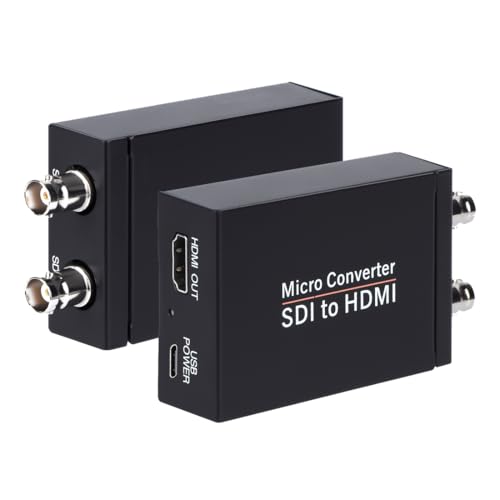
- Supports 3G-, HD-, and SD-SDI formats
- Input distances rated up to 1,000 feet for SD-SDI
- Includes HDMI output, SDI loopout, and audio de-embedding
Best For: Extended SDI camera runs feeding an HDMI display
Best 12G Workflow Choice
Blackmagic Micro Converter HDMI to SDI 12G

- Supports SDI rates from 270Mb to 12G
- Automatically matches HDMI input
- Offers two SDI outputs with reclocking
Best For: Converting HDMI sources into multi-rate SDI systems
Best Budget Full-HD Option
SHUITING SDI-to-HDMI Converter

- Supports HD-SDI, 3G-SDI, and SD-SDI
- Handles up to 1080p Full HD, not 4K
- Adds SDI loopout and a durable metal housing
Best For: Simple Full-HD SDI camera-to-HDMI installations
Premium 12G LUT Converter
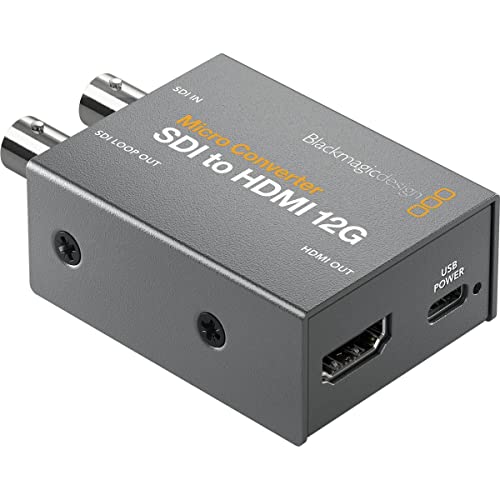
- 33-point 3D LUT support
- SDI loop output for LUTs
- Compact broadcast-quality metal body
Best For: Calibrated SDI-to-HDMI monitoring
Industrial Bidirectional 3G

- Bidirectional SDI/HDMI conversion
- Up to 80m 3G-SDI transmission
- Metal housing with FPGA and ESD protection
Best For: Flexible 1080p installations with long SDI runs
Long-Run Bidirectional 3G

- Bidirectional 1080p conversion
- Up to 80m 3G-SDI output
- Clock recovery and ESD protection
Best For: Compact 1080p camera and broadcast links
Long-Range Fiber Kit – 3G/HD-SDI Over Fiber Extender
For demanding sdi converters for long cable runs, this transmitter-and-receiver kit sends uncompressed SD-, HD-, and 3G-SDI video over fiber. It reaches up to 20 km over single-mode fiber or 1 km over multimode fiber, with LC SFP modules already installed.
Best For: Long-distance camera, studio, field, and industrial SDI links where compact mounting and fiber connectivity are priorities.
Pros:
- Complete TX/RX kit with pre-installed LC SFP modules
- Supports SD, HD, 3G-SDI, 1080p60, and DVB-ASI
- Compact design with DIN-rail and wall-mount brackets
- Convenient 5V USB-C power and clear link-status LEDs
Cons:
- Requires compatible fiber cabling and optical connections
- Maximum distance depends on single-mode versus multimode fiber
This is the most purpose-built option here for very long SDI runs. Its included modules, flexible mounting, and USB-C power simplify deployment, especially when coaxial cable is impractical.
12G Signal Conversion – Blackmagic BiDirectional SDI/HDMI
Blackmagic Design Micro Converter BiDirectional SDI/HDMI 12G with Power Supply CONVBDC/SDI/HDMI12G/P
Check Price On AmazonThe Blackmagic Design Micro Converter is a compact bidirectional choice for systems that need to move between SDI and HDMI rather than extend SDI directly over a long cable. It includes one SDI input, one HDMI 2.0 input, and a 5V universal power supply.
Best For: Camera and display setups that need flexible SDI-to-HDMI or HDMI-to-SDI conversion near the equipment.
Pros:
- Supports bidirectional SDI and HDMI conversion
- Includes HDMI 2.0 connectivity
- Compact converter format for camera and display workflows
- Universal 5V power supply includes international socket adapters
Cons:
- It is a signal converter, not a dedicated long-distance cable extender
- Only one SDI input and one HDMI input are specified
Choose this model when format conversion is the main requirement. For a genuinely extended SDI run, pair your broader system design with a dedicated transport solution rather than treating this unit as a fiber or coax extender.
Coaxial Run Extender – 1080p HDMI-to-SDI 100m Kit
This paired HDMI-to-SDI and SDI-to-HDMI set is aimed at shorter sdi converters for long cable runs, extending compatible 1080p signals over a single coaxial cable up to 100 m (328 ft). It supports HDMI 1.3, HDCP 1.1, deep color, and 48 kHz LPCM audio.
Best For: 1080p HDMI and SDI installations needing a budget-oriented point-to-point connection over coaxial cable.
Pros:
- Includes both HDMI-to-SDI and SDI-to-HDMI converters
- Designed for runs up to 100 m over one coaxial cable
- Supports deep color video and 48 kHz LPCM audio
- Two power adapters are included
Cons:
- Does not support SD signals
- Notes state that the SDI-to-HDMI converter is not compatible with Sony and Blackmagic devices
- Limited to the product’s specified 1080p-oriented compatibility
This kit makes sense when 100 m is sufficient and your source and display meet its compatibility limits. Verify equipment brands and signal format before installation, particularly in professional SDI environments.
Multi-Output Distribution – Blackmagic Mini SDI Distribution
The Blackmagic Mini Converter SDI Distribution is not a distance extender, but it can help organize an SDI installation after a long run by splitting one incoming signal into multiple outputs. It accepts SD, HD, and 3G-SDI and provides eight reclocked outputs.
Best For: Broadcast, live-event, and studio systems that need to feed several SDI devices from one source.
Pros:
- Eight reclocked SDI outputs for distributing one input
- Auto-switches among SD, HD, and 3G-SDI formats
- Supports embedded audio, ancillary data, and ASI
- Redundant SDI input supports mission-critical workflows
Cons:
- Does not extend a signal over fiber or coaxial cable
- Requires a 12V minimum supply
- Included components list only the main unit
Consider this unit as a signal-splitting companion rather than one of the primary solutions for long cable runs. Its reclocked outputs and broad SDI format support are useful when one transported feed must reach multiple downstream devices.
Best Long-Run SDI-to-HDMI Pick – Anber-Tech 3G-SDI Converter
For users comparing sdi converters for long cable runs, the Anber-Tech model is a practical SDI-to-HDMI option with automatic format detection and a loop output. It accepts 3G-SDI, HD-SDI, and SD-SDI signals, with stated input distances of up to 300 feet for 3G-SDI, 500 feet for HD-SDI, and 1,000 feet for SD-SDI.
Best For: SDI camera setups feeding an HDMI monitor, television, or projector over extended cable distances.
Pros:
- Supports 3G-SDI, HD-SDI, and SD-SDI with automatic format detection.
- Stated long-run input support up to 300 feet for 3G-SDI, 500 feet for HD-SDI, and 1,000 feet for SD-SDI.
- Provides HDMI output, SDI loopout, and stereo audio de-embedding with support for eight channels of 48 kHz digital audio.
Cons:
- Converts SDI to HDMI only; it does not support HDMI-to-SDI conversion.
- Does not support 4K according to the listed input formats.
The combination of format flexibility, loopout, audio de-embedding, and specified cable distances makes this a strong fit for extended SDI distribution where the display side uses HDMI.
Best 12G Workflow Choice – Blackmagic Micro Converter HDMI to SDI 12G
The Blackmagic Design Micro Converter HDMI to SDI 12G is aimed at sending an HDMI source into SDI infrastructure, making it a useful consideration when evaluating sdi converters for long cable runs. It automatically matches the HDMI input and supports SDI rates from 270Mb through 12G, with reclocking for signal handling.
Best For: HDMI sources that need conversion to SDI for professional video distribution or monitoring systems.
Pros:
- Supports SDI rates of 270Mb, 1.5G, 3G, 6G, and 12G.
- Automatically matches the HDMI input.
- Provides two SDI video outputs and reclocking.
Cons:
- This is an HDMI-to-SDI converter, not an SDI-to-HDMI model.
- The supplied notes do not specify maximum cable-run distances.
- Requires a 5V to 5.25V DC supply.
Choose this unit when your source is HDMI and your downstream system is SDI, especially if multi-rate support and two SDI outputs matter more than a published cable-distance rating.
Best Budget Full-HD Option – SHUITING SDI-to-HDMI Converter
The SHUITING SDI-to-HDMI Converter is a straightforward option for SDI cameras and other SDI devices that need an HDMI display connection. For shoppers researching sdi converters for long cable runs, its durable metal housing and SDI loopout are useful practical features, although the supplied specifications do not state a maximum cable distance.
Best For: Full-HD SDI camera feeds sent to an HDMI television, monitor, or projector in broadcast, conference, and control-room applications.
Pros:
- Accepts HD-SDI, 3G-SDI, and SD-SDI signals.
- Supports up to 1920×1080 and provides synchronous audio and video transmission.
- Includes SDI loopout, a metal shell, and plug-and-play operation.
Cons:
- Supports Full HD up to 1080p but not 4K.
- Converts SDI to HDMI only; HDMI-to-SDI conversion is not supported.
- The notes do not provide a stated maximum cable-run distance.
This converter is a sensible choice for basic Full-HD SDI-to-HDMI installations, particularly when loopout and simple operation are priorities. For especially long runs, verify the cable plan because no distance rating is listed.
Premium 12G LUT Converter – Micro SDI to HDMI 12G
The Blackmagic Design Micro Converter SDI to HDMI 12G is a compact choice for sdi converters for long cable runs when you need a professional SDI-to-HDMI link in a rugged enclosure. Its supplied notes emphasize broadcast-quality construction and 3D LUT support for display calibration.
Best For: Users connecting SDI equipment to a monitor, projector, or television while needing color calibration features.
Pros:
- Supports 33-point 3D LUTs for monitor, projector, or television calibration.
- Can output a 3D LUT through the SDI loop output.
- Uses a compact, robust metal body with broadcast-quality technology.
Cons:
- Converts SDI to HDMI rather than offering bidirectional conversion.
- The supplied notes do not specify a maximum cable distance.
This is the most feature-focused option here for SDI-to-HDMI monitoring and calibrated display workflows. Choose it when LUT functionality and Blackmagic’s compact metal design matter more than reverse conversion or a stated long-run distance.
Industrial Bidirectional 3G – SDI/HDMI Converter
This bidirectional 3G converter is a practical pick for sdi converters for long cable runs when a setup may need either SDI-to-HDMI or HDMI-to-SDI conversion. It supports uncompressed 1080p video and lists SDI transmission distances up to 80 meters for 3G-SDI, 100 meters for HD-SDI, and 120 meters for SD-SDI.
Best For: Broadcast, live-streaming, conferencing, and industrial installations that need flexible SDI/HDMI conversion over specified distances.
Pros:
- Provides bidirectional SDI-to-HDMI and HDMI-to-SDI conversion.
- Supports up to 1080p adaptive input with low-latency, uncompressed video.
- Lists transmission distances of 80m for 3G-SDI, 100m for HD-SDI, and 120m for SD-SDI.
- Includes FPGA processing, clock recovery, ESD protection, and a durable aluminum housing.
Cons:
- Resolution support is described up to 1080p rather than higher-resolution formats.
- Requires a power supply, though one is included.
For long cable runs, this model stands out because the supplied specifications include clear distance figures for multiple SDI standards. Its bidirectional design also reduces the need to keep separate converter types on hand.
Long-Run Bidirectional 3G – Qonakism SDI/HDMI Converter
The Qonakism bidirectional converter is aimed at sdi converters for long cable runs in 1080p workflows. It combines SDI/HDMI direction switching with FPGA-based processing, clock recovery, ESD protection, and stated SDI distance support for 3G, HD, and SD signals.
Best For: Camera, monitor, projector, broadcast, conference, and industrial systems that need compact bidirectional conversion and uncompressed 1080p transmission.
Pros:
- Converts in both directions between SDI and HDMI.
- Supports adaptive input resolution up to 1920×1080 with low-latency, uncompressed video.
- Lists SDI output distances up to 80 meters for 3G-SDI, 100 meters for HD-SDI, and 120 meters for SD-SDI.
- Includes clock recovery for repeater use, ESD protection, and a heat-dissipating metal housing.
Cons:
- Its stated video support tops out at 1080p.
- The supplied warranty description is limited to three months.
- A 5V power input and Type C plug are part of the setup.
This converter offers a strong feature set for installations that need both conversion directions and defined SDI reach. It is especially useful when 1080p is sufficient and the system benefits from repeater-oriented clock recovery and protective circuitry.
How We Picked the Best Sdi Converters for Long Cable Runs
We evaluated these products by their stated signal standards, conversion direction, transmission method, connector type, audio handling, and practical installation features. The selection includes dedicated fiber solutions for very long runs, coax-based 3G-SDI options, and compact HDMI-to-SDI or SDI-to-HDMI converters for cameras, monitors, switchers, and streaming systems.
Because performance depends on the source, cable, resolution, and environment, published distance claims should be treated as installation targets rather than guarantees. A properly terminated, high-quality cable and compatible equipment remain essential.
Quick Comparison
| Best For | Converter Type | Notable Consideration |
|---|---|---|
| Very long point-to-point links | SDI over fiber | Typically offers the greatest reach and electrical isolation |
| Modern 4K workflows | 12G-SDI converter | Check support for the exact frame rate and format |
| HD production and streaming | 3G-SDI converter | Well suited to HD and many 1080p workflows |
| Monitoring or recording | SDI-to-HDMI | Look for audio de-embedding and loop-through |
| Multiple destinations | SDI distribution converter | Useful when one source must feed several SDI outputs |
Key Buying Factors for Sdi Converters for Long Cable Runs
Transmission Medium and Distance
Choose coax when the run is moderate and existing BNC infrastructure is convenient. For especially long routes, electrically noisy locations, or links between buildings, fiber can provide greater distance and galvanic isolation. Confirm whether the kit includes both transmitter and receiver, the required fiber type, and the correct LC or other optical connectors.
SDI Standard and Resolution
3G-SDI generally targets HD formats up to 1080p, while 12G-SDI is intended for higher-bandwidth 4K workflows. Verify support for your camera or switcher’s frame rate, level, and signal format. A converter that handles the connector but not the required standard will not solve the compatibility problem.
Conversion Direction and Loop-Through
Bidirectional models are flexible for mixed HDMI and SDI systems, but dedicated one-way converters may be simpler and easier to troubleshoot. An SDI loop output is valuable when the incoming signal must continue to another device, while distribution hardware is better when several destinations need simultaneous feeds.
Audio, Power, and Installation
Check whether embedded SDI audio passes through, is de-embedded, or is unavailable. Also confirm the included power supply, connector placement, cooling requirements, and mounting options. Compact converters are convenient for field work, but secure strain relief and reliable power are particularly important on long cable routes.
Who Should Buy Which Sdi Converters for Long Cable Runs?
Choose the fiber optical converter kit for the longest point-to-point installations or electrically separated locations. Choose a 12G model for compatible 4K equipment, and a 3G converter for conventional HD cameras, switchers, and streaming setups. If you need to connect an SDI camera to an HDMI display or recorder, select an SDI-to-HDMI model with the audio and loop-out features you need. For flexible temporary rigs, a bidirectional HDMI/SDI converter is often the most practical choice. If one SDI source must feed several downstream devices, use an SDI distribution converter rather than chaining multiple adapters.