
Choosing among the best 4K SDI converters depends on more than resolution alone. Connection direction, SDI speed, audio handling, format support, power options, and workflow flexibility all affect whether a converter fits a camera, switcher, monitor, recorder, or broadcast rack.
This roundup covers compact Blackmagic Design and Decimator options for converting, distributing, scaling, and embedding or de-embedding signals in modern 4K production systems. Use the guide below to narrow the list by job rather than by brand or appearance.
Best 10 4K Sdi Converters Picks for 2026
Versatile Conversion
Decimator 12G-CROSS 4K Cross Converter

- HDMI/SDI cross-conversion
- Scaling and frame-rate conversion
- Compact 10 x 6.2 x 2.4-inch design
Best For: Mixed HDMI and SDI systems needing format conversion
Signal Distribution
Blackmagic SDI Distribution 4K

- One SDI input
- Eight SDI outputs
- Listed 2-year warranty
Best For: Sending one SDI source to multiple destinations
Compact BiDirectional
Blackmagic Micro Converter 12G SDI/HDMI

- SDI and HDMI 2.0 support
- Automatic HDMI output matching
- Universal 5V power supply included
Best For: Portable camera-to-display conversion
Audio Extraction
Blackmagic SDI to Audio 4K Converter

- Extracts audio from SDI
- Supports eight channels
- Analog and AES-EBU output modes
Best For: SDI workflows requiring separate audio outputs
Flexible Signal Bridge
Bidirectional SDI/HDMI 12G Micro Converter

- Bidirectional SDI and HDMI conversion
- Compact 0.19 kg design
- Stainless steel body with 2-year warranty
Best For: Single-camera or display connections needing either conversion direction
Audio Integration Pick
Mini Converter Audio to SDI 4K

- Embeds audio into SDI 4K
- Provides eight channels
- Automatic Ultra HD switching
Best For: Multi-channel audio-to-SDI installations
Color-Control Compact
Micro Converter SDI to HDMI 12G
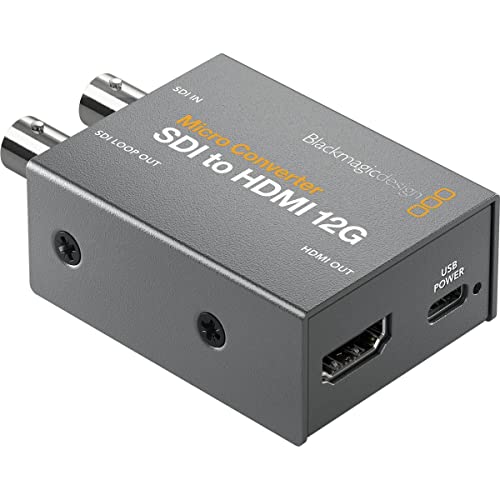
- SDI-to-HDMI 12G conversion
- 33-point 3D LUT calibration
- Portable metal housing with SDI loop output
Best For: Portable calibrated SDI monitoring
Best SDI-to-HDMI Pick

- Converts SDI to HDMI in SD, HD, and Ultra HD.
- Offers down conversion for HD HDMI monitoring.
- Adds 3D LUTs, audio de-embedding, and HDMI instant lock.
Best For: SDI-to-HDMI monitoring
Best HDMI-to-SDI Pick
Micro Converter HDMI to SDI 12G

- Provides two SDI video outputs.
- Supports SDI rates up to 12G.
- Handles SD through 4K with automatic HDMI matching and reclocking.
Best For: HDMI sources feeding SDI equipment
Best Simple Pick

- Supports SD, HD, 2K, and 4K SDI signals.
- Outputs four channels of balanced AES/EBU audio via XLR.
- Includes 12G-SDI loop output and USB/Ethernet configuration.
Best For: Professional SDI audio extraction
Versatile Conversion – Decimator 12G-CROSS 4K Cross Converter
Decimator 12G-CROSS 4K HDMI/SDI Cross Converter with Scaling and Frame Rate Conversion
Check Price On AmazonThe Decimator 12G-CROSS is a flexible choice among 4k sdi converters when your setup needs HDMI/SDI cross-conversion plus scaling and frame-rate conversion. Its two-port design and HDMI connector make it suited to compact signal-management workflows.
Best For: Users who need 4K HDMI/SDI conversion with scaling and frame-rate conversion.
Pros:
- Supports HDMI and SDI cross-conversion.
- Includes scaling and frame-rate conversion.
- Compact 10 x 6.2 x 2.4-inch form factor.
Cons:
- The supplied specifications list only two ports.
- Uses a North American Type B power plug.
Choose this model when format flexibility matters more than a high port count. Its integrated scaling and frame-rate conversion add practical versatility for mixed HDMI and SDI systems.
Signal Distribution – Blackmagic SDI Distribution 4K
The Blackmagic Design Mini Converter SDI Distribution 4K is a straightforward option among 4k sdi converters for sending one SDI input to multiple destinations. Its distribution-box layout provides one input and eight outputs for larger monitoring or routing setups.
Best For: Production and installation workflows that need one SDI source delivered to eight outputs.
Pros:
- Provides one SDI input and eight outputs.
- Purpose-built for SDI signal distribution.
- Includes a listed 2-year warranty.
Cons:
- It is a distribution unit rather than a general HDMI/SDI converter.
- The supplied notes do not specify scaling or frame-rate conversion.
This is the focused choice for multiplying an SDI feed rather than changing formats. The eight-output arrangement is its main advantage when several compatible destinations must receive the same signal.
Compact BiDirectional – Blackmagic Micro Converter 12G SDI/HDMI
Blackmagic Design Micro Converter BiDirectional SDI/HDMI 12G with Power Supply CONVBDC/SDI/HDMI12G/P
Check Price On AmazonThe Blackmagic Design Micro Converter BiDirectional SDI/HDMI 12G is a compact pick among 4k sdi converters for camera, computer, and display connections. It supports one SDI input and one HDMI 2.0 input, with automatic matching for the HDMI video output, and includes a 5V universal power supply.
Best For: Portable camera and display setups requiring bidirectional SDI/HDMI connectivity.
Pros:
- Supports SDI and HDMI 2.0 connections.
- Automatic HDMI video-output matching is specified.
- Includes a 5V universal power supply with international adapters.
Cons:
- Its compact design provides only one SDI video input.
- The unit weighs 386 g, which may be more than some ultra-portable setups prefer.
For users moving between SDI cameras and HDMI monitors, this model combines broad compatibility with a small footprint. The included international power adapters make it particularly practical for travel or varied installation locations.
Audio Extraction – Blackmagic SDI to Audio 4K Converter
The Blackmagic Design Mini Converter SDI to Audio 4K targets a different need within 4k sdi converters: extracting audio from an SDI signal. It supports eight channels and offers analog/AES-EBU audio output modes, making it useful when SDI video must feed separate audio equipment.
Best For: Users who need eight-channel audio extraction from SDI for monitor or audio-system workflows.
Pros:
- Supports eight audio channels.
- Offers analog and AES-EBU output modes.
- Includes a power supply with multinational adapters.
Cons:
- It is designed for SDI-to-audio conversion, not general HDMI conversion.
- The supplied notes do not specify video output conversion features.
This converter makes sense when audio access is the priority. Its eight-channel capacity and dual output modes give compatible SDI workflows more routing flexibility than a basic audio breakout.
Flexible Signal Bridge – Bidirectional SDI/HDMI 12G Micro Converter
For setups comparing 4k sdi converters, this compact Blackmagic Design model stands out for bidirectional SDI and HDMI conversion. Its metal construction, single-channel design, camera compatibility, and 2-year warranty make it a practical choice when you need a small converter for SDI or HDMI devices.
Best For: Camera and monitor setups that need flexible SDI-to-HDMI or HDMI-to-SDI conversion in a compact unit.
Pros:
- Supports bidirectional SDI and HDMI conversion.
- Compact 0.19 kg design for easier installation and transport.
- Stainless steel construction and a 2-year warranty.
Cons:
- Provides one channel.
- The supplied notes do not specify included accessories beyond the unit.
This is a versatile pick for users who want one small converter to handle either direction between SDI and HDMI. Its straightforward, single-channel format is best suited to individual camera or display connections rather than multi-channel systems.
Audio Integration Pick – Mini Converter Audio to SDI 4K
Among 4k sdi converters, this Blackmagic Design Mini Converter is designed specifically to embed audio into an SDI signal. It offers eight channels, SDI output, automatic Ultra HD switching, and a 12-volt minimum supply requirement for production and monitoring workflows.
Best For: Adding multiple audio channels to an SDI feed for compatible monitors and broadcast-style installations.
Pros:
- Converts audio to SDI 4K.
- Supports eight channels.
- Includes automatic Ultra HD switching and a 2-year warranty.
Cons:
- It is an audio-to-SDI converter rather than a general SDI/HDMI converter.
- Requires a minimum 12-volt supply.
This model makes the most sense when audio embedding is the central requirement. Its eight-channel capacity gives it a clear advantage over basic single-channel converters, while its SDI output keeps the workflow focused and purpose-built.
Color-Control Compact – Micro Converter SDI to HDMI 12G
For 4k sdi converters focused on display output, this Blackmagic Design Micro Converter changes SDI to HDMI 12G in a compact metal housing. Its 33-point 3D LUT supports monitor, projector, or television color calibration, and the SDI loop output can also carry the 3D LUT.
Best For: Portable SDI-to-HDMI monitoring setups that need display calibration through a 3D LUT.
Pros:
- Converts SDI to HDMI 12G.
- Includes a 33-point 3D LUT for color calibration.
- Compact, portable metal body with SDI loop-output LUT support.
Cons:
- Supports SDI-to-HDMI conversion only, according to the supplied notes.
- Requires a 5-volt supply.
This is the strongest fit of the three for calibrated monitoring. Choose it when LUT functionality and portability matter more than bidirectional conversion or audio embedding.
Best SDI-to-HDMI Pick – Mini Converter SDI to HDMI 4K
For buyers comparing 4k sdi converters, the Blackmagic Design Mini Converter SDI to HDMI 4K is a practical choice for sending SDI video to an HDMI monitor. It supports SD, HD, and Ultra HD formats, with audio de-embedding to HDMI and features aimed at monitoring workflows.
Best For: Monitoring SDI sources on HDMI displays, including Ultra HD sources on HD HDMI monitors.
Pros:
- Converts SDI to HDMI across SD, HD, and Ultra HD formats.
- Supports down conversion for viewing Ultra HD on HD HDMI monitors.
- Includes built-in 3D LUTs and HDMI instant lock.
- De-embeds audio to HDMI.
Cons:
- Its listed conversion direction is SDI to HDMI, so it is not suited to HDMI-to-SDI output.
- Its feature set is focused on monitoring rather than professional audio breakout.
This is a strong fit when your setup already uses SDI and you need flexible HDMI monitoring with useful format-conversion features.
Best HDMI-to-SDI Pick – Micro Converter HDMI to SDI 12G
Among 4k sdi converters, the Blackmagic Design Micro Converter HDMI to SDI 12G stands out for moving HDMI video into SDI equipment. It provides two SDI video outputs, automatically matches the HDMI input, and supports formats from SD through 4K.
Best For: Connecting an HDMI source to SDI monitors, switchers, or other SDI-based equipment.
Pros:
- Provides two SDI video outputs.
- Supports 270Mb, 1.5G, 3G, 6G, and 12G SDI rates.
- Automatically matches HDMI input video.
- Supports SD, HD, 2K, Ultra HD, and 4K formats with reclocking.
Cons:
- It converts HDMI to SDI rather than SDI to HDMI.
- Power requirements are specified at 5 to 5.25 volts DC, so the power setup should be checked.
Choose this model when your source is HDMI but the rest of your video path relies on SDI, especially when dual SDI outputs and broad rate support are useful.
Best Simple Pick – Teranex Mini SDI to Audio 12G
Blackmagic Design Teranex Mini SDI to Audio 12G | SD HD Ultra HD Supported Converter
Check Price On AmazonFor 4k sdi converters that also address professional audio, the Blackmagic Design Teranex Mini SDI to Audio 12G combines SDI format support with AES/EBU output. It accepts SD, HD, 2K, and 4K signals, provides an SDI loop output, and supports USB or Ethernet configuration.
Best For: Extracting professional digital audio from SDI signals while maintaining an SDI loop-through connection.
Pros:
- Supports SD, HD, 2K, and 4K with automatic switching.
- Provides four channels of balanced AES/EBU audio through XLR connectors.
- Includes a 12G-SDI loop output.
- Supports USB or Ethernet updates and configuration.
Cons:
- This is an SDI-to-audio converter, not a general HDMI conversion device.
- The professional XLR and AES/EBU design may be more than a basic monitoring setup needs.
This model is the most specialized option here, making sense when your workflow needs SDI loop-through plus balanced professional digital audio extraction.
How We Picked These 4K Sdi Converters
We selected models based on practical production capabilities rather than resolution claims alone. The lineup includes HDMI-to-SDI and SDI-to-HDMI converters, bidirectional units, SDI distribution hardware, audio converters, and a cross converter with scaling and frame-rate conversion. We also considered support for SD, HD, and Ultra HD signals, 3G, 6G, or 12G-SDI bandwidth, portability, included power supplies, and suitability for live events, studios, post-production, and installation work.
Because converter requirements vary widely, there is no single best model for every setup. A simple one-way converter may be preferable for a fixed connection, while a bidirectional or cross-conversion unit can provide more flexibility at a higher cost.
Quick Comparison
| Need | Best fit from this roundup |
|---|---|
| HDMI and SDI conversion in either direction | Blackmagic Design Micro Converter Bidirectional SDI/HDMI 12G models |
| Scaling and frame-rate conversion | Decimator 12G-CROSS |
| Sending one SDI source to multiple outputs | Blackmagic Design Mini Converter SDI Distribution 4K |
| SDI to HDMI monitoring | Blackmagic Design Mini Converter SDI to HDMI 4K or Micro Converter SDI to HDMI 12G |
| Embedding or extracting analog audio | Blackmagic Design Mini Converter Audio to SDI 4K, SDI to Audio 4K, or Teranex Mini SDI to Audio 12G |
Key Buying Factors for 4K Sdi Converters
Signal Direction and Connector Type
Start by identifying the source and destination. HDMI-to-SDI models suit consumer or prosumer cameras and computers feeding professional SDI infrastructure. SDI-to-HDMI models are useful for confidence monitors, displays, and consumer-facing recording equipment. Bidirectional units are more adaptable when a production changes frequently.
SDI Speed and Format Support
For 4K signals, check whether the converter supports 6G-SDI or 12G-SDI at the required frame rate. A 12G model generally offers more headroom for single-link Ultra HD workflows, while older or lower-bandwidth equipment may be limited to HD or lower SDI rates. Confirm compatibility with your exact resolution, frame rate, and color format before buying.
Audio Capabilities
Some converters only pass embedded audio, while dedicated audio models embed external analog audio into SDI or extract SDI audio for mixers, monitors, and powered speakers. Check the number and type of audio inputs or outputs, channel support, and whether your workflow requires analog, embedded, or de-embedded audio.
Conversion Features and Power
If your sources do not share the same format, scaling and frame-rate conversion can prevent compatibility problems. For portable systems, compare USB-C or external power options, included adapters, mounting considerations, and the converter’s physical size. In permanent installations, prioritize dependable cabling, cooling, and easy access to configuration controls.
Who Should Buy Which 4K Sdi Converters?
Choose the Decimator 12G-CROSS when you need advanced cross-conversion, scaling, or frame-rate conversion between HDMI and SDI equipment. Choose a Blackmagic Micro Converter when compact size and straightforward HDMI-SDI conversion are the priorities. Bidirectional versions make the most sense for mobile kits and shared production spaces.
For multi-camera or rack-based systems, the Mini Converter SDI Distribution 4K is the practical choice for feeding several SDI destinations from one source. Select an SDI-to-HDMI model for monitoring, and choose a dedicated audio converter when embedding or extracting audio is central to the workflow. The Teranex Mini is better suited to users who want a more installation-oriented SDI-to-audio solution with broad SD, HD, and Ultra HD support.