
Optical disc duplicators remain useful for distributing CDs, DVDs, training materials, event media, and archival copies without relying on a computer for every job.
We compared 10 optical disc duplicators under $300, focusing on standalone operation, simultaneous copy capacity, supported disc formats, and practical features such as M-Disc compatibility.
Best 10 Optical Disc Duplicators Under 300 Picks for 2026
Best Overall

- Standalone operation with no PC required
- Up to 24x DVD and 52x CD-R writing
- Supports M-Disc DVD media
Best For: Small businesses and archival users
Best for Batch Copies
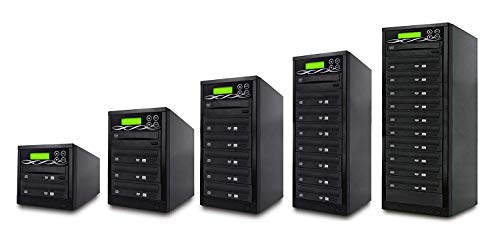
- Three built-in target burners
- Supports common DVD and CD formats
- Includes test, verify, and compare modes
Best For: Small batch duplication jobs
Best for Easy Operation

- Automatically starts after disc detection
- No PC required
- Supports M-Disc and fast DVD/CD writing
Best For: Home and small-office users
Best for CD Format Support
Standard 1-to-1 Disc Duplicator

- Recognizes specialized CD formats
- Standalone 1-to-1 operation
- Supports M-Disc and up to 24x DVD writing
Best For: CD-focused personal and business duplication
High-Volume Standalone Pick
ACARD 1-to-5 CD/DVD Duplicator

- Duplicates to up to five discs at once
- Standalone operation requires no PC
- Supports dual-layer DVD and up to 24x DVD writing
Best For: High-volume CD and DVD duplication without a computer
Archival Media Specialist
PlexCopier 1-to-5 M-Disc Duplicator

- Supports 1000-year archival-grade M-Disc DVD media
- Duplicates to five target discs
- Can create compatible copy-protected DVD Video copies
Best For: Standalone duplication and archival M-Disc workflows
Audio Flexibility Pick
Optiarc 1-to-1 CD/DVD Duplicator
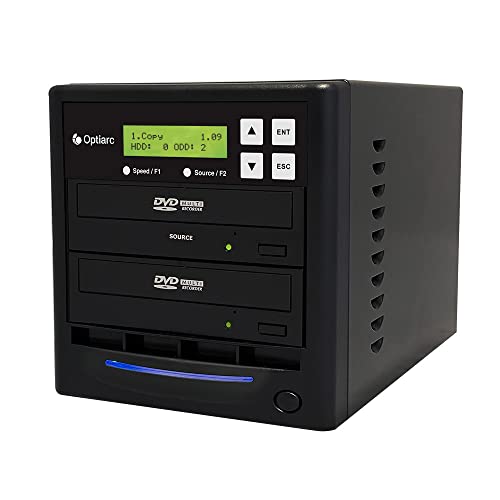
- Supports DAO, TAO, and audio mix compilation
- Standalone one-to-one duplication
- Selectable CD-R and DVD writing speeds
Best For: Audio CD compilation and occasional single-disc duplication
Best Archival Pick

- Standalone CD/DVD copying
- Supports M-Disc DVD media
- Up to 24x DVD writing
Best For: Small-batch backups and long-term disc archiving
Best All-Around CD Support

- Standalone operation
- Broad CD format recognition
- M-Disc support
Best For: Mixed CD/DVD duplication with specialized CD formats
Best for Audio Projects

- Copies up to five discs
- Audio DAO, TAO, and mix modes
- Selectable write speeds
Best For: Audio CD projects and higher-volume small batches
Best Overall – 1-to-1 M-Disc Duplicator
PlexCopier 24X 1 to 1 CD DVD M-Disc Supported Duplicator Copier Tower with Free Copy Protection
Check Price On AmazonFor shoppers comparing optical disc duplicators under 300, this standalone 1-to-1 tower offers a practical mix of speed, archival support, and specialized DVD copy-protection functionality. It operates without a PC, writes DVDs at up to 24x and CD-Rs at up to 52x, and supports M-Disc DVD media.
Best For: Small businesses and users who want standalone duplication with M-Disc support and lifetime technical support.
Pros:
- Standalone operation requires no PC.
- Supports up to 24x DVD and 52x CD-R write speeds.
- Supports 1000-year archival-grade M-Disc DVD media.
- Includes lifetime free technical support and a one-year parts-and-labor warranty.
Cons:
- Only provides one target drive for each duplication cycle.
- Will not copy encrypted discs.
- DVD copy protection requires OptoDisc MID media.
This is a strong all-around choice when ease of use and archival compatibility matter more than producing several copies simultaneously.
Best for Batch Copies – 1-to-3 Disc Duplicator
This 1-to-3 tower is a useful option among optical disc duplicators under 300 when producing multiple copies matters. Its three built-in target burners support common DVD and CD blank-media standards, while automatic source analysis and verification tools help streamline repeat jobs.
Best For: Users who need up to three copies per duplication cycle for office, event, or small production tasks.
Pros:
- Three target burners can create multiple copies at once.
- Supports DVD+/-R, DVD+/-RW, dual-layer DVD, CD-R, and CD-RW media.
- Includes Copy, Test, Verify, and Compare functions.
- Password protection and self-diagnostics support controlled operation.
Cons:
- Maximum listed write speed is 16x for DVD and 52x for CD.
- Its plastic enclosure may feel less substantial than heavier tower designs.
- Requires a source disc rather than offering hard-drive-based duplication.
Choose this model if throughput is your priority and three simultaneous target discs are more valuable than the faster DVD speeds offered by some 1-to-1 towers.
Best for Easy Operation – AutoDupe 1-to-1 Tower
PlexCopier AutoDupe Easy to USE STANDALONE 24X 1 to 1 CD DVD Burner Writer Drive Duplicator Tower
Check Price On AmazonAmong optical disc duplicators under 300, the AutoDupe stands out for simplifying the duplication process. It works as a standalone tower and automatically begins copying after detecting a master disc and blank media, while still supporting up to 24x DVD and 52x CD-R writing.
Best For: Home users, small offices, and anyone who wants minimal button programming for routine disc copies.
Pros:
- Automatically starts duplication after detecting the source and blank disc.
- No PC is required for operation.
- Supports up to 24x DVD and 52x CD-R write speeds.
- Records to archival-grade M-Disc DVD media.
Cons:
- One target drive limits each cycle to a single copy.
- Will not copy encrypted discs.
- Includes a one-year manufacturer warranty but does not list lifetime support.
The AutoDupe is a sensible pick for users who value a straightforward workflow and do not need multi-target production or encrypted-disc copying.
Best for CD Format Support – Standard 1-to-1 Disc Duplicator
Vinpower Digital Standard 1 to 1 Target 24x DVD CD Disc Duplicator Tower SATA Optical Drives - Black
Check Price On AmazonThis 1-to-1 SATA tower is a practical contender among optical disc duplicators under 300, especially for users working with varied CD formats. It runs without a PC, writes DVDs at up to 24x, and supports features such as CD-TEXT, ISRC, and over-burned CDs.
Best For: Personal, gaming, and business users who need broad CD-format recognition alongside standard DVD duplication.
Pros:
- Standalone operation does not require a PC.
- Recognizes common CD formats plus CD-TEXT, ISRC, and over-burned CDs.
- Supports up to 24x DVD and 52x CD-R write speeds.
- Supports M-Disc DVD media and OptoDisc-based DVD copy protection.
Cons:
- One target drive produces only one copy per cycle.
- Will not copy encrypted discs.
- DVD copy protection depends on OptoDisc MID media.
This model makes the most sense when specialized CD compatibility is central to your workflow and a simple one-copy-at-a-time tower meets your volume needs.
High-Volume Standalone Pick – ACARD 1-to-5 CD/DVD Duplicator
For buyers comparing optical disc duplicators under 300, the ACARD 1-to-5 tower is a practical choice when standalone operation and simultaneous duplication are priorities. It supports up to five target discs, native SATA data acceleration, and DVD speeds up to 24x or CD-R speeds up to 52x.
Best For: Businesses and users duplicating multiple CDs or DVDs without a computer.
Pros:
- Duplicates one source disc to up to five targets.
- Operates independently without a PC.
- Supports single-layer and dual-layer DVD formats, with automatic format detection.
- Uses native SATA controller technology and supports up to 24x DVD writing.
Cons:
- Cannot copy protected or encrypted discs.
- At approximately 17 pounds, it is not especially portable.
This ACARD tower is a strong fit for routine, higher-volume disc production. Its standalone design reduces setup requirements, while broad DVD media support gives it useful flexibility for standard duplication tasks.
Archival Media Specialist – PlexCopier 1-to-5 M-Disc Duplicator
Among optical disc duplicators under 300, this PlexCopier tower stands out for its combination of five-target duplication, M-Disc support, and a feature for creating copy-protected DVD Video copies from an original master using compatible OptoDisc MID media. It operates without a PC and reaches up to 24x DVD or 52x CD-R writing.
Best For: Organizations that need standalone duplication with M-Disc archival-media support.
Pros:
- Copies one source disc to up to five targets.
- Supports 1000-year archival-grade M-Disc DVD media.
- Can create copy-protected DVD Video copies with compatible OptoDisc MID media.
- Runs as a standalone tower without requiring a PC.
Cons:
- Will not copy encrypted discs.
- Its approximately 17-pound tower design takes up dedicated space.
The PlexCopier is especially compelling when archival media or controlled DVD Video distribution matters. Its five-drive layout makes it more efficient than one-to-one systems for recurring duplication work.
Audio Flexibility Pick – Optiarc 1-to-1 CD/DVD Duplicator
For shoppers seeking optical disc duplicators under 300 for occasional or specialized work, this Optiarc 1-to-1 tower focuses on flexible audio CD duplication. It supports Disc at Once, Track at Once, and Mix Audio Compilation modes, along with selectable writing speeds and standalone operation.
Best For: Users creating audio CD compilations or making one duplicate at a time.
Pros:
- Supports DAO, TAO, and Mix Audio Compilation options.
- Operates without a PC for standalone duplication.
- Offers selectable writing speeds up to 24x for DVD and 52x for CD-R.
- Drive firmware can be upgraded for selected brands through the duplicator.
Cons:
- Duplicates only one target disc at a time.
- Cannot copy discs with copy protection.
- The supplied specifications list a PC hardware platform, so setup details should be confirmed before purchase.
This Optiarc model is less suited to high-volume production than multi-target towers, but its audio-focused modes make it useful for custom CD compilations. Selectable speeds and firmware-upgrade capability add flexibility for supported drives.
Best Archival Pick – 1-to-3 M-Disc DVD Duplicator
PlexCopier 24X 1 to 3 CD DVD M-Disc Supported Duplicator Copier Tower with Free Copy Protection
Check Price On AmazonFor shoppers comparing optical disc duplicators under 300, this standalone PlexCopier tower offers a straightforward way to copy CDs and DVDs without a computer. It supports up to 24x DVD and 52x CD-R writing, plus M-Disc DVD media for long-term archiving.
Best For: Home users and small organizations making routine backups or archiving data on M-Disc media.
Pros:
- Standalone operation requires no PC.
- Copies up to three discs at once from a master.
- Supports M-Disc DVD media and up to 24x DVD writing.
- Can create copy-protected DVD Video copies with compatible OptoDisc MID media.
Cons:
- Will not copy encrypted discs.
- Uses plastic construction and weighs 14 pounds.
- Copy-protection creation is limited to compatible media and DVD Video use.
This model is a practical choice when standalone convenience and archival M-Disc support matter more than high-volume duplication. Its 1-to-3 layout suits occasional or small-batch work.
Best All-Around CD Support – PioData 1-to-3 DVD Duplicator
Among optical disc duplicators under 300, this PioData tower balances standalone usability with broad CD format support. It can duplicate up to three discs at a time and reaches 24x DVD and 52x CD-R write speeds, depending on the media.
Best For: Users who need a standalone duplicator with support for common and specialized CD formats.
Pros:
- Operates without a PC.
- Recognizes CD-TEXT, ISRC, over-burned CDs, and other common CD formats.
- Supports M-Disc media.
- Offers up to 24x DVD and 52x CD-R writing.
Cons:
- Cannot copy encrypted discs.
- Copy-protected DVD creation requires compatible OptoDisc MID media.
- Its 13-pound tower may be more equipment than occasional users need.
Choose this model if CD compatibility is a priority. Its format support and standalone design make it especially useful for varied CD duplication tasks, while the 1-to-3 configuration keeps it suited to modest production volumes.
Best for Audio Projects – 1-to-5 CD/DVD Duplicator
For buyers seeking optical disc duplicators under 300 with greater batch capacity, this Optiarc tower duplicates one source disc to as many as five targets. It also adds audio-focused DAO, TAO, and Mix Audio Compilation options, along with selectable write speeds.
Best For: Users producing small batches of audio CDs or duplicating CD and DVD media with adjustable write settings.
Pros:
- Duplicates to up to five discs simultaneously.
- Supports DAO, TAO, and Mix Audio Compilation modes.
- Allows selectable speeds up to 24x for DVD and 52x for CD-R.
- Drive firmware can be upgraded for selected brands.
Cons:
- Cannot copy discs with copy-protection features.
- Weighs 17 pounds and uses a plastic enclosure.
- Does not list the copy-protected DVD creation feature included with some comparable models.
This is the strongest fit in the group for audio compilation and larger small-batch runs. Its five-target capacity can reduce duplication time, while selectable speeds provide more control over the burning process.
How We Picked the Best Optical Disc Duplicators Under 300
We focused on standalone tower duplicators that can copy CDs and DVDs without requiring disc-burning software on a connected computer. The selected models cover one-to-one, one-to-three, and one-to-five configurations, giving occasional users and higher-volume operators different ways to balance cost and throughput.
We also considered advertised 24X writing speeds, SATA drive designs, M-Disc support, built-in burners, copy-protection options, and the clarity of the controls. Because actual results depend on source media, blank-disc quality, and the content being copied, advertised maximum speed should be treated as a benchmark rather than a guaranteed everyday rate.
Quick Comparison
| Configuration | Best For | Main Advantage |
|---|---|---|
| 1-to-1 | Occasional or low-volume copying | Usually the simplest and most affordable setup |
| 1-to-3 | Small batches | Copies several discs at once without a large tower |
| 1-to-5 | Frequent duplication | Higher output per copying cycle |
| M-Disc supported | Long-term archival projects | Works with compatible archival-grade media |
Key Buying Factors for Optical Disc Duplicators Under $300
Target Count and Throughput
The target count determines how many blank discs can be written simultaneously. A one-to-one unit suits home users, offices, and occasional projects. A one-to-three model is a practical middle ground, while a one-to-five tower can reduce labor when creating larger batches.
Disc and Format Compatibility
Check whether the duplicator supports the exact CD, DVD, DVD-R, DVD+R, rewritable, or dual-layer media you plan to use. If archival storage matters, select a model that explicitly supports M-Disc and pair it with compatible M-Disc media.
Standalone Controls
Look for a clear LCD, straightforward copy and verify functions, and simple loading access. Standalone operation is the main convenience advantage, so confusing menus or cumbersome disc handling can undermine the value of an otherwise capable tower.
Copy Protection and Verification
Some models include copy-protection features or verification tools. These may be useful for authorized distribution workflows, but they do not bypass every form of commercial DRM or guarantee that protected content can be copied. Confirm that your intended use complies with copyright law.
Speed, Noise, and Reliability
Twenty-four-times writing is common in this price range, but slower settings can produce more consistent results with some media. Consider fan noise, drive replacement options, warranty coverage, and the availability of compatible blank discs before buying.
Who Should Buy Which Optical Disc Duplicators Under 300?
Choose a one-to-one duplicator if you make occasional backups or small batches and want the lowest operating complexity. A one-to-three tower is better for clubs, schools, churches, small businesses, and event organizers that regularly need several copies at a time. Choose a one-to-five model when reducing hands-on time matters more than minimizing the tower’s footprint.
For archival projects, prioritize M-Disc support and a reliable verification process. For routine music, video, or data distribution, prioritize the target count and media compatibility first. Whichever model you choose, use high-quality blank discs, keep the source disc clean, and verify important batches before distribution.