
Optical disc duplicators can streamline backups, archival projects, media distribution, and repeatable copying without relying on a computer for every job. The models in this roundup range from compact 1:1 systems to higher-output towers and versatile flash-media copiers.
Because “erase” can refer to different media types and workflows, check the specifications carefully before buying. The right choice depends on whether you need rewritable-disc handling, USB or flash-media erasing, Blu-ray support, or high-volume DVD and CD duplication.
Best 10 Optical Disc Duplicators with Erase Functions Picks for 2026
Best High-Capacity DVD Tower

- Standalone duplication to five targets
- Up to 24x DVD and 52x CD-R writing
- Supports M-Disc DVD media
Best For: Businesses producing multiple archival DVD copies
Best USB Eraser
StarTech 1-to-2 Flash Drive Duplicator

- Standalone USB duplication and erasing
- Quick, single-pass, and three-pass overwrite modes
- LCD controls with Copy & Compare verification
Best For: IT teams sanitizing and reusing USB drives
Best Compact DVD Copier

- Standalone one-to-one disc copying
- Supports DVD, CD-R, and M-Disc media
- Includes lifetime support and one-year warranty
Best For: Small offices making occasional archival disc copies
Best Audio CD Features
1-to-5 Standalone Disc Duplicator

- Standalone duplication to five targets
- Supports CD-TEXT, ISRC, and over-burned CDs
- Compiles audio tracks from multiple sources
Best For: Batch CD/DVD copying and audio CD compilation
Best Blu-ray Standalone Pick
Blu-ray BD BDXL M-Disc Duplicator

- Standalone copying for Blu-ray, DVD, and CD
- Supports BDXL and M-Disc media
- Up to 16x BD-R writing
Best For: Blu-ray and archival-disc duplication
Best DVD/CD Value
24x Standalone DVD CD Duplicator

- Standalone DVD and CD duplication
- Supports M-Disc DVD media
- Up to 24x DVD writing
Best For: Routine DVD and CD copying
Best Multimedia Backup Pick
Flash and Blu-ray Media Mirror

- Copies between flash media and discs
- Supports CD, DVD, and Blu-ray
- Automatic disc spanning for larger files
Best For: Mixed-media backup and archiving
Best Standalone DVD Archiver

- Standalone operation needs no PC
- Supports M-Disc DVD media
- Up to 24x DVD and 52x CD-R writing
Best For: DVD/CD backups and archival projects
Best Blu-ray Batch Tower
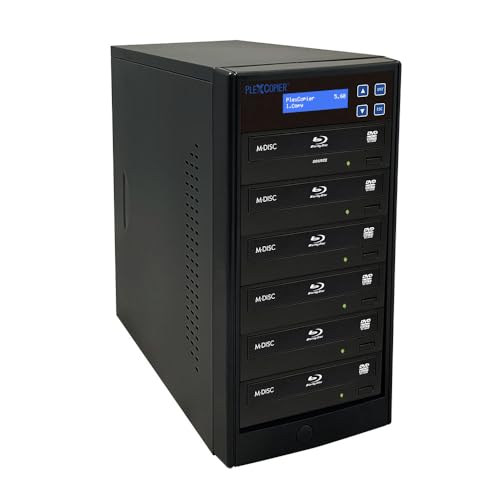
- Supports Blu-ray, BDXL, M-Disc, CD, and DVD
- Handles up to five copies per batch
- Works with Windows and macOS
Best For: Mixed-format, higher-volume disc duplication
Best Simple Pick

- Duplicates up to seven discs at once
- Standalone operation needs no PC
- Supports M-Disc and copy-protected DVD Video creation
Best For: Larger DVD/CD production and backup batches
Best High-Capacity DVD Tower – 1-to-5 M-Disc DVD Duplicator
For businesses producing several optical copies at once, this 1-to-5 tower is a practical choice among optical disc duplicators with erase functions, although the supplied specifications focus on disc writing rather than disc erasing. It operates without a PC and supports DVD, CD-R, and M-Disc media.
Best For: Businesses that need standalone, multi-disc DVD and CD duplication.
Pros:
- Copies one source disc to up to five targets.
- Supports up to 24x DVD and 52x CD-R write speeds.
- Supports archival M-Disc DVD media.
- Can create copy-protected DVD Video copies with compatible OptoDisc MID media.
Cons:
- Does not copy encrypted discs.
- The supplied notes do not identify an erase or disc-sanitizing function.
- At 17 pounds, it is less convenient to move than compact duplicators.
This PlexCopier is best suited to repeatable batch production rather than data erasure. Its standalone design and five-target capacity make it a strong option when throughput matters more than portability.
Best USB Eraser – StarTech 1-to-2 Flash Drive Duplicator
Although it handles USB flash media rather than optical discs, this StarTech unit is especially relevant when comparing optical disc duplicators with erase functions because it combines standalone duplication with dedicated erase and overwrite modes. It requires no computer and includes an LCD control interface.
Best For: IT technicians and businesses duplicating, sanitizing, or reusing USB drives.
Pros:
- Duplicates or erases up to two USB drives without a computer.
- Offers Quick Erase, single-pass, and three-pass overwrite modes.
- Supports FAT16/32, NTFS, and Linux ext2, ext3, and ext4 in system and file copy mode.
- Includes Copy & Compare verification and error scanning.
Cons:
- It is a USB duplicator, not an optical-disc duplicator.
- External USB devices may require their own power source.
- Asynchronous copying is limited to source content under 64 MB.
This is the strongest option in the supplied group for actual erase functionality, but its media compatibility is limited to USB storage. Choose it when secure drive reuse matters more than CD or DVD support.
Best Compact DVD Copier – 1-to-1 M-Disc Duplicator
PlexCopier 24X 1 to 1 CD DVD M-Disc Supported Duplicator Copier Tower with Free Copy Protection
Check Price On AmazonThis 1-to-1 PlexCopier is a straightforward standalone option for users comparing optical disc duplicators with erase functions and primarily needing reliable disc copying. It supports CD, DVD, and M-Disc formats, but the supplied notes do not list an erase mode.
Best For: Small offices and users making occasional single DVD or CD copies.
Pros:
- Runs without a PC.
- Supports up to 24x DVD and 52x CD-R write speeds.
- Records to archival-grade M-Disc DVD media.
- Includes lifetime technical support and a one-year parts-and-labor warranty.
Cons:
- Only one target disc can be written at a time.
- Does not copy encrypted discs.
- No erase function is specified in the supplied product information.
With one source and one target, this tower favors simplicity over production volume. It is a sensible fit for occasional duplication, especially when M-Disc support and standalone operation are priorities.
Best Audio CD Features – 1-to-5 Standalone Disc Duplicator
This Optodisc tower is designed for standalone batch duplication and includes broad CD-format support, making it worth considering alongside optical disc duplicators with erase functions. However, the supplied specifications describe duplication and compilation features, not disc erasing.
Best For: Users producing multiple CD or DVD copies and compiling audio CDs.
Pros:
- Copies one disc to up to five targets without a PC.
- Supports up to 24x DVD writing and 24x optical reading.
- Recognizes common CD formats plus CD-TEXT, ISRC, and over-burned CDs.
- Can compile multiple audio tracks from different sources onto one disc.
Cons:
- Cannot copy discs with copy-protection features.
- No erase or sanitizing mode is listed.
- The supplied details identify a one-year warranty rather than longer coverage.
This model stands out for CD versatility and audio compilation rather than erasure. Its five-target layout is useful for batch work, while its standalone controls avoid the need for computer-based burning software.
Best Blu-ray Standalone Pick – Blu-ray BD BDXL M-Disc Duplicator
PlexCopier 1 to 1 Blu-ray BD BDXL M-Disc CD DVD Duplicator Copier Tower with Free Copy Protection
Check Price On AmazonFor buyers seeking optical disc duplicators with erase functions, this standalone Blu-ray tower is a versatile choice for copying Blu-ray, DVD, and CD media without a computer. It supports up to 16x BD-R, 24x DVD, and 52x CD-R write speeds, while also creating free copy-protected DVD Video copies with compatible OptoDisc MID media.
Best For: Home users, small businesses, and archival projects needing standalone Blu-ray, DVD, CD, and M-Disc duplication.
Pros:
- Copies Blu-ray, DVD, and CD discs without a PC.
- Supports BDXL and archival-grade M-Disc media.
- Offers free copy protection for compatible DVD Video copies.
- Supports fast write speeds across multiple disc formats.
Cons:
- Will not copy encrypted, copy-protected source discs.
- Its 11-pound tower design requires dedicated space.
This is the strongest option here when Blu-ray compatibility and broad disc-format support matter most. Keep in mind that its copy-protection feature is for creating compatible protected copies, not bypassing encryption.
Best DVD/CD Value – 24x Standalone DVD CD Duplicator
Vinpower Digital Standard 1 to 1 Target 24x DVD CD Disc Duplicator Tower SATA Optical Drives - Black
Check Price On AmazonThis DVD/CD tower is a practical option for buyers comparing optical disc duplicators with erase functions for routine disc production. It works independently of a PC, recognizes common CD formats plus CD-TEXT, ISRC, and over-burned CDs, and supports up to 24x DVD and 52x CD-R writing.
Best For: Personal, gaming, and business users who primarily duplicate DVDs and CDs and want M-Disc DVD support.
Pros:
- Operates as a standalone duplicator without a PC.
- Supports common CD formats and special CD data.
- Records to archival-grade M-Disc DVD media.
- Provides up to 24x DVD and 52x CD-R write speeds.
Cons:
- Does not duplicate Blu-ray discs.
- Cannot copy encrypted discs.
- The 14-pound tower may be bulky for limited workspaces.
Choose this model if your workflow centers on DVD and CD duplication rather than Blu-ray. Its format support and M-Disc compatibility add flexibility, while the standalone design keeps operation simple.
Best Multimedia Backup Pick – Flash and Blu-ray Media Mirror
For shoppers considering optical disc duplicators with erase functions alongside flash-media backup, this standalone unit handles USB, CF, SD, Micro SD, and MS cards as well as CD, DVD, and Blu-ray discs. It can copy between media types, span oversized flash-media files across multiple discs, and operate without software or a host computer.
Best For: Users who need one standalone device for flash-card, USB, CD, DVD, and Blu-ray backup workflows.
Pros:
- Copies between flash media, USB drives, and optical discs.
- Supports CD, DVD, and Blu-ray source and target media.
- Automatically spans larger source files across multiple discs.
- Includes a one-year warranty and lifetime technical support.
Cons:
- Optical write speeds are limited to 16x for DVD and 8x for Blu-ray.
- It is a specialized backup unit rather than a general computer-connected drive.
- It does not connect to a computer or use a computer operating system.
This is the most flexible choice when your source material includes memory cards or USB drives as well as discs. Its standalone, multi-format design is especially useful for transferring and archiving mixed media.
Best Standalone DVD Archiver – 1-to-3 M-Disc Duplicator
PlexCopier 24X 1 to 3 CD DVD M-Disc Supported Duplicator Copier Tower with Free Copy Protection
Check Price On AmazonFor buyers comparing optical disc duplicators with erase functions, this standalone 1-to-3 tower is a practical DVD and CD option for repeated copying, backups, and archival projects. It requires no PC, supports M-Disc DVD media, and reaches up to 24x DVD and 52x CD-R write speeds. Note that the supplied specifications do not indicate an erase function, so it should be treated as a duplicator rather than an erasing device.
Best For: Home offices, small businesses, and users archiving CDs or DVDs to M-Disc media.
Pros:
- Standalone operation without a computer
- Copies up to three discs at once
- Supports M-Disc DVD archival media
- Can create copy-protected DVD Video copies with compatible OptoDisc MID media
Cons:
- Does not copy encrypted discs
- Supplied notes do not confirm an erase function
- DVD-focused design does not support Blu-ray duplication
This model is a sensible choice when straightforward DVD/CD duplication and long-term M-Disc archiving matter more than Blu-ray support or disc erasure. Its standalone design keeps the workflow simple, while the 1-to-3 capacity suits modest batch jobs.
Best Blu-ray Batch Tower – 1-to-5 BD and DVD Duplicator
PlexCopier 1 to 5 Blu-ray BD BDXL M-Disc CD DVD Duplicator Copier Tower with FREE Copy Protection
Check Price On AmazonFor shoppers evaluating optical disc duplicators with erase functions, this 1-to-5 tower stands out for broad optical-media compatibility, including Blu-ray, BDXL, M-Disc, CD, and DVD formats. It offers up to five-copy capacity and supports Windows and macOS environments. The supplied details do not list an erase capability, so confirm that requirement before buying.
Best For: Users who need higher-volume duplication across Blu-ray, BDXL, DVD, CD, and M-Disc formats.
Pros:
- Supports Blu-ray, BDXL, M-Disc, CD, and DVD media
- Duplicates up to five discs per batch
- Works with Windows and macOS
- Supports listed media speeds of 16x, 24x, and 52x
Cons:
- Supplied specifications do not confirm an erase function
- Requires compatible PCs and optical drives
- At 17 pounds, it is less portable than a compact drive
This is the most versatile choice of the three for mixed-format duplication and larger batches. Its Blu-ray and BDXL support adds flexibility, but buyers specifically seeking disc erasure should verify that feature separately because it is not documented in the supplied information.
Best Simple Pick – 1-to-7 SATA DVD/CD Duplicator
Among optical disc duplicators with erase functions, this 1-to-7 SATA tower is aimed at users who need larger DVD/CD batches and standalone operation. It writes DVDs at up to 24x and CD-Rs at up to 52x, supports M-Disc DVD media, and can create copy-protected DVD Video copies with compatible media. The provided notes do not specify an erase function, so it is primarily a duplication and archiving solution.
Best For: Businesses and organizations producing larger batches of DVD or CD backups without relying on a PC.
Pros:
- Duplicates up to seven discs simultaneously
- Standalone operation requires no PC
- Supports M-Disc DVD archival media
- Offers up to 24x DVD and 52x CD-R write speeds
Cons:
- Does not copy encrypted discs
- Supplied notes do not confirm an erase function
- Does not provide the Blu-ray support listed for the other tower
Choose this model when throughput is the priority and your projects center on DVD and CD media. Its seven-target design is better suited to recurring batch work than the smaller tower, while M-Disc support adds an archival-use option.
How We Picked the Best Optical Disc Duplicators with Erase Functions
We compared these Optical Disc Duplicators with Erase Functions by looking at drive configuration, supported media, duplication ratio, standalone operation, format coverage, and practical workflow features. The selection includes 1:1 units for occasional jobs, multi-target towers for higher throughput, and hybrid systems that work with flash cards or USB storage as well as optical discs.
We also considered support for M-Disc, Blu-ray and BDXL media, SATA drive layouts, LCD status displays, and advertised write speeds. Speed ratings are maximums rather than guaranteed real-world performance, so source media, target media, verification settings, and the contents being copied can all affect results.
Quick Comparison
| Best For | Recommended Configuration | What to Look For |
|---|---|---|
| Occasional copying | 1:1 duplicator | Simple controls, verification, broad CD/DVD support |
| Small-batch production | 1:3 or 1:5 tower | Multiple target drives and reliable disc handling |
| Higher-volume jobs | 1:7 tower | More simultaneous targets and adequate ventilation |
| Blu-ray projects | BD, BDXL, DVD and CD model | Compatible Blu-ray writers and suitable blank media |
| Mixed media workflows | Flash-and-disc duplicator | USB, SD, CF, MS or MMC support plus erase controls |
Key Buying Factors for Optical Disc Duplicators with Erase Functions
Media Compatibility
Confirm whether the unit handles CD-R/RW, DVD±R/RW, M-Disc, Blu-ray, or BDXL. A DVD-only tower cannot duplicate Blu-ray content, and support for rewritable media does not necessarily mean every disc type can be erased. For USB or memory-card erasing, verify the supported interfaces and capacities.
Target Count and Throughput
A 1:1 machine is usually easier to operate and can be sufficient for occasional duplication. Models with three, five, or seven targets reduce the time required for batches, but they need more workspace and may have higher media-handling demands. Look for copy, compare, test, and verify modes if accuracy matters.
Erase and Data-Handling Controls
Check how erasing is performed, whether it applies to rewritable discs or flash storage, and whether the system offers quick and full erase options. If sensitive information is involved, confirm the manufacturer’s documentation rather than assuming a standard erase provides secure data sanitization.
Standalone Operation and Reliability
LCD prompts, menu navigation, source-to-target status indicators, and error reporting make standalone towers easier to manage. Also consider drive replacement, cooling, warranty coverage, media compatibility lists, and the availability of spare parts.
Who Should Buy Which Optical Disc Duplicators with Erase Functions?
Choose a 1:1 DVD/CD duplicator if you value a smaller footprint and straightforward operation. Select a 1:3 or 1:5 tower for clubs, schools, offices, event production, or small media batches. A 1:7 model is better suited to recurring, higher-volume jobs where reducing operator time matters.
For archival or long-life projects, prioritize M-Disc compatibility and verify that your source and target media match the intended archival format. Blu-ray or BDXL models are the better fit for larger video or data projects, while a hybrid flash-and-disc unit makes sense when your workflow includes USB drives and memory cards. Before ordering, confirm regional power requirements, included accessories, media restrictions, and the exact erase functions supported by the selected model.