
Choosing among multi-target optical disc duplicators depends on more than the number of drives. Duplication speed, supported media, source options, storage, and day-to-day reliability all affect how efficiently a tower handles your workload.
This roundup compares 10 models ranging from compact single-target units to 11-target systems. Use the buying guide below to match capacity and features with your production volume, media requirements, and budget.
Best 10 Multi Target Optical Disc Duplicators Picks for 2026
Best High-Capacity Pick
11-Target M-Disc DVD Duplicator

- Duplicates one source to up to 11 targets
- Supports CD, DVD, dual-layer, and M-Disc media
- Standalone operation with automatic format detection
Best For: High-volume disc duplication without a computer
Best Storage-Enabled Pick
SharkCopier 3-Target Duplicator

- Includes a 2 TB project-storage hard drive
- Transfers files through USB 3.0
- Supports true audio comparison and up to 24x DVD writing
Best For: Repeat jobs using stored master projects
Best Compact Value
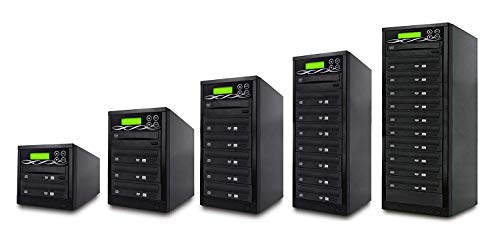
- Makes up to three copies per batch
- Includes verify, compare, and self-diagnostic functions
- Supports common CD and DVD media formats
Best For: Occasional home or small-office duplication
Best M-Disc Business Pick

- Duplicates to five targets without a computer
- Supports M-Disc archival DVD recording
- Writes DVDs up to 24x and CDs up to 52x
Best For: Business duplication with archival-media support
Best High-Volume Pick
SharkCopier 11 Target Duplicator

- 11-target standalone CD/DVD duplication
- 2 TB hard drive with USB 3.0 file transfer
- True audio comparison and dual-layer DVD support
Best For: High-volume CD/DVD duplication and repeat projects
Best Archival-Friendly Value
Standard Series 11 Target Duplicator

- Standalone 11-target CD/DVD tower
- Supports M-Disc archival DVD media
- Recognizes special CD formats
Best For: Standalone duplication with archival-media support
Best Blu-ray-Compatible Option
BestDuplicator 11 Target BD Tower

- Supports Blu-ray, DVD, CD, and M-Disc media
- One source slot plus 11 target slots
- Standalone operation with automatic format recognition
Best For: Multi-format duplication including Blu-ray
Compact Starter

- Standalone operation with no PC required
- Up to 24x DVD and 52x CD-R writing
- Supports common CD formats and M-Disc DVD
Best For: Occasional personal, gaming, or business duplication
Digital Workflow Pick

- Includes a 2TB project-storage hard drive
- USB 3.0 supports PC file transfers
- Adds true audio comparison for CD jobs
Best For: Recurring duplication with reusable stored projects
Small-Batch Workhorse
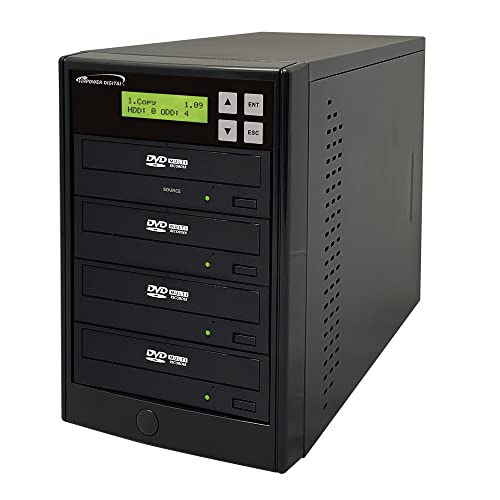
- Burns up to three target discs per cycle
- Standalone operation needs no PC
- Supports up to 24x DVD and 52x CD-R writing
Best For: Small-batch business, event, and creator duplication
Best High-Capacity Pick – 11-Target M-Disc DVD Duplicator
For buyers comparing multi target optical disc duplicators, the BestDuplicator BD-SMG-11T stands out when producing up to 11 copies per batch matters. Its standalone design requires no computer, automatically recognizes source formats, and supports common CD, DVD, dual-layer, and M-Disc media.
Best For: Personal or small-business users who need high-volume DVD and CD duplication without a computer.
Pros:
- Burns up to 11 blank discs from one source disc at a time.
- Supports DVD±R/RW, dual-layer DVD media, CD-R/RW, and M-Disc.
- Offers automatic source-disc detection and a straightforward tactile controller.
- Includes a one-year parts warranty, three years of labor coverage, and lifetime phone support.
Cons:
- Uses one slot for the source, so the unit is not an 11-source duplicator.
- Its tower format and 11-drive design may be more capacity than occasional users need.
Choose this model when throughput is the priority. The 24x write speed and 11-target layout make it particularly practical for repeated batches, while standalone operation keeps the workflow simple.
Best Storage-Enabled Pick – SharkCopier 3-Target Duplicator
The Vinpower SharkCopier is one of the more flexible multi target optical disc duplicators for users who want to store projects as well as copy discs. It operates independently of a PC, includes a 2 TB hard drive, and adds USB 3.0 file transfer for recalling saved projects.
Best For: Users who regularly repeat duplication jobs and want a built-in library of master projects.
Pros:
- Duplicates to three targets without requiring a computer.
- Stores numerous master projects on its installed 2 TB hard drive.
- USB 3.0 supports transferring folders and files from a PC to the duplicator.
- Supports up to 24x DVD and 52x CD-R write speeds, plus true audio comparison.
Cons:
- Its three-target capacity is lower than larger tower duplicators.
- It cannot copy discs with copy-protection features.
- The hard drive and added functions may be unnecessary for simple, occasional copying.
This is a strong choice when workflow convenience matters as much as simultaneous output. The hard drive and USB connectivity reduce the need to locate and reload a physical master for recurring projects.
Best Compact Value – 1-to-3 DVD/CD Duplicator
For straightforward, lower-volume copying, this 1-to-3 unit offers a compact entry into multi target optical disc duplicators. It includes built-in burners, automatic source analysis, and essential copy, test, verify, and compare functions for a more controlled duplication process.
Best For: Home users, small offices, and occasional projects needing up to three copies per batch.
Pros:
- Creates up to three copies from one source disc.
- Supports common DVD±R/RW, dual-layer DVD, CD-R, and CD-RW media.
- Includes copy, test, verify, compare, password protection, and self-diagnostic functions.
- Works with Windows, macOS, and Linux environments when computer connectivity is needed.
Cons:
- Its 16x optical write speed is slower than the 24x models in this roundup.
- Three-target output is less suitable for larger production runs.
- The supplied notes identify a plastic enclosure rather than a heavier-duty tower material.
This model keeps the feature set focused and the target count manageable. It makes sense for buyers who want verification tools and broad media support without paying for a high-capacity duplication tower.
Best M-Disc Business Pick – 1-to-5 SATA Disc Duplicator
The PlexCopier PLEX-S5T-DVD-BK is a practical middle ground among multi target optical disc duplicators, offering five target drives, standalone operation, and M-Disc support. It also supports DVD video copy protection creation with compatible OptoDisc MID media, while clearly excluding encrypted discs from its copying capability.
Best For: Business users who need five simultaneous copies and archival-grade M-Disc recording.
Pros:
- Copies one source to five target discs without a PC.
- Records to M-Disc DVD media designed for long-term archival use.
- Supports up to 24x DVD and 52x CD-R write speeds.
- Can create copy-protected DVD video copies using compatible OptoDisc MID media.
Cons:
- It will not copy encrypted discs with copy protection.
- The tower weighs about 17 pounds, making it less portable than compact duplicators.
- Copy-protection creation depends on using the specified compatible media.
Consider this PlexCopier when five-target throughput and archival recording are more important than portability. Its standalone design simplifies routine jobs, while the M-Disc support adds a preservation-oriented option.
Best High-Volume Pick – SharkCopier 11 Target Duplicator
For buyers comparing multi target optical disc duplicators, the Vinpower SharkCopier stands out with 11 targets, standalone operation, a built-in 2 TB hard drive, and USB 3.0 support. It handles common CD and DVD formats at speeds up to 52x for CD-R and 24x for DVD.
Best For: High-volume CD/DVD duplication and users who need to store and recall multiple master projects.
Pros:
- Operates without a PC and includes an installed 2 TB hard drive.
- Supports up to 11 simultaneous targets, with DVD speeds up to 24x and CD-R speeds up to 52x.
- Offers true audio comparison for checking copied music CDs.
- Supports USB 3.0 file transfers and common CD, DVD, and dual-layer DVD formats.
Cons:
- Does not copy discs with copy protection, including typical retail movies and TV shows.
- At 32 pounds, it is a substantial tower for smaller workspaces.
The hard drive and USB workflow make this a practical choice for repeat jobs, while true audio verification adds reassurance for music projects. It is best suited to users who need capacity and convenient project recall rather than occasional single-disc copying.
Best Archival-Friendly Value – Standard Series 11 Target Duplicator
The Standard Series is a straightforward option among multi target optical disc duplicators, providing 11-target CD/DVD copying without requiring a PC. It supports up to 24x DVD writing, common CD formats, and M-Disc DVD media for archival-oriented projects.
Best For: Personal, gaming, and business users who want standalone CD/DVD duplication with M-Disc support.
Pros:
- Standalone design requires no computer during duplication.
- Supports up to 24x DVD writing and 24x reading.
- Recognizes common CD formats, including CD-TEXT, ISRC, and over-burned CDs.
- Supports M-Disc DVD media and can create free copy-protected DVD videos with compatible OptoDisc media.
Cons:
- It has no built-in hard drive for storing master projects.
- It will not copy encrypted or otherwise copy-protected discs.
- The supplied specifications identify it as a PC hardware platform despite its standalone operating mode.
This tower focuses on essential, hands-off duplication rather than project storage or advanced file-transfer features. Its M-Disc compatibility makes it particularly appealing when archival media is part of the workflow.
Best Blu-ray-Compatible Option – BestDuplicator 11 Target BD Tower
For shoppers seeking multi target optical disc duplicators with Blu-ray support, the BestDuplicator BDC-11T combines one source slot with 11 target slots. It is a fully standalone tower that supports BD-R, M-Disc, DVD, dual-layer DVD, CD-R, and CD-RW media.
Best For: Users who need 11-target duplication across Blu-ray, DVD, and CD formats without a computer.
Pros:
- Supports BD-R, M-Disc, DVD formats, dual-layer DVD, CD-R, and CD-RW media.
- Uses one source slot and 11 target slots for simultaneous duplication.
- Standalone operation eliminates the need for a computer.
- Includes a 128 MB controller and automatic source-disc format recognition.
Cons:
- The supplied specifications list optical read speed as 8x, so source-reading performance may be more limited than its 24x write rating.
- The unit weighs 43 pounds, making it less convenient to move.
- The notes specify a 24x burner rating but do not provide separate write speeds for every supported Blu-ray and DVD format.
Its broad media compatibility is the main advantage, especially for workflows that include Blu-ray alongside standard CDs and DVDs. The heavier chassis and 11-target layout make it more appropriate for a fixed workstation than portable use.
Compact Starter – 1-to-1 DVD/CD Duplicator
Vinpower Digital Standard 1 to 1 Target 24x DVD CD Disc Duplicator Tower SATA Optical Drives - Black
Check Price On AmazonIf you need a straightforward option among multi target optical disc duplicators, this standalone 1-to-1 tower handles DVD and CD copying without a PC. It supports up to 24x DVD and 52x CD-R writing, recognizes common CD formats, and can record M-Disc DVDs.
Best For: Personal, gaming, and business users who need occasional one-disc-at-a-time duplication.
Pros:
- Standalone operation requires no computer.
- Supports up to 24x DVD and 52x CD-R write speeds.
- Recognizes CD-TEXT, ISRC, and over-burned CDs.
- Supports M-Disc DVD archival media.
Cons:
- Copies only one target disc per cycle.
- Will not copy encrypted discs.
This is a practical entry-level tower for users who value simple operation and broad CD/DVD format support over higher-volume output.
Digital Workflow Pick – SharkCopier 1-Target Tower
This SharkCopier is a versatile choice among multi target optical disc duplicators when storing projects and transferring files matters. Its 2TB hard drive, USB 3.0 connection, standalone controls, and true audio comparison capability support repeatable CD/DVD duplication workflows.
Best For: Users who regularly reuse master projects or need to manage disc images from a computer.
Pros:
- 2TB internal hard drive stores numerous master projects.
- USB 3.0 supports transferring folders and files from a PC.
- True audio comparison helps verify music CD duplication.
- Supports DVD9 and common CD/DVD formats.
Cons:
- One target disc can be duplicated per cycle.
- Will not copy discs with copy-protection features.
The built-in storage and USB workflow make this a stronger fit than a basic tower for recurring jobs, especially when you want to recall projects without loading the original disc.
Small-Batch Workhorse – 1-to-3 DVD/CD Duplicator
Vinpower Digital Standard 1 to 3 Target 24x DVD CD Disc Duplicator Tower SATA Optical Drives - Black
Check Price On AmazonFor users comparing multi target optical disc duplicators, this 1-to-3 tower offers a clear productivity advantage over one-target models. It operates independently of a PC and can write up to three DVD or CD copies at once, with support for common CD formats and up to 24x DVD writing.
Best For: Small businesses, event organizers, and creators producing several copies per batch.
Pros:
- Duplicates to up to three target discs per cycle.
- Standalone design requires no PC during operation.
- Supports up to 24x DVD and 52x CD-R write speeds.
- Recognizes CD-TEXT, ISRC, and over-burned CDs.
Cons:
- Will not copy encrypted discs.
- Does not provide the 2TB hard drive and USB 3.0 workflow listed for the SharkCopier.
Its three-target configuration is the main reason to choose it: it can reduce the number of duplication cycles while retaining simple standalone operation.
How We Picked the Best Multi Target Optical Disc Duplicators
We focused on standalone duplication towers that can copy optical media without requiring a computer for every job. The selection covers one-to-one, one-to-three, one-to-five, and one-to-11 configurations, making it easier to compare occasional-use equipment with higher-throughput systems.
We also considered advertised writing speed, SATA drive architecture, CD and DVD compatibility, M-Disc or Blu-ray support where listed, onboard hard-drive storage, USB connectivity, and practical workflow features. Because media compatibility and performance can vary by disc type, source quality, and blank-media brand, published speed ratings should be treated as maximums rather than guaranteed real-world output.
Quick Comparison
- Best for the highest output: 11-target towers can produce many copies in a single batch and suit offices, organizations, and duplication services.
- Best balance of capacity and cost: Three- and five-target systems offer useful batch production without the footprint or expense of the largest towers.
- Best for occasional duplication: One-target models are compact, simpler to operate, and appropriate when speed is less important than affordability.
- Best for archiving: Choose a model with explicitly listed M-Disc support and verify that your chosen media is compatible.
Key Buying Factors for Multi-Target Optical Disc Duplicators
Target Count and Workload
The target count indicates how many blank discs can be written simultaneously from one source or image. Estimate your normal batch size rather than choosing solely by the largest advertised number. More targets improve throughput but also increase space, power requirements, and media consumption.
Media and Format Support
Confirm whether you need CD, DVD, M-Disc, or Blu-ray capability. A DVD duplicator may not copy Blu-ray media, even when its product listing mentions a Blu-ray-certified burner. Check supported capacities, recordable formats, and regional or copy-protection limitations before purchasing.
Source Options and Storage
Built-in hard-drive storage is useful when you regularly reuse disc images or need to duplicate without keeping the original disc in the source drive. USB connectivity can simplify importing content, but verify whether the system supports the file types and devices you plan to use.
Speed, Verification, and Reliability
Look for selectable write speeds and verification features. Slower settings can improve compatibility with older players or lower-quality media. Replaceable standard drives and accessible controls may also matter more over time than a higher peak speed.
Who Should Buy Which Multi Target Optical Disc Duplicators?
Choose a one-target tower for home users, small offices, and occasional archival or event-copying tasks. A three-target model is a practical step up for regular but moderate batches. Five-target equipment fits departments, schools, nonprofits, and small production operations that need more output without moving to a large tower.
Eleven-target Multi Target Optical Disc Duplicators are best for frequent, high-volume work where minimizing operator time matters. If long-term preservation is a priority, select a unit with confirmed M-Disc support. Before ordering, verify the warranty, replacement-drive availability, included accessories, and the manufacturer’s current media compatibility documentation.