
Small businesses often need to copy training materials, promotional files, software packages, or recovery media to multiple USB drives without wasting time on one-at-a-time transfers. The right duplicator can make that process faster, more consistent, and easier to manage.
We selected 10 USB duplicators for small businesses across standalone and PC-based designs, with different target counts, transfer speeds, and erasing capabilities. Use the guide below to narrow the choices based on workload, budget, and the type of USB media you handle.
Best 10 USB Duplicators for Small Businesses Picks for 2026
Best Compact Pick
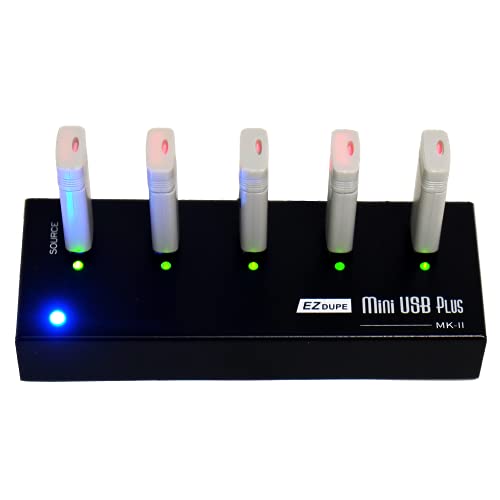
- Standalone 1-to-4 duplication
- Up to 2.5GB/min copy speed
- Supports USB 1.0, 2.0, and 3.0
Best For: Portable, small-batch USB copying
Best High-Capacity Pick

- Duplicates to up to 15 drives
- Standalone, computer-free operation
- Synchronous and asynchronous modes
Best For: Larger batch duplication runs
Best for IT Workflows

- Duplicates and erases up to 15 drives
- Copy-and-compare verification
- LCD controls and overwrite modes
Best For: IT technicians and drive-management tasks
Best PC-Based Speed Option

- Supports 16 target drives
- Uses USB 3.0 technology
- Includes Drive Manager software
Best For: Computer-based, high-volume duplication
High-Capacity Workhorse
USB Cyclone 1-to-15 Duplicator

- Copies to up to 15 USB devices at once
- Supports USB media and external HDDs or SSDs
- Includes four copy and four erase modes
Best For: Higher-volume business duplication and drive erasure
Compact Starter Pick

- Makes two USB copies simultaneously
- Provides quick and bit-for-bit copy modes
- Adds LCD monitoring and media tests
Best For: Portable, low-volume USB duplication
Secure Deployment Choice
Vinpower 1-to-3 USB Duplicator
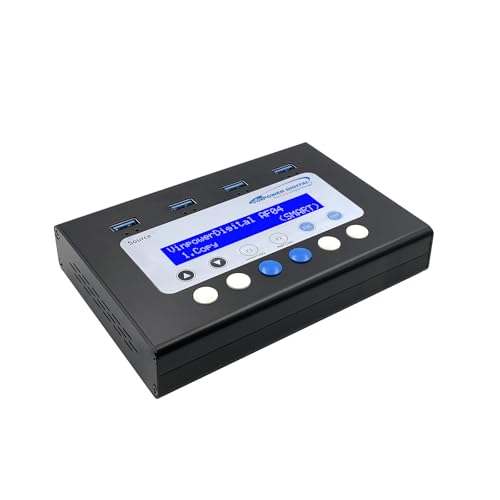
- Copies to three USB targets without a PC
- Includes Smart Copy and Raw Copy modes
- Adds DoD erasure and Read Error Skip
Best For: Secure USB deployment and media reuse
Best Compact USB Duplicator

- Standalone five-target copying and erasing
- Supports file and sector-by-sector duplication
- LCD monitoring with Copy & Compare
Best For: Portable office and technician workflows
Best High-Volume USB Duplicator
Vinpower USBDBL 15-Target Cloner

- Handles up to 15 target drives
- Asynchronous duplication works independently
- Includes Smart Copy, Raw Mode, and secure erase
Best For: Batch production and high-volume drive preparation
Best Seven-Port USB Duplicator

- Copies or erases up to seven USB drives
- Supports sector-by-sector duplication
- Includes LCD verification and overwrite modes
Best For: IT teams needing moderate batch capacity
Best Compact Pick – EZ Dupe Mini USB Plus MK II
For small businesses that need usb duplicators for small businesses without a computer, the EZ Dupe Mini USB Plus MK II is a portable 1-to-4 option. It supports USB 1.0, 2.0, and 3.0 flash drives, copies up to four drives simultaneously, and can use a power bank or USB power source.
Best For: Small teams making modest batches of USB copies in different locations.
Pros:
- Standalone plug-and-use operation requires no computer.
- Copies up to four USB drives at once.
- Updated version offers up to 2.5GB per minute and supports capacities above 2TB.
- Compact 6-inch design with a one-year manufacturer warranty.
Cons:
- Four target ports may be limiting for larger production runs.
- Maximum speed depends on the connected drives.
- External USB storage devices require their own power source.
This is a practical choice when portability and simple operation matter more than high-volume throughput. Its four-drive capacity fits routine business duplication tasks while keeping the hardware compact.
Best High-Capacity Pick – Systor 1-to-15 USB Duplicator
The Systor 1-to-15 is a strong option for small businesses that need usb duplicators for small businesses with more target ports. This standalone unit copies one source drive to as many as 15 USB drives, supports synchronous and asynchronous modes, and performs bit-by-bit duplication.
Best For: Teams producing larger batches of identical USB drives without using a computer.
Pros:
- Supports up to 15 target USB drives.
- Standalone operation needs no computer or software.
- Offers synchronous and asynchronous copy modes.
- Includes one-year parts, three-year labor, and lifetime technical support.
Cons:
- Copy speed is listed at up to 2GB per minute, slower than some newer USB 3.0-focused systems.
- USB Type-C drives require an adapter.
- Designed around USB 2.0 connectivity.
With 15 target ports and consistent listed throughput even as the number of loaded drives increases, this Systor model is suited to repeatable batch work. Its support coverage is also useful for businesses deploying the duplicator regularly.
Best for IT Workflows – StarTech 1:15 USB Duplicator
For IT departments comparing usb duplicators for small businesses, the StarTech 1:15 adds drive sanitizing and verification tools to standard duplication. Its standalone design supports USB 2.0 and 3.0 media, offers an LCD menu, and can perform sector-by-sector copies or file-system-aware copying.
Best For: Technicians who need to clone, verify, erase, and manage multiple USB drives.
Pros:
- Duplicates or erases up to 15 USB drives without a computer.
- Supports quick erase and single- or three-pass overwrite options.
- Copy-and-compare can verify completed clones against the source.
- LCD controls, activity/error LEDs, and error scanning aid monitoring.
Cons:
- Listed duplication speed is 1.5GB per minute.
- Asynchronous copying is limited to source content under 128MB.
- At 3.9 pounds, it is less portable than compact duplicators.
This is the most feature-oriented choice in the group for businesses that need more than straightforward copying. Its erase modes, verification function, and drive diagnostics make it particularly useful for technical or compliance-conscious workflows.
Best PC-Based Speed Option – Nexcopy SuperSpeed USB 3.0
The Nexcopy SSUSB160PC takes a PC-based approach for small businesses seeking usb duplicators for small businesses with 16 target drives. It uses USB 3.0 technology and includes Nexcopy Drive Manager software, with copying designed to work like a photocopier.
Best For: Businesses that already have a computer available and need a 16-target USB 3.0 duplicator.
Pros:
- Provides 16 target USB ports.
- Uses USB 3.0 technology for high-speed drive transfers.
- Can copy at the connected flash drives’ maximum transfer speeds.
- Includes Nexcopy Drive Manager software.
Cons:
- Requires a PC, unlike standalone alternatives.
- Software-based operation may be less convenient for mobile use.
- The supplied notes do not specify a copy-speed figure or warranty.
This model makes sense when a workstation is already part of the workflow and USB 3.0 performance is a priority. Its 16-target capacity offers slightly more batch capacity than the standalone 15-target options.
High-Capacity Workhorse – USB Cyclone 1-to-15 Duplicator
For small businesses that need to produce many copies at once, the EZ DUPE USB Cyclone is one of the more capable usb duplicators for small businesses. Its 15 USB target slots, standalone operation, broad drive support, and multiple copy and erase modes make it suited to repeatable deployment and data-management tasks.
Best For: Businesses duplicating USB drives or external HDDs in higher volumes, including media distribution, backups, and secure drive reuse.
Pros:
- Duplicates to up to 15 USB devices simultaneously.
- Supports USB 1.0 through USB 3.1 media, USB flash drives, and external HDDs or SSDs.
- Offers four copy modes and four erase modes, including DoD 3-pass and DoD 7-pass options.
- Standalone design requires no computer or software.
Cons:
- Its 7-pound weight and larger 1-to-15 design are less convenient for occasional or highly portable use.
- Listed transfer speed is up to 45 MB/s, so actual performance depends on the connected USB devices.
The Cyclone is the strongest fit here when throughput and flexible erase options matter more than compactness. Independent bandwidth design and slow-drive alerts are useful touches for keeping one problematic device from holding back the broader job.
Compact Starter Pick – BestDuplicator UB300 1-to-2
The BestDuplicator UB300 is a compact option for small businesses that only need two target copies per job. As usb duplicators for small businesses go, it keeps the workflow straightforward with standalone operation, an LCD screen, LED status indicators, and both quick and bit-for-bit copying.
Best For: Small IT teams, schools, technicians, and field users making one or two USB copies without a computer.
Pros:
- Duplicates one USB flash drive to two targets simultaneously.
- Offers Quick Copy for data and Whole Media Copy for bit-for-bit cloning.
- Includes capacity checks, device information, speed testing, and erase functions.
- Compact, lightweight standalone design weighs 6.72 ounces.
Cons:
- Supports USB 1.1 and USB 2.0 media rather than newer USB standards.
- Only two target ports are available, limiting larger batch jobs.
- Other card formats require a compatible USB card reader, sold separately.
Choose the UB300 when simplicity, portability, and modest duplication volume are the priorities. Its testing tools are particularly practical for checking flash media before distributing copies, while its two-port limit makes it less appropriate for recurring production runs.
Secure Deployment Choice – Vinpower 1-to-3 USB Duplicator
The Vinpower Flash Memory USB Duplicator is designed for organizations that need repeatable copying plus secure media handling. Among usb duplicators for small businesses, its three-port format, standalone workflow, DoD 5220.22-M erasure, and Read Error Skip technology make it a practical middle ground for deployment and data-security tasks.
Best For: Businesses distributing bootable drives, software, training materials, firmware, presentations, or securely reused USB media.
Pros:
- Duplicates to three USB targets without requiring a PC.
- Smart Copy and Raw Copy modes support accessible-file copying and bit-by-bit cloning.
- DoD 5220.22-M erasure helps remove sensitive data before reuse or disposal.
- Read Error Skip can bypass damaged sectors to recover readable data from aging media.
Cons:
- Three target ports provide less batch capacity than larger duplicators.
- The supplied notes specify USB flash-drive duplication but do not list support for external HDDs or SSDs.
This model stands out for small organizations that value controlled data handling as much as copy speed. Smart and Raw modes cover common deployment needs, while error skipping and secure erasure add useful capabilities for media that is being recovered, reused, or retired.
Best Compact USB Duplicator – StarTech 1:5 USB Duplicator
For small businesses needing practical usb duplicators for small businesses, the StarTech 1:5 is a compact standalone option for copying or erasing up to five USB drives at once. It operates without a computer and supports both file-level and sector-by-sector duplication.
Best For: Small IT teams, technicians, and offices that need a portable five-target duplicator for boot drives, data distribution, or USB sanitization.
Pros:
- Copies or erases up to five USB drives without a computer.
- Supports USB 3.0, 2.0, and 1.1 flash drives and external USB storage.
- Offers system/file copy, sector-by-sector copy, quick erase, and single- or three-pass overwrite modes.
- LCD controls, error scanning, and Copy & Compare help monitor and verify jobs.
Cons:
- Asynchronous copying is limited to source content under 64 MB.
- External USB storage may require its own power source.
This model is a sensible fit when portability and flexible erase options matter more than maximum target capacity. Its five-port layout suits routine office deployment and technician workflows.
Best High-Volume USB Duplicator – Vinpower USBDBL 15-Target Cloner
The Vinpower USBDBL is built for businesses that regularly prepare many drives at once. As one of the more capacity-focused usb duplicators for small businesses, it provides 15 target slots, standalone operation, and asynchronous duplication for independent copying.
Best For: Small businesses, production teams, and service providers that need to duplicate larger batches of USB drives without connecting a PC.
Pros:
- Copies to up to 15 USB drives simultaneously.
- Standalone design requires no computer.
- Asynchronous duplication lets completed drives be replaced independently.
- Smart Copy, Raw Mode, and secure erase support different copying and data-removal needs.
Cons:
- At 11 pounds, it is less portable than compact duplicators.
- Adapters are required to copy SD, microSD, CF, and other alternative flash formats.
- Its warranty is listed as one year.
Choose this model when throughput is the priority. The 15-target design can reduce repeated duplication cycles, while Smart Copy and Raw Mode provide useful flexibility for accessible files or exact bit-by-bit copies.
Best Seven-Port USB Duplicator – StarTech 1:7 USB Duplicator
The StarTech 1:7 gives small businesses more simultaneous target capacity than a five-port unit while retaining a standalone workflow. It is a practical choice among usb duplicators for small businesses for distributing boot media, cloning drives, and securely erasing USB storage.
Best For: IT departments and technicians that need seven-port throughput, verification tools, and documented erase options in a standalone unit.
Pros:
- Duplicates or erases up to seven USB drives without a computer.
- Supports system/file copy and sector-by-sector duplication across common file systems and formats.
- Includes quick erase and single- or three-pass overwrite options aligned with DoD/NIST SP 800-88 Rev. 1 Clear.
- LCD controls, bad-sector scanning, LEDs, and Copy & Compare support job monitoring.
Cons:
- Asynchronous copying is limited to source content under 128 MB.
- External USB storage may need a separate power source.
- Its listed dimensions and 2.3-pound weight make it less compact than the smaller five-port model.
This is a strong middle ground for teams that regularly need more than five copies but do not require a 15-target production machine. The larger asynchronous memory allowance also helps with smaller unattended copy cycles.
How We Picked These USB Duplicators for Small Businesses
We focused on practical business requirements: the number of target drives each unit can handle, advertised transfer speed, standalone versus computer-connected operation, supported USB media, and available copy, compare, verify, or erase functions. We also included a range of capacities, from compact one-to-two and one-to-three systems to higher-volume 15-target models.
Specifications can vary by source media, file sizes, USB generation, and drive performance. Treat published speed ratings as best-case guidance rather than a guaranteed real-world result.
Quick Comparison
| Type | Best For | Main Advantage | Potential Trade-Off |
|---|---|---|---|
| 1:2 or 1:3 standalone | Occasional small batches | Lower cost and compact size | Limited throughput per batch |
| 1:4 or 1:5 standalone | Routine office distribution | Good balance of capacity and convenience | Less efficient for large runs |
| 1:7 or 1:15 standalone | Frequent high-volume duplication | More drives processed at once | Higher purchase price and workspace needs |
| PC-based duplicator | Managed production workflows | Computer-driven control and scalability | Requires a connected host system |
Key Buying Factors for USB Duplicators for Small Businesses
Target Count and Workload
Choose the number of target ports based on your normal batch size, not an occasional peak. A smaller duplicator may be sufficient for a few client deliveries each week, while a 1:7 or 1:15 model can reduce labor for training kits, event media, or recurring distribution runs.
Speed and USB Compatibility
Compare the advertised megabytes-per-second rating, USB generation, and the speed of the source and target drives. A fast duplicator cannot overcome slow flash media. Confirm that the ports support the drive types and capacities your business uses.
Standalone Controls Versus PC-Based Operation
Standalone units work without a computer and are useful in offices, workshops, and field locations. PC-based systems may be better when you need software control, repeatable workflows, or integration with an existing production computer.
Copy Verification and Data Erasure
Verification helps confirm that target drives match the source after copying. If you reuse or resell USB media, look for secure erasing or sanitizing modes and check whether the available erase standards match your privacy requirements.
Who Should Buy Which USB Duplicators for Small Businesses?
Choose a compact 1:2, 1:3, or 1:4 model if portability, occasional duplication, and a modest budget matter most. These are practical for consultants, small offices, educators, and service businesses.
A 1:5 or 1:7 unit is a sensible middle ground for companies that regularly prepare multiple drives but do not need a full production setup. Select a 1:15 model when minimizing operator time and increasing batch capacity are priorities.
Businesses with structured, computer-managed workflows should consider a PC-based duplicator. If secure reuse is central to your operation, prioritize a model that combines copying, verification, and dependable erasing or sanitizing functions rather than choosing on port count alone.