
Wireless video receivers can simplify live production by sending a camera, laptop, or switcher feed to a monitor, capture device, or streaming setup without running long HDMI cables.
This roundup compares 10 wireless video receivers for live streaming across range, resolution, latency, outputs, and multi-receiver flexibility so you can choose a system that fits your workflow and venue.
Best 10 Wireless Video Receivers for Live Streaming Picks for 2026
Best for Live Streaming
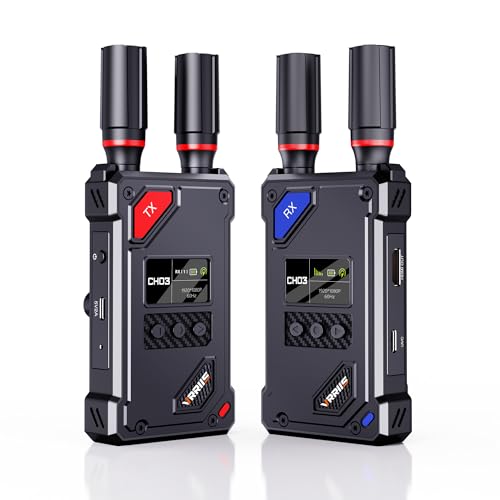
- UVC output works with OBS without a separate capture device
- 20 adjustable channels with LCD signal and interference display
- 1,500-foot line-of-sight range and 0.05-second latency
Best For: Camera-based streaming setups using OBS
Best for Remote Source Control

- IR support enables remote HDMI-source control
- 1080p at 60Hz with 0.05-second latency
- Transmitter loop out supports local monitoring
Best For: Presentations and installations needing remote source control
Best for 4K Playback

- Receiver supports 4K at 30Hz
- Pairs up to eight transmitters with one receiver
- Includes mini and micro HDMI adapters
Best For: 4K playback and multi-source presentations
Best for Multi-Screen Monitoring
1080p HDMI Transmission System

- Receiver provides two HDMI outputs
- 1080p at 60Hz with 0.05-second latency
- Supports IR control and multiple power options
Best For: Live monitoring with two receiver-side displays
Long-Range Church & Event Pick

- 1080P at 60Hz with 4K input support
- One transmitter can serve up to four receivers
- Claims 820-foot range and under 0.06-second latency
Best For: Church presentations, outdoor events, and multi-screen monitoring
Low-Power Production Pick

- 1080P/60fps transmission over a claimed 300 meters
- 40ms latency for real-time monitoring
- 2W design with app-based review and image tools
Best For: Film production, live events, and app-assisted on-set monitoring
Built-In Monitor Pick
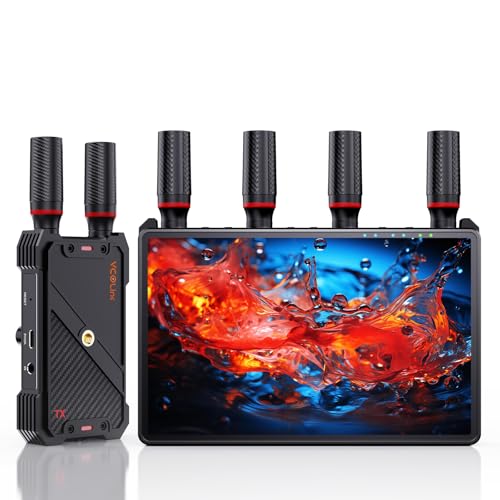
- Built-in 7-inch HD receiver monitor
- Claims 1,312-foot range and under 0.05-second latency
- One transmitter supports up to five receivers
Best For: Film crews and live events needing flexible multi-viewer monitoring
Long-Range 4K Pick
Vrriis WL095P Wireless HDMI Kit

- Up to 1,150ft open-field range
- UHD 4K at 30Hz with synced audio
- Supports up to four receivers
Best For: Long-distance 4K distribution and multi-monitor setups
Streaming-Ready Receiver
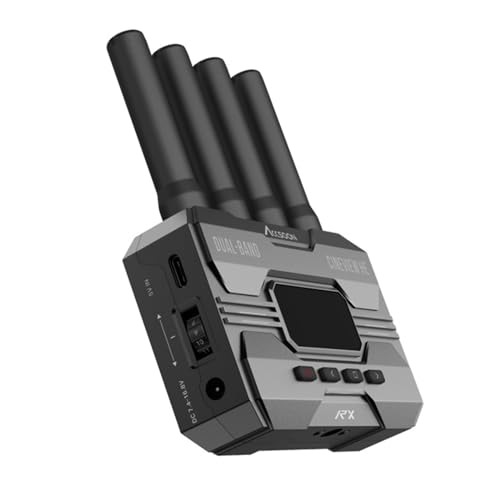
- UVC output for computer streaming
- Dual-band 2.4/5GHz transmission
- Up to 1,200ft range and 0.06s latency
Best For: Camera-to-computer streaming with OBS or YouTube
Compact 1080p Option
ZOCIBIHI CD10 Wireless HDMI Kit

- Automatic pairing with no app required
- 1080p output with 4K source compatibility
- Compact design and up to 165ft range
Best For: Portable, nearby HDMI setups and presentations
Best for Live Streaming – UVC 1080p Wireless Video Kit
For shoppers comparing wireless video receivers for live streaming, this Vrriis kit stands out because its receiver includes UVC output. Connect it to a computer with the included USB-C cable and send received footage to platforms such as OBS without buying a separate capture device. It also supports 1080p at 60Hz, manual channel selection, and up to 1,500 feet of line-of-sight range in open conditions.
Best For: Camera-based streaming setups that need direct USB connection to OBS and flexible power options.
Pros:
- UVC output supports computer-based streaming without an additional capture device.
- Offers 20 manually adjustable channels with an LCD showing signal and interference levels.
- Supports 1080p at 60Hz, 0.05-second latency, and up to 1,500 feet line of sight.
- Can use NP-F batteries, USB-C power, or included adapters.
Cons:
- Walls, metal, brick, and glass can significantly reduce coverage.
- Batteries are not included.
- Adding more receivers can reduce the transmission distance.
This is the most streaming-focused option in the group, especially if you want a straightforward UVC workflow. Its long-range rating is intended for open, unobstructed environments rather than typical multi-wall rooms.
Best for Remote Source Control – 1300FT HDMI Extender
This Vrriis extender is a practical choice among wireless video receivers for live streaming when you also need remote control of the HDMI source. It carries 1080p video at up to 60Hz, includes transmitter-side loop out for local monitoring, and uses an IR cable so a remote can control the source from the receiver location.
Best For: Presentations, church projection, offices, and streaming environments where source-device control from another room matters.
Pros:
- Supports up to 1080p at 60Hz with claimed 0.05-second latency.
- IR extension lets users control the HDMI source from the display location.
- Transmitter loop out supports a local monitoring screen.
- Can connect up to five receivers, with reduced range as receivers are added.
Cons:
- The 1,300-foot range applies to open areas without interference.
- Walls, metal, brick, and glass can shorten coverage or cause signal loss.
- It does not list a UVC output for direct computer streaming.
Choose this model when IR control and simple HDMI distribution are more important than direct USB streaming. It is well suited to fixed installations that need a local monitor and a remotely located display.
Best for 4K Playback – AIMIBO Wireless HDMI Receiver
If your priority is higher-resolution playback rather than a dedicated camera-to-OBS workflow, this AIMIBO kit is a flexible option among wireless video receivers for live streaming. Its receiver supports 4K at 30Hz, while the system supports 1080p at 60Hz, and included mini and micro HDMI adapters make it easier to connect cameras, laptops, and other source devices.
Best For: Home theaters, meetings, classrooms, and presentations that benefit from 4K receiver output and broad HDMI compatibility.
Pros:
- Receiver supports 4K at 30Hz for compatible viewing setups.
- Plug-and-play design requires no Bluetooth, Wi-Fi, or app.
- Supports up to eight transmitters paired with one receiver.
- Includes mini and micro HDMI adapters for additional source-device compatibility.
Cons:
- Range is up to 165 feet in barrier-free conditions, substantially less through walls or floors.
- Latency is listed at 0.1 seconds, higher than the 0.05-second systems here.
- The supplied notes do not identify a UVC output for direct OBS capture.
This is the strongest fit for 4K display and multi-source sharing, but buyers seeking direct live-stream capture should verify their computer workflow before choosing it. Its shorter range makes it better suited to rooms and nearby spaces.
Best for Multi-Screen Monitoring – 1080p HDMI Transmission System
This Vrriis system is a useful option among wireless video receivers for live streaming when monitoring flexibility is important. It supports 1080p at 60Hz, provides transmitter loop out, and gives the receiver two HDMI outputs for connecting two screens at once. IR support and multiple power options add convenience for production, presentation, and camera-monitoring setups.
Best For: Live production and monitoring arrangements that need two receiver-side displays and flexible power.
Pros:
- Two HDMI outputs on the receiver can connect two screens simultaneously.
- Supports 1080p at 60Hz with claimed 0.05-second latency.
- Transmitter loop out enables local monitoring at the source.
- Supports IR control and NP-F battery, USB-C, adapter, or portable-power options.
Cons:
- The 1,300-foot range requires an open field without interference.
- Walls, metal, brick, and glass can severely reduce signal coverage.
- Batteries are not included.
Its dual receiver outputs make this model especially practical when one wireless feed must serve two monitors. It is less focused on direct computer streaming than the UVC-equipped option, but stronger for multi-screen HDMI monitoring.
Long-Range Church & Event Pick – BovBox WL-900S
For shoppers comparing wireless video receivers for live streaming, the BovBox WL-900S stands out for its long claimed range, low latency, and multi-receiver support. It delivers 1080P at 60Hz, accepts 4K input, and works without apps, Wi-Fi, Bluetooth, or drivers.
Best For: Church presentations, outdoor events, camera monitoring, and productions that need one transmitter to feed several displays.
Pros:
- Claims up to 820 feet of range with one receiver and less than 0.06-second latency.
- Supports one transmitter with up to four receivers for multi-screen viewing.
- Includes HDMI loop-out, IR remote control, and NP-F or USB-C power options.
- Outputs 1080P at 60Hz while accepting 4K input.
Cons:
- The stated range drops to 623 feet when using four receivers.
- Its feature set may be more than needed for simple point-to-point setups.
The WL-900S is a practical choice when range and multi-display flexibility matter most. Its loop-out and battery-friendly power options also suit mobile event workflows.
Low-Power Production Pick – SYNCO XVision
The SYNCO XVision is a compelling option among wireless video receivers for live streaming when low power use and on-set monitoring are priorities. It transmits 1080P at 60fps over a claimed 300 meters and adds app-based review and image-assistance tools.
Best For: Film crews, live productions, TVC work, and operators who want app-assisted monitoring with efficient, quiet operation.
Pros:
- Claims 40ms latency for responsive real-time video feedback.
- Supports 1080P/60fps transmission up to 300 meters with signal penetration features.
- Uses a low-power 2W design intended to reduce heat and fan noise.
- SYNCO Link App offers monitoring, image adjustments, screenshots, saving, and playback.
Cons:
- The supplied notes do not specify the number of receivers supported.
- App-based features may be unnecessary for users seeking a basic transmitter-receiver link.
Choose the XVision if efficient operation and workflow tools are as important as wireless range. Its display, pairing memory, and app functions are geared toward repeatable professional shoots.
Built-In Monitor Pick – 7-Inch Multi-Viewer System
For wireless video receivers for live streaming that need monitoring without extra screens, this system combines a receiver with a built-in 7-inch display. It also supports HDMI output, loop-out, IR control, and up to five receivers for collaborative production setups.
Best For: Film crews, studios, and live events that need private receiver monitoring plus shared HDMI displays.
Pros:
- Built-in 7-inch HD monitor reduces the need for a separate viewing screen.
- Claims 1080P at 60Hz transmission up to 1,312 feet with less than 0.05-second latency.
- One transmitter can broadcast to up to five receivers.
- Offers HDMI output, transmitter loop-out, headphone monitoring, IR control, and flexible NP-F, USB-C, or power-bank operation.
Cons:
- An HDMI cable for connecting the receiver to an external monitor is not included.
- Smartphone or tablet compatibility requires a Type-C-to-HDMI cable.
- The built-in monitor and multi-receiver features may be unnecessary for basic single-display use.
This is the most self-contained option of the three for crews that need immediate visual monitoring. Its expandable receiver setup and built-in screen make it especially useful when several people need access to the feed.
Long-Range 4K Pick – Vrriis WL095P Wireless HDMI Kit
For shoppers comparing wireless video receivers for live streaming, the Vrriis WL095P stands out for its advertised long range, 4K support, and flexible multi-receiver setup. It is pre-paired and designed for straightforward HDMI connections without apps or drivers.
Best For: Long-distance home, event, or multi-monitor video distribution where 4K playback and multiple receivers are useful.
Pros:
- Advertised transmission range of up to 1,150 feet in an open, interference-free area.
- Supports up to UHD 4K at 30Hz with synchronized audio.
- Can support one transmitter with up to four receivers and offers dual HDMI outputs on the receiver.
- Pre-paired plug-and-play setup with claimed latency below 0.1 second.
Cons:
- Walls, metal, brick, and glass can significantly reduce signal coverage.
- The listed 4K support is limited to 30Hz.
- Additional receivers can shorten the wireless transmission distance.
The WL095P is a strong fit when range and distribution flexibility matter more than a compact streaming workflow. Its HDMI-only design may be less convenient for direct computer streaming than a receiver with built-in UVC output.
Streaming-Ready Receiver – Accsoon CineView HE
The Accsoon CineView HE is a purpose-built option for wireless video receivers for live streaming, especially when you want to send received footage directly to a computer. Its UVC output can connect to streaming software such as OBS or YouTube without requiring a separate video capture device.
Best For: Camera operators and small production teams that need low-latency wireless monitoring and direct computer-based streaming.
Pros:
- UVC output supports streaming to a computer through a user-provided USB-C cable.
- 2.4GHz and 5GHz dual-band transmission is designed for stability and interference resistance.
- Advertised range reaches up to 1,200 feet with latency below 0.06 second.
- One transmitter can send video and audio to up to four receivers or supported mobile devices.
Cons:
- This listing is for the receiver only, so a compatible transmitter is required.
- The supplied notes identify a single HDMI port rather than a dual-output receiver design.
- A USB-C cable for UVC computer connection is user-provided.
Among these options, the CineView HE offers the clearest direct path into a live-streaming computer workflow. Confirm that you have the matching transmitter and the necessary USB-C cable before planning a shoot.
Compact 1080p Option – ZOCIBIHI CD10 Wireless HDMI Kit
The ZOCIBIHI CD10 is a compact, simple choice among wireless video receivers for live streaming when a short-range 1080p connection is sufficient. Its built-in antenna, automatic pairing, and included adapters are aimed at quick setups for laptops, TVs, monitors, cameras, and projectors.
Best For: Portable presentations, home entertainment, classrooms, RVs, and nearby HDMI streaming setups.
Pros:
- Automatic pairing and no-configuration setup for basic operation.
- Supports 1080p streaming and accepts compatible 4K sources with 1080p output.
- Compact built-in-antenna design with an advertised range up to 165 feet.
- Includes a USB-C cable, HDMI-to-Type-C cable, and two Mini HDMI adapters.
Cons:
- Walls or obstacles may reduce the effective range to about 50 feet.
- It outputs 1080p rather than native 4K video.
- Requires a 5V/2A power connection for stable operation.
The CD10 prioritizes portability and ease of use over long-range or high-resolution production features. It is a practical match for nearby wireless HDMI links, but serious live-streaming setups may prefer the Accsoon’s UVC workflow.
How We Picked These Wireless Video Receivers for Live Streaming
We focused on the specifications that have the greatest effect on real-world streaming: supported resolution and frame rate, claimed transmission range, latency, HDMI loop-out, UVC output, audio handling, channel flexibility, and the number of receivers supported. We also included systems suited to different setups, from a single camera and monitor to multi-display productions.
Advertised range is typically measured with clear line of sight and minimal interference. Walls, crowded Wi-Fi environments, antennas, and local regulations can reduce performance, so treat range figures as a comparison point rather than a guarantee.
Quick Comparison
| Best For | Look For | Notable Features |
|---|---|---|
| USB streaming | UVC output | Direct computer or capture compatibility |
| Long venues | High range and stable signal | Useful for stages, houses of worship, and events |
| Multi-camera or multi-display work | Multiple receivers | One transmitter feeding several viewing points |
| Detailed video | 4K support | Higher source and display compatibility |
| Fast-moving production | Low latency | Better synchronization between camera and monitor |
Key Buying Factors for Wireless Video Receivers for Live Streaming
Resolution, Frame Rate, and Compatibility
Confirm that the transmitter and receiver support the output your camera or computer actually produces. A system labeled 1080p may be appropriate for most streams, while 4K support is useful for high-resolution monitoring or future upgrades. Check frame-rate limits as well as resolution, especially when using 60fps sources.
Latency and Reliability
Low latency matters when talent, camera operators, or presenters rely on a remote monitor. It also helps reduce noticeable timing differences between local and wireless feeds. For reliability, prioritize clear line of sight, sensible antenna placement, and systems with stable channel options rather than choosing on range alone.
Outputs and Streaming Workflow
HDMI loop-out lets you keep a wired monitor or switcher connected while sending a wireless feed elsewhere. UVC output is especially valuable if you want a computer to recognize the receiver as a video source without a separate HDMI capture device. Verify whether audio is embedded over HDMI, supplied separately, or handled by the camera and streaming computer.
Receiver Count and Operating Environment
Single-receiver kits are simpler and often easier to troubleshoot. Multi-receiver systems make sense for stages, classrooms, presentations, and productions requiring several displays. Consider supported frequency bands, channel selection, power requirements, and whether the units need constant AC power or can use batteries.
Who Should Buy Which Wireless Video Receivers for Live Streaming?
Choose a UVC-equipped model if your primary goal is sending a camera feed directly to a laptop, streaming computer, or capture workflow. Choose a long-range 1080p kit for events where the camera and display or control position are separated by a large venue. Choose a 4K-capable system if you use 4K cameras, need detailed monitoring, or want more headroom for future equipment.
Choose a multi-receiver setup when one source must reach several monitors or viewing positions. For demanding live productions, prioritize low latency, loop-out, dependable channel management, and verified compatibility with your camera, switcher, displays, and streaming software before prioritizing the maximum advertised distance.