
The right capture card can turn Nintendo Switch gameplay into a smoother streaming, recording, or video-call setup. The best choice depends on your desired resolution, passthrough performance, connection type, and budget.
We compared 10 popular options ranging from straightforward USB 3.0 devices to feature-rich models designed for higher-resolution consoles and demanding creators.
Best 10 Capture Card for Nintendo Switch Picks for 2026
Best Value Switch Capture

- 1080p60 YUY2 capture
- 4K30 HDMI pass-through
- 3.5mm mic input
Best For: Budget-minded Switch streamers
Best Flexible Connectivity
UGREEN 2K Capture Card with Loop-Out

- 2K30 or 1080p60 capture
- 4K30 HDMI loop-out
- USB-A and USB-C support
Best For: Mixed-device streaming setups
Best Premium Performance

- 4K60 capture
- 1440p120 and 1080p240 pass-through
- HDR10 and analog audio input
Best For: High-quality console creators
Best Portable Option
Guermok 1080p60 HDMI Capture Card

- 1080p60 capture
- USB-C and USB 3.0 support
- Compact plug-and-play design
Best For: Mobile and casual streaming
Best 4K Loop-Out Pick

- 4K input with 1080p60 output
- HDMI loop-out and mic input
- Compatible with Switch 2, OBS, and more
Best For: Switch gamers wanting flexible streaming and direct commentary
Best Plug-and-Play Value
BENFEI Full HD 60FPS Capture Card

- 1080p60 USB output
- USB-A/USB-C cable included
- 18-month warranty and low-latency design
Best For: Portable Switch capture across computers and compatible tablets
Best High-Resolution Option
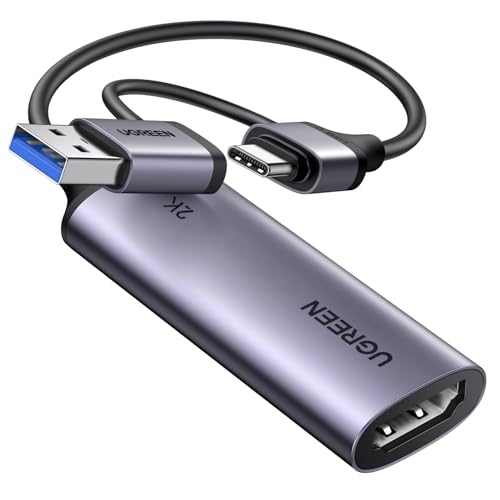
- 4K input with 2K30 or 1080p60 output
- 5Gbps USB 3.0 transfer speed
- USB-A and USB-C connectivity
Best For: Switch streamers wanting 2K capability and device flexibility
Best with Extra Features

- 4K HDMI input with 2K30 or 1080p60 recording
- USB 3.0 and USB-C plug-and-play connectivity
- Supports Switch, OBS, cameras, Windows, macOS, and Android
Best For: Creators wanting flexible connections and high-resolution HDMI input
Best Heavy-Duty Pick
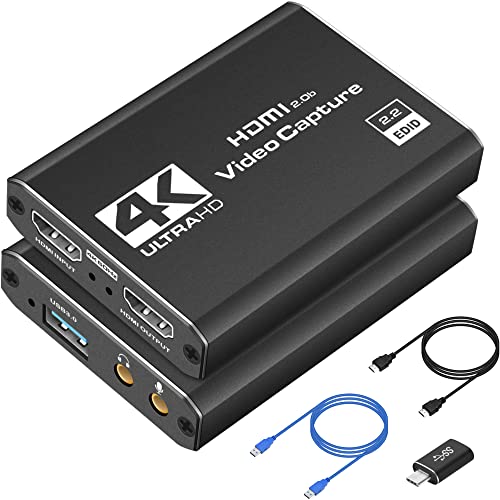
- 1080p60 capture with 4K HDMI input
- HDMI loop-out for low-delay gameplay
- Includes USB, Type-C, and HDMI extension accessories
Best For: Beginners and mobile creators building a simple streaming setup
Best for Commentary

- 1080p capture with HDMI loop-out
- 3.5mm TRS microphone input for commentary
- Accepts 4K input up to 60Hz
Best For: Gamers streaming with live microphone commentary
Best Value Switch Capture – 1080p60 USB 3.0 Capture Card
If you want a practical capture card for Nintendo Switch streaming, this Swudloe model combines 1080p at 60fps capture with 4K input and pass-through at 30Hz. Its USB 3.0 connection and plug-and-play setup make it a straightforward option for recording or streaming through software such as OBS.
Best For: Switch players who want 1080p60 capture, 4K30 pass-through, and a microphone input for commentary.
Pros:
- Captures YUY2 video at 1080p and 60fps through USB 3.0.
- Supports 4K30 input and zero-latency HDMI pass-through.
- Includes a 3.5mm mic or headset input for commentary.
- Works with Windows, macOS, Linux, Android, and common streaming software.
Cons:
- USB output is limited to 1080p60; 4K30 is available through HDMI pass-through.
- The mic input does not record party chat.
Choose this model when 1080p60 recording is your priority and you want useful extras such as 4K pass-through and direct commentary input without installing drivers or using an external power supply.
Best Flexible Connectivity – UGREEN 2K Capture Card with Loop-Out
For a capture card for Nintendo Switch that can adapt to different recording setups, the UGREEN 25773 offers USB-A and USB-C connectivity, 1080p60 capture, and 2K30 recording. Its HDMI loop-out supports 4K30 for real-time monitoring while you stream or record.
Best For: Users switching between USB-A and USB-C computers, tablets, and other compatible recording devices.
Pros:
- Captures up to 2K at 30fps or 1080p at 60fps.
- Provides 4K30 HDMI input and loop-out for low-delay monitoring.
- Includes both USB-A and USB-C interfaces.
- Aluminum housing helps with durability and heat dissipation.
Cons:
- It does not support 4K capture.
- Windows 7 requires USB 3.0 drivers.
- PS4 and PS5 require HDCP to be disabled.
This is a strong fit for a flexible desk or mobile setup, especially if your devices use different USB connectors. Keep its 2K30 capture ceiling in mind if you specifically need native 4K recording.
Best Premium Performance – Elgato 4K S Capture Card
The Elgato 4K S is a premium capture card for Nintendo Switch and other current consoles, with 4K60 capture, HDR10 support, and high-frame-rate pass-through. It also adds analog audio input for game chat or commentary and works across supported Windows, macOS, and iPadOS setups.
Best For: Creators who want 4K60 capture, HDR10 support, and high-refresh-rate pass-through for compatible consoles and displays.
Pros:
- Captures 4K video at 60fps.
- Supports 1440p120 and 1080p240 pass-through.
- Includes HDR10 support with tone mapping on Windows.
- Offers a 3.5mm analog audio input for chat or commentary.
Cons:
- Requires relatively current hardware, including Windows 11 or macOS 13 and later.
- Higher-end features may be more than needed for basic 1080p Switch recording.
Pick the Elgato when image quality and high-refresh pass-through matter more than keeping the setup minimal. Its system requirements are worth checking before purchase, particularly for older computers.
Best Portable Option – Guermok 1080p60 HDMI Capture Card
This compact Guermok capture card for Nintendo Switch is designed for portable recording and streaming, with 1080p60 capture, 2K30 output, and USB-C and USB 3.0 compatibility. It is plug and play, but you will need capture software such as OBS to use it.
Best For: Portable Switch streaming, online meetings, and users who need both USB-C and USB connections.
Pros:
- Captures 1080p video at 60fps and supports up to 2K30 output.
- Compact aluminum design supports portability and heat dissipation.
- Includes a USB 3.0-to-USB-C adapter.
- Works with Windows, macOS, Linux, Android, OBS, and major streaming platforms.
Cons:
- It is for capture software use and cannot directly cast to a monitor or TV.
- USB 3.0 is recommended to maintain bandwidth and resolution.
- Audio may require restarting OBS after setup.
The Guermok is a convenient choice for travelers and casual creators who value a small footprint. Just plan to use compatible capture software and a USB 3.0 connection for the most reliable results.
Best 4K Loop-Out Pick – Acer 1080p 60Hz Capture Card
If you want a versatile capture card for Nintendo Switch with 4K input and smooth 1080p output, this Acer model is a practical option. It supports 1080p at 60Hz, uses USB 3.0, and includes HDMI loop-out for a flexible streaming setup.
Best For: Nintendo Switch and Switch 2 gamers who want low-latency capture, mic input, and compatibility with multiple consoles and streaming apps.
Pros:
- Accepts 4K input and delivers 1080p at 60Hz.
- HDMI loop-out supports a convenient display-and-capture setup.
- Built-in mic input enables direct voice commentary.
- Works with OBS, XSplit, VLC, Windows, macOS, Linux, and Android devices.
Cons:
- USB 3.0 is required for USB 3.0 operation.
- The listed capture output resolutions are 1080p and 720p rather than 4K.
Choose this Acer card if you value 4K source support, 1080p60 capture, and built-in commentary features in a compact plug-and-play design. Its broad device compatibility also makes it useful beyond Switch gameplay.
Best Plug-and-Play Value – BENFEI Full HD 60FPS Capture Card
This BENFEI capture card for Nintendo Switch focuses on straightforward Full HD recording at up to 1080p60. Its plug-and-play design, combined USB-A/USB-C cable, and broad operating-system support make it easy to connect to a laptop, desktop, or compatible tablet.
Best For: Switch, PS4, PS5, and Xbox users seeking portable 1080p60 capture with minimal setup.
Pros:
- Supports USB output up to 1080p at 60Hz.
- Plug-and-play operation works across Windows, Linux, Mac OS, and Android.
- Two-in-one USB-A/USB-C cable improves device compatibility.
- Includes ultra-low-latency processing and an 18-month warranty.
Cons:
- PS4 and PS5 require HDCP to be turned off.
- iPhone is not supported, and iPadOS requires version 17 or later.
- It does not include HDMI loop-out in the supplied specifications.
BENFEI is a sensible choice for buyers prioritizing simple setup and dependable 1080p60 capture over advanced loop-out features. The included USB-A/USB-C connectivity is especially useful when switching between different host devices.
Best High-Resolution Option – UGREEN 2K 60FPS Capture Card
For shoppers comparing a capture card for Nintendo Switch with higher-resolution support, the UGREEN model accepts 4K input and can output up to 2K at 30Hz or 1080p at 60Hz. USB-A and USB-C interfaces add flexibility for computers, tablets, and other compatible devices.
Best For: Switch and Switch 2 streamers who want 2K output, 1080p60 compatibility, and a durable aluminum housing.
Pros:
- Supports 4K input, 2K at 30Hz output, and 1080p at 60Hz.
- USB 3.0 provides 5Gbps high-speed transfer and low latency.
- USB-A and USB-C interfaces support a wide range of host devices.
- Compatible with OBS, XSplit, QuickTime, Windows, macOS, Linux, and supported mobile devices.
Cons:
- 2K output requires compatible source and capture devices.
- PS4 and PS5 require HDCP to be disabled.
- iPadOS USB-C compatibility requires iPadOS 17 or later.
UGREEN stands out when resolution flexibility matters. It offers more than standard 1080p capture while retaining a 1080p60 mode for smoother gameplay streaming, though the highest modes depend on compatible equipment.
Best with Extra Features – Compact 4K USB-C Capture Card
This capture card for Nintendo Switch is a flexible choice for creators who want 4K HDMI input, up to 2K recording at 30Hz, or 1080p recording at 60Hz. Its USB 3.0 and USB-C connectivity, plug-and-play setup, and broad software compatibility make it practical for streaming, recording, and video calls.
Best For: Streamers and mobile creators who need flexible USB-C connectivity, high-resolution HDMI input, and compatibility with Switch, consoles, cameras, and computers.
Pros:
- Supports up to 4K HDMI input with recording up to 2K at 30Hz or 1080p at 60Hz.
- Plug-and-play operation without drivers or external power.
- Works with OBS, Zoom, Twitch Studio, Windows, macOS, Linux, and Android.
- Compact aluminum-alloy design includes USB 3.0-to-USB-C adapter.
Cons:
- The advertised 4K capability is input support; recording is limited to 2K at 30Hz or 1080p at 60Hz.
- Tablet use requires OTG support to be enabled.
Choose this model if you value connection flexibility and higher-resolution input more than native 4K recording. It is especially convenient for setups that alternate between computers, tablets, and several HDMI devices.
Best Heavy-Duty Pick – 1080p60 USB 3.0 Capture Card
This capture card for Nintendo Switch focuses on straightforward 1080p at 60FPS recording with 4K HDMI input and real-time preview. It includes useful connection accessories and supports popular streaming software, making it a practical option for first-time streamers and creators who move between setups.
Best For: Beginners and traveling creators who want simple USB 3.0 streaming, 1080p60 capture, and compatibility with Switch, PS5, Xbox, cameras, and OBS.
Pros:
- Captures video at 1080p and 60FPS while accepting 4K HDMI input.
- Plug-and-play design works with OBS Studio, Streamlabs, and XSplit.
- Supports HDMI loop-out for playing while streaming or recording.
- Includes HDMI extension, USB-to-Type-C adapter, and USB extension cable.
Cons:
- Requires a USB 3.0 port on a compatible Windows or Mac system.
- Recording output is 1080p60 rather than 4K.
This is a sensible everyday choice when smooth Full HD capture matters more than recording at 4K. The included adapters and loop-out feature also make it easier to build a flexible gaming or travel setup.
Best for Commentary – HDMI Loop-Out Capture Card
This capture card for Nintendo Switch combines 1080p capture with HDMI loop-out and a dedicated microphone input. It accepts 4K video input up to 60Hz and connects over USB 3.0, making it well suited to gameplay streaming where direct play and live commentary are important.
Best For: Gamers who want HDMI pass-through and a 3.5mm microphone input for adding external commentary during streams or recordings.
Pros:
- Supports 1080p capture and HDMI loop-out for gameplay with no stated play delay.
- Accepts 4K input up to 60Hz and 1080p input up to 120/144Hz.
- Plug-and-play operation requires no driver or external power.
- 3.5mm TRS microphone input supports external commentary.
Cons:
- Output is limited to up to 2K at 30Hz, with 1080p listed as the capture resolution.
- The microphone input accepts only a 3.5mm TRS standard microphone headset.
- Its listed warranty is 60 days.
Pick this model when commentary and pass-through are central to your setup. It offers useful input flexibility, but buyers seeking higher capture resolutions or a longer stated warranty may prefer another option.
How We Picked the Best Capture Card for Nintendo Switch
We focused on the features that matter most for Switch owners: reliable HDMI input, 1080p capture at up to 60 frames per second, low-latency passthrough, USB 3.0 connectivity, broad software compatibility, and straightforward setup. We also considered whether each model supports higher-resolution input or passthrough for use with other consoles, computers, and cameras.
Because product specifications and included accessories can vary, check the current listing carefully before buying. In particular, confirm the supported capture resolution rather than assuming that a 4K label means the device records 4K video.
Quick Comparison
| Best For | Features to Look For |
|---|---|
| Budget Switch streaming | 1080p60 capture, USB 3.0, HDMI input |
| Lag-free local play | HDMI loop-out or passthrough |
| Portable setups | Compact USB-C design and bus power |
| Multi-console use | 4K input or passthrough support |
| Professional streaming | Consistent drivers, stable software support, and high-quality passthrough |
Key Buying Factors for a Capture Card for Nintendo Switch
Capture Resolution and Frame Rate
The Nintendo Switch commonly outputs 1080p at 60fps when docked, so a capture card that supports 1080p60 is usually the practical sweet spot. Higher-resolution input can be useful if you also own a Switch 2, PS5, Xbox Series console, or another HDMI source, but confirm whether 4K refers to capture, passthrough, or input compatibility.
Passthrough and Latency
HDMI passthrough sends the console signal to a monitor or TV while the card captures a separate feed for your computer. This lets you play on the original display with minimal delay. Without passthrough, you may need to play through preview software, which can introduce noticeable lag.
USB Connection and Compatibility
USB 3.0 is preferable for stable 1080p60 transfers. USB-C models can be convenient for newer laptops, but verify whether the included cable matches your computer and whether the port supports the required data speed. Most cards work with common apps such as OBS Studio, but operating-system compatibility should still be checked.
Audio and Setup
Look for clear HDMI audio handling and simple plug-and-play operation. If you plan to use a headset, microphone, or party chat, check how the card and console handle audio routing; some setups require extra adapters or software configuration.
Who Should Buy Which Capture Card for Nintendo Switch?
Choose a basic 1080p60 USB 3.0 model if you mainly want to stream or record docked Switch gameplay at a reasonable cost. Select a card with HDMI loop-out if responsive local play is important. A compact USB-C model suits laptop-based creators and portable setups. If you use several consoles or want more room to upgrade, prioritize 4K input or passthrough and stronger compatibility over the lowest price.