
A capture card for 1440p 240Hz passthrough should preserve the fast, fluid gaming experience you see on a high-refresh monitor while sending a separate signal to your streaming or recording setup.
This roundup compares 10 internal and external options, including HDMI 2.1 models, 4K-capable cards, and budget-friendly devices. Pay close attention to passthrough limits, capture resolution, variable refresh support, and connection requirements before buying.
Best 10 Capture Card for 1440p 240hz Passthrough Picks for 2026
Best Overall
AVerMedia Live Gamer Ultra 2.1

- 1440p240 and 1080p360 passthrough
- Up to 4K144 Windows capture
- HDMI 2.1 with HDR and VRR
Best For: High-refresh PC and console streaming setups
Best Internal Card

- HDMI 2.1 input and output
- VRR passthrough with low latency
- Up to 8K60 passthrough and 4K60 capture
Best For: Windows desktop and dual-PC streaming builds
Best Plug-and-Play Option
AVerMedia Live Gamer Extreme 3

- 4K60 HDR passthrough
- Up to 1080p240 passthrough
- Plug-and-play USB setup
Best For: Simple multi-platform streaming and recording
Best Portable Option
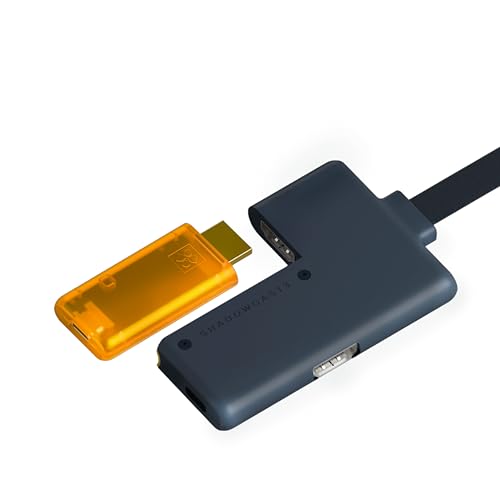
- Zero-latency HDMI passthrough
- 1440p120 and 1080p240 support
- USB-C capture for laptops and iPads
Best For: Portable gaming and creator workflows
Best for Easy Setup

- 4K60 capture with HDR10 support
- 1440p120 or 1080p240 passthrough
- Analog audio input and broad platform support
Best For: Console and PC creators seeking flexible high-refresh passthrough
Best for High-Refresh HDR

- 4K60 HDR and VRR passthrough
- 1440p144 or 1080p240 support
- Ultrawide input and 5.1 audio on Windows
Best For: HDR, VRR, ultrawide, and Windows OBS setups
Best Budget-Friendly Option

- 4K60 capture with 1080p240 passthrough
- HDR, VRR, and ultra-low latency
- Plug-and-play Windows, macOS, and Linux support
Best For: Flexible high-refresh 1080p and 2K120 streaming setups
Best with Extra Features

- 4K60 capture with 4K60 passthrough
- Supports 1440p120 and 1080p240 passthrough
- HDR10 passthrough plus mic and headphone ports
Best For: Streamers wanting versatile 4K capture and high-refresh passthrough
Best Heavy-Duty Pick

- 4K60 HDR10 capture
- High-frame-rate support up to 240 fps
- Internal PCIe design with zero-lag passthrough
Best For: Windows desktop users recording 4K HDR gameplay
Best High-Refresh Value

- 1440p144 and 1080p240 passthrough
- 4K60 MJPEG capture
- HDR, VRR, and ALLM support with USB plug-and-play
Best For: Gamers using high-refresh 1440p, 1080p, or ultrawide displays
Best Overall – AVerMedia Live Gamer Ultra 2.1
For a capture card for 1440p 240Hz passthrough, the AVerMedia Live Gamer Ultra 2.1 is the most capable option here. Its HDMI 2.1 passthrough supports 1440p240, along with 4K144 HDR/VRR and 1080p360 on compatible displays, while Windows users can capture up to 4K144 in MJPEG.
Best For: PC and console gamers who want high-refresh HDMI 2.1 passthrough, HDR/VRR support, and advanced audio features.
Pros:
- Supports 1440p240 and 1080p360 passthrough.
- Handles up to 4K144 capture on supported Windows PCs.
- Includes party-chat connectivity and compatible 5.1-channel audio support.
- Works with Windows, Mac, and iPad over USB-C.
Cons:
- 4K capture at high frame rates is limited to supported Windows workflows.
- Displays using DSC may limit 4K passthrough to 4K120.
- Its advanced features may be more than casual streamers need.
The GC553G2 is the strongest match for competitive setups centered on 1440p240. It also offers useful future-proofing through HDMI 2.1, HDR, VRR, and broad device support.
Best Internal Card – Elgato 4K Pro
The Elgato 4K Pro is an internal PCIe capture card for Windows systems, making it a practical capture card for 1440p 240Hz passthrough when you want HDMI 2.1 connectivity inside a desktop. It offers VRR passthrough, ultra-low latency, and high-resolution gameplay output while capturing up to 4K60.
Best For: Windows desktop users building a dedicated internal or dual-PC streaming setup.
Pros:
- HDMI 2.1 input and output support high frame rates.
- Provides VRR passthrough and ultra-low-latency gameplay.
- Supports up to 8K60 passthrough and 4K60 HDR10 capture.
- Compatible with OBS, Streamlabs, Twitch Studio, Zoom, Teams, and other apps.
Cons:
- Requires a Windows 10 computer with an available PCIe slot.
- The supplied details specify up to 1080p240 recording rather than 1440p240 recording.
- Less suitable for laptops, Macs, or portable setups.
Choose the 4K Pro if you prefer an internal card and need smooth VRR passthrough for a desktop streaming workstation. Its passthrough ceiling is impressive, but its listed high-frame-rate recording support does not match 1440p240.
Best Plug-and-Play Option – AVerMedia Live Gamer Extreme 3
The AVerMedia Live Gamer Extreme 3 is an external USB option for creators who want straightforward setup. It supports 4K60 HDR passthrough and up to 1080p240 passthrough, but it does not reach 1440p240, so it is better suited to 1080p high-refresh gaming or 1440p120 VRR use.
Best For: Streamers who value plug-and-play operation, broad platform support, and simple headset or microphone connections.
Pros:
- Plug-and-play design requires no extra drivers or external power.
- Supports 4K60 HDR passthrough and VRR at 1440p120 or 1080p120.
- Works with Windows, Mac, iPadOS, PS5, Nintendo Switch, and Xbox Series X/S.
- Provides 3.5mm audio input and output for game chat and commentary.
Cons:
- Does not support 1440p240 passthrough.
- Capture is listed up to 4K30.
- Requires a USB 3.2 Gen 1 Type-C port and supported operating system.
This is a convenient, flexible capture device, but it is not the right pick if 1440p240 is a firm requirement. Its strengths are easy installation, console compatibility, and useful 1080p240 or 1440p120 passthrough modes.
Best Portable Option – GENKI ShadowCast 3 Pro
The GENKI ShadowCast 3 Pro combines USB-C capture with integrated zero-latency HDMI passthrough. It is not a full 1440p 240Hz passthrough solution—the listed modes reach 1440p120 and 1080p240—but its compact, plug-and-play design makes it appealing for portable gaming, streaming, and camera use.
Best For: Portable creators who want to use an iPad or laptop as a gaming monitor or capture device.
Pros:
- Integrated HDMI passthrough is designed for zero-lag monitor play.
- Supports 4K60 capture, 1440p120, and 1080p240.
- USB-C connectivity works with laptops and iPads through the Genki Studio app.
- Recognized by OBS, Streamlabs, Zoom, and Discord as a camera feed.
Cons:
- Does not list 1440p240 passthrough.
- Its warranty is one year.
- Portable operation may require the Genki Studio app for iPad or laptop use.
The ShadowCast 3 Pro is a versatile travel-friendly choice when 1080p240 or 1440p120 is sufficient. Its passthrough power supply and four-port layout also help simplify portable setups.
Best for Easy Setup – Elgato 4K S
The Elgato 4K S is a strong choice for shoppers seeking a capture card for 1440p 240Hz passthrough, with support for 1440p120 or 1080p240 passthrough alongside 4K60 capture. It also adds HDR10 support, near-zero latency, and analog audio input for chat or commentary.
Best For: Console and PC players who want a compact, cross-platform capture card with HDR and analog audio support.
Pros:
- Supports 1440p120 and 1080p240 passthrough.
- Captures video at up to 4K60 with HDR10 support.
- Works with PS5, Xbox Series X/S, Switch 2, Mac, Windows, and iPadOS devices.
- Includes a 3.5mm analog audio input for chat or commentary.
Cons:
- Its listed passthrough support does not reach 1440p240.
- Windows HDR tone mapping requires Windows 11.
- Requires USB 3.0 Type-C and compatible host hardware.
The Elgato 4K S balances high-resolution capture with high-refresh passthrough, making it a practical fit for modern console and PC setups. Choose it if 4K60 recording and flexible audio connectivity matter more than 1440p240 passthrough.
Best for High-Refresh HDR – AVerMedia Live Gamer Ultra S
The AVerMedia Live Gamer Ultra S is a compelling capture card for 1440p 240Hz passthrough when 1440p144 or 1080p240 is sufficient, while also supporting 4K60 HDR and VRR passthrough. It adds ultrawide input support, VRR recording options, and 5.1-channel audio on Windows.
Best For: Gamers and streamers using HDR, VRR, ultrawide displays, or advanced Windows-based OBS workflows.
Pros:
- Supports 1440p144 and 1080p240 passthrough with HDR and VRR.
- Captures up to 4K60 and supports VRR recording at selected resolutions.
- Handles 3440×1440 and 2560×1080 ultrawide inputs.
- Supports 5.1-channel audio on Windows and includes a three-year warranty.
Cons:
- It does not list 1440p240 passthrough; the maximum listed at 1440p is 144Hz.
- 5.1-channel audio capture is specified for Windows workflows.
- Advanced software features depend on Streaming Center or its OBS plug-in.
With HDR, VRR, ultrawide support, and a high 1440p refresh ceiling, the Live Gamer Ultra S is especially well suited to feature-rich gaming setups. It is the better pick here for users prioritizing display flexibility and advanced capture workflows.
Best Budget-Friendly Option – PORTTA DX20R
The PORTTA DX20R offers a practical route to high-refresh capture, supporting 1080p240 and 2K passthrough while capturing up to 4K60. For shoppers comparing a capture card for 1440p 240Hz passthrough, note that its listed 2K passthrough specification is 120Hz rather than 240Hz.
Best For: Streamers who want plug-and-play Windows, macOS, or Linux compatibility with HDR, VRR, and flexible video formats.
Pros:
- Supports 1080p240 and 2K@120Hz passthrough.
- Captures up to 4K60 and supports YUY2, NV12, and RGB24 formats.
- Offers HDR, VRR, ultra-low latency, and no-driver setup across major desktop platforms.
- CapHub software provides audio, firmware, EDID, and VRR controls.
Cons:
- Its listed 2K passthrough limit is 120Hz, not 240Hz.
- Some customization features require downloading the CapHub utility.
- The supplied notes do not specify console or PC recording software compatibility beyond general streaming use.
The DX20R is a compact and flexible option for high-refresh 1080p gaming and moderate-resolution 2K setups. Consider it when HDR, VRR, broad operating-system support, and software controls are more important than true 1440p240 passthrough.
Best with Extra Features – NearStream CCD30
If you need a capture card for 1440p 240hz passthrough, the NearStream CCD30 is a flexible external option with USB-C 3.1 connectivity, low-latency passthrough, and support for up to 1440p120 or 1080p240. It also adds 4K60 capture and HDR10 passthrough for compatible displays.
Best For: Console and dual-PC streamers who want 4K60 capture, high-refresh passthrough, and built-in audio connections.
Pros:
- Supports 4K60, 1440p120, and 1080p240 passthrough.
- Captures up to 4K60 through USB-C 3.1.
- Includes HDR10 passthrough, microphone input, and headphone monitoring.
- Works with Windows, macOS, and Linux and supports OBS.
Cons:
- It does not capture HDR10; HDR is passthrough-only.
- Computer requirements vary by capture format and resolution.
- It does not provide 1440p240 passthrough according to the supplied specifications.
The CCD30 is a well-rounded choice when 4K60 recording and broad device compatibility matter more than achieving 1440p at 240Hz specifically. Its 1080p240 passthrough and 3.5mm audio ports make it practical for high-frame-rate gaming setups.
Best Heavy-Duty Pick – AVerMedia Live Gamer 4K
The AVerMedia GC573 is an internal PCIe capture card for Windows desktops that targets high-quality recording and low-latency gameplay. For shoppers comparing a capture card for 1440p 240hz passthrough, it offers high-frame-rate support up to 240 fps and 1080p240 passthrough, alongside 4K60 HDR10 capture.
Best For: Windows desktop users building an internal capture setup for 4K HDR recording and high-frame-rate gameplay.
Pros:
- Captures 4K60 HDR10 video.
- Supports high-frame-rate capture up to 240 fps.
- Provides zero-lag passthrough and support for 1080p240.
- Includes customizable RGB lighting and a three-year warranty.
Cons:
- Requires a PCI Express x4 slot and is limited to Windows 10 or 11.
- The supplied specifications do not confirm 1440p240 passthrough.
- High-resolution HDR workflows require a capable CPU, GPU, and dual-channel memory.
The GC573 is best suited to a dedicated Windows streaming or recording PC rather than a portable setup. It is a strong fit for 4K60 HDR workflows, but buyers specifically seeking 1440p240 passthrough should verify the desired resolution and refresh combination before purchasing.
Best High-Refresh Value – BlueAVS Cyber4K
The BlueAVS Cyber4K is an external USB capture card aimed at high-refresh gaming and ultrawide displays. It supports 1440p144 and 1080p240 passthrough, plus 4K60 capture, making it a useful option for shoppers seeking a capture card for 1440p 240hz passthrough while balancing resolution and refresh-rate needs.
Best For: High-refresh console and PC gamers using 1440p or 1080p displays, ultrawide monitors, and USB 5Gbps systems.
Pros:
- Supports 1440p144 and 1080p240 passthrough.
- Captures up to 4K60 in MJPEG.
- Supports HDR, VRR, and ALLM on compatible setups.
- Offers plug-and-play UVC/UAC compatibility with Windows, macOS, and Linux.
Cons:
- Its supplied specifications do not list 1440p240 passthrough; 1440p is listed up to 144Hz.
- A USB 5Gbps port is required for the advertised higher resolutions.
- USB 2.0 limits output to up to 1080p according to the product notes.
The Cyber4K is a practical external choice for users who prioritize 1080p240 or 1440p144 rather than true 1440p240. Its audio ports, broad operating-system support, and ultrawide compatibility add flexibility for streaming and recording setups.
How We Picked the Best Capture Card for 1440p 240hz Passthrough
We focused on cards that can fit a high-refresh gaming setup, prioritizing passthrough performance, input and output standards, capture quality, latency, and platform compatibility. HDMI 2.1 models are especially relevant for modern consoles and gaming PCs, while HDMI 2.0 cards may still work well when your source or display does not require 4K at high refresh rates.
We also considered whether each card is internal or external, the available USB or PCIe connection, support for HDR and variable refresh features, and how easily it can integrate with common streaming software such as OBS Studio.
Quick Comparison
| Best For | What to Prioritize | Recommended Type |
|---|---|---|
| Competitive PC gaming | 240Hz passthrough, low latency, VRR | HDMI 2.1 or high-refresh external card |
| PS5 or Xbox Series X/S | 4K60 capture, HDR, console compatibility | HDMI 2.1 card with 4K support |
| Desktop streaming | Reliable bandwidth and minimal cabling | Internal PCIe card |
| Laptop or portable setup | USB 3.x connectivity and plug-and-play setup | External USB card |
Key Buying Factors for a Capture Card for 1440p 240hz Passthrough
Passthrough Refresh Rate
Check the exact passthrough specification rather than relying on a product’s maximum capture resolution. Some cards capture at 4K60 but pass through 1440p at 240Hz, while others support only 1080p at 240Hz or 1440p at 120Hz. Your monitor, source device, cables, and card must all support the target signal.
HDMI Standard and VRR
HDMI 2.1 is the safer choice for high-bandwidth PC and console setups. Variable refresh rate support can help prevent tearing, but it is not universal. Confirm compatibility with technologies such as HDMI VRR, FreeSync, or G-SYNC before purchase.
Capture Quality and HDR
For streaming, 1080p60 remains common, while 4K60 capture is useful for recording and high-quality archives. If you play in HDR, verify that the card can pass through HDR while capturing correctly; some devices may require specific software or color settings.
Connection and System Requirements
External cards generally need a fast USB 3.x connection and may be easier to move between systems. Internal PCIe cards can offer a cleaner, dependable desktop installation, but they require an available slot and compatible drivers. Use certified high-bandwidth HDMI cables to avoid handshake or refresh-rate problems.
Who Should Buy Which Capture Card for 1440p 240hz Passthrough?
Choose an HDMI 2.1 model if you want the strongest chance of preserving 1440p at 240Hz, especially with a gaming PC or newer console. Pick an internal card for a permanent desktop streaming station, or an external USB model for laptops, travel, and simpler setup. A lower-cost HDMI 2.0 card makes sense when you mainly play at 1080p or 1440p below 240Hz and do not need advanced HDR or VRR features.