
The right webcam can make your streams, tutorials, video calls, and social content look sharper and sound more polished without requiring a complicated camera setup.
We compared 10 webcams for content creators across resolution, frame rates, autofocus, tracking, microphones, lighting, and overall flexibility to help you choose the best fit for your workflow.
Best 10 Webcams for Content Creators Picks for 2026
Best Premium Pick

- 4K video from a large 1/1.3-inch sensor
- PTZ AI tracking and natural bokeh
- Directional mics and Stream Deck support
Best For: Streamers and presenters seeking premium image quality
Best Dual-Camera Pick
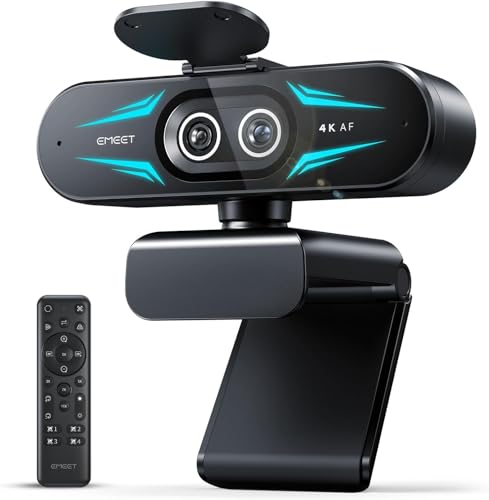
- Wide-angle and telephoto cameras in one unit
- Up to 11X hybrid zoom with PDAF autofocus
- Remote control, RGB lighting, and dual mics
Best For: Product demos, teaching, and flexible streaming views
Best Simple Full HD Pick

- Full HD 1080p video at 30 fps
- Autofocus and automatic lighting adjustment
- Dual mics plus three-month XSplit VCam license
Best For: New creators wanting dependable plug-and-play video
Best All-Around Pick

- 1080p video at 60 fps
- Auto-framing and intelligent exposure
- Landscape, portrait, and tripod mounting
Best For: Streamers wanting polished Full HD video with helpful automatic controls
Best With Built-In Lighting

- 4K at 30 fps or 1080p at 60 fps
- Integrated ring light with four modes
- Fast PDAF autofocus and 1/2-inch sensor
Best For: Creators who need detailed video and adjustable desk lighting in one device
Best for Smooth High-Resolution Streaming

- 1440p video at 60 fps
- Wide-angle lens with fast autofocus
- Synapse software customization and privacy shutter
Best For: Gamers and streamers who want fluid 1440p footage and flexible framing
Best Budget Pick

- 1080p video with automatic light adjustment
- Dual mics and a removable privacy cover
- 90° FOV with USB-A and A-to-C connectivity
Best For: Beginners, video calls, and straightforward streaming
Best 4K Upgrade
EMEET S600 4K Streaming Webcam

- 4K/30fps or 1080p/60fps video
- Sony sensor with PDAF autofocus
- Adjustable FOV and noise-canceling microphones
Best For: Streamers and creators seeking sharper footage
Best for High-Frame-Rate Streaming

- 1080p/100fps capture for smooth motion
- AI framing for individual or group composition
- Low-light sensor features and gesture controls
Best For: Gaming streamers and presenters needing dynamic framing
Best Premium Pick – Insta360 Link 2 Pro
For content creators who want polished video without a DSLR setup, the Insta360 Link 2 Pro is a strong choice among webcams for content creators. Its 4K resolution, large 1/1.3-inch sensor, natural bokeh, and PTZ AI tracking are suited to streams, presentations, and creator-led meetings.
Best For: Streamers, presenters, and creators who prioritize image quality, low-light performance, and automated framing.
Pros:
- Sharp 4K video with a large sensor designed for cleaner low-light footage.
- Physical pan-and-tilt AI tracking keeps moving presenters in frame.
- Directional beamforming microphones help isolate speech from background noise.
- Supports DeskView, Whiteboard, Portrait Mode, and Elgato Stream Deck integration.
Cons:
- Not compatible with ARM-based Windows systems or Windows Hello Face Recognition.
- Advanced features rely on the dedicated Link Controller software.
This is the most creator-focused option here for buyers who want a flexible, professional setup in one USB webcam. It is especially compelling when tracking, bokeh, and low-light video matter more than keeping costs minimal.
Best Dual-Camera Pick – EMEET C60E Dual-Camera 4K
The EMEET C60E takes a specialized approach to webcams for content creators by combining wide-angle and telephoto cameras. With up to 11X hybrid zoom, remote controls, and RGB lighting, it is designed for creators who switch between showing themselves, their workspace, and close-up details.
Best For: Teachers, product demonstrators, streamers, and presenters who need both room-wide framing and close-up views.
Pros:
- Dual-camera design supports wide scenes and detailed telephoto views.
- Up to 11X hybrid zoom with PDAF autofocus for flexible framing.
- Remote and EMEET STUDIO controls allow adjustments without moving the camera.
- Includes RGB lighting, two microphones, and 1/4-inch tripod mounting.
Cons:
- Zoom is not supported in 4K, 60FPS, or YUY2 modes.
- USB 2.0 Type-A connectivity may be less convenient for some newer setups.
Choose the C60E if visual flexibility is more useful to you than a conventional single-lens webcam. Its dual-camera layout is particularly practical for demonstrations and teaching, where switching from a full scene to a close-up can improve clarity.
Best Simple Full HD Pick – Logitech C920x HD Pro
The Logitech C920x is a straightforward option for webcams for content creators who need dependable Full HD video rather than advanced PTZ features. Its 1080p recording, autofocus, automatic lighting adjustment, dual microphones, and included XSplit VCam license cover the essentials for streaming and recorded content.
Best For: New creators, video callers, and desktop users who want reliable 1080p video with minimal setup.
Pros:
- Records and streams Full HD 1080p video at 30 fps.
- Autofocus and automatic lighting adjustment help maintain a clear image.
- Dual microphones capture natural sound for calls and recordings.
- Includes a three-month XSplit VCam license for background replacement or blur.
Cons:
- Limited to 1080p at 30 fps rather than 4K.
- Does not include a privacy shutter.
- Its feature set is less specialized for moving creators than PTZ models.
The C920x remains a sensible entry point for creators who value compatibility and ease of use over cinematic controls. It is a practical pick for talking-head videos, meetings, and basic livestreaming when Full HD is sufficient.
Best AI Tracking Value – EMEET PIXY Dual-Camera PTZ
The EMEET PIXY combines a 4K main camera, auxiliary AI camera, PTZ movement, and a triple-microphone array in a compact design. For webcams for content creators, it offers useful automation for creators who move during streams, fitness content, product demonstrations, lessons, or presentations.
Best For: Active streamers, instructors, fitness creators, and presenters who need smooth tracking and adaptable audio modes.
Pros:
- 4K main camera with PDAF and AI autofocus for fast focusing.
- Three-chip AI tracking supports 310-degree pan and 180-degree tilt.
- Triple microphones offer Live, Noise Canceling, and Original Sound modes.
- Gesture control, presets, Whiteboard mode, and privacy mode add workflow flexibility.
Cons:
- A remote is available separately rather than included in the listed package.
- Field of view is locked in some 4K 30FPS and 1080p 60FPS modes.
- Tripod mounting requires a tripod sold separately.
PIXY is a strong fit when hands-free framing and integrated audio are central to your workflow. Its tracking range and multiple sound modes make it more versatile than a basic webcam, while the compact design avoids the complexity of a separate camera, tracker, and microphone.
Best All-Around Pick – Logitech StreamCam
For content creators seeking webcams for content creators, the Logitech StreamCam offers smooth Full HD video at 1080p and 60 fps. Its autofocus, auto-framing, and exposure controls are useful for streaming, recording, video calls, and other creator workflows.
Best For: Streamers and creators who want dependable 1080p/60 fps video with automatic framing and exposure assistance.
Pros:
- Records Full HD 1080p video at 60 fps for smooth motion.
- Premium glass lens with smart autofocus supports crisp, detailed video.
- Auto-framing and intelligent exposure help maintain a polished image.
- Supports landscape or portrait mounting and works with a standard tripod.
Cons:
- Video resolution is Full HD rather than 4K.
- USB-C connectivity may require an adapter depending on the computer.
The StreamCam is a balanced choice for creators who prioritize smooth video and easy setup over maximum resolution. Compatibility with OBS, Streamlabs OBS, XSplit, Twitch, and YouTube further suits regular streaming use.
Best With Built-In Lighting – EMEET S600L 4K Webcam
The EMEET S600L combines a 4K webcam with an integrated ring light, making it a practical option among webcams for content creators who need both image detail and on-camera illumination. Its larger sensor, fast autofocus, and adjustable lighting are designed for streaming, recording, and podcast setups.
Best For: Creators who want 4K capture, built-in lighting, and physical controls for adjusting their presentation.
Pros:
- Supports true 4K at 30 fps and 1080p at 60 fps.
- Large 1/2-inch Samsung sensor is designed to capture more light.
- Built-in ring light offers four lighting modes with adjustable brightness.
- Includes PDAF autofocus, a privacy cover, flexible rotation, and portrait capture.
Cons:
- Uses USB 2.0 connectivity, despite supporting 4K video.
- Its many lighting and appearance controls may be more than casual users need.
With EMEET STUDIO software, a control dial, dual microphones, and broad compatibility with Windows, macOS, OBS, YouTube, and Twitch, the S600L is particularly versatile for creators building a dedicated desk setup.
Best for Smooth High-Resolution Streaming – Razer Kiyo V2 X Webcam
The Razer Kiyo V2 X delivers 1440p video at 60 fps, giving content creators a high-resolution option with smooth motion. Its wide-angle lens, fast autofocus, built-in microphone, and Razer Synapse customization make it suitable for gaming streams, unboxings, meetings, and other creator content.
Best For: Gamers and streamers who want smooth 1440p video with a wide view and software-based image adjustments.
Pros:
- Captures 1440p video at 60 fps for detailed, fluid footage.
- Fast autofocus helps keep the subject sharp during movement.
- Wide-angle lens provides flexibility for showing a setup or getting closer to viewers.
- Razer Synapse offers presets plus color and lighting adjustments.
Cons:
- It does not offer 4K capture.
- The supplied specifications identify USB connectivity without detailing the connector type.
The Kiyo V2 X is a strong fit when 1440p/60 fps is the priority. Its pivoting mount and built-in tripod thread also make it easier to fine-tune camera angles for streams and recordings.
Best Budget Pick – EMEET C960 1080p Webcam
For shoppers comparing webcams for content creators on a budget, the EMEET C960 offers dependable 1080p video, automatic light adjustment, and built-in microphones for straightforward calls, streams, and recordings. Its 90-degree field of view can also include more than one person in the frame.
Best For: Beginners, video calls, and simple streaming setups that need privacy coverage and broad compatibility.
Pros:
- 1920×1080 video with a five-layer anti-glare lens
- Dual omnidirectional microphones and automatic exposure adjustment
- Privacy cover plus USB Type-A and A-to-C connection options
- 90-degree wide-angle view for group framing
Cons:
- Fixed focus is designed for approximately 11.8 to 118.1 inches
- Does not include built-in speakers
- Not compatible with Windows Hello, TVs, tablets, or game consoles
The C960 is a practical entry-level choice when ease of setup and essential features matter more than advanced resolution or studio controls. Use it in a well-lit environment for the clearest image.
Best 4K Upgrade – EMEET S600 4K Streaming Webcam
The EMEET S600 is a strong option among webcams for content creators who want sharper footage and more control. Its Sony 1/2.55-inch sensor supports 4K at 30fps or 1080p at 60fps, while PDAF autofocus and automatic light balancing help maintain a clear image across changing scenes.
Best For: Streamers and creators who prioritize 4K detail, faster autofocus, and adjustable framing.
Pros:
- 4K at 30fps and 1080p at 60fps recording options
- Sony sensor with PDAF autofocus and automatic light adjustment
- Adjustable 40- to 73-degree FOV at 1080p
- Dual noise-canceling microphones and built-in privacy cover
Cons:
- At 4K, the field of view is fixed at 73 degrees
- Advanced image and audio customization requires EMEETLINK software
- Actual resolution depends on the camera software or application used
Choose the S600 if image detail and flexible shooting options are central to your workflow. It remains plug-and-play for basic use while offering software-based adjustments for more demanding setups.
Best for High-Frame-Rate Streaming – OBSBOT Meet SE 1080p Webcam
The OBSBOT Meet SE stands out among webcams for content creators who want unusually high frame rates and automated composition. It records at up to 1080p/100fps, supports AI framing for individuals or groups, and uses a stacked CMOS sensor with dual native ISO and HDR features for improved low-light performance.
Best For: Streamers, gaming creators, and presenters who value smooth motion, AI framing, and hands-free controls.
Pros:
- 1080p at 100fps, 1080p at 60fps, or 720p at 150fps
- AI framing supports individual and group composition
- Stacked CMOS sensor, dual native ISO, and staggered HDR for low-light shooting
- Gesture controls, autofocus, and OBSBOT Center customization
Cons:
- 100fps recording requires the More Output Options setting in OBSBOT software
- Advanced controls and customization depend on software support
- Uses a USB-C connection, which may require an adapter on some computers
The Meet SE is a compelling fit for dynamic content where smooth movement and automatic framing are useful. Its software ecosystem also gives creators more control than a basic plug-and-play webcam.
How We Picked the Best Webcams for Content Creators
We focused on features that affect real-world recording and streaming: image quality, sensor performance, frame-rate options, autofocus speed, field of view, built-in microphones, AI framing, low-light handling, and ease of setup. We also included a range of prices and capabilities, from dependable 1080p webcams to advanced 4K PTZ models.
Compatibility and versatility mattered, too. Each camera should work with common computers and popular video software, while mounting flexibility and privacy features can make a meaningful difference in daily use.
Quick Comparison
| What to prioritize | Best suited for | Recommended feature |
|---|---|---|
| Maximum image quality | Studio-style streaming and tutorials | 4K resolution and a larger sensor |
| Smooth motion | Gaming, demonstrations, and energetic delivery | 60fps or higher |
| Hands-free framing | Presenters who move around | AI tracking or auto-framing |
| Simple everyday calls | Remote work and occasional content | Reliable 1080p video and microphones |
Key Buying Factors for Webcams for Content Creators
Resolution, Frame Rate, and Sensor Size
1080p is sufficient for video calls, basic tutorials, and many livestreams. Choose 4K if you crop footage, create detailed product demonstrations, or want more flexibility in editing. A higher frame rate creates smoother motion, but it may require more light and computer bandwidth. Sensor size also matters: larger sensors generally capture cleaner images in dim rooms and produce better tonal detail.
Autofocus and Framing
Fast autofocus is valuable when you hold products close to the lens or move between sitting and standing positions. AI tracking and auto-framing can keep you centered, but they are not essential if you remain in a fixed position. PTZ models offer additional control for presentations and multi-position setups.
Audio, Lighting, and Placement
Built-in microphones are convenient, especially for calls, but a dedicated USB microphone will usually deliver clearer, more controlled sound for serious content. Look for noise reduction when recording in shared spaces. A built-in light can help in a dim setup, although a separate key light gives you more control. Check the mount, tripod compatibility, USB connection, and privacy shutter before buying.
Who Should Buy Which Webcams for Content Creators?
Choose a 4K AI or PTZ Webcam If You Produce Polished Video
Choose an advanced 4K model with tracking, HDR, or PTZ control if you stream regularly, record courses, demonstrate products, or want to move around without constantly adjusting the camera.
Choose a 1080p 60fps Webcam for Smooth Streaming
A 1080p camera with a 60fps mode is a practical choice for gaming, live presentations, and fast-moving demonstrations when you want fluid video without the storage and bandwidth demands of 4K.
Choose a Basic 1080p Webcam for Calls and Occasional Content
If your priority is dependable video meetings, casual streaming, or a low-cost upgrade over a laptop camera, a straightforward 1080p webcam is usually the best value. Spend more only if you need better low-light performance, tracking, higher resolution, or stronger audio.