
The best webcams for classrooms do more than put a teacher on screen. They can capture faces, whiteboards, books, worksheets, and demonstrations clearly enough for students in the room or joining remotely.
We selected 10 classroom-ready options, from compact Full HD meeting webcams to flexible document cameras with overhead views, built-in lighting, microphones, and plug-and-play USB connections.
Best 10 Webcams for Classrooms Picks for 2026
Best Document Camera
INS-1 Classic USB Document Camera

- 8MP imaging with 30 fps streaming
- Autofocus, macro mode, LED, and anti-glare sheet
- Includes software for annotation and recording
Best For: Live demonstrations of documents and small classroom objects
Best Simple Webcam
Logitech Brio 101 Full HD Webcam

- 1080p video for lessons and meetings
- Automatic light balancing for dim rooms
- Built-in privacy cover and microphone
Best For: Plug-and-play classroom video calls
Best Foldable Document Camera

- Covers documents up to A3 size
- Autofocus, macro capture, and adjustable LED lighting
- Foldable multi-joint design for storage and positioning
Best For: Large-page and object demonstrations in classrooms
Best 360-Degree Webcam
j5create All Around Meeting Webcam
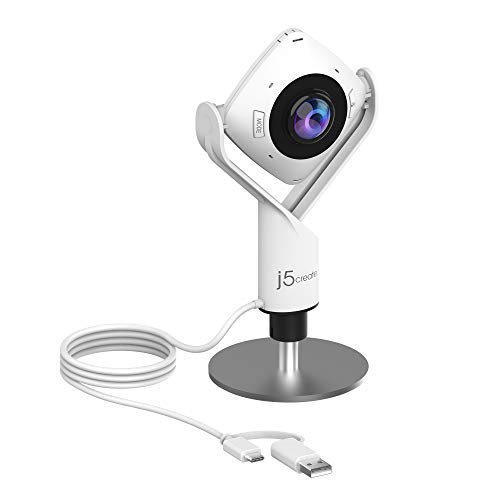
- 360-degree video for group participation
- Six viewing modes for flexible framing
- Omnidirectional microphone and Full HD video
Best For: Collaborative lessons and hybrid classroom discussions
Best for Easy Setup
THUSTAR 8MP 4K Classroom Visualiser

- 8MP/2448P video at 30fps
- Foldable design with A3 coverage
- LED lighting and dual microphones
Best For: Teachers showing documents, objects, and live demonstrations
Best for Everyday Use
EMEET C960 1080P Classroom Camera

- 1080p video with a 90° field of view
- Dual microphones and privacy cover
- Compact plug-and-play clip design
Best For: Online classes and video meetings
Best Flexible Visualiser
Kitchbai 4K USB Document Camera

- 8MP/2448P video at 30fps
- A3 coverage for documents and objects
- Foldable multi-joint design with LED light
Best For: Live classroom demonstrations and close-up teaching
Wide-Angle 4K Pick

- 4K Sony CMOS imaging with swift autofocus
- 120° lens captures tabloid-size materials
- AI noise reduction and broad USB compatibility
Best For: Large documents, objects, and detailed classroom demonstrations
Flexible Classroom Value

- 3-in-1 webcam and document-camera design
- A3 coverage with adjustable flexible arm
- LED lighting and manual ISO exposure controls
Best For: Versatile lessons, video calls, and close-up demonstrations
Easy Demo Specialist

- 5MP sensor with Full HD streaming at 30 fps
- 360° gooseneck and A3 document coverage
- Adjustable LED, autofocus, and image flip controls
Best For: Distance learning and flexible live classroom demonstrations
Best Document Camera – INS-1 Classic USB Document Camera
For classrooms that need to show worksheets, books, demonstrations, or small objects, the INS-1 is a versatile choice among webcams for classrooms. Its 8MP sensor, autofocus, macro capability, built-in LED, and included software support detailed live teaching.
Best For: Teachers demonstrating documents, physical objects, and close-up materials during in-person or remote lessons.
Pros:
- Captures up to 3264 x 2448 resolution and streams at 30 fps.
- Autofocus and macro mode capture objects as close as 3.9 inches.
- LED lighting, anti-glare sheet, brightness controls, and built-in microphone improve flexibility.
- Works with Windows, Mac, iPad with USB-C, Chromebook, and common webinar software.
Cons:
- Uses a USB-A connection, so some newer devices may require an adapter.
- Its document-camera design is less suited to typical face-to-face webcam framing.
The INS-1 stands out when classroom instruction depends on showing more than the teacher’s face. It offers strong image detail and useful controls, though buyers should confirm port compatibility before purchasing.
Best Simple Webcam – Logitech Brio 101 Full HD Webcam
The Logitech Brio 101 is a straightforward option for classrooms that primarily need reliable teacher and student video. This webcam for classrooms delivers 1080p video, automatic light balancing, a built-in microphone, and plug-and-play compatibility with major meeting platforms.
Best For: Video lessons, virtual meetings, and everyday classroom calls where easy setup matters.
Pros:
- Provides Full HD 1080p video with a 60-degree viewing angle.
- RightLight automatically boosts brightness and reduces shadows in low light.
- Integrated privacy cover offers convenient camera privacy when not in use.
- Works with Microsoft Teams, Zoom, Google Meet, Windows, macOS, and Chrome OS.
Cons:
- Fixed focus is less flexible for close-up document demonstrations.
- USB-A connectivity may need an adapter with some modern classroom devices.
Choose the Brio 101 for uncomplicated face-to-face video rather than detailed document capture. Its privacy cover and automatic lighting are especially practical for shared or frequently used classroom computers.
Best Foldable Document Camera – PAKOTOO 8MP Classroom Camera
The PAKOTOO KB700 is designed for teachers who need to display large pages, worksheets, and three-dimensional materials. Its 8MP document camera covers up to A3 paper, includes autofocus and adjustable lighting, and folds for easier storage or transport.
Best For: Classroom demonstrations involving A3 or A4 documents, books, crafts, and objects viewed from multiple angles.
Pros:
- Covers an area up to 16.5 by 11.6 inches for larger teaching materials.
- Autofocus supports close-ups down to approximately 3.94 inches.
- Three LED brightness levels and ten exposure adjustments help manage lighting.
- Foldable multi-joint design supports flexible positioning and storage.
Cons:
- Not plug and play; users must select USB Camera in the computer’s system settings.
- Does not support zoom, HDMI, or iPad compatibility according to the supplied notes.
- Uses USB 2.0, which may be less convenient for some setups.
The KB700 is a practical pick for teachers who prioritize coverage and flexible positioning over a streamlined setup. Its controls are useful for demonstrations, but buyers should be comfortable selecting the camera manually on their computer.
Best 360-Degree Webcam – j5create All Around Meeting Webcam
The j5create JVCU360 offers a different approach to webcams for classrooms by capturing participants around a room instead of focusing on one presenter. Its 360-degree camera, omnidirectional microphone, six display modes, and Full HD video support collaborative lessons and group discussions.
Best For: Roundtable teaching, group collaboration, hybrid meetings, and classrooms where several participants need to appear on camera.
Pros:
- 360-degree video helps include participants around the camera.
- Six display modes provide options such as full view, host, dual host, and wide angle.
- Built-in omnidirectional microphone supports room-wide audio capture.
- USB UVC/UAC plug-and-play support works with Zoom, Teams, Google Meet, and other platforms.
Cons:
- Fixed focus and 1080p resolution are less suited to detailed document capture.
- App permissions may need to be authorized, and a firmware update may be required.
- Its room-focused design may be unnecessary for one-person instruction.
The JVCU360 makes the most sense when classroom interaction extends beyond a single presenter. Its flexible viewing modes can help remote learners follow group activity, provided the software permissions and firmware are handled during setup.
Best for Easy Setup – THUSTAR 8MP 4K Classroom Visualiser
For teachers comparing webcams for classrooms, the THUSTAR combines a high-resolution webcam with a flexible document-camera design. Its 8MP sensor, 30fps video, adjustable lighting, and A3-size coverage make it suited to showing worksheets, books, and three-dimensional objects during remote or hybrid lessons.
Best For: Teachers who need one camera for live demonstrations, document sharing, and video calls.
Pros:
- Captures 8MP/2448P video at up to 30fps.
- Foldable, multi-joint design supports multiple viewing angles.
- Three-level LED lighting and manual brightness controls help in uneven lighting.
- Built-in dual microphones support clearer classroom communication.
Cons:
- Its document-camera form factor is larger than a standard laptop webcam.
- Requires USB connectivity and compatible computer software.
The THUSTAR is a versatile choice when classroom instruction involves more than talking-head video. Autofocus, image inversion, macro capture down to 3.94 inches, and support for Windows, macOS, and Chrome OS give it useful flexibility for demonstrations.
Best for Everyday Use – EMEET C960 1080P Classroom Camera
The EMEET C960 is a straightforward option for teachers seeking webcams for classrooms that prioritize video calls over document demonstrations. It provides 1080p video, a 90-degree field of view, dual microphones, automatic light adjustment, and a privacy cover in a compact clip-on design.
Best For: Online teaching, meetings, and classes where a conventional front-facing webcam is sufficient.
Pros:
- Delivers 1920×1080 video with a 90-degree wide-angle view.
- Dual omnidirectional microphones capture voice audio.
- Automatic exposure and color adjustment support consistent image quality.
- Includes a removable privacy cover and USB-A-to-C adapter.
Cons:
- Fixed focus is less suitable for close-up document work.
- It has no built-in speakers.
- Chrome OS compatibility may vary, according to the supplied notes.
Choose the C960 when ease of setup and a familiar webcam format matter most. It is compatible with Windows 10/11 and macOS 10.14 or later and works with platforms such as Zoom, Teams, FaceTime, and Google Meet, though good lighting is recommended for the best results.
Best Flexible Visualiser – Kitchbai 4K USB Document Camera
The Kitchbai visualiser is a strong fit for webcams for classrooms where teachers need to switch between live video and hands-on instruction. Its 8MP camera covers A3-size materials, offers adjustable image inversion and brightness, and folds down for easier storage between lessons.
Best For: Classroom demonstrations involving papers, books, crafts, and 2D or 3D objects.
Pros:
- Provides 8MP/2448P video at 30fps.
- Multi-joint construction allows flexible positioning and viewing angles.
- Three-level LED lighting and brightness controls assist with difficult lighting.
- Built-in dual microphones include noise-reduction support.
Cons:
- It is more specialized and less compact than a standard webcam.
- Manual image-inversion and focus controls may require adjustment during demonstrations.
With macro capture from about 3.94 inches and a one-press focus function designed to reduce unwanted refocusing, the Kitchbai is practical for close-up teaching. USB-C connectivity and compatibility with Windows, macOS, and Chromebooks also make it suitable for distance education and web conferencing.
Wide-Angle 4K Pick – IPEVO V4K PRO 120
For classrooms that need more than a standard talking-head view, the IPEVO V4K PRO 120 combines a 4K document camera with a 120-degree lens. It is a strong option among webcams for classrooms when teachers need to show tabloid-size documents, larger objects, or detailed demonstrations.
Best For: Teachers who want high-resolution document capture and a wide view for larger materials.
Pros:
- 4K capture with a Sony CMOS sensor and swift autofocus for detailed visuals.
- 120-degree lens and adjustable arm cover tabloid-size documents and larger objects.
- Built-in LED light and AI noise reduction support clearer presentations and calls.
- Works with Windows, Mac, Chromebooks, Zoom, Google Meet, Skype, and Teams.
Cons:
- It weighs 860 g, making it less lightweight than some classroom document cameras.
- It uses a USB connection and does not offer image stabilization.
The V4K PRO 120 is the most capable choice here for large-format teaching materials and fine detail. Its broad compatibility and plug-and-play USB setup add flexibility, while the wide lens makes it useful as both a document camera and webcam.
Flexible Classroom Value – PAKOTOO PA-800
The PAKOTOO PA-800 is a flexible document camera and webcam for classrooms, with A3 coverage, a movable hose-style arm, and built-in lighting. It suits teachers who need to switch between live document demonstrations, video calls, and close-up object views.
Best For: Teachers seeking an adaptable A3 document camera with manual image and lighting controls.
Pros:
- 3-in-1 design works as a document camera, webcam, and presentation camera.
- Flexible arm captures views from different angles and supports A3-size documents.
- Three-level LED lighting and five-level ISO exposure adjustment help in uneven lighting.
- Autofocus, dual microphones, and compatibility with Mac, Windows, Chromebooks, and major conferencing apps.
Cons:
- It is not fully plug and play; users must select “USB Camera” in their computer settings.
- The supplied details specify 5MP capture and Full HD streaming rather than 4K.
The PA-800 offers useful classroom controls without requiring a separate webcam. Its A3 coverage and adjustable arm are practical for lessons, while the fill light and exposure controls help teachers manage less-than-ideal rooms.
Easy Demo Specialist – THUSTAND 5MP A3 Camera
The THUSTAND 5MP document camera is designed for teachers who need a straightforward overhead webcam for classroom demonstrations. Its A3 coverage, flexible 360-degree gooseneck, image controls, and adjustable LED make it a practical option among webcams for classrooms.
Best For: Distance learning, live demos, and teachers who need flexible positioning and image adjustment.
Pros:
- 5MP sensor supports up to 2592×1944P capture and Full HD streaming at 30 fps.
- 360-degree adjustable gooseneck covers A3 materials and different presentation angles.
- Three-level LED lighting and five-level ISO adjustment help manage dim or backlit settings.
- One-key mirroring and 180-degree inversion simplify remote teaching and video chats.
Cons:
- First-time users must select “USB Camera” in their system settings.
- The supplied video resolution is 1080p, despite the sensor’s higher still-image resolution.
The THUSTAND model focuses on teaching flexibility rather than advanced 4K output. Its adjustable arm, A3 coverage, autofocus, and lighting controls make it well suited to showing worksheets, crafts, and other physical demonstrations over Zoom, Meet, Teams, or OBS.
How We Picked the Best Webcams for Classrooms
We focused on features that matter during real lessons: image clarity, autofocus performance, viewing angle, document coverage, microphone capability, lighting, setup simplicity, and compatibility with common teaching and video-conferencing software. The selection includes standard webcams for face-to-face instruction and document cameras for showing books, worksheets, experiments, and handwriting.
Resolution claims are only part of the picture. A well-focused 1080p camera can be more useful than a poorly positioned 4K model, while an overhead document camera may be the better choice for teachers who frequently demonstrate materials.
Quick Comparison
- Best for standard video calls: Full HD models such as the Logitech Brio 101 and EMEET C960.
- Best for overhead teaching: USB document cameras with A3 coverage, flexible arms, and image rotation.
- Best for detailed demonstrations: 4K or 8MP document cameras with autofocus and built-in lighting.
- Best for group or room views: Wide-angle or 360-degree meeting webcams.
- Best for simpler setups: Plug-and-play USB cameras with integrated microphones.
Key Buying Factors for Webcams for Classrooms
Resolution and Focus
Choose 1080p for routine teacher meetings and remote classes. Move to 4K or 8MP when students need to read small text, inspect diagrams, or see detailed demonstrations. Autofocus is especially useful when moving between a teacher and materials on a desk.
Camera Style and Coverage
A conventional webcam works well at eye level, but document cameras are more versatile for classroom instruction. Check whether the arm covers A3 or A4 paper, whether the lens can point downward, and whether the image can be flipped or rotated in software.
Audio, Lighting, and Compatibility
Built-in dual microphones can simplify setup, although a dedicated headset or classroom microphone may deliver better sound in noisy rooms. Integrated LED lights help with shadows under overhead cameras. Confirm USB compatibility with the classroom computer and test the camera with the specific meeting or teaching application you use.
Mounting and Daily Usability
Look for foldable designs, stable bases, flexible positioning, and controls that are easy to reach. A camera that stores neatly and reconnects reliably is often more valuable than one with advanced features that slow down every lesson.
Who Should Buy Which Webcams for Classrooms?
Choose a standard Full HD webcam if your main need is clear teacher video for meetings, remote lessons, or parent conferences. Choose an overhead document camera if you regularly show physical teaching materials, write by hand, or demonstrate objects. Choose a 4K or 8MP model when fine detail and readable small text are priorities. Choose a wide-angle or 360-degree camera for group discussions, shared rooms, or situations where one fixed viewpoint is limiting.
Before buying, confirm your computer’s available USB port, the camera’s software compatibility, and where it will sit during lessons. The best Webcams for Classrooms are the ones that match your teaching style and can be positioned quickly without interrupting instruction.