
Dim classrooms, shaded desks, and evening video calls can make printed pages and physical demonstrations difficult to see. The best document cameras for low light combine useful illumination with sharp imaging, dependable autofocus, and simple software support.
We selected 10 models suited to teaching, remote learning, presentations, and live demonstrations. This guide explains which features matter most and how to choose the right camera for your setup.
Best 10 Document Cameras for Low Light Picks for 2026
Best Low-Light 4K Pick

- Back-illuminated Sony sensor
- 30fps 8MP streaming
- Near-Ledger capture area
Best For: Dim classrooms, projector-lit lessons, and hybrid teaching
Best Built-In Lighting
THUSTAR 8MP 4K Document Camera

- Three-level LED lighting
- A3-size coverage
- Dual built-in microphones
Best For: Classrooms needing adjustable illumination and wide coverage
Best High-Resolution Option
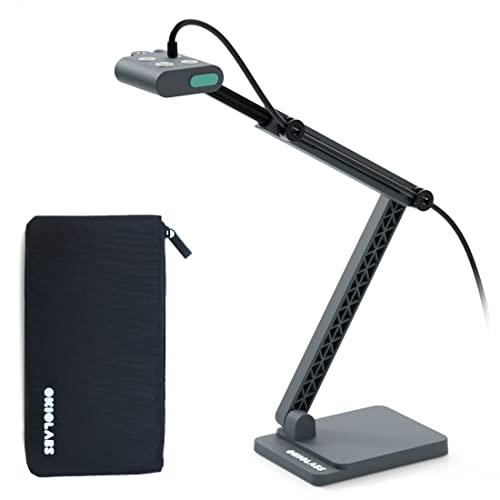
- 13MP 4K CMOS sensor
- Integrated LED light
- OKIOPoint smart pointer
Best For: Detailed lessons, remote teaching, and dim presentation spaces
Best Budget Lighting Setup
PAKOTOO A3 USB Document Camera

- Three-level LED fill light
- Five-level exposure adjustment
- 1080p A3 capture
Best For: Budget classroom setups and remote teaching
Low-Light Classroom Pick

- 8MP Sony Exmor R sensor for improved dim-light clarity
- UHD capture with up to 30fps Full HD streaming
- Portable design with AI Smart Pointer support
Best For: Teachers needing detailed document capture in variable classroom lighting
Adjustable Lighting Value

- Three-level LED light for dim or uneven settings
- 8MP capture up to 2448p at 30fps
- Foldable design covers A3 materials
Best For: Presenters who need built-in lighting control and wide document coverage
Dim-Environment Detail Pick

- Sony CMOS sensor supports dim-light capture
- 8MP UHD resolution with fast focusing
- Works with Mac, Windows, and Chromebook
Best For: Educators needing quick-focus, low-light detail without built-in lighting
Flexible Low-Light Pick

- Three LED brightness levels and five fill-light settings
- Manual focus plus autofocus for documents and objects
- Foldable design with Windows, Mac, and Chromebook support
Best For: Teachers needing adjustable lighting and hands-on image control
Large-Format Classroom Choice

- Three LED levels and ten exposure adjustments
- Captures materials up to A3 size
- Foldable arm with autofocus and image reversal
Best For: Teachers displaying large worksheets and 3D materials
Feature-Rich Lighting Pick

- Warm, cool, and neutral LED lighting modes
- Ten exposure settings for glare and dim rooms
- 8MP capture, dual microphones, and A3 coverage
Best For: Hybrid teaching and demonstrations needing detailed lighting control
Best Low-Light 4K Pick – OKIOCAM S2-4K
The OKIOCAM S2-4K is a strong choice among document cameras for low light, using a back-illuminated Sony Exmor R sensor to produce clearer, lower-noise images without supplemental LEDs. It also delivers 30fps streaming, near-Ledger coverage, and broad device compatibility.
Best For: Teachers and presenters working under dim projector light or in hybrid classrooms.
Pros:
- 8MP capture up to 3264 x 2448 at 30fps
- Back-illuminated sensor improves low-light clarity without extra lights
- Captures areas up to 15.1 x 11.2 inches
- Works with Windows, Mac, iPadOS, Chromebook, and interactive displays
Cons:
- OKIOPoint tracking and annotation features depend on OKIOCAM Live software
- iPad compatibility requires iPadOS 17 or above
Choose this model when low-light image quality is more important than built-in illumination. Its durable articulated design and flexible software also make it well suited to frequent classroom use.
Best Built-In Lighting – THUSTAR 8MP 4K Document Camera
The THUSTAR 8MP document camera combines 4K capture with three-level LED lighting, making it a practical option among document cameras for low light when you want direct control over illumination. Its A3-sized coverage and foldable design add flexibility for classroom demonstrations.
Best For: Teachers who need adjustable lighting and a large shooting area for documents or objects.
Pros:
- 8MP 2448p output with 30fps live transmission
- Three brightness levels from 14 integrated LED beads
- Supports documents and objects up to A3 size
- Includes dual microphones with noise-reduction support
Cons:
- Uses a USB 2.0 connection
- Compatible platforms listed are Windows, macOS, and Chrome OS rather than iPadOS
- Built-in LEDs may introduce glare compared with a sensor-only low-light design
This is a useful pick if lighting conditions change during lessons. The adjustable brightness, one-press autofocus, and image controls provide hands-on ways to keep demonstrations visible.
Best High-Resolution Option – OKIOCAM S2 Pro
The OKIOCAM S2 Pro is designed for detailed presentations, pairing a 13MP sensor with 4K video and an integrated LED light. For buyers comparing document cameras for low light, it offers minimal graininess in dim conditions along with software tools for tracking, annotation, and recording.
Best For: Presenters who want high-resolution 4K detail with some built-in lighting support.
Pros:
- 13MP sensor supports 4K resolutions up to 3840 x 2160
- Integrated LED light helps in dim locations
- 30fps 4K streaming and quick autofocus
- Includes OKIOPoint smart pointer and compatible presentation software
Cons:
- Maximum viewing area is 13.6 x 10.6 inches
- Macro focus range begins at 10cm
- Listed compatibility centers on Windows, Mac, Chromebook, and interactive displays
The S2 Pro is a good fit when fine image detail matters more than maximum document coverage. Its LED and high-resolution sensor provide useful support for dim presentations, while the software adds interactive teaching features.
Best Budget Lighting Setup – PAKOTOO A3 USB Document Camera
The PAKOTOO USB document camera offers a straightforward low-light setup with three-level LED fill lighting, five-level exposure adjustment, and 1080p streaming. It is a practical entry-level choice among document cameras for low light, especially for remote teaching and basic classroom demonstrations.
Best For: Budget-conscious teachers needing A3 coverage, fill light, and webcam functionality.
Pros:
- Three-level LED fill light supports dark or uneven environments
- Five-level exposure adjustment provides manual image control
- Captures A3-sized materials at up to 30fps
- Can function as a document camera or webcam and includes dual microphones
Cons:
- Maximum video resolution is 1080p
- Requires manually selecting “USB Camera” on the computer rather than being fully plug-and-play
- Uses a USB 2.0 interface
This model makes sense when you want useful low-light controls without paying for 4K capture. Its foldable design, USB-C cable, and flexible arm are convenient for distance learning and occasional presentations.
Low-Light Classroom Pick – OKIOCAM S-4K
For shoppers comparing document cameras for low light, the OKIOCAM S-4K stands out with its 8MP Sony Exmor R sensor, which is designed to improve low-light performance, reduce image noise, and preserve color. It also offers UHD capture, autofocus, and portable classroom-friendly controls.
Best For: Teachers who need a compact, high-resolution camera for dimly lit classrooms, distance learning, and live demonstrations.
Pros:
- 8MP Sony Exmor R sensor supports UHD images up to 3264 x 2448.
- Enhanced low-light performance, noise reduction, and vibrant color reproduction.
- Streams at up to 30fps in Full HD and includes focus, exposure, zoom, and image-flip controls.
- Portable design captures letter-size materials in landscape orientation.
Cons:
- Maximum-resolution streaming is limited to 15fps.
- Requires a USB connection and compatible computer or display.
The S-4K is a strong all-around choice when lighting is inconsistent but image detail still matters. Its portable construction and software features add flexibility for teachers who move between classrooms or teaching setups.
Adjustable Lighting Value – Kitchbai KB-700
The Kitchbai KB-700 is a practical option among document cameras for low light because it includes a three-level LED light and manual brightness controls. Those adjustments can help compensate for dark or uneven environments while the 8MP sensor captures A3-sized materials at up to 2448p.
Best For: Teachers and presenters who want built-in lighting adjustment, broad coverage, and a foldable setup.
Pros:
- Three brightness levels help address difficult lighting conditions.
- 8MP camera captures up to 2448p at 30fps.
- Supports an A3-sized shooting area and captures 2D or 3D objects.
- Foldable, multi-joint design and built-in dual microphones suit portable presentations.
Cons:
- Its listed dimensions indicate a relatively tall unit when unfolded.
- Manual image reversal and brightness adjustments may require extra setup.
The KB-700 is especially useful when lighting cannot be controlled reliably. Its integrated LED levels and brightness buttons offer more direct control than a camera that relies only on automatic exposure.
Dim-Environment Detail Pick – IPEVO V4K
The IPEVO V4K is a dependable choice for document cameras for low light, using a Sony CMOS image sensor with noise reduction and color reproduction intended to perform well in dimly lit environments. It combines 8MP UHD capture with fast focusing for lessons that switch frequently between pages and objects.
Best For: Educators and remote presenters who prioritize low-light image quality, quick focus, and broad software compatibility.
Pros:
- Sony CMOS sensor is designed for noise reduction and color reproduction in dim lighting.
- 8MP resolution captures images up to 3264 x 2448.
- Fast focusing helps reduce interruptions when changing materials.
- Multi-jointed stand and compatibility with Mac, Windows, and Chromebook software add flexibility.
Cons:
- It has no built-in flash or zoom.
- Maximum-resolution streaming is limited to 15fps.
- The listed shooting area is smaller than A3 coverage.
The V4K is a good fit when the priority is clear, natural-looking video in less-than-ideal lighting rather than built-in illumination. Its fast focus and adjustable stand make it well suited to active demonstrations.
Flexible Low-Light Pick – THUSTAND PA800
For shoppers comparing document cameras for low light, the THUSTAND PA800 stands out for its adjustable illumination and compact, foldable design. Its three LED brightness levels and five fill-light settings help improve visibility in dim environments, while manual focus provides more control over close-up objects.
Best For: Teachers and remote presenters who need flexible lighting, manual focus, and broad computer compatibility.
Pros:
- Three LED brightness levels plus five fill-light settings support dim-room use.
- Manual focus and autofocus options help capture documents and objects clearly.
- Foldable, multi-jointed construction saves desk space and supports 2D and 3D demonstrations.
- Works with Windows, Mac, Chromebook, Zoom, and Google Meet.
Cons:
- Uses USB 2.0 connectivity.
- Manual focus may require more adjustment than a fully automatic setup.
The PA800 is a practical choice when lighting conditions vary. Its image controls, adjustable lights, and compact form make it well suited to classrooms, video calls, and demonstrations where shadows or dim surroundings could otherwise reduce clarity.
Large-Format Classroom Choice – PAKOTOO KB700
The PAKOTOO KB700 is a strong option for document cameras for low light when you also need to cover larger teaching materials. Its three brightness levels and ten exposure adjustments help improve visibility, while the camera supports documents up to A3 size.
Best For: Classrooms and distance-learning setups that display large worksheets, books, or 3D objects in variable lighting.
Pros:
- Three brightness levels and ten exposure adjustments help refine dim or bright scenes.
- Autofocus supports clearer images when objects move under the lens.
- Captures an A3-sized area up to 16.5 by 11.6 inches.
- Foldable, multi-joint arm supports portable, multi-angle positioning.
Cons:
- Requires selecting “USB Camera” in the computer system; it is not fully plug and play.
- Does not support zoom or HDMI, and it is not compatible with iPad.
- Includes a one-year warranty.
Choose the KB700 if coverage area matters as much as lighting. Its exposure controls and built-in LED light are useful in changing classroom conditions, while the A3 capture area makes it more suitable for oversized teaching materials than compact document cameras.
Feature-Rich Lighting Pick – Gawervan KB700
For document cameras for low light with more detailed lighting control, the Gawervan KB700 combines a three-level LED panel with ten exposure settings. Its adjustable warm, cool, and neutral lighting options are designed to improve visibility across dim rooms, glossy pages, and backlit demonstrations.
Best For: Hybrid teachers, presenters, and demonstrators who want adjustable lighting, large-format capture, and built-in audio.
Pros:
- Three-level LED lighting includes warm, cool, and neutral options.
- Ten exposure levels help manage glare and darker surroundings.
- 8MP resolution, autofocus, and A3 capture support detailed demonstrations.
- Built-in dual microphones and USB-C connectivity support remote lessons and conferencing.
Cons:
- Does not support HDMI or iPad.
- Some systems require manually selecting “USB Camera” in the application.
- USB connectivity may limit use with devices lacking a compatible port.
The Gawervan KB700 is the most lighting-focused choice here for users who need to tune color and exposure rather than rely on a single lamp setting. Its foldable arm, autofocus, microphones, and A3 coverage add versatility for lessons, live demonstrations, and web conferencing.
How We Picked the Best Document Cameras for Low Light
We focused on the features that most directly affect readability and presentation quality in less-than-ideal lighting. Every selected model offers USB connectivity and is designed for displaying documents, books, objects, or handwritten work. We also considered resolution, autofocus behavior, built-in lighting, capture area, microphone support, folding design, and compatibility with common computers and video-conferencing platforms.
Resolution alone does not guarantee a clear image in a dark room. A well-placed LED light, accurate exposure, and stable focus can matter just as much as an 8MP or 13MP sensor. Models with broad A3 or near-ledger capture areas are especially useful for textbooks, worksheets, maps, and demonstrations.
Quick Comparison
| Feature | What to look for | Why it matters |
|---|---|---|
| Resolution | 8MP or higher; 4K output where supported | Preserves fine text and detail |
| Lighting | Adjustable built-in LED illumination | Improves visibility in dim spaces |
| Focus | Fast autofocus with manual control if available | Keeps pages and objects readable |
| Coverage | A3, near-ledger, or flexible capture area | Fits larger materials and demonstrations |
| Compatibility | Windows, macOS, Chromebook, and standard USB video | Reduces setup and software problems |
Key Buying Factors for Document Cameras for Low Light
Light and Exposure Control
Choose adjustable LED lighting rather than relying only on ceiling lights. Multiple brightness levels let you illuminate dark pages without creating harsh glare. Exposure control is also valuable when showing glossy worksheets, whiteboards, or reflective objects.
Resolution and Image Processing
Higher resolution helps preserve small print, but the camera must process the image well. Look for sharp details, balanced brightness, and an image that does not become excessively noisy when the room is dim. A 4K-capable model can provide useful cropping flexibility, although actual output depends on the software and computer.
Autofocus, Image Controls, and Microphones
Autofocus is helpful when switching between pages and three-dimensional objects. Image reversal or rotation can correct awkward orientations during demonstrations. Built-in microphones are convenient for online teaching, but serious presenters may still prefer a dedicated microphone for clearer audio.
Size, Positioning, and Compatibility
An A3-capable camera offers more flexibility than an A4-only model, while a foldable arm is easier to store and transport. Confirm that your computer supports the required USB connection and that the camera works with your preferred classroom, recording, or conferencing software.
Who Should Buy Which Document Cameras for Low Light?
For teachers and classrooms: Choose a model with adjustable LEDs, autofocus, a broad capture area, and straightforward USB operation. These features make it easier to switch between worksheets, books, and physical objects.
For remote instructors: Prioritize reliable autofocus, a built-in microphone, and compatibility with your video platform. A foldable design is useful if the camera moves between home and school.
For detailed demonstrations: Select a higher-resolution camera with a stable arm and accurate image controls. This is especially helpful for crafts, science samples, diagrams, and small components.
For frequent travel: Favor compact, foldable models that work as standard USB webcams. Built-in lighting can reduce the need to carry extra equipment.