
Choosing the right document camera can make it easier to turn drawings, paintings, prints, and other flat artwork into clean digital files. The best models combine sharp image capture with even lighting, generous coverage, and a flexible setup that works with your computer or tablet.
We selected 10 document cameras for different digitizing needs, from compact USB options to higher-resolution models with A3 capture areas, built-in microphones, LEDs, and wireless or HDMI connectivity.
Best 10 Document Cameras for Digitizing Art Picks for 2026
Best for Fast, Detailed Scanning

- 8MP capture up to 3264 x 2448 pixels
- Autofocus and 30 fps Full HD streaming
- Works with Mac, Windows, and Chromebook
Best For: Desktop artwork, demonstrations, and live critique
Best for Large Artwork

- 13MP Sony sensor with 4K at 30 fps
- A3 capture area for large artwork and spreads
- LED, anti-glare, autofocus, and Documate software
Best For: Large artwork, classroom instruction, and exhibitions
Best Portable Large-Format Option

- Captures up to 13.86 x 18.11 inches
- 8MP Sony sensor with up to 3264 x 2448 capture
- Compact 363-gram design with 30 fps Full HD
Best For: Portable capture of large artwork and book spreads
Best Feature-Rich Everyday Pick

- 8MP capture up to 3264 x 2448 pixels
- LED, anti-glare sheet, and adjustable brightness
- Documate software adds annotation and recording tools
Best For: Everyday desk-based artwork capture and teaching
Best Wireless Pick
IPEVO VZ-X 8MP Document Camera
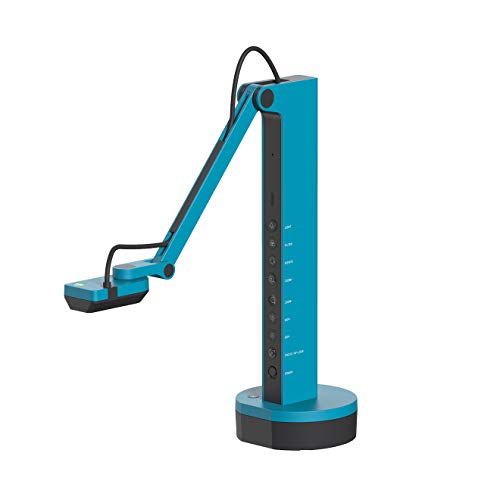
- 8MP sensor with near-4K USB capture
- Wi-Fi, HDMI, and USB connectivity
- 33-foot range and 9–12-hour battery
Best For: Flexible wireless art capture and demonstrations
Best Budget USB Option

- Up to 2592 × 1944 resolution
- Adjustable LED fill light
- Autofocus and USB plug-and-play
Best For: Simple home art capture and online demos
Best for Comfort

- 8MP capture at up to 2448p and 30fps
- Covers artwork up to A3 size
- Foldable multi-joint design with adjustable lighting
Best For: A3 artwork, close-ups, and live instruction
Flexible A3 Capture
PAKOTOO 8MP USB Document Camera

- 2448P autofocus capture with macro capability
- Covers artwork up to A3 size
- Foldable arm with adjustable LED and exposure
Best For: USB-based digitizing of A3 artwork and 3D pieces
High-Resolution Live Capture

- 8MP/2448P capture at up to 30 fps
- A3 coverage with autofocus and macro focus
- Ring light, dual microphones, and foldable design
Best For: Art digitizing combined with live demos and streaming
Versatile Art Demonstrations

- 5MP capture with Full HD streaming up to 30 fps
- 360-degree gooseneck and A3 coverage
- Adjustable fill light, ISO, autofocus, and image flip
Best For: Art capture, instruction, conferencing, and live demonstrations
Best for Fast, Detailed Scanning – IPEVO V4K
If you need document cameras for digitizing art with responsive autofocus and high-resolution capture, the IPEVO V4K is a practical choice. Its 8MP Sony CMOS sensor records images up to 3264 x 2448 pixels, while Full HD streaming can reach 30 fps for smooth demonstrations and live critique sessions.
Best For: Artists, teachers, and creators who prioritize fast focusing, detailed images, and broad Mac, Windows, and Chromebook compatibility.
Pros:
- 8MP capture reaches 3264 x 2448 resolution.
- Autofocus and fast focusing help when switching between artwork and materials.
- Sony CMOS imaging supports noise reduction and color reproduction in dimmer environments.
- Multi-jointed stand and compatibility with Mac, PC, and Chromebook add flexibility.
Cons:
- The maximum shooting area is 13.46 x 10.04 inches, limiting oversized artwork.
- It has no optical zoom.
- Full-resolution streaming is limited to 15 fps.
The V4K balances strong still-image detail with smooth Full HD video. It is especially well suited to desktop artwork and instructional use, though artists digitizing larger pieces may want a model with a wider capture area.
Best for Large Artwork – INSWAN INS-2 UHD 4K
For large pieces and two-page spreads, the INSWAN INS-2 is one of the more capable document cameras for digitizing art. Its 13MP Sony sensor captures 4K video, and the adjustable arm accommodates materials up to A3 size.
Best For: Art instructors, educators, and creators who need large-format capture, 4K output, and presentation-focused controls.
Pros:
- 13MP Sony sensor captures 4K video at 30 fps.
- Flexible multi-joint arm supports documents and artwork up to A3 size.
- Built-in LED, anti-glare sheet, brightness control, and dual-mode autofocus help with varied materials and lighting.
- Documate software includes annotation, recording, scanning, whiteboard tools, and OCR.
Cons:
- The listed compatibility requirements vary by operating system and may require newer software versions.
- Its larger design weighs 2.3 pounds, making it less portable than compact options.
- Macro focus begins at approximately 3.9 inches.
The INS-2 is the strongest fit here when artwork size and presentation quality matter most. Its A3 coverage and 4K output make it useful for large originals, exhibitions, and classroom demonstrations, while the included software adds practical workflow tools.
Best Portable Large-Format Option – OKIOCAM T-4K
The OKIOCAM T-4K stands out among document cameras for digitizing art when you need a compact setup with a surprisingly wide viewing area. Its 8MP Sony Exmor R sensor captures up to 3264 x 2448 pixels, and the camera can show ledger-size materials or both pages of an open book at once.
Best For: Mobile creators, educators, and artists who need detailed capture of large artwork without a bulky camera system.
Pros:
- Large 13.86 x 18.11-inch maximum view accommodates ledger-size materials and artwork.
- 8MP Sony Exmor R sensor provides high-resolution capture and improved low-light performance.
- Streams at up to 30 fps in Full HD and up to 25 fps at maximum resolution.
- Software supports annotation, digital zoom, recording, snapshots, stop-motion, and time-lapse.
Cons:
- The camera is limited to 8MP rather than 13MP.
- It uses digital zoom rather than optical zoom.
- The optional carrying pouch is not included in the listed camera contents.
With its broad capture area and 363-gram body, the T-4K offers a useful mix of portability and coverage. It is a particularly good choice for artists who move between workspaces or need to show large pieces while keeping their equipment compact.
Best Feature-Rich Everyday Pick – INSWAN INS-1 Classic
The INSWAN INS-1 is a versatile everyday option for document cameras for digitizing art, combining 8MP imaging with useful lighting and software controls. It captures up to 3264 x 2448 pixels, supports 30 fps streaming, and offers a 14.72 x 11-inch viewing area for many desk-sized originals.
Best For: Artists, instructors, and remote presenters who want autofocus, built-in lighting, and annotation tools in a compact desktop setup.
Pros:
- 8MP Sony camera captures detailed images up to 3264 x 2448 pixels.
- 30 fps streaming is available across listed resolutions.
- Built-in LED, anti-glare sheet, seven-segment brightness control, and autofocus help with challenging materials.
- Documate software provides zoom, annotation, hue adjustment, rotation, recording, and snapshots.
Cons:
- The 14.72 x 11-inch viewing size may not cover larger artwork.
- It uses digital rather than optical zoom.
- Mac and iPad compatibility depends on the listed operating-system versions and iPad USB-C availability.
The INS-1 is a well-rounded choice for regular desk use, especially when you want built-in illumination and software-based editing or annotation. It provides strong resolution and smooth video without requiring the larger footprint of an A3-focused model.
Best Wireless Pick – IPEVO VZ-X 8MP Document Camera
For artists who need flexible document cameras for digitizing art, the IPEVO VZ-X stands out with wireless, HDMI, and USB connectivity. Its 8MP Sony sensor, swiveling head, built-in LED, and multi-jointed stand make it practical for capturing artwork from different angles and orientations.
Best For: Artists, educators, and presenters who want wireless freedom plus near-4K still capture over USB.
Pros:
- Captures up to 3264 × 2448 in USB mode and 1920 × 1080 in Wi-Fi or HDMI mode.
- Works with computers, mobile devices, Apple TV, projectors, TVs, and monitors.
- Offers a 33-foot wireless range and 9–12 hours of battery life.
- Swiveling head, adjustable stand, small footprint, and built-in LED support varied setups.
Cons:
- Wi-Fi and HDMI modes are limited to 1920 × 1080 capture.
- It weighs 2.6 pounds, making it less lightweight than simpler USB-only models.
- The camera uses manual focus.
The VZ-X is the most versatile choice here for artists who may digitize work at a desk, demonstrate techniques remotely, or display artwork on larger screens. Choose it when connectivity and positioning flexibility matter as much as image quality.
Best Budget USB Option – Kitchbai 5MP Document Camera
This Kitchbai model is a straightforward USB choice for artists seeking document cameras for digitizing art without a complicated setup. It combines a 5MP HD sensor, autofocus, adjustable LED lighting, and a flexible hose-style structure for artwork, live demonstrations, and video calls.
Best For: Beginners and home users who want an affordable, plug-and-play camera for smaller artwork and online demonstrations.
Pros:
- Provides up to 2592 × 1944 resolution from its HD sensor.
- Five-level fill light and three brightness levels help in dim or changing conditions.
- Autofocus and image-invert controls support quick setup for live viewing.
- Compatible with Windows PCs, Macs, MacBooks, Chromebooks, and common conferencing platforms.
Cons:
- USB connectivity requires a wired connection to a compatible device.
- Its listed video capture resolution is 1080p, below the highest still resolution.
- The supplied notes do not specify a maximum viewing area for larger artwork.
With autofocus, lighting controls, and a flexible support arm, this camera is easy to position for casual art capture. It is a sensible starter option, though artists working with large pieces may want a model with a clearly specified wider coverage area.
Best for Comfort – Kitchbai KB-700 4K Visualiser
For artists digitizing larger pieces, the Kitchbai KB-700 offers an A3-size coverage area, 8MP imaging, and a foldable multi-joint design. Its manual brightness controls, one-touch autofocus, and macro range make it a capable USB option among document cameras for digitizing art.
Best For: Artists and instructors capturing A3-sized artwork, 2D materials, and close-up details over USB.
Pros:
- 8MP sensor delivers up to 2448p imaging at 30 frames per second.
- Maximum coverage is listed as 16.5 × 11.6 inches, suitable for A3 paper.
- Three-level lighting and manual brightness controls help manage difficult lighting.
- Foldable, multi-joint construction supports multiple angles and easier storage.
Cons:
- It is USB-only, with no listed wireless or HDMI connectivity.
- The supplied notes do not provide a complete zoom specification.
- Its tall design may require more vertical desk or stand clearance when extended.
The KB-700 is the strongest fit for artists who need to cover artwork larger than standard letter paper while retaining close-up capability. Its foldable structure and built-in microphones also make it useful for teaching or live demonstrations, but it depends on a USB-connected computer.
Flexible A3 Capture – PAKOTOO 8MP USB Document Camera
For shoppers comparing document cameras for digitizing art, the PAKOTOO KB700 offers 2448P capture, autofocus, and an A3-sized coverage area. Its multi-joint design can be positioned for artwork, flat pages, or three-dimensional pieces, while adjustable LED brightness and exposure help compensate for uneven lighting.
Best For: Artists, teachers, and home users digitizing A3 or smaller artwork with a compact USB camera.
Pros:
- 2448P resolution with one-button autofocus and macro capture down to 3.94 inches.
- Covers up to 16.5 x 11.6 inches, accommodating A3 artwork.
- Three LED brightness levels and 10 exposure settings provide useful lighting control.
- Foldable, multi-joint construction supports multiple viewing angles and easier storage.
Cons:
- USB 2.0 only; it does not support HDMI or zoom.
- Not compatible with iPad according to the supplied specifications.
- Initial setup requires selecting “USB Camera” in the computer’s system settings.
The PAKOTOO is a practical choice when flexible positioning and A3 coverage matter more than standalone scanning features. Its USB connection and manual image controls make it suitable for computer-based digitizing workflows, provided your device supports the required connection.
High-Resolution Live Capture – THUSTAR 8MP Document Camera
The THUSTAR 8MP document camera is a strong option among document cameras for digitizing art when you also want live demonstrations or video calls. It combines 2448P output at up to 30 fps, A3 coverage, autofocus, and adjustable lighting in a foldable design that can handle both flat artwork and three-dimensional objects.
Best For: Creators and educators who need high-resolution art capture plus streaming, presentation, or video-conferencing support.
Pros:
- 8MP/2448P output with video capture listed up to 30 frames per second.
- A3 coverage and a multi-joint arm support larger artwork and varied object angles.
- Autofocus includes macro capture as close as 3.94 inches.
- Three-level ring lighting, 10 brightness settings, and dual microphones add versatility.
Cons:
- Uses a USB 2.0 connection.
- Some listed specifications describe the product as a webcam/document camera, so software-based workflow setup may still be required.
- Its broad live-presentation feature set may be more than needed for simple still-art digitizing.
Choose the THUSTAR if digitizing artwork is part of a wider teaching or content-creation setup. Its lighting, microphone, and live-video capabilities make it especially useful for explaining or demonstrating art while capturing it.
Versatile Art Demonstrations – THUSTAND 5MP Document Camera
For a flexible setup involving document cameras for digitizing art, the THUSTAND PA-800 combines a 5MP sensor, A3 coverage, and a 360-degree-adjustable gooseneck. Its one-button flip controls, autofocus, and manual exposure adjustments are useful for switching between artwork capture, demonstrations, and webcam use.
Best For: Home studios, tutors, and creators who want one USB camera for art capture, live instruction, and conferencing.
Pros:
- 5MP resolution reaches 2592 x 1944P, with Full HD streaming up to 30 fps.
- Flexible gooseneck adjusts through 360 degrees and covers up to A3 size.
- Three-level LED fill light and five ISO exposure settings help manage difficult lighting.
- Autofocus, macro capture down to 3.94 inches, and one-button image flipping support detailed demonstrations.
Cons:
- Lower effective still resolution than the supplied 8MP alternatives.
- Requires selecting “USB Camera” in system settings for first use, despite the no-driver setup.
- The supplied details list video resolution as 1080p, so it is not positioned as a 4K camera.
The THUSTAND is a well-rounded choice for users who value positioning flexibility and multi-purpose use. It is particularly appealing when artwork digitizing needs to share space with online teaching, Zoom calls, OBS recording, or live craft demonstrations.
How We Picked the Best Document Cameras for Digitizing Art
We focused on the features that matter most when photographing or scanning artwork from above: image resolution, color and detail potential, capture-area size, lighting control, camera-arm flexibility, and connection options. We also considered compatibility with macOS, Windows, Chromebooks, video-conferencing software, and common image-capture workflows.
Resolution claims are only part of the picture. A well-positioned 8MP camera with even lighting can produce more useful results than a higher-megapixel model with glare, distortion, or an unstable stand. Models with A3 coverage are particularly useful for larger drawings, posters, and sketchbook pages.
Quick Comparison
- Best for straightforward USB use: IPEVO V4K and OKIOLABS OKIOCAM T-4K.
- Best for higher-resolution A3 capture: INSWAN INS-2 UHD 4K 13MP.
- Best for flexible connectivity: IPEVO VZ-X, with Wi-Fi, HDMI, and USB modes.
- Best for built-in illumination: INSWAN, THUSTAR, and several foldable LED-equipped models.
- Best for budget-friendly classroom-style setups: the generic 5MP and 8MP USB models.
Key Buying Factors for Document Cameras for Digitizing Art
Resolution and Image Quality
Choose at least 8MP when you want to preserve fine pencil lines, brush texture, or small lettering. A 4K-capable camera can provide extra detail, but check the actual software output and frame-rate limitations rather than relying only on the label.
Capture Area and Camera Height
A3 support gives you more room for larger artwork and reduces the need to stitch multiple images. Confirm the camera’s working distance and arm reach, especially if you plan to digitize thick books, canvas boards, or framed pieces.
Lighting and Glare Control
Built-in LEDs are useful in dim rooms, but direct light can create hotspots on glossy paint or coated paper. Look for adjustable brightness, diffused lighting, and enough stand flexibility to angle the camera and lights independently when possible.
Connections and Software
USB is usually the simplest choice for a computer-based workflow. HDMI can be helpful for direct display, while Wi-Fi adds placement freedom but may introduce setup steps or compression. Verify operating-system support and whether your preferred capture app recognizes the camera as a standard webcam.
Who Should Buy Which Document Cameras for Digitizing Art?
Artists digitizing small drawings or prints should prioritize sharp USB capture, easy positioning, and reliable software compatibility. Artists working with larger pages should choose an A3-capable model with a stable, adjustable arm. Users photographing glossy or mixed-media work should favor flexible lighting and camera positioning over maximum resolution alone.
Teachers and creators who also stream demonstrations may benefit from built-in microphones, image inversion, foldable designs, or multiple connection modes. Finally, traveling users should look for a compact foldable camera, while anyone building a more permanent digitizing station should prioritize stand stability, consistent lighting, and the highest practical image quality.