
Good lighting can make a bigger difference to your MacBook camera image than upgrading your webcam. The best ring lights for MacBook video calls add flattering, adjustable illumination without taking up much desk space.
We’ve gathered 10 compact clip-on and desktop options for Zoom, Teams, FaceTime, streaming, and remote work. The selections cover portable designs, high color accuracy, multiple lighting modes, and flexible mounting setups.
Best 10 Ring Lights for Macbook Video Calls Picks for 2026
Best Clip-On Value

- Three color temperatures and five brightness levels
- Soft, even clip-on lighting for laptops and monitors
- USB-powered, portable design
Best For: Remote workers and students wanting simple MacBook call lighting
Best Premium Lighting
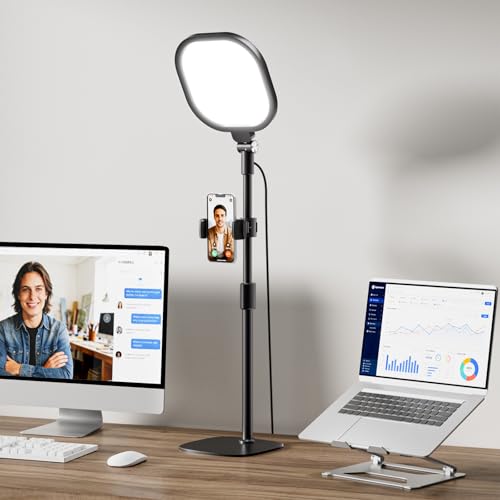
- CRI above 98 for accurate-looking color
- 30 modes with dimming and color adjustment
- Tall stand and rotating light head
Best For: Frequent callers and creators wanting polished desktop lighting
Best Screen-Safe Design

- 50 lighting combinations for varied rooms
- Diffused panel avoids harsh ring reflections
- Clip, adjustable stand, and device holder included
Best For: MacBook users wanting flexible, soft video-call lighting
Best Compact Kit
NEEWER BR60 Clip-On Ring Light

- Five color modes and 10-level dimming
- Includes laptop clip and mini desk tripod
- USB-powered with a 6-foot cable
Best For: Small desks, travel, and occasional video creators
Best Soft-Light Pick
LitONES Ring Light for MacBook Video Calls

- Soft, glare-reducing four-layer panel
- CRI 97.8 with 50 lighting combinations
- Screen-safe clip and portable USB design
Best For: Long video meetings, streaming, and flattering laptop lighting
Best Flexible Setup
InnoGear Ring Light for MacBook Calls

- Clip-on or standalone desktop operation
- Three colors and 10 brightness levels
- 360-degree horizontal and 180-degree vertical adjustment
Best For: Flexible MacBook, monitor, streaming, and desk setups
Best Desktop Stand
LitONES Zoom Light for MacBook Video Calls

- Large 7-inch edge-lit panel
- 22–32.5-inch adjustable height
- Stable metal base with rotating phone holder
Best For: Fixed home-office desks and larger MacBook video setups
Best Overall Clip-On
ACMEZING Video Conference Ring Light

- Five color temperatures and five brightness levels
- Clamp and flexible tripod included
- USB powered with a 2-meter cable
Best For: Flexible laptop, monitor, desk, and travel setups
Best Desk Setup
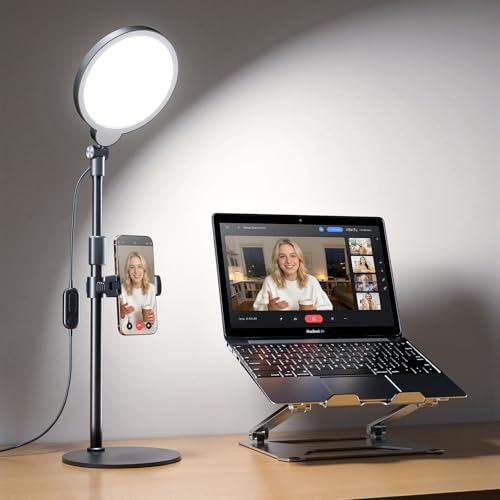
- High CRI 97.8 edge-lit illumination
- Adjustable height and multi-directional head
- Stable base with built-in phone holder
Best For: Freestanding home-office and creator setups
Best Portable Design
Evershop Clip-On Laptop Ring Light

- Lightweight 5-inch foldable design
- Three colors with adjustable brightness
- Stand supports laptops, phones, and tablets
Best For: Portable video calls, travel, and flexible device setups
Best Clip-On Value – Cyezcor Monitor Ring Light
If you need ring lights for MacBook video calls without adding much bulk to your desk, the Cyezcor Video Conference Lighting Kit is a practical clip-on option. It attaches to a laptop or monitor, runs from USB power, and offers adjustable brightness and color temperature for changing room conditions.
Best For: Remote workers, students, and anyone seeking a portable clip-on light for Zoom calls and everyday video conferencing.
Pros:
- Three color temperatures from 3200K to 6800K and five brightness levels
- Ring design provides soft, even illumination with reduced glare and shadows
- USB-powered and compatible with laptops, displays, chargers, and power banks
- Clip rotates for flexible positioning and is easy to carry
Cons:
- It has fewer brightness settings than some competing models
- The supplied notes do not specify a stand for use away from a screen
This is a straightforward choice when you want compact, adjustable lighting that mounts directly to your MacBook or monitor. Its simple controls and USB connectivity suit routine calls, though a separate stand may be preferable for off-screen setups.
Best Premium Lighting – LitONES 30-Mode Video Light
For polished ring lights for MacBook video calls, the LitONES Video Conference Lighting offers a larger square light head, high color rendering, and extensive adjustment. Its stand-based design can sit behind a laptop or monitor, making it useful when a screen clip is not ideal.
Best For: Professionals, streamers, and frequent video callers who prioritize soft, accurate-looking illumination and flexible placement.
Pros:
- CRI above 98 is designed to reproduce skin tones and colors accurately
- Three color temperatures and 10 brightness levels provide 30 lighting modes
- Four-layer optical diffusion and edge lighting help reduce harsh glare
- Adjustable 20.5- to 28.5-inch stand, 360-degree lamp rotation, and included phone holder
Cons:
- The stand requires more space than a direct clip-on light
- Its feature set may be more than needed for occasional calls
The LitONES is the most studio-oriented option in this group, with strong color-rendering claims and a broad range of positioning options. Choose it if consistent, comfortable lighting matters more than having the smallest possible setup.
Best Screen-Safe Design – LitONES Diffused Laptop Light
The LitONES Ring Light for Laptop is designed for people comparing ring lights for MacBook video calls and wanting soft illumination without visible ring reflections. Its hanging clip fits laptops and monitors, while the adjustable stand and integrated device holder add flexibility for desk or travel use.
Best For: MacBook users, students, and creators who want screen-safe mounting, diffused light, and multiple ways to position the lamp.
Pros:
- Five color temperatures and 10 brightness levels provide 50 lighting combinations
- Four-layer diffused and edge-lit panel softens shadows without traditional ring reflections
- Screen-safe clip supports 1.57- to 2.3-inch extension with adjustable height and angle
- USB-powered, lightweight design includes a stand that can hold a phone or iPad
Cons:
- It requires a USB power source rather than batteries
- The mounting setup needs adjustment to balance correctly on a screen
This model stands out for combining a laptop-friendly clip with a fallback desk stand. Its broad lighting range and diffused panel make it a strong all-around pick for calls, interviews, streaming, and other camera-facing work.
Best Compact Kit – NEEWER BR60 Clip-On Ring Light
The NEEWER BR60 is a compact option for ring lights for MacBook video calls, especially if you also want a small tripod for desk use. It clips to laptops, monitors, and webcams, offers five preset lighting modes, and includes USB power for convenient everyday operation.
Best For: Budget-conscious callers and creators who want one small light for laptop mounting, desktop use, selfies, and short-form video.
Pros:
- Five lighting modes cover warm, mixed, and cool looks from 3000K to 6000K
- 10-level dimming adjusts brightness from 10% to 100%
- Includes a clip and mini desk tripod with pan and tilt adjustment
- USB-powered with a built-in 6-foot cable and compatibility with common USB sources
Cons:
- The clip is recommended for laptops, monitors, and displays rather than smartphones
- Its compact 5-inch form is less substantial than larger studio-style lights
The BR60 is a versatile starter kit for users who want both screen-mounted and tabletop lighting. Its compact size and included tripod make it especially useful for small desks, travel, and occasional content creation.
Best Soft-Light Pick – LitONES Ring Light for MacBook Video Calls
For ring lights for MacBook video calls, the LitONES V01C stands out for its soft, glare-reducing illumination and high color accuracy. Its screen-safe clip fits most laptops and monitors, while USB power makes setup straightforward.
Best For: Long video meetings, streaming, and users who want flattering, natural-looking light in a compact clip-on design.
Pros:
- Four-layer optical soft panel helps reduce glare, hotspots, and harsh shadows.
- CRI 97.8 lighting supports vivid, true-to-life on-camera colors.
- Offers 5 color temperatures, 10 brightness levels, and 360-degree rotation with 180-degree tilt.
- Stretchable 2–2.5-inch clip fits many laptops and monitors without taking desk space.
Cons:
- Requires a suitable 5V/2A USB power source to avoid flickering.
- Its compact light head may provide less overall room illumination than a larger desktop lamp.
This is a strong choice when your priority is comfortable, polished face lighting directly beside your MacBook screen. The portable build and screen-safe mount are especially useful for changing workspaces.
Best Flexible Setup – InnoGear Ring Light for MacBook Calls
The InnoGear computer light is a practical option among ring lights for MacBook video calls, with clip-on and standalone modes for different desk layouts. Its adjustable stand, remote control, and multiple lighting settings make it easy to reposition between meetings and recordings.
Best For: MacBook users who want flexible placement, simple controls, and a light that can also support streaming or content creation.
Pros:
- Provides white, warm, and natural color modes with 10 brightness levels.
- Rotates 360 degrees horizontally and 180 degrees vertically for flexible aiming.
- Works as either a clip-on light or a standalone desktop light.
- Non-slip sponge pads help protect attached laptops, monitors, or desktops.
Cons:
- The clip is designed for screens between 1.55 and 2.35 inches thick.
- For consistent performance, it requires a 5V/2A-or-higher adapter or power bank rather than a typical laptop USB port.
Choose this model if flexibility matters more than maximum color-temperature control. The dual mounting options are convenient for a MacBook setup that changes from desk work to mobile use.
Best Desktop Stand – LitONES Zoom Light for MacBook Video Calls
For a more substantial alternative to clip-on ring lights for MacBook video calls, this LitONES desk light pairs a large 7-inch panel with an adjustable stand. Its edge-lit design aims to provide soft, even illumination while keeping the light positioned beside or behind your laptop.
Best For: Home offices and fixed desk setups where height adjustment, stability, and a phone holder are useful.
Pros:
- Edge-lit technology is designed to reduce harsh glare and provide even lighting.
- CRI 97.8 supports natural-looking colors on video.
- Adjustable height ranges from 22 to 32.5 inches, with 360-degree light rotation.
- Sturdy metal base includes a non-slip, scratch-resistant pad and a rotating phone holder.
Cons:
- The 1,163-gram stand is less portable than a compact clip-on light.
- It requires a 10W USB power supply rated at 5V/2A.
- Only three color temperatures are listed, fewer than some competing models.
This model makes the most sense when you have room for a dedicated light stand and want consistent positioning. Its height range and metal base can be helpful for larger desks or multi-purpose video setups.
Best Overall Clip-On – ACMEZING Video Conference Ring Light
If you want ring lights for MacBook video calls that can adapt to changing rooms and setups, this ACMEZING model is a versatile choice. It clips onto a laptop or monitor, offers five color temperatures and five brightness levels, and can also be mounted on the included flexible tripod.
Best For: Remote workers and creators who want flexible laptop, monitor, desk, or travel mounting.
Pros:
- Five color temperatures from 3200K to 6500K and five brightness levels.
- Soft ring-light design helps reduce harsh shadows on video.
- Includes a stable padded clamp and flexible mini tripod.
- USB-powered with a 2-meter cable for convenient placement.
Cons:
- Requires access to a USB power source.
- Its compact light may provide less coverage than a larger desk model.
The combination of clip and tripod mounting makes this a practical all-around option for MacBook calls, streaming, and occasional travel. Its broad color-temperature range is especially useful when room lighting changes.
Best Desk Setup – Yarrashop 30-Mode Ring Light
For a permanent home-office setup, this Yarrashop desk ring light offers more height and positioning control than a basic clip-on. It uses edge-lit illumination, has 30 lighting modes, and adjusts from 20.5 to 32 inches to work around a computer monitor.
Best For: Home-office users, teachers, streamers, and creators who prefer a freestanding light.
Pros:
- High CRI 97.8 lighting is designed for true-to-life color reproduction.
- Three color temperatures and 10 brightness levels provide useful adjustments.
- Height adjusts from 20.5 to 32 inches, with 360-degree horizontal and 180-degree vertical rotation.
- Sturdy anti-scratch base and built-in 360-degree phone holder add desk versatility.
Cons:
- It occupies desk space instead of attaching directly to a MacBook.
- USB power adapter is not included.
This is a strong pick when you want ring lights for MacBook video calls positioned beside or behind the computer. The adjustable height and high color-rendering rating make it suitable for both calls and content creation.
Best Portable Design – Evershop Clip-On Laptop Ring Light
This compact Evershop light is designed for shoppers who need portable ring lights for MacBook video calls. Its adjustable stand is intended for straight or curved screens, while the foldable design and 7.1-ounce weight make it easy to carry between home, office, and travel locations.
Best For: Travelers and users who want a compact laptop light with phone and tablet support.
Pros:
- Lightweight 5-inch design folds for easier storage and transport.
- USB plug-and-play operation works with laptops, PCs, power banks, and charging plugs.
- Three lighting colors and adjustable brightness support different environments.
- Stand can hold a phone or iPad and is designed for straight or curved screens.
Cons:
- The small 5-inch light may illuminate a narrower area than a full-size desk ring light.
- It requires a USB power source and does not use standalone batteries.
The Evershop stands out for portability and its multifunctional mounting design. It is a convenient choice for MacBook calls when you need a light that can travel with you and double as a phone-support stand.
How We Picked the Best Ring Lights for Macbook Video Calls
We focused on lights designed for laptop or monitor use, prioritizing easy setup, adjustable brightness, useful color-temperature controls, and compatibility with typical MacBook video-call setups. We also considered whether each model uses a monitor clip, desktop stand, or both, since mounting flexibility affects how easily you can position light near the camera.
Other considerations included portability, claimed color-rendering performance, diffuser design, control simplicity, and the amount of workspace required. A compact light may suit frequent travelers, while a stand-mounted model can offer more precise positioning at a permanent desk.
Quick Comparison
| Type | Best For | What to Look For |
|---|---|---|
| Clip-on ring light | Small desks and travel | Secure grip, low weight, adjustable angle |
| Light with desktop stand | Flexible home-office setups | Stable base, height adjustment, cable reach |
| High-CRI light | Natural-looking skin tones | CRI rating, diffuser, color controls |
| Multi-mode light | Users who change rooms or backgrounds | Brightness range and color-temperature options |
Key Buying Factors for Ring Lights for Macbook Video Calls
Mounting and Placement
A clip-on light should attach securely without blocking the MacBook camera or placing excessive pressure on the display. Check the clip opening and padding, especially if you use a monitor, laptop stand, or protective case. A desktop stand is better when you want the light slightly above or beside the screen.
Brightness and Color Control
Look for multiple brightness levels so you can compensate for dim rooms or bright windows. Adjustable color temperature is useful for matching warm household bulbs, cool daylight, or the appearance you want on camera. Diffused LEDs generally produce softer shadows than exposed bulbs.
Color Accuracy and Eye Comfort
Higher CRI claims can indicate more natural colors, though real-world results also depend on diffusion and placement. Avoid aiming a very bright light directly at your eyes. A dimmer setting, wider diffuser, or position slightly above the camera can improve comfort during long meetings.
Power and Controls
Most compact models draw power through USB, so verify that the included cable reaches your preferred position. Inline controls are convenient, while button or remote controls may be easier when the light sits out of reach. Confirm whether a wall adapter is included or required.
Who Should Buy Which Ring Lights for Macbook Video Calls?
Choose a clip-on model if you want the simplest solution for a MacBook, limited desk space, or frequent travel. Pick a stand-based light if you need more control over height and angle or use an external monitor. A high-CRI option is well suited to consultants, educators, creators, and anyone whose on-camera appearance needs accurate color. If your lighting changes throughout the day, prioritize models with several brightness and color settings. For occasional calls, a compact five-inch light may provide the best balance of cost, portability, and useful illumination.