
Reading notes while maintaining natural eye contact can make livestreams feel more polished and easier to follow. The best teleprompter depends on your camera, screen source, room layout, and how often you move your setup.
We compared 10 options ranging from compact phone models to full-size monitor teleprompters, focusing on readability, compatibility, controls, portability, and setup convenience.
Best 10 Teleprompters for Livestreaming Picks for 2026
Premium All-in-One Pick

- Built-in display with no extra mobile screen required
- HDR-enabled 1080p60 webcam included
- Camera Hub provides extensive script and camera controls
Best For: Streamers wanting an integrated desktop teleprompter and webcam
Versatile Monitor Pick
NEEWER X11 2-in-1 Teleprompter

- Built-in LCD monitor supports prompts without a tablet
- Mirrors compatible phones and tablets
- Can operate as a second Windows or macOS display
Best For: Users needing flexible computer and mobile display connections
Large-Format Pick
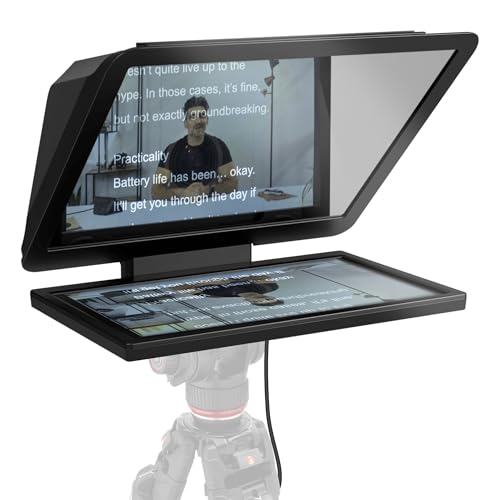
- 15.6-inch Full HD display for extended-range reading
- Detachable screen doubles as a spare monitor
- Fits DSLR, mirrorless, and studio-camera setups
Best For: Studio presenters who need a large, readable display
Portable Tablet Pick

- Folds flat and includes a carry case
- 14-inch beamsplitter supports reading up to 10 feet
- Remote and app control adjust scrolling and text size
Best For: Mobile creators using phones or tablets for scripts
Best Built-In Display

- Built-in 9-inch FHD display
- Shows scripts, chat, or any computer window
- Works with PCs, Macs, cameras, webcams, and Stream Deck
Best For: Streamers wanting an integrated, computer-controlled setup
Best Large Tablet Format

- 14-inch design with 75% light-transmission glass
- Remote control and iOS/Android app support
- Fits tablets up to 9.84 by 8.68 inches
Best For: Tablet-based livestreaming, teaching, and presentations
Best Portable Phone Setup
LENSGO TC7S Portable Teleprompter

- Folds in one second for travel
- Bluetooth remote with TCQI app controls
- Supports smartphones and tablets below 8 inches
Best For: Mobile livestreamers, vloggers, and interview creators
Large-Screen Flexibility

- 16-inch clear beam-splitter glass
- Supports devices up to 16 inches
- Foldable and Bluetooth controlled
Best For: Large tablet-based livestream and recording setups
Portable Phone Prompter
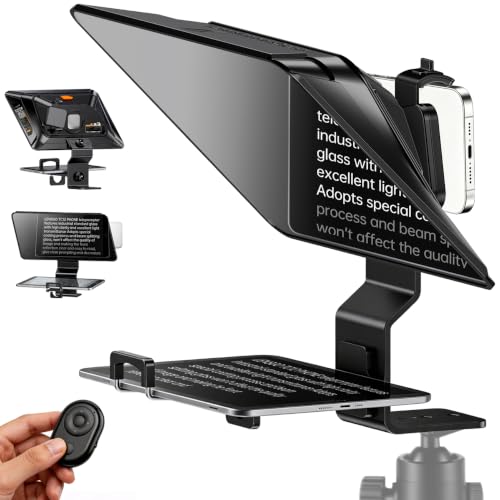
- 14.5-inch wide-angle HD glass
- Supports phones and tablets
- Bluetooth remote with TCQI app
Best For: Mobile, smartphone-based livestreaming and vlogging
Quick-Setup Camera Kit

- No-assembly foldable design
- Supports cameras, tablets, and phones
- 12-inch display with app and remote control
Best For: Flexible camera-based livestreaming and portable production
Premium All-in-One Pick – Elgato Prompter Camera Set
For creators who want streamlined teleprompters for livestreaming, the Elgato Prompter Camera Set combines a built-in display with an HDR-enabled Full HD webcam. It connects to a PC or Mac, works with common streaming and video-call software, and lets you move scripts or other windows onto the prompter display without a phone or tablet.
Best For: Streamers and presenters seeking an integrated, desktop-controlled setup.
Pros:
- Built-in display eliminates the need for a separate phone or tablet.
- Supports HDR-enabled 1080p60 video and customizable settings through Camera Hub.
- Works with OBS, Zoom, Teams, Stream Deck, and a range of cameras and wide lenses.
- Includes useful controls such as script management, contrast adjustment, crosshair overlay, and AI tracking.
Cons:
- Mac users must install free DisplayLink software.
- Android use requires free DisplayLink Presenter software.
- Its tabletop design may be less suitable for mobile or studio-mounted setups.
This is a particularly convenient choice when reducing setup complexity matters. The built-in screen, webcam, and Camera Hub controls make it a strong desktop option for frequent livestreaming and calls.
Versatile Monitor Pick – NEEWER X11 2-in-1 Teleprompter
The NEEWER X11 is a flexible option among teleprompters for livestreaming, with a built-in LCD monitor that can mirror a compatible phone or tablet or function as a second Windows or macOS display. Its 11-inch beam-splitter glass supports lenses with threads up to 72mm and focal lengths from 35mm to 200mm.
Best For: Livestreamers who want phone mirroring and external-monitor flexibility in one unit.
Pros:
- Built-in LCD monitor means prompts can be displayed without a separate tablet or phone.
- Supports computer use as a second display and screen mirroring from compatible mobile devices.
- Multi-coated glass offers 75% light transmission and a stated reading distance of up to 2.5 meters.
- Adjustable Arca-type holder and 1/4-inch and 3/8-inch mounting holes support varied setups.
Cons:
- Some connection methods require drivers or specific USB-C, USB-A, or HDMI hardware.
- Mobile mirroring is limited to phones with DP protocol support.
- Voice sync is not supported.
The X11 stands out for its multiple connection modes and built-in monitor. Check your computer ports and phone’s DP compatibility before buying, especially if you want a plug-and-play mobile workflow.
Large-Format Pick – Elgato Prompter XL
For presenters who need comfortable long-distance reading, the Elgato Prompter XL uses a detachable 15.6-inch Full HD display. Its extended range suits larger filming spaces, while the removable screen can also serve as a spare monitor for video conferencing or multitasking.
Best For: Studio presenters, educators, and creators reading scripts from a greater distance.
Pros:
- Large 15.6-inch Full HD display improves readability at extended range.
- Detachable screen can be reused for conferencing and multitasking.
- Designed to fit setups ranging from DSLRs and mirrorless cameras to studio cameras.
- Voice Sync can scroll scripts at a natural pace with compatible hardware.
Cons:
- At 7.43 pounds, it is heavier than more compact teleprompter options.
- Voice Sync requires an NVIDIA RTX GPU or Apple M1 and better.
- The full-sized design takes up more space than a typical desktop prompter.
The Prompter XL is best when reading comfort and camera compatibility take priority over portability. Its detachable display adds value for creators who can also use a spare monitor in their workspace.
Portable Tablet Pick – NEEWER X14 III Teleprompter
The NEEWER X14 III is a portable choice for teleprompters for livestreaming, combining a 14-inch beamsplitter, a fold-flat design, and included remote control. It supports tablets and phones up to 8.7 inches wide, while its app and Bluetooth remote provide hands-on control over scrolling, page turns, and font size.
Best For: Mobile crews and creators using phones or tablets who want a travel-friendly, remotely controlled prompter.
Pros:
- Requires no assembly and folds into the included portable carry case.
- 14-inch beamsplitter offers 71% light transmission and a stated reading range of up to 10 feet.
- Included RT113 remote controls playback, scroll speed, page turns, and font size.
- Manfrotto 501PL-compatible quick-release plate and multiple mounting threads support flexible rigs.
Cons:
- Prompts require a compatible phone or tablet rather than a built-in display.
- The NEEWER app requires iOS 11.0 or Android 6.0 or later.
- At 5.2 pounds, it is portable but not especially lightweight.
The X14 III is a practical fit for presenters who already use a tablet or phone for scripts. Its no-assembly design, carry case, and silent remote make it convenient for courses, presentations, and livestream setups on the move.
Best Built-In Display – Elgato Prompter
The Elgato Prompter is a strong choice among teleprompters for livestreaming if you want to read scripts or Twitch chat without adding a separate tablet or phone screen. Its built-in 9-inch FHD display connects to a PC or Mac and can show any movable window or app.
Best For: Streamers and video-call users who want an integrated, desktop-controlled prompting setup.
Pros:
- Built-in display eliminates the need for an extra tablet or smartphone screen.
- Can display scripts, Twitch chat, or other computer windows through drag-and-drop control.
- Supports DSLR cameras, webcams, smartphones, and a broad range of lenses.
- Works with the Camera Hub app and Stream Deck for added control and customization.
Cons:
- Mac users need free DisplayLink software, while Android users need DisplayLink Presenter.
- Requires a PC or Mac rather than a third-party mobile app.
- Manual-focus and lens compatibility details should be checked against your camera setup.
Choose this model when minimizing desk clutter and maintaining eye contact are priorities. It is especially convenient for livestreaming and video conferencing, though its computer-based workflow may be more than phone-only creators need.
Best Large Tablet Format – NEEWER X12 Teleprompter
The NEEWER X12 is a practical option among teleprompters for livestreaming when you already use an iPad, tablet, or smartphone for scripts. Its 14-inch aluminum-alloy design uses beam-splitter glass with 75% light transmittance and supports reading from up to 10 feet away.
Best For: Livestreamers, online teachers, and presenters who want a larger tablet-based display with remote page control.
Pros:
- Fits smartphones and tablets up to 9.84 by 8.68 inches, including iPad and iPad Air models.
- Included RT-110 remote and NEEWER app support pausing, page turns, and speed adjustments.
- Adjustable hood and beam-splitter glass help keep reflected text clear.
- Collapsing aluminum-alloy construction includes a carrying case for storage and transport.
Cons:
- Not compatible with wide-angle lenses; the camera lens focal length needs to exceed 28mm.
- Not compatible with the 12-inch iPad Pro.
- Requires a separate phone or tablet to display the script.
The X12 makes sense for creators who prefer a roomy tablet screen and remote-controlled scrolling. Confirm both your lens focal length and tablet dimensions before buying, since those compatibility limits are central to the setup.
Best Portable Phone Setup – LENSGO TC7S Portable Teleprompter
The LENSGO TC7S is a compact pick among teleprompters for livestreaming, designed for smartphone creators who need a setup that folds in one second. Its 9.7-inch format uses beam-splitter glass and pairs with a Bluetooth remote and mobile app for hands-free script control.
Best For: Mobile vloggers, live broadcasters, interviewers, and creators who frequently shoot indoors and outdoors.
Pros:
- One-second folding design is convenient for travel and quick setup.
- Works with smartphones and tablets below 8 inches, including iPhone and Android devices.
- TCQI app supports script entry, TXT uploads, scrolling control, and font or background changes.
- Bluetooth remote can pause, turn pages, and adjust scrolling speed.
Cons:
- Designed around phones and smaller tablets rather than larger tablet displays.
- Requires the TCQI app for the remote-controlled script workflow.
- The product details list a 7.9-inch screen size, so buyers should verify the exact fit for their device.
Pick the TC7S if portability and phone compatibility matter more than a full-size studio teleprompter. Its foldable body and app-based controls suit mobile livestreaming, while larger tablets or more elaborate camera rigs may require another model.
Large-Screen Flexibility – FEELWORLD TP16
For livestreamers who want a large reading surface, the FEELWORLD TP16 is one of the more accommodating teleprompters for livestreaming. Its 16-inch beam-splitter glass supports larger tablets while remaining compatible with DSLR cameras, small and medium camcorders, and webcams.
Best For: Creators who prefer a large tablet-based prompting display for studio shoots, speeches, or livestream setups.
Pros:
- 16-inch HD glass with 70% light transmission for clear text.
- Supports prompting devices up to 16 inches.
- Works with DSLR cameras, camcorders, and webcams.
- Foldable design and 135° hinged glass frame simplify setup and viewing-angle adjustment.
Cons:
- Its larger 16-inch format may require more setup space than compact models.
- At 4.74 pounds, it is less travel-friendly than smaller teleprompters.
The TP16 stands out when screen size and device flexibility matter most. App and Bluetooth control add convenience, while the foldable frame helps make storage and setup more manageable.
Portable Phone Prompter – LENSGO TC12P
The LENSGO TC12P is built for creators who move between locations and shooting orientations. Its 14.5-inch wide-angle glass supports smartphones and tablets, while the included Bluetooth remote and TCQI app help you control scripts without touching your recording device.
Best For: Smartphone-first creators making YouTube, TikTok, Zoom, vlog, and walk-and-talk content.
Pros:
- Supports horizontal or vertical shooting with quick assembly and disassembly.
- 14.5-inch HD glass fits phones and iPads up to 7.3 inches horizontally.
- Includes four phone lens rings and an adjustable phone/tablet holder.
- Bluetooth remote and app support scrolling, speed adjustment, TXT imports, and mirror mode.
Cons:
- Designed around smartphone and tablet shooting rather than broad camera compatibility.
- The listed device limit does not accommodate every larger tablet.
With anti-glare coated glass, foam light blocking, and an adjustable front panel, the TC12P is a practical choice for mobile teleprompters for livestreaming. Its strongest advantage is quick, phone-centered operation.
Quick-Setup Camera Kit – GVM TQ-MB
The GVM TQ-MB combines broad device support with a no-assembly design, making it a strong option for teleprompters for livestreaming when setup speed matters. It works with cameras, smartphones, and tablets, and includes mounting options for accessories such as microphones and fill lights.
Best For: Livestreamers and video teams using interchangeable cameras or tablets who want a portable, adjustable setup.
Pros:
- No-assembly design uses hand-tightening screws for quick setup.
- Supports smartphones, tablets, DSLRs, and camcorders up to the listed size limits.
- 12-inch HD display is readable from up to 10 feet, according to the supplied specifications.
- Includes app and remote controls for text, font size, speed, color, and mirroring adjustments.
Cons:
- Not compatible with the 12-inch iPad Pro.
- The 12-inch display is smaller than the largest model in this roundup.
- Its range of adjustment options may require more initial positioning than a simpler setup.
The TQ-MB is a versatile middle ground for creators who alternate between camera and tablet workflows. Its foldable aluminum-alloy build, tripod mounting holes, cold shoes, and carrying case add useful flexibility for portable production.
How We Picked These Teleprompters for Livestreaming
We focused on the factors that matter during real broadcasts: whether the unit can fit your camera and lens, how clearly text appears through the beamsplitter glass, how easily you can control scrolling, and how much space the setup requires. We also considered whether each model uses a built-in display, a phone or tablet, or a separate monitor.
The selection includes compact options for creators who stream from a desk, larger teleprompters for studio cameras, and folding designs for presenters who need to travel. Features such as remote control, app support, screen mirroring, adjustable height, and quick assembly were weighed according to their practical value rather than treated as automatic advantages.
Quick Comparison
| Best For | Look For | Typical Advantage |
|---|---|---|
| Desk livestreaming | Compact body and integrated display | Simple, tidy setup |
| Tablet-based scripts | Large tablet opening and sturdy support | Flexible text and app choices |
| Studio cameras | Large glass and broad lens compatibility | Better viewing distance |
| Travel | Folding construction and low weight | Fast packing and setup |
| Hands-free operation | Remote or app control | Easier speed and cue adjustments |
Key Buying Factors for Teleprompters for Livestreaming
Camera and Lens Compatibility
Check the mounting method, lens opening, and clearance before buying. A teleprompter must accommodate your camera body and lens without blocking controls, focus movement, or the view of a webcam. Some models suit phones and compact cameras, while larger units are better for DSLRs, mirrorless cameras, and studio cameras.
Screen Size and Reading Distance
A larger screen is easier to read from farther away, but it adds weight and takes up more desk or tripod space. For close-up desk streams, a compact 9.7- to 12-inch design may be sufficient. Choose a larger 14- or 16-inch model if you stand farther from the camera or need larger text.
Display Source and Brightness
Built-in screens simplify setup, while tablet and phone models offer more flexibility with scripts and teleprompter apps. Make sure the display can produce enough brightness and contrast for your lighting conditions. Strong front lighting can make faint text harder to see through the glass.
Scrolling Controls and Setup
Remote controls and app compatibility let you change speed, pause, and move through a script without reaching toward the camera. Also consider assembly time, cable management, height adjustment, and whether the unit folds for storage.
Who Should Buy Which Teleprompters for Livestreaming?
- Choose an integrated Elgato-style model if you want a streamlined desk setup for streaming, video calls, or regular presenting.
- Choose a NEEWER X11, X12, or X14-style model if you want a tablet or monitor-based workflow with flexible screen options and remote control.
- Choose a larger Elgato Prompter XL or FEELWORLD TP16 for studio work, longer camera distances, or scripts that need comfortable viewing.
- Choose a LENSGO portable model if you travel frequently or use a phone and need a quick, compact teleprompter.
- Choose a GVM or similar liftable kit if adjustable positioning and compatibility with multiple camera types are priorities.
Before ordering, measure your camera, lens, tripod or desk space, and preferred reading distance. The right fit will improve eye contact without making your livestream harder to assemble or operate.