
The best audio mixers with USB interface combine hands-on level control with simple computer connectivity, making them useful for podcasts, livestreams, rehearsals, and recording. The right model depends on how many inputs you need, whether you want built-in effects, and how much control you expect over routing and monitoring.
This roundup covers compact streaming mixers, flexible analog consoles, and app-controlled digital systems. Use the buying guide below to narrow your choices by workflow, connectivity, sound control, and budget.
Best 10 Audio Mixers with USB Interface Picks for 2026
Best for Expandable Digital Mixing

- 18 channels and 12 buses
- 16 programmable Midas-designed preamps
- 18 x 18 bidirectional USB interface
Best For: Live bands, studios, and multichannel recording
Best for Gaming and Streaming

- XLR input with 48V phantom power
- Independent mic, line, headphone, and output controls
- Custom sound effects and voice modes
Best For: Beginner streamers using an XLR microphone
Best for Traditional Analog Mixing

- 12-input, 2/2-bus analog layout
- XENYX preamps and compressors
- British-style three-band EQs
Best For: Home studios and small live setups
Best for Compact Live Streaming

- Six-channel USB mixer with loopback
- Two phantom-powered microphone inputs
- Includes Cubase AI and WaveLab Cast
Best For: Streamers and creators needing a compact mixer
Best for Feature-Rich Mixing
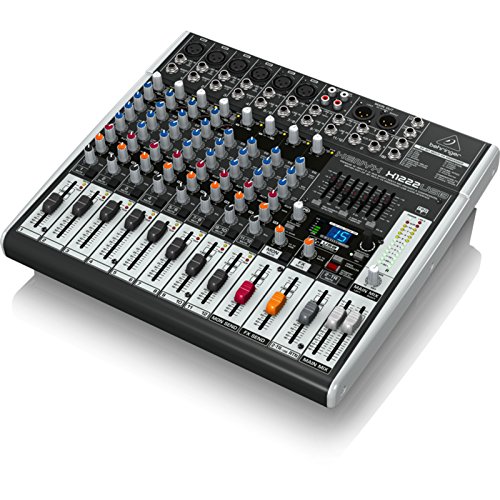
- Four phantom-powered XENYX mic preamps
- One-knob compressors and British-style EQ
- 24-bit effects processor and USB interface
Best For: Vocalists, small live setups, and recording
Best for Karaoke and Live Events

- Eight channels with 48V phantom power
- USB recording, MP3 playback, and Bluetooth 5.0
- Thin design with LED display and reverb
Best For: Karaoke, conferences, and small live events
Best for Streaming and Podcasting

- Stereo USB interface for computer or mobile devices
- Mixes PC and gaming audio into streaming output
- Analog mixing with XLR, TRS, and RCA outputs
Best For: Streaming, podcasting, and computer-audio setups
Versatile DJ Pick

- Eight channels with XLR and 1/4-inch inputs
- Bluetooth, USB-A MP3 playback, and DSP effects
- Rugged chassis with +48V phantom power
Best For: DJs, karaoke, and small live performances
Compact Podcast Pick
Behringer XENYX 302USB Mini Mixer
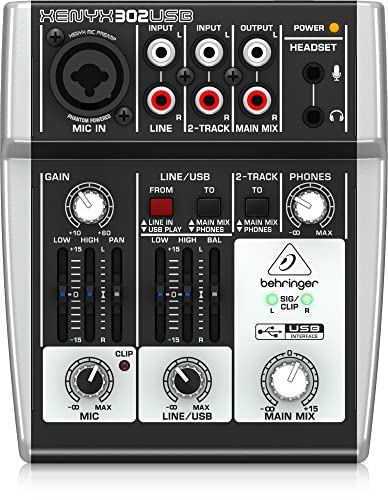
- Five-input design in an ultra-compact enclosure
- Stereo USB/audio interface for computer connection
- XENYX mic preamp with phantom power
Best For: Podcasting, streaming, and home studios
Effects-Focused Pick

- Four XLR inputs with selectable +48V phantom power
- Bluetooth and USB-drive playback support
- 16 DSP effects plus 3-band EQ
Best For: Karaoke, small studios, and effect-heavy live mixing
Best for Expandable Digital Mixing – Behringer X AIR XR18
For musicians and live engineers who need audio mixers with usb interface connectivity, the Behringer X AIR XR18 combines 18 channels, tablet control, and an 18 x 18 bidirectional USB interface. Its 16 programmable Midas-designed preamps and built-in Wi-Fi router make it suitable for detailed studio or live setups.
Best For: Live bands, recording setups, and users who want extensive digital routing with tablet-based control.
Pros:
- 18-channel digital mixer with 12 buses.
- Includes 16 programmable Midas-designed microphone preamps.
- Built-in tri-mode Wi-Fi router avoids requiring an external router.
- 18 x 18 bidirectional USB interface supports direct multichannel recording.
Cons:
- Tablet control may be less immediate than using a mixer with dedicated physical controls.
- Its broad channel and routing capabilities may be more than a simple setup requires.
The XR18 is a strong choice when channel count, flexible digital control, and multichannel USB recording matter more than a compact analog-style workflow.
Best for Gaming and Streaming – FIFINE Ampligame SC3
The FIFINE Ampligame SC3 is a compact choice among audio mixers with usb interface connectivity, designed for one-microphone streaming and gaming setups. It provides an XLR input with 48V phantom power, independent channel controls, monitoring, and USB-C computer connection.
Best For: Beginner streamers, gamers, podcasters, and creators using an XLR condenser microphone with a Mac or Windows computer.
Pros:
- XLR microphone input includes 48V phantom power for compatible condenser microphones.
- Separate controls for microphone, line input, headphones, and line output.
- Front mute and monitor buttons simplify live operation.
- Includes customizable sound-effect buttons, voice-changing modes, auto-tune effects, and RGB lighting.
Cons:
- Not compatible with USB microphones.
- Supports a relatively focused two-input, two-output setup rather than a full multichannel mix.
- XLR cable is not included.
The SC3 prioritizes accessible streaming controls and creative effects, making it a practical upgrade for creators who want hands-on management without a large studio mixer.
Best for Traditional Analog Mixing – Behringer XENYX 1204USB
The Behringer XENYX 1204USB suits buyers seeking audio mixers with usb interface functionality in a familiar analog format. It offers 12 inputs, a 2/2-bus layout, XENYX microphone preamps and compressors, plus British-style three-band EQs for hands-on signal shaping.
Best For: Home studios, small live setups, and users who prefer physical controls with USB connectivity.
Pros:
- 12-input, 2/2-bus design provides useful flexibility for compact setups.
- XENYX microphone preamps and compressors are built in.
- British-style three-band EQs offer hands-on tonal adjustment.
- Designed as a low-noise, high-headroom analog mixer.
Cons:
- Analog operation may offer less routing flexibility than a modern digital mixer.
- The supplied notes do not specify multichannel USB recording capability.
The 1204USB is a sensible fit for users who value tactile mixing and classic EQ controls while still needing a USB/audio interface for computer-based work.
Best for Compact Live Streaming – Yamaha AG06MK2
The Yamaha AG06MK2 is a compact option among audio mixers with usb interface connectivity, combining six channels with DSP effects, loopback, and a mute button for live streaming. Two phantom-powered microphone inputs and included Steinberg software make it useful for creators who also produce or edit audio.
Best For: Live streamers, content creators, and musicians who need a small USB mixer with microphone support and loopback.
Pros:
- Six-channel mixer includes a USB audio interface and loopback function.
- Two microphone inputs support condenser microphones with phantom power.
- AG Controller provides control from Windows, Mac, and iOS devices.
- Includes Cubase AI and WaveLab Cast software.
Cons:
- Six channels provide less expansion than larger digital mixers.
- Its compact format may be limiting for complex multi-microphone or band setups.
The AG06MK2 balances portability and streaming-focused features, making it a strong choice when you want straightforward computer integration without the footprint of a larger mixer.
Best for Feature-Rich Mixing – XENYX X1222USB
The Behringer XENYX X1222USB is a practical choice for shoppers comparing audio mixers with USB interface connectivity and needing several microphone-oriented features. It combines four phantom-powered XENYX mic preamps, one-knob compressors, British-style three-band EQs, a 24-bit multi-effects processor, and USB audio connectivity in a corded mixer.
Best For: Vocalists, small live setups, recording, and users who want built-in compression and effects.
Pros:
- Four phantom-powered XENYX mic preamps
- Four easy-to-use studio-grade compressors with control LEDs
- Built-in 24-bit effects processor with 16 editable presets
- USB/audio interface connectivity with XLR and auxiliary outputs
Cons:
- Its 15.7-by-18.3-inch footprint may require substantial desk or console space
- It weighs 8.2 pounds, making it less convenient to move frequently
- The supplied details list four channels despite the product title describing a 16-input mixer
Choose this model if hands-on analog controls, vocal processing, and onboard effects matter more than a compact design. Its USB interface adds computer connectivity while the analog features support more involved mixing setups.
Best for Karaoke and Live Events – FULUODE CT-80S
The FULUODE CT-80S is a flexible option among audio mixers with USB interface connectivity, especially for karaoke, family KTV, conferences, and casual live music. This eight-channel mixer adds USB/MP3 playback, Bluetooth 5.0, a large LED display, reverb, and 48V phantom power in a relatively thin enclosure.
Best For: Karaoke, family events, campus activities, conferences, and small live performances.
Pros:
- Eight-channel design supports microphones and instruments
- Includes USB recording, MP3 playback, and Bluetooth 5.0
- Provides 48V phantom power and reverb
- Thin 1.77-inch design with a large LED display
Cons:
- The supplied details specify a 110-volt American plug
- At 3.3 kg, it is heavier than its thin profile may suggest
- The notes do not provide detailed specifications for its USB recording workflow
This mixer stands out for convenience features rather than studio-focused specifications. Its Bluetooth, media playback, USB recording, and multiple input options make it suited to event-oriented setups where quick access to different audio sources is useful.
Best for Streaming and Podcasting – XENYX 802S
Behringer XENYX 802S Premium Analog 8-Input Mixer with USB Streaming Interface
Check Price On AmazonThe Behringer XENYX 802S is a straightforward pick for shoppers seeking audio mixers with USB interface functionality for streaming, podcasting, or recording. Its analog mixing and equalization are paired with a stereo USB audio interface, plus direct mixing of computer or gaming audio into the streaming output.
Best For: Streamers, podcasters, and creators combining computer or gaming audio with analog sources.
Pros:
- Stereo USB audio interface connects to a computer or mobile device
- Supports direct mixing of PC or gaming sounds into the streaming output
- Provides analog mixing and equalization controls
- Offers XLR, TRS, and RCA output connections
Cons:
- The supplied notes do not specify phantom power
- Detailed channel-by-channel input information is not provided
- Listed dimensions of 19.69 by 19.69 by 11.02 inches may be substantial for compact desks
For a streaming-focused setup, the 802S keeps the feature set centered on analog control and computer audio integration. It is a sensible match when combining gaming or PC sound with other sources is a priority.
Versatile DJ Pick – Pyle PMXU83BT 8-Channel Mixer
The Pyle PMXU83BT is a flexible choice among audio mixers with USB interface, combining eight channels with Bluetooth streaming, USB-A MP3 playback, and built-in DSP effects. Its XLR and 1/4-inch inputs, 3-band channel EQ, and +48V phantom power suit small live setups, karaoke, and home mixing.
Best For: DJs, karaoke users, and small live performances needing Bluetooth and multiple input options.
Pros:
- Eight-channel layout with XLR and unbalanced 1/4-inch inputs.
- Bluetooth streaming and USB-A MP3 player add convenient playback options.
- Includes +48V phantom power, 3-band EQ, LED peak indicators, and 16-bit DSP.
- Rugged steel chassis with sealed rotary controls.
Cons:
- USB functionality is identified as an MP3 player in the supplied specifications, so recording capabilities are not confirmed.
- At 4 pounds, it is less lightweight than a compact desktop mixer.
Choose this model when you want a feature-rich, stage-oriented mixer with wireless playback and a sturdy enclosure. It offers broad connectivity, though buyers seeking a clearly specified computer-recording interface may want to verify that function first.
Compact Podcast Pick – Behringer XENYX 302USB Mini Mixer
The Behringer XENYX 302USB is a space-saving option among audio mixers with USB interface. This five-input analog mixer includes a built-in stereo USB interface, a XENYX mic preamp with phantom power, and a two-band British-style EQ for podcasting, streaming, recording, and home-studio use.
Best For: Podcasters, streamers, and home users who need a small USB mixer with a microphone preamp.
Pros:
- Ultra-compact design weighs about 13.44 ounces.
- Built-in stereo USB/audio interface connects directly to a computer.
- XENYX mic preamp provides phantom-powered microphone support.
- Can run through USB or the included external power adapter.
Cons:
- Five inputs and a two-band EQ provide less control than larger mixers.
- The supplied notes specify an auxiliary output rather than a broader collection of output connectors.
The 302USB is a practical choice when desk space and simple computer connectivity matter more than channel count. Its compact format fits voice-focused workflows well, while larger productions may require a more expansive mixer.
Effects-Focused Pick – 6-Channel Bluetooth USB Mixer
This six-channel console is a feature-heavy option among audio mixers with USB interface, offering Bluetooth playback, USB drive support, 16 DSP effects, and 3-band EQ. Four XLR inputs include +48V phantom power, making the board suitable for karaoke, streaming, recording, and small live audio setups.
Best For: Karaoke hosts, small studios, and performers who want built-in effects and wireless playback.
Pros:
- Four XLR inputs support condenser or dynamic microphones with selectable phantom power.
- Bluetooth and USB interface support wireless streaming and USB-drive playback.
- Includes 16 DSP effects, including delay and reverb options.
- Per-channel 3-band EQ, gain controls, and independent faders provide hands-on mixing.
Cons:
- The manufacturer provides a 90-day warranty.
- At 2.3 kg, it is less portable than a mini desktop mixer.
- The supplied notes describe it as a traditional analog product, so users should verify their intended USB workflow.
This model stands out for users who want effects and playback features built into one affordable-style console. Its four phantom-powered XLR inputs are useful for microphones, while the larger control set may be more than needed for simple voice recording.
How We Picked These Audio Mixers with USB Interface
We compared the selected mixers by input count, USB functionality, microphone preamp features, monitoring options, portability, onboard processing, and ease of use. We also considered how well each model fits common use cases, including podcasting, livestreaming, gaming, home recording, DJ work, and small live performances.
A USB connection can serve different purposes. Some mixers provide straightforward stereo recording or playback, while others offer more advanced routing, multitrack control, or digital mixing through software and mobile devices. Buyers should check the exact USB capabilities before assuming every model works the same way.
Quick Comparison
| Best For | What to Prioritize |
|---|---|
| Podcasting and voice recording | Clean mic preamps, headphone monitoring, simple level controls |
| Livestreaming and gaming | Loopback, quick mute controls, USB playback, compact design |
| Home recording | Low-noise inputs, reliable USB drivers, flexible routing |
| Live bands and events | More channels, phantom power, EQ, effects, and durable controls |
| Advanced setups | Digital processing, scene recall, remote control, and multichannel flexibility |
Key Buying Factors for Audio Mixers with USB Interface
Input Count and Connections
Count the microphones, instruments, playback devices, and other sources you plan to connect at the same time. Leave some headroom for future expansion. XLR inputs are important for microphones, while line inputs suit keyboards, media players, and other higher-level sources. If you use condenser microphones, confirm that the mixer supplies 48V phantom power.
USB Recording and Streaming Features
Look for details about USB playback, recording channels, loopback, and operating-system compatibility. A simple stereo USB output is enough for many livestreams, but creators who record separate tracks may need a mixer with multichannel USB routing. Loopback is especially useful when combining computer audio with microphones for streams or calls.
Controls, EQ, and Effects
Physical faders and knobs make live adjustments quick, while channel EQ helps shape voices and instruments. Built-in compression can make speech more consistent, and reverb or other effects may be useful for performance. Digital models often provide deeper processing and presets, but analog mixers can be faster to understand.
Monitoring and Power
Check for headphone outputs, monitor outputs, independent level controls, and any mute or solo functions you need. Also consider size, power requirements, wireless control, and whether the mixer will remain on a desk or travel to events.
Who Should Buy Which Audio Mixers with USB Interface?
Choose a Compact Mixer for Simple Content Creation
Streamers, gamers, and solo podcasters should favor a compact unit with easy USB connectivity, headphone monitoring, and direct controls for microphone and computer audio. These features reduce setup time and make live adjustments less distracting.
Choose a Larger Analog Mixer for Multiple Sources
Small bands, rehearsal rooms, DJs, and event operators will benefit from additional channels, multiple outputs, phantom power, and onboard effects. A larger console is worthwhile when several microphones and instruments must remain connected.
Choose a Digital Mixer for Flexible Routing
Choose a digital system if you need remote control, stored scenes, detailed processing, or more sophisticated routing. It may require a longer learning curve, but it can handle complex live and recording workflows with fewer physical limitations.