
A sharp 4K pen display can make fine linework, color grading, and detailed illustration feel more precise. The right model also needs dependable pen performance, comfortable ergonomics, and connectivity that fits your setup.
We selected 10 drawing tablets with 4K displays across several sizes and workflows, from portable 15.6-inch models to large professional screens with customizable controls. Use the guide below to narrow your choices by workspace, color needs, and budget.
Best 10 Drawing Tablets with 4K Display Picks for 2026
Best Balanced 4K Pick
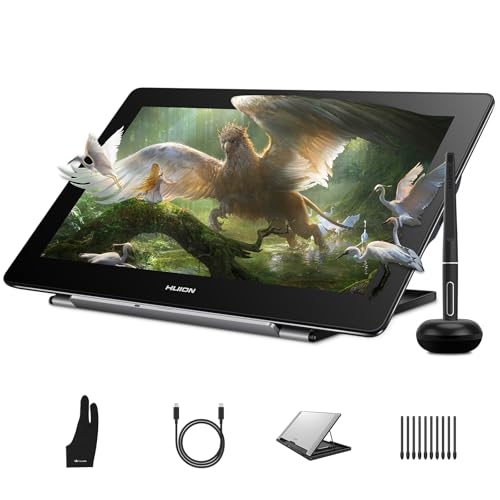
- 4K UHD display with 120% sRGB color gamut
- Fully laminated anti-glare screen
- Battery-free stylus and broad device compatibility
Best For: Versatile digital art and design on a compact display
Best Large-Format Pro Workflow

- 23.8-inch 4K display with broad color coverage
- Two 16,384-level pressure styluses included
- Wireless keydial with 40 customizable functions
Best For: Professional desktop studios and color-critical creative work
Best Ergonomic Studio Setup

- 4K IPS display with 99.43% Adobe RGB coverage
- Two battery-free pens with 8,192 pressure levels
- 40 programmable shortcut functions and dial control
Best For: Long studio sessions and customized professional workflows
Best Wide-Gamut Compact Display
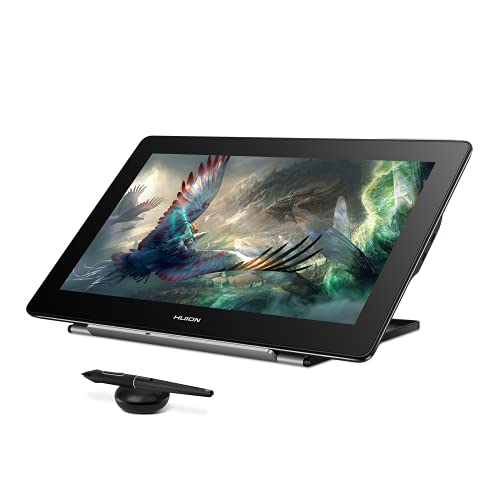
- 4K display with 145% sRGB color gamut
- Quantum Dot technology and 1,200:1 contrast ratio
- Battery-free stylus with tilt and 8,192 pressure levels
Best For: Vivid-color creative work in a compact pen display
Best OLED Color Accuracy

- 15.6-inch 4K OLED display with 99% Adobe RGB
- Multi-touch controls and customizable shortcut remote
- Dual 16,384-level pressure stylies included
Best For: Color-critical illustration, retouching, and animation
Best Large Workspace

- 23.8-inch 4K UHD screen for multitasking
- 140% sRGB Quantum Dot color with HDR support
- Integrated stand and customizable Keydial Mini
Best For: Desktop artists and editors needing ample workspace
Best High-Refresh Professional Display

- 27-inch 4K display with a 120Hz refresh rate
- 99% Adobe RGB and Calman-certified Delta E<1 color
- Wireless shortcut keyboard and X3 Pro stylus included
Best For: Professional illustration, animation, and editing
Best for Large-Canvas Color Work

- 27-inch 4K UHD canvas for detailed work
- Three color spaces with ΔE<1.5 calibration
- PenTech 4.0 and multi-touch controls
Best For: Studio artists needing maximum workspace and color accuracy
Best Feature-Rich 4K Display

- 4K screen with Calman-verified ΔE<1.5 color
- Two 16,384-level pressure styluses included
- Wireless keydial adds customizable shortcuts
Best For: Creators wanting color accuracy and an extensive control setup
Best Value 4K Pen Display

- 18.4-inch 4K UHD fully laminated display
- ΔE<1.5 color accuracy with 99% sRGB
- Battery-free 16,384-level pressure pen
Best For: Students and creators wanting strong 4K features in a compact setup
Best Balanced 4K Pick – HUION Kamvas Pro 16 4K
For creators seeking drawing tablets with 4k display resolution in a compact format, the HUION Kamvas Pro 16 4K combines sharp UHD detail with a fully laminated, anti-glare screen. Its battery-free stylus, dual USB-C connectivity, and adjustable stand make it practical for illustration, retouching, design, and study, though it requires a connected computer or compatible Android device.
Best For: Digital artists, students, designers, and hobbyists who want a versatile 15.6-inch 4K pen display.
Pros:
- 4K UHD resolution with 120% sRGB coverage and 16.7 million colors.
- Fully laminated anti-glare display helps reduce parallax and reflections.
- Battery-free PW517 stylus offers 8,192 pressure levels and ±60° tilt recognition.
- Works with Windows, macOS, Linux, Android, and major creative software.
Cons:
- It is a pen display, not a standalone tablet.
- The 15.6-inch workspace may feel limiting for users who prefer large-format screens.
The Kamvas Pro 16 4K is a well-rounded option when you want high-resolution detail without moving to a 24-inch display. Its flexible compatibility and included stand add everyday convenience.
Best Large-Format Pro Workflow – XPPen Artist Pro 24 Gen2 4K
The XPPen Artist Pro 24 Gen2 is a large-format choice among drawing tablets with 4k display resolution, pairing a 23.8-inch UHD screen with professional color coverage and advanced workflow controls. It is especially suited to artists and designers who value a spacious canvas, calibration tools, dual styluses, and a dedicated wireless keydial.
Best For: Professional illustrators, photographers, designers, and game or VR creators needing a large, color-accurate workspace.
Pros:
- Calman-verified display with 99% Adobe RGB, 99% sRGB, and 98% P3 coverage.
- 4K resolution, 1.07 billion colors, and 300cd/m² brightness support detailed visual work.
- Includes two X3 Pro styluses with 16,384 pressure levels and 60° tilt.
- Wireless ACK05 keydial provides 40 customizable keys and a physical dial.
Cons:
- Its large size is less suitable for compact desks or portable setups.
- The optional height-adjustable ACS15 stand is not included.
For demanding desktop workflows, the Artist Pro 24 Gen2 stands out through its expansive canvas, wide color support, and extensive shortcut controls. It is a strong fit when productivity and display accuracy matter more than portability.
Best Ergonomic Studio Setup – Xencelabs Pen Display 24
The Xencelabs Pen Display 24 is built for creators comparing drawing tablets with 4k display resolution and studio-focused controls. Its 23.8-inch IPS panel offers 4K clarity, 99.43% Adobe RGB coverage, anti-glare etching, two battery-free pens, and a shortcut system with 40 programmable functions.
Best For: Artists, animators, and designers who want an ergonomic, color-focused workstation with extensive customization.
Pros:
- 4K UHD display with 1.07 billion colors and Pantone and SkinTone validation.
- Super-AG etched glass reduces glare and supports smooth pen movement.
- Two battery-free pens offer different designs, erasers, 8,192 pressure levels, and tilt recognition.
- Quick Keys, dial controls, and customizable device buttons streamline application workflows.
Cons:
- Its 23.8-inch form factor is intended mainly for a stationary workstation.
- Connectivity is wired or wireless, but the display is designed for use with a compatible computer.
The Xencelabs Pen Display 24 emphasizes comfort and control as much as resolution. Its adjustable stand, fan-less design, dual pens, and customizable shortcuts make it particularly appealing for long studio sessions.
Best Wide-Gamut Compact Display – HUION Kamvas Pro 16 Plus 4K
The HUION Kamvas Pro 16 Plus 4K is a compact option for shoppers seeking drawing tablets with 4k display resolution and an especially wide color gamut. Its 15.6-inch Quantum Dot screen reaches 145% sRGB, while full lamination, anti-glare glass, and a battery-free PW517 pen support detailed and comfortable creative work.
Best For: Artists, editors, animators, and designers who prioritize vivid color in a portable-sized pen display.
Pros:
- 4K UHD display with Quantum Dot technology and 145% sRGB gamut.
- Full lamination and anti-glare glass provide an immersive, low-parallax drawing surface.
- PW517 stylus supports 8,192 pressure levels, ±60° tilt, and battery-free operation.
- Dual USB-C connectivity supports PCs, Macs, Linux systems, and compatible Android devices.
Cons:
- It must be connected to a computer, laptop, or compatible Android device.
- The 15.6-inch screen offers less workspace than the 23.8-inch models in this roundup.
The Kamvas Pro 16 Plus 4K is a sensible pick for creators who want highly saturated color and sharp detail in a smaller footprint. Its broad compatibility and included cables make connecting to different setups straightforward.
Best OLED Color Accuracy – XPPen Artist Ultra 16
If you want drawing tablets with 4k display resolution in a portable 15.6-inch format, the XPPen Artist Ultra 16 combines a 4K OLED screen with highly precise color reproduction. It is designed for professional illustration, photo retouching, and animation, but remember that it must connect to a computer or laptop to operate.
Best For: Creative professionals who prioritize OLED contrast, wide color coverage, and touchscreen workflow controls.
Pros:
- 4K OLED display with 1.07 billion colors, 99% Adobe RGB, and Delta E<1.1 accuracy.
- Multi-touch gestures, customizable touch areas, and an included shortcut remote with 40 assignable keys.
- Two 16,384-level pressure stylies support tilt control and responsive, precise lines.
Cons:
- Not a standalone tablet; it requires a compatible computer or laptop.
- The 15.6-inch workspace is less spacious than larger desktop drawing displays.
The Artist Ultra 16 is a strong fit when color-critical work and flexible touch interaction matter more than having a large built-in canvas. Its OLED panel and included accessories make it especially appealing for mobile or space-conscious professional setups.
Best Large Workspace – HUION Kamvas Pro 24 4K
The HUION Kamvas Pro 24 4K is one of the drawing tablets with 4k display resolution built for a spacious desktop setup. Its 23.8-inch screen supports multitasking, while full lamination, anti-glare glass, and a wide Quantum Dot color gamut help create a precise and comfortable drawing experience.
Best For: Artists, video editors, and designers who want a large 4K workspace for multitasking.
Pros:
- Large 23.8-inch 4K UHD display provides room for timelines, previews, and multiple assets.
- 140% sRGB color gamut, HDR support, and 1.07 billion colors deliver vivid image reproduction.
- Includes an integrated 20-degree stand, customizable Keydial Mini, and multiple connection options.
Cons:
- It is not standalone and must connect to a computer, laptop, or compatible Android device.
- The large desktop-oriented design is less convenient for portable use.
Choose the Kamvas Pro 24 when screen real estate is the priority. Its generous display and included stand make it well suited to extended sessions, while the Keydial Mini can reduce repetitive keyboard and menu navigation.
Best High-Refresh Professional Display – XPPen Artist Pro 27
For professionals comparing drawing tablets with 4k display resolution, the XPPen Artist Pro 27 (Gen 2) stands out with a 27-inch 120Hz screen and Calman-certified color accuracy. Full lamination, anti-glare treatment, multi-touch controls, and a wireless shortcut keyboard support demanding illustration, animation, and editing workflows.
Best For: Professional artists and animators who want a large, high-refresh display with calibrated color.
Pros:
- 27-inch 4K display runs at 120Hz and offers 99% Adobe RGB with Delta E<1 accuracy.
- X3 Pro stylus provides 16,384 pressure levels, tilt support, and a paper-like felt-nib feel.
- Includes multi-touch controls, wireless shortcut keyboard, and ColorMaster calibration.
Cons:
- Its large 27-inch format is primarily suited to a dedicated desktop workspace.
- As a pen display, it requires connection to a compatible computer or tablet.
The Artist Pro 27 is the most productivity-focused option here for users who can accommodate its size. The 120Hz refresh rate, large canvas, calibrated color, and wireless controls make it well matched to professional creative workflows.
Best for Large-Canvas Color Work – HUION Kamvas Pro 27
For artists seeking drawing tablets with 4k display resolution and abundant workspace, the HUION Kamvas Pro 27 combines a large 27-inch 4K UHD screen with broad color-space support. Its calibrated display, paper-like surface, and multi-touch controls suit detailed creative work, though it requires a separate compatible computer.
Best For: Professional illustrators, photographers, motion designers, and creators who want a spacious canvas and color-accurate workflow.
Pros:
- Large 27-inch 4K UHD canvas reduces the need for frequent zooming and panning.
- Supports sRGB, Adobe RGB, and DCI-P3 with 1 billion colors and factory calibration of ΔE<1.5.
- PenTech 4.0 offers 2g activation force, tilt auto-alignment, and a 0.35mm retraction distance.
- Full lamination, anti-glare glass, DC dimming, and multi-touch support improve workflow comfort.
Cons:
- It is not a standalone device and must connect to a compatible computer.
- The 27-inch format may require substantial desk space.
- Some macOS 14.5 Mac users need the ActiveTrackPad tool for multi-touch functionality.
The Kamvas Pro 27 is a strong choice when screen size, color control, and immersive drawing comfort matter more than portability. Its professional display features make it particularly suited to studio-based production.
Best Feature-Rich 4K Display – XPPen Artist Pro 19 Gen2
The XPPen Artist Pro 19 Gen2 is a versatile pick among drawing tablets with 4k display resolution, pairing an 18.4-inch 4K screen with wide color coverage, dual styluses, and a wireless shortcut keydial. It is well suited to creators who want a complete, flexible workstation rather than a basic pen display.
Best For: Illustrators, photographers, web designers, and film or motion creatives who value color accuracy, shortcut controls, and multiple pen options.
Pros:
- 4K UHD resolution with 1.07 billion colors and Calman-verified ΔE<1.5 accuracy.
- Covers 99.8% sRGB, 96% Adobe RGB, and 98% Display P3.
- Includes Roller and Slim styluses with 16,384 pressure levels and 60° tilt support.
- ACK05 wireless keydial provides a physical dial and 10 customizable keys.
Cons:
- The display and accessories may be more capability than beginners need.
- Some connection and mounting configurations may require planning around available USB-C, HDMI, or VESA support.
- Its 18.4-inch screen provides less drawing area than the 27-inch alternative.
With its verified color performance and unusually complete accessory package, the Artist Pro 19 Gen2 offers a polished setup for demanding workflows. Choose it when productivity controls and connection flexibility are as important as display resolution.
Best Value 4K Pen Display – GAOMON Pro 19
The GAOMON Pro 19 delivers a practical balance of screen size, 4K detail, and pen performance for shoppers comparing drawing tablets with 4k display resolution. Its 18.4-inch fully laminated screen, built-in adjustable stand, and battery-free stylus make it a straightforward option for digital art and design.
Best For: Art students, beginners, content creators, and designers seeking a large, high-resolution display without an overly large footprint.
Pros:
- 18.4-inch 4K UHD display offers detailed viewing while remaining more compact than a 27-inch model.
- 99% sRGB, 98% DCI-P3, 1.07 billion colors, and ΔE<1.5 factory calibration support consistent color.
- Battery-free pen provides 16,384 pressure levels, 2g activation force, and ±60° tilt support.
- Pre-attached 20°–80° adjustable stand and included cables simplify setup.
Cons:
- It is a pen display rather than a standalone computer.
- A single USB-C cable setup requires a compatible computer and a separately sold USB-C-to-C cable.
- The included warranty is listed as one year for non-human-made damage.
The Pro 19 is a sensible middle ground for creators who want 4K clarity and professional-oriented color performance without moving to a much larger display. Its integrated stand and battery-free pen also help keep the setup convenient.
How We Picked the Best Drawing Tablets with 4K Displays
We compared the selected pen displays by screen resolution, size, color coverage, pen technology, refresh rate, shortcut controls, and overall suitability for illustration, animation, photo editing, and design. We also considered practical details such as full lamination, anti-glare treatment, stand compatibility, included accessories, and whether the display is better suited to a compact desk or a dedicated studio.
Specifications can vary by configuration and region, so confirm current ports, included stands, operating-system support, and color claims before purchasing.
Quick Comparison
| Best for | What to prioritize | Models to consider |
|---|---|---|
| Small desks and portability | 15.6-inch size, useful connectivity, lightweight design | HUION Kamvas Pro 16 4K, Kamvas Pro 16 Plus 4K, XPPen Artist Ultra 16 |
| Large studio canvases | 24- to 27-inch screen, ergonomic stand, strong color performance | HUION Kamvas Pro 24, Kamvas Pro 27, Xencelabs Pen Display 24 |
| Animation and high-motion work | High refresh rate, accurate pen tracking, customizable controls | XPPen Artist Pro 27 Gen 2, Artist Pro 24 Gen2 |
| Large-screen value | 4K resolution, ample active area, essential included features | GAOMON Pro 19, XPPen Artist Pro 19 Gen2 |
Key Buying Factors for Drawing Tablets with 4K Display
Screen Size and Desk Space
A 15.6-inch display is easier to fit into a compact workspace and may be more convenient to move. Larger 19-, 24-, and 27-inch models provide more room for timelines, reference images, and broad gestures, but they need a deeper desk and a stable stand.
Color and Viewing Experience
Look beyond the 4K label. Adobe RGB or wide-sRGB coverage matters for color-critical work, while an anti-glare surface can reduce reflections during long sessions. OLED models may offer deeper blacks and stronger contrast, but LCD pen displays can provide excellent brightness and value.
Pen Performance and Controls
Battery-free pens reduce charging interruptions. Pressure-level ratings are only part of the experience; initial activation, tilt support, cursor accuracy, and surface texture affect how natural the tablet feels. Shortcut keys, key dials, and remote controls can speed up repetitive tasks.
Refresh Rate, Ports, and Ergonomics
A higher refresh rate can make strokes and panning feel smoother, especially for animation. Check whether your computer supports the required video connection, and look for adjustable stands or VESA compatibility. A good viewing angle and manageable heat are important for extended sessions.
Who Should Buy Which Drawing Tablets with 4K Display?
Choose a compact 15.6-inch model if you have limited desk space, work across locations, or want a practical first 4K pen display. Choose a 19-inch model for a middle ground between workspace and footprint. Choose a 24- or 27-inch display if you create professionally, manage complex timelines, or prefer drawing with larger arm movements. If smooth motion is especially important, prioritize the high-refresh-rate XPPen options. For color-sensitive illustration and editing, compare gamut coverage and calibration features rather than relying on resolution alone.