
Small businesses digitizing customer archives, historical records, or media collections need more than a scanner with a high megapixel claim. The right model should match your film formats, expected workload, image-quality standards, and available staff time.
This roundup compares 10 film scanners across those priorities, from simple large-screen converters to higher-resolution 35mm scanners designed for detailed archival work.
Best 10 Film Scanners for Small Businesses Picks for 2026
Fast Standalone Pick
Magnasonic FS71 24MP Film Scanner

- Scans several film and slide formats
- 24MP JPEG output with onboard adjustments
- 5-inch display and up to 128GB SD support
Best For: Fast, computer-free digitization of mixed film collections
Streamlined Workflow Pick

- Smooth tray supports efficient feeding
- Handles 135mm, 110mm, and 126mm media
- Direct SD saving and one-touch editing
Best For: Simple batch scanning of common slides and negatives
Complete Kit Pick
DigitPro M129A Photo and Film Scanner
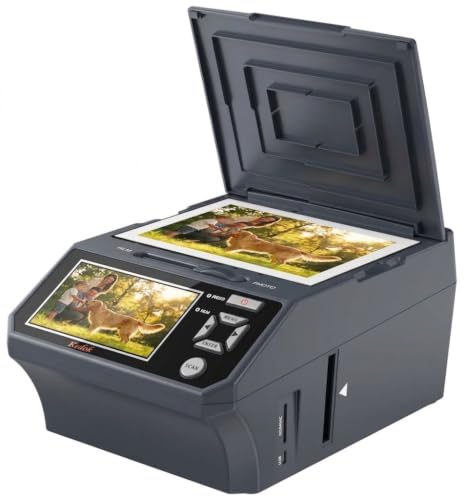
- Scans film, prints, and business cards
- Includes 8GB SD card and accessories
- Three-year warranty and 5-inch display
Best For: Mixed media digitization with an all-in-one starter bundle
USB-C Convenience Pick
HP HPFS500 Film and Slide Scanner

- 5-inch touchscreen for preview and editing
- 13MP sensor with 22MP interpolation
- USB-C power and direct SD saving
Best For: Compact film scanning with touchscreen and USB-C flexibility
Best All-in-One Option

- Scans 135, 110, 126, and 50mm formats
- 5-inch LCD with gallery mode
- Includes adapters and HDMI/USB cables
Best For: Small offices needing simple, multi-format scanning
Best for High-Detail Scans

- 7200 dpi resolution for 35mm media
- Infrared dust and scratch detection
- Includes SilverFast SE Plus 9
Best For: Detailed 35mm digitization projects
Best Standalone Workflow

- No computer or drivers required
- Large 7-inch real-time preview
- Includes a 2-year warranty and tech support
Best For: Teams needing simple, standalone film scanning
Compact Multi-Format Pick
KODAK SCANZA Film & Slide Scanner

- Converts five listed film formats to JPEG
- 3.5-inch adjustable LCD preview screen
- Includes adapters, cables, and cleaning brush
Best For: Small businesses digitizing mixed film formats
Large-Screen Starter
DigitPro C190 22MP Film Scanner

- 5-inch LCD with one-touch scanning
- Supports 35mm, 110, 126, 50mm slides, and Super 8
- Includes built-in memory and a full accessory kit
Best For: Beginner-friendly office scanning workflows
High-Resolution Display Pick
BEONEGLOBAL ClearScan P7 Film Scanner

- Up to 24MP scans with a CMOS sensor
- Large 7-inch LCD for previewing and adjustment
- Includes an SD card and supports five listed film types
Best For: Businesses wanting large previews and higher stated resolution
Fast Standalone Pick – Magnasonic FS71 24MP Film Scanner
For small businesses looking for film scanners for small businesses, the Magnasonic FS71 is a practical standalone option. It converts 35mm, 126, 110, and Super 8 film plus slides into JPEG files, scans in less than five seconds per image, and works without a computer.
Best For: Businesses digitizing mixed film formats quickly and saving files directly to SD cards.
Pros:
- Supports 35mm, 126, 110, Super 8 film, and multiple slide formats.
- 24MP output with brightness and RGB color adjustments built in.
- Large 5-inch display and HDMI output for viewing on a monitor or TV.
- SD card support up to 128GB and no required editing software.
Cons:
- SD card and HDMI cable are not included.
- Listed minimum system requirement is Windows 7 for computer use.
Its broad format support, quick operation, and high-capacity SD compatibility make the FS71 well suited to straightforward archival projects where convenience matters more than advanced computer-based controls.
Streamlined Workflow Pick – KODAK Slide N Scan Max
The KODAK Slide N Scan Max is a convenient choice among film scanners for small businesses that need a simple, repeatable scanning workflow. Its smooth-moving tray, direct SD saving, and support for 135mm, 110mm, and 126mm media help reduce handling during batch digitization.
Best For: Small offices and archival services scanning common slide and negative formats with minimal setup.
Pros:
- Smooth tray feed helps streamline film loading.
- Supports 135mm, 110mm, and 126mm slides and negatives.
- Saves directly to SD or SDHC cards up to 32GB.
- One-touch editing and output up to 4208×3120 resolution.
Cons:
- SD storage is limited to cards up to 32GB.
- The supplied notes list USB connectivity rather than HDMI output.
The Max emphasizes ease of use and efficient feeding, making it a sensible fit when staff need to process familiar film formats without relying on a computer for every scan.
Complete Kit Pick – DigitPro M129A Photo and Film Scanner
For businesses seeking film scanners for small businesses with broader media needs, the DigitPro M129A combines film, slide, print, and business-card scanning. It operates without a computer, saves to the included 8GB SD card, and comes with holders, trays, a cleaning brush, and a three-year warranty.
Best For: Small businesses that want one bundled device for film, printed photos, and business cards.
Pros:
- Scans 35mm slides, 135 and 110 negatives, printed photos, and business cards.
- Large 5-inch HD screen supports previewing and editing.
- Standalone operation with one-touch controls and direct SD saving.
- Includes an 8GB SD card and a three-year warranty.
Cons:
- The supplied details specify 1080P rather than a megapixel output rating.
- Only an 8GB SD card is included, so larger projects may require additional storage.
- At 1.5 kg, it is heavier than the compact options listed here.
Its accessory bundle and broader document support can reduce setup costs for mixed digitization work, while the extended warranty adds reassurance for regular business use.
USB-C Convenience Pick – HP HPFS500 Film and Slide Scanner
The HP HPFS500 offers a compact workflow for small businesses comparing film scanners for small businesses. Its 5-inch touchscreen, quick-load tray, USB-C power, and direct SD-card saving make it easy to preview and digitize 135, 126, and 110 film without a computer.
Best For: Businesses wanting a compact scanner with touchscreen controls and flexible USB-C power.
Pros:
- 5-inch all-angle touchscreen enables previewing and editing.
- 13MP CMOS sensor with 22MP interpolation for detailed output.
- Quick-load tray supports 135, 126, and 110 negatives and slides.
- USB-C power works from a PC USB port or external 5V adapter.
Cons:
- Supports film scanning rather than the broader printed-photo formats of some alternatives.
- Includes a one-year limited warranty.
- SD card saving is supported, but the supplied notes do not state card capacity or inclusion.
The HPFS500 is a strong fit for compact workstations and mobile setups, especially where touchscreen operation and USB-C compatibility are more important than scanning a wide range of media types.
Best All-in-One Option – KODAK Slide N Scan
For small businesses looking for film scanners that are simple to operate and easy to share, the KODAK Slide N Scan combines a large 5-inch LCD with support for multiple film formats. It can save converted images directly to an SD or SDHC card, though the card is not included.
Best For: Small offices that need straightforward scanning, on-device previews, and broad 135, 110, 126, and 50mm slide compatibility.
Pros:
- Supports 135, 110, and 126 negatives plus 50mm slides.
- Large 5-inch LCD offers wide-angle previews and gallery mode.
- Includes film adapters, a cleaning brush, USB cable, and HDMI cable.
- Offers one-touch scanning with basic color, brightness, and date/time adjustments.
Cons:
- SD or SDHC card is required but not included.
- Its minimum listed system requirement is Windows 7, and computer connectivity is via USB.
This is a practical choice when convenience matters more than advanced archival controls. Its built-in screen and multi-format support can make occasional business scanning less dependent on a computer.
Best for High-Detail Scans – Plustek OpticFilm 8200i SE
For small businesses evaluating film scanners for detailed 35mm work, the Plustek OpticFilm 8200i SE emphasizes high resolution and image correction. Its 7200 dpi scanning, 48-bit input, infrared dust and scratch detection, and included SilverFast SE Plus 9 software suit more demanding digitization projects.
Best For: Businesses digitizing 35mm negatives and mounted slides where resolution and automated dust or scratch removal are priorities.
Pros:
- Provides up to 7200 x 7200 dpi resolution.
- Built-in infrared channel helps detect dust and scratches.
- Supports 48-bit input and includes multi-exposure functionality.
- Works with Windows 7 through 11 and Mac OS 10.7 through 14.x.
Cons:
- Designed for 35mm negatives and mounted slides rather than multiple film formats.
- Requires a computer and USB connection.
- Its workflow may be more involved than a standalone LCD scanner.
The OpticFilm 8200i SE is the strongest fit for quality-focused workflows. It is less convenient for quick, unattended conversions, but its resolution and software package provide more control for professional-looking 35mm results.
Best Standalone Workflow – ClearClick Virtuoso 3.0
The ClearClick Virtuoso 3.0 is a convenient option for small businesses that want film scanners without requiring a computer or drivers. It previews scans on an extra-large 7-inch screen, saves images to an SD card, and supports 35mm, 110, 126, and 50mm slide formats.
Best For: Small teams that value a standalone scanning workflow, large previews, and support for several common film types.
Pros:
- Works without a computer or drivers.
- Offers a large 7-inch real-time preview screen.
- Supports 35mm, 110, and 126 negatives plus 50mm slides.
- Includes a 2-year warranty and free technical support from ClearClick.
Cons:
- SD card is not included and must be 32GB or less.
- 22MP mode is interpolated; listed scanning quality is approximately 3824 x 2512 pixels.
- Mini HDMI cable is not included.
Choose this model when ease of use and minimal setup are more important than advanced computer-based correction. The large display and standalone operation can help staff process film efficiently, while the included warranty adds support for business use.
Compact Multi-Format Pick – KODAK SCANZA Film & Slide Scanner
For small businesses looking for film scanners for small businesses, the KODAK SCANZA is a compact option that converts several common film formats to JPEG without requiring a computer during scanning. Its included adapters, built-in display, and one-touch controls support straightforward batch work.
Best For: Small offices, photo organizers, and service businesses handling mixed 35mm, 126, 110, Super 8, and 8mm collections.
Pros:
- Supports 35mm, 126, 110, Super 8, and 8mm negatives and slides.
- Offers a bright, adjustable 3.5-inch tilt LCD for previews and operation.
- Includes multiple film inserts, USB and HDMI cables, an AC adapter, and a cleaning brush.
Cons:
- Does not support film formats beyond those specifically listed.
- SD card is not included, though cards up to 128GB are supported.
The SCANZA stands out when format flexibility and a small footprint matter more than a fully automated professional workflow. Its bundled accessories can help a small business start scanning quickly.
Large-Screen Starter – DigitPro C190 22MP Film Scanner
For small businesses that value simple operation and a larger preview, the DigitPro C190 combines one-touch scanning with a 5-inch LCD. It can save scans to built-in memory or an SD card and supports several commonly encountered negative, slide, and film formats.
Best For: Small offices and entry-level scanning services that want an easy-to-use standalone unit with a generous display.
Pros:
- Supports color and black-and-white 35mm/135, 110, 126, 50mm slides, and Super 8 film.
- Provides a large 5-inch LCD for previewing, editing, and playback.
- Includes 128MB of built-in memory, film holders, USB and HDMI cables, and a cleaning brush.
Cons:
- External SD storage is not included.
- External cards are limited to 64GB and require FAT32 or exFAT.
The C190 is a practical choice for operators who want minimal setup and clear on-device previews. Its built-in memory and included accessory kit reduce the number of items needed to begin scanning.
High-Resolution Display Pick – BEONEGLOBAL ClearScan P7 Film Scanner
For small businesses seeking film scanners for small businesses with a larger viewing area, the BEONEGLOBAL ClearScan P7 offers up to 24MP scans, a 7-inch LCD, and standalone operation. Its included SD card also lets a team begin saving images without purchasing extra storage immediately.
Best For: Small businesses that prioritize large previews, adjustable framing, and higher stated scan resolution across several film formats.
Pros:
- Uses a 1/2.3-inch CMOS sensor and supports scans up to 24MP.
- Features a 7-inch LCD with controls positioned below the screen.
- Supports 35mm/135, 126, 110, Super 8, and 8mm film and includes an SD card.
Cons:
- Its listed warranty is one year.
- USB is the listed connection type, so the supplied notes do not specify HDMI output.
The ClearScan P7 is the most display-focused option in this group. Its large screen, adjustable image size, and included storage make it appealing for businesses that review and save scans directly on the device.
How We Picked the Best Film Scanners for Small Businesses
We evaluated these scanners according to the factors that matter most in a small-business workflow: supported film formats, advertised resolution, preview-screen usability, connection options, scan consistency, and the amount of manual handling required. We also considered whether a scanner is better suited to occasional transfers, customer-facing work, or repeated archival projects.
All-in-one models generally emphasize speed and convenience, while dedicated 35mm scanners tend to offer more control and potentially better detail. Because advertised megapixels and dpi figures are not directly interchangeable, they should be viewed alongside software, infrared cleaning, color control, and actual workflow requirements.
Quick Comparison
| Best For | What to Prioritize | Likely Scanner Type |
|---|---|---|
| Occasional business use | Simple controls and broad format support | Standalone all-in-one model |
| High-volume basic conversion | Fast loading, large preview, and easy file transfer | Large-screen standalone scanner |
| Detailed 35mm archiving | High optical resolution and dust or scratch reduction | Dedicated film scanner |
| Client previews or demonstrations | Bright, readable LCD and straightforward operation | Large-display model |
Key Buying Factors for Film Scanners for Small Businesses
Film-Format Compatibility
Confirm that the scanner accepts every format in your collection. Common options include 35mm, 110, 126, Super 8, and 8mm film, but support varies. A broader format range can prevent the need to purchase a second device later.
Resolution and Image Quality
Higher advertised resolution can preserve more detail, but results also depend on the lens, sensor, film holder, and software. For web images, reference copies, and quick sharing, modest resolution may be sufficient. Detailed restoration, printing, or archival work benefits from a dedicated high-resolution scanner.
Speed and Handling
For paid digitization services or large company archives, loading time and batch handling may matter more than headline resolution. Look for accessible holders, quick previews, and controls that reduce repeated adjustments.
Connectivity and File Workflow
Check whether files are saved to a memory card, transferred through USB, or both. USB-C can simplify modern office setups, while an integrated screen allows standalone operation without a computer. Confirm the output formats and make sure they fit your storage and backup process.
Cleaning and Color Correction
Dust and scratches are unavoidable with older film. Infrared removal and stronger scanning software can save substantial editing time, although they may require a computer-based workflow. Standalone models are convenient but may offer fewer restoration controls.
Who Should Buy Which Film Scanners for Small Businesses?
Choose a broad-format, large-screen scanner if your business handles mixed media and values simple operation. A KODAK, Magnasonic, ClearClick, BEONEGLOBAL, or similar standalone model can be a practical choice for straightforward conversions and customer previews.
Choose a dedicated high-resolution model such as the Plustek if your priority is 35mm detail, archival quality, or more advanced post-processing. For businesses that only need occasional scans, a compact scanner with a clear interface and flexible format support should keep costs and training time under control.
Before buying, estimate your weekly scan volume and test a representative sample of your film. The best Film Scanners for Small Businesses are the ones that produce acceptable files consistently without creating unnecessary handling or editing work.