
Finding the best photo printer for a MacBook Pro means balancing macOS compatibility, print quality, connection options, and the cost of paper and supplies. The right choice depends on whether you want polished 4×6-inch photos, a versatile home printer, or a small model for quick portable prints.
We compared 10 popular options across wireless setup, print formats, portability, running costs, and everyday usability to help you choose a printer that fits your workflow.
Best 10 Photo Printers for Macbook Pro Picks for 2026
Most Flexible Paper Options

- Prints 4x6 photos and 3x3 sticker paper
- Bluetooth and USB connectivity
- App includes filters, borders, and photo adjustments
Best For: Mixed-size photo and sticker printing
Best All-in-One

- Wireless color printer with scan and copy functions
- Automatic duplex printing and document feeder
- Supports Apple AirPrint and photo sizes up to 8x10 inches
Best For: Home offices printing both documents and photos
Best Docking Station
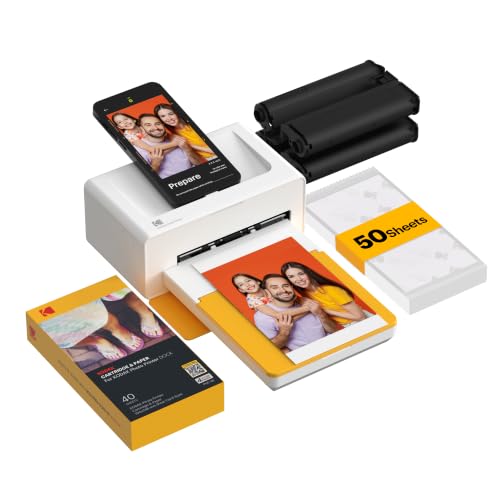
- 4PASS dye-sublimation printing for 4x6 photos
- Integrated smartphone docking station
- Laminated prints resist water, fingerprints, and fading
Best For: Easy smartphone-based home photo printing
Best Pocket Pick
Canon Ivy 2 Mini Photo Printer
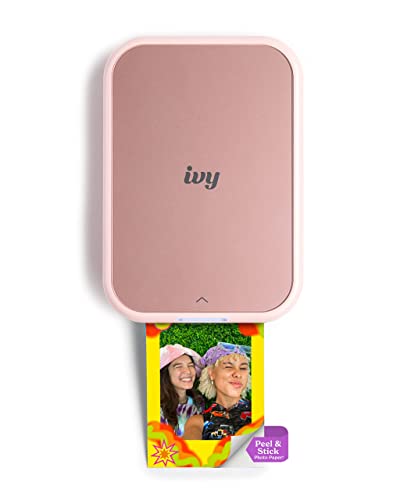
- No-ink ZINK printing
- Peel-and-stick 2x3-inch photos
- Bluetooth mobile printing
Best For: Portable phone-based scrapbooking and journaling
Best 4x6 Quality

- Mac-compatible 4x6 printing
- Includes 100 sheets and 3 cartridges
- Water- and scratch-resistant laminated prints
Best For: Home photo printing from Mac, PC, phones, and tablets
Best Creative Mini Prints
Nelko PP01 Portable Photo Printer
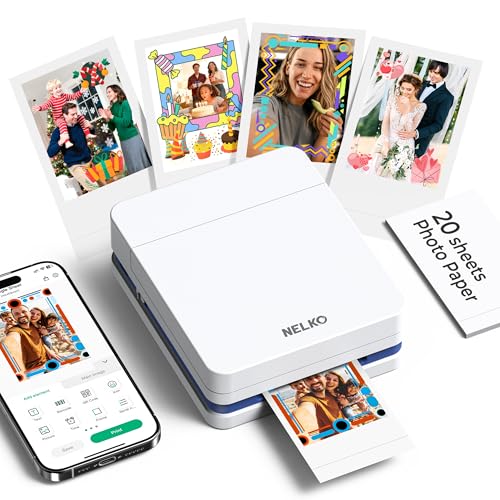
- 600-DPI 2x3-inch adhesive prints
- Feature-rich editing app
- Portable Bluetooth smartphone printing
Best For: Scrapbooks, planners, travel journals, and personalized crafts
Best for 4x6 Keepsakes

- Durable dye-sublimation 4x6 prints
- Wi-Fi app with creative editing tools
- Bundle includes 118 sheets and 3 cartridges
Best For: Home users making full-size keepsake photos
Best for Portable Snapshots

- Pocket-size 2x3 sticky-back photos
- Ink-free ZINK printing
- Bluetooth and NFC mobile connectivity
Best For: Travelers and crafters making small peel-and-stick photos
Best for Shared 4x6 Printing
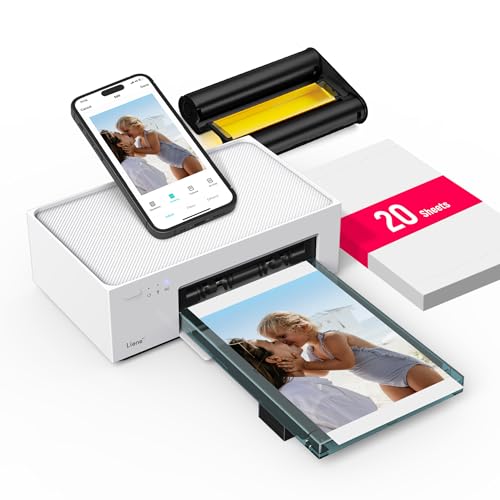
- Vibrant protected 4x6 dye-sublimation prints
- Built-in Wi-Fi hotspot needs no home network
- Supports laptops, PCs, and up to 5 devices
Best For: Families sharing a 4x6 printer across devices
Best Portable Pick – Canon SELPHY CP1500
For shoppers comparing photo printers for MacBook Pro, the Canon SELPHY CP1500 is a compact dye-sublimation option with Wi-Fi and USB connectivity. It prints 4×6-inch color photos and includes a 3.5-inch display for basic viewing and editing.
Best For: Portable 4×6-inch photo printing and flexible connections.
Pros:
- Compact design with optional battery support for mobile use.
- Wi-Fi, USB, and memory-card connectivity.
- Water-resistant, instantly dry prints designed to last up to 100 years.
- Built-in display supports viewing, filters, and basic edits.
Cons:
- Maximum print size is limited to 4×6 inches.
- The optional battery pack is required for printing away from an outlet.
The CP1500 is a practical choice when portability and connection flexibility matter more than large-format printing. Its stated computer compatibility and USB connection make it a versatile fit for a MacBook Pro setup.
Most Flexible Paper Options – Liene Amber M110
The Liene Amber M110 stands out among photo printers for MacBook Pro shoppers who also print from phones and tablets. Its dual-tray design handles both 4×6-inch photos and 3×3-inch sticker paper, while Bluetooth and USB provide connection options.
Best For: Users who want both standard photos and square sticker prints.
Pros:
- Dual trays support 4×6-inch and 3×3-inch media.
- Thermal-dye sublimation prints have laminated, water- and scratch-resistant surfaces.
- Bluetooth pairing is described as taking about 13 seconds.
- App supports borders, filters, adjustments, and ID or visa photos.
Cons:
- Cartridges are limited to compatible Liene 4×6 and 3×3 supplies.
- Bluetooth is the primary wireless connection method.
The M110 offers more media variety than a conventional 4×6-only printer. It is especially appealing for creative projects, though buyers should account for its proprietary cartridge compatibility.
Best All-in-One – Canon PIXMA TR7120
If your MacBook Pro printing needs include documents as well as photos, the Canon PIXMA TR7120 is a more versatile choice than a dedicated photo printer. This wireless inkjet includes scanning, copying, automatic duplex printing, and an automatic document feeder.
Best For: Home offices that need photo, document, scan, and copy functions.
Pros:
- Prints photos and documents with a 4800 x 1200 resolution specification.
- Supports dual-band Wi-Fi, USB, and mobile printing services including Apple AirPrint.
- Automatic two-sided printing helps reduce paper use.
- ADF simplifies multi-page scanning and copying.
Cons:
- At 18 pounds, it is less portable than compact photo printers.
- It uses inkjet cartridges rather than a dedicated dye-sublimation photo system.
- Its maximum media size is listed as legal, but photo output is limited by supported paper sizes.
The TR7120 is the strongest multifunction option in this group. Choose it when your MacBook Pro workspace needs one printer for everyday paperwork and occasional photo output rather than a lightweight photo-only device.
Best Docking Station – KODAK Dock Plus
The KODAK Dock Plus is a straightforward 4×6-inch dye-sublimation printer for shoppers considering photo printers for MacBook Pro alongside smartphone printing. It uses Bluetooth and includes a smartphone docking station, with the KODAK app handling edits and customization.
Best For: Simple home printing of 4×6-inch photos from compatible mobile devices.
Pros:
- Produces 4×6-inch photos using 4PASS dye-sublimation printing.
- Integrated dock can connect and charge a compatible smartphone during printing.
- Prints include a protective lamination layer designed to resist fingerprints, water, and fading.
- App supports cropping, editing, and customization.
Cons:
- Supplied compatibility focuses on smartphones and tablets rather than computers.
- Bluetooth is the listed wireless connection, with no Wi-Fi connection specified.
- It prints only one photo at a time and uses simplex printing.
The Dock Plus is best suited to a dedicated home photo station rather than direct MacBook Pro workflow. Its dock, app, and 4×6 output make it convenient for phone-based albums, gifts, and everyday sharing.
Best Pocket Pick – Canon Ivy 2 Mini Photo Printer
If you want compact photo printers for MacBook Pro alternatives and mobile devices, the Canon Ivy 2 is designed for quick, colorful 2×3-inch prints from compatible iOS and Android smartphones. Its ZINK system requires no ink cartridges, while the adhesive backing makes each print useful for crafts, journals, and decorating.
Best For: Travelers, scrapbookers, and anyone who wants small sticky-back prints from a phone.
Pros:
- Uses ZINK technology, so no ink cartridges are needed.
- Prints colorful 2×3-inch photos with peel-and-stick backing.
- Bluetooth 5.0 supports mobile printing through the Canon Mini Print App.
- Compact 8.8-ounce design is easy to carry.
Cons:
- Notes specify smartphone compatibility rather than direct MacBook Pro support.
- Prints are limited to the smaller 2×3-inch format.
- Bluetooth printing depends on compatible mobile devices and the app.
The Ivy 2 is a convenient choice when portability and adhesive mini prints matter more than large, traditional photo sizes. MacBook Pro users should verify device compatibility before buying, since the supplied specifications focus on iOS and Android smartphones.
Best 4×6 Quality – Liene M100 4×6 Photo Printer
Among photo printers for MacBook Pro users seeking a larger format, the Liene M100 offers 4×6-inch color prints and lists Mac compatibility alongside Windows, iOS, and Android. Its dye-sublimation process produces laminated photos designed to resist water, scratches, fingerprints, and fading.
Best For: Home users who want traditional 4×6 prints, included supplies, and printing from multiple devices.
Pros:
- Supports Mac, PC, iOS, and Android devices.
- Includes 100 sheets of photo paper and three color cartridges.
- Dye-sublimation printing creates vibrant, laminated 4×6 photos.
- Built-in Wi-Fi hotspot supports up to five simultaneous connections.
Cons:
- Uses proprietary Liene cartridges.
- Printing requires connecting to the printer’s dedicated Wi-Fi hotspot.
- The supplied details recommend cleaning the print head if smudges appear.
The M100 is the strongest fit here for MacBook Pro owners because Mac compatibility is explicitly listed and the 4×6 output suits albums, frames, and ID-style prints. Its included paper and cartridges also make it a practical starter package.
Best Creative Mini Prints – Nelko PP01 Portable Photo Printer
The Nelko PP01 is a pocket-sized option for quick, customized mini photos, though its supplied compatibility details focus on iOS and Android smartphones rather than MacBook Pro computers. It uses inkjet printing for 2×3-inch, 600-DPI adhesive prints and pairs with an app offering filters, collages, text, stickers, and AI editing.
Best For: Crafters, students, travelers, and anyone making personalized scrapbook or planner prints from a phone.
Pros:
- Produces vivid 2×3-inch sticky-backed prints.
- 600-DPI resolution is intended to capture detailed images.
- App includes frames, filters, collages, stickers, text, and AI editing.
- Pocket-sized design weighs 308g and supports Bluetooth printing.
Cons:
- Notes list iOS and Android smartphone compatibility, not MacBook Pro support.
- Requires ink cartridges and periodic cartridge-head care.
- USB charging cable is included, but the power adapter is not.
The PP01 is appealing for creative projects where adhesive prints and app-based customization are priorities. If you specifically need direct MacBook Pro printing, confirm compatibility first; otherwise, it is better suited to smartphone-centered portable printing.
Best for 4×6 Keepsakes – HP Sprocket Studio Plus
The HP Sprocket Studio Plus is a strong choice for MacBook Pro users who want vibrant, borderless 4×6 prints for albums, gifts, or home display. Its dye-sublimation process, Wi-Fi connectivity, and editing features make it suited to polished photo projects, though the supplied compatibility details focus on smartphones rather than laptops.
Best For: Home users who want durable, full-size 4×6 photos and creative editing options.
Pros:
- Produces dry-to-the-touch, borderless 4×6 color photos.
- Dye-sublimation prints use tear-resistant, smudge-proof, and waterproof paper.
- Wi-Fi setup and the HP Sprocket app support frames, filters, stickers, collages, and photo IDs.
- This bundle includes 118 sheets and three cartridges.
Cons:
- The listed compatible devices are smartphones, with iOS and Android controller support.
- It is designed for print-only use and has a maximum sheet capacity of 10.
- Its initial print time is listed as 61 seconds or slightly more.
Choose this model when print longevity and standard 4×6 sizing matter more than pocket portability. For MacBook Pro workflows, verify laptop compatibility before buying, since the supplied specifications emphasize mobile-device connectivity.
Best for Portable Snapshots – KODAK Step Instant Printer
The KODAK Step is a compact option to consider when shopping for photo printers for MacBook Pro alternatives focused on quick mobile snapshots. It prints small 2×3 sticky-back photos over Bluetooth or NFC, making it better for stickers, journals, and casual projects than large-format laptop printing.
Best For: Travelers, crafters, and users who want peel-and-stick photos from iOS or Android devices.
Pros:
- Compact, lightweight design weighs less than a pound.
- ZINK technology requires no ink cartridges and produces moisture-, tear-, and smudge-resistant prints.
- The app offers collages, filters, borders, stickers, and text.
- Built-in rechargeable battery prints up to 25 photos per charge.
Cons:
- Prints are limited to small 2×3-inch photos.
- The listed connectivity is Bluetooth and NFC for iOS and Android devices, not MacBook Pro.
- The maximum sheet capacity is 10, and the initial print time is listed as 60 seconds.
The KODAK Step makes sense if portability and adhesive-backed prints are your priorities. MacBook Pro shoppers should note that the supplied specifications do not list macOS or laptop compatibility, so it is primarily a smartphone printer.
Best for Shared 4×6 Printing – Liene M100 4×6 Photo Printer
The Liene M100 is a practical pick among photo printers for MacBook Pro users who want standard 4×6 output and a direct wireless connection. Its built-in Wi-Fi hotspot can connect up to five devices simultaneously, while listed support for laptops and PCs gives it broader computer compatibility than the mobile-only options in this roundup.
Best For: Families or small groups printing vibrant 4×6 photos from phones, laptops, and PCs.
Pros:
- Thermal dye-sublimation produces vibrant, borderless 4×6 photos.
- A protective finishing layer helps resist water, scratches, and fading.
- Built-in Wi-Fi supports direct connection without relying on a home network.
- Supports up to five connected devices and includes 20 sheets plus one cartridge.
Cons:
- At 2.2 pounds, it is less pocket-friendly than mini photo printers.
- The supplied package includes only 20 sheets, so additional media may be needed for larger projects.
- Printing uses separate paper and cartridge supplies.
For a MacBook Pro setup, the M100 is the most computer-oriented choice here because its supplied details explicitly list laptops and PCs. Its direct hotspot and multi-device support also make it useful when several people need to add photos to a shared print queue.
How We Picked the Best Photo Printers for Macbook Pro
We focused on printers that can fit naturally into a MacBook Pro setup, prioritizing Wi-Fi or wireless connectivity, practical macOS workflows, and companion apps where they are required. We also considered the type of printing each model supports, including dye-sublimation, ZINK, thermal sticker printing, and conventional inkjet printing.
Our comparison weighs photo quality, print size, speed, portability, paper capacity, replacement-supply costs, and versatility. Some models are designed mainly for snapshots, while others also scan, copy, and print documents. Always confirm current macOS support, app requirements, and wireless specifications before buying, since compatibility can vary by operating-system version.
Quick Comparison
| Best For | Recommended Type | What to Look For |
|---|---|---|
| Consistent 4×6 photos | Dye-sublimation printer | Dedicated cartridges, protective print layers, and low-fuss wireless setup |
| Home photo and document printing | Wireless inkjet all-in-one | macOS drivers, AirPrint support, scanner, duplex printing, and ink costs |
| Travel and events | Portable mini printer | Battery operation, compact size, app compatibility, and paper availability |
| Stickers and creative projects | ZINK or adhesive-paper printer | Peel-and-stick media, supported print dimensions, and image durability |
Key Buying Factors for Photo Printers for Macbook Pro
Connection and MacOS Compatibility
For a MacBook Pro, Wi-Fi and AirPrint can be more convenient than a USB-only connection. Check whether the printer supports direct Mac printing or requires a mobile app. Some compact printers are intended primarily for iPhone and Android use, so verify that they offer a Mac-compatible workflow before purchasing.
Print Quality and Format
Dye-sublimation models generally suit users who want consistent, lab-style 4×6 prints with smooth color transitions. Inkjet printers offer greater flexibility for different paper sizes and can handle documents, but they may require more maintenance. ZINK and mini thermal printers are convenient for small prints and stickers, though their output is usually better suited to casual use than archival display.
Paper, Cartridges, and Total Cost
Compare bundled supplies with the printer’s ongoing media cost. A low purchase price can become less attractive if paper-and-cartridge packs are expensive or difficult to find. Also check whether the printer uses proprietary media, how many prints each pack produces, and whether replacement supplies are sold in convenient quantities.
Size and Intended Workload
Compact printers are easy to store and carry, but their small media trays and limited formats may not suit frequent printing. If you plan to create albums, gifts, or event prints, choose a model with a larger paper capacity and readily available refill packs.
Who Should Buy Which Photo Printers for Macbook Pro?
Choose a dedicated dye-sublimation model if your priority is polished, durable 4×6 photography. Pick a wireless inkjet all-in-one if your MacBook Pro is also used for school, work, scanning, copying, or varied paper sizes. A portable mini printer makes the most sense for travel, journaling, parties, and quick social-media snapshots. For labels, crafts, and personalized keepsakes, choose a model that supports adhesive-backed media.
Before ordering, confirm the printer’s supported connection method, print dimensions, operating-system compatibility, and current refill pricing. Those details matter more than headline resolution when selecting among the best Photo Printers for Macbook Pro.