
The best sublimation printers make it easier to create vibrant, personalized designs on compatible mugs, shirts, tumblers, signs, and other coated blanks. The right choice depends on your project size, preferred print format, startup budget, and willingness to manage ink and paper settings.
This roundup compares compact purpose-built models, starter bundles, and adaptable EcoTank printers so you can choose a practical setup for crafting at home or producing custom orders.
Best 10 Sublimation Printers Picks for 2026
Best Compact OEM Pick

- Genuine Epson ink included
- 8.5-inch maximum media width
- Covered 150-sheet input tray
Best For: Hobbyists, crafters, and small businesses
Best Wide-Format Flexibility

- Supports up to 11-by-17-inch media
- Prints, scans, copies, and faxes
- Refillable EcoTank ink system
Best For: Users needing wide-format office and sublimation flexibility
Best Ready-to-Craft Bundle

- Full CMYK ink set included
- 160 transfer sheets and 50 blanks
- Tape and design resources included
Best For: Beginners and small businesses building a starter setup
Best Photo-Centric Option

- Six-color refillable ink-tank system
- Prints media up to 13 x 19 inches
- Includes wireless print, scan, and copy functions
Best For: Home photo and creative projects requiring wide-format color printing
Best Beginner Bundle
Brother SP-1 Sublimation Printer

- Dedicated dye-sublimation printer
- Includes extra color cartridges and 100 sheets
- Works with Artspira and prints in up to 45 seconds
Best For: Beginners creating letter-size apparel and personalized projects
Best for Small-Business Transfers

- PrecisionCore dye-sublimation printing
- 150-sheet enclosed auto-feed tray
- Includes Epson sublimation ink and multiple connectivity options
Best For: Small customization businesses and personalized-gift production
Best Budget EcoTank

- Refillable ink tanks
- Wireless printing and scanning
- Prints up to 7,500 color pages per supplied notes
Best For: Home documents, photos, scanning, and copying
Best Dedicated Sublimation Printer
SureColor F170 Dye-Sublimation Printer

- Purpose-built dye-sublimation printing
- Includes OEM ink and starter supplies
- 150-sheet dust-resistant paper tray
Best For: Hobbyists, crafters, and small sublimation businesses
Best Everyday EcoTank
- Automatic two-sided printing
- Refillable tanks with high page yields
- Wireless mobile printing and scanning
Best For: Efficient home documents, photos, and general all-in-one use
Best Compact OEM Pick – Epson SureColor F170
For shoppers comparing sublimation printers, the Epson SureColor F170 is a compact, purpose-built option for producing colorful transfers up to 8.5 inches wide. It includes genuine Epson sublimation ink, a 150-sheet covered input tray, auto-stop ink bottles, and support for Windows and macOS.
Best For: Hobbyists, crafters, and small businesses that want an OEM Epson sublimation printer with a space-saving design.
Pros:
- Includes a full set of genuine Epson sublimation inks and Epson documentation.
- PrecisionCore printhead with Precision Droplet Control for detailed output.
- Closed 150-sheet tray helps keep paper protected from dust.
- Supports wireless, USB, and Ethernet connectivity.
Cons:
- Maximum media width is limited to 8.5 inches.
- Does not support connections to mobile devices.
- Designed for printing only, without scanning or copying functions.
The F170 stands out when print quality, genuine supplies, and manufacturer support matter more than wide-format flexibility. Its compact footprint and covered paper tray make it a practical choice for a dedicated crafting or small-business workspace.
Best App-Connected Option – Brother SP-1 Sublimation Printer
The Brother SP-1 is one of the more approachable sublimation printers for design-focused crafting. Its Artspira compatibility lets users import and save designs, while included Brother ink and starter sublimation paper help simplify the transition from digital artwork to heat-pressed projects.
Best For: DIY crafters who want app-assisted design workflows for shirts, mugs, tumblers, bags, and other polyester-coated projects.
Pros:
- Works with the Artspira app and provides access to more than 100 sublimation designs.
- Includes Brother Genuine CMYK sublimation ink and starter paper.
- Wi-Fi connectivity supports a convenient wireless workflow.
- Two-year limited warranty is listed in the product details.
Cons:
- A heat press is required and must be purchased separately.
- Artspira must be downloaded to begin the stated DIY workflow.
- Product is intended for sale in the United States at 120 volts.
The SP-1 is a strong fit for makers who value guided design tools and a straightforward crafting process. Its app ecosystem is useful, although buyers should budget for a separate heat press and confirm voltage compatibility.
Best Wide-Format Flexibility – Epson EcoTank ET-15000
The Epson EcoTank ET-15000 is a wide-format all-in-one inkjet that can be considered by shoppers exploring sublimation printers, especially those who also need everyday office functions. It supports media up to 11 by 17 inches and combines printing, scanning, copying, and faxing with refillable ink tanks.
Best For: Users who need a multifunction wide-format printer and specifically want a model listed as compatible with standard or sublimation ink.
Pros:
- Handles media up to 11 by 17 inches.
- Combines printing, scanning, copying, and faxing.
- Refillable EcoTank design can reduce reliance on traditional cartridges.
- Offers Wi-Fi, LAN, and USB connectivity plus automatic duplexing.
Cons:
- It is an inkjet all-in-one rather than a dedicated dye-sublimation printer.
- The supplied package lists standard Epson ink rather than sublimation ink.
- Its larger 26.5-pound design takes more space than compact craft printers.
The ET-15000 makes the most sense for buyers who need a general-purpose office printer alongside wide-format capability. Because the supplied package includes standard ink, users should verify the correct sublimation ink setup before treating it as a dedicated transfer solution.
Best Ready-to-Craft Bundle – Brother SP-1 Starter Bundle
This Brother SP-1 bundle is aimed at shoppers who want more than a standalone sublimation printer. Along with the printer and full CMYK ink set, it includes transfer paper, 50 blanks, heat-resistant tape, Artspira access, and design files for getting started with shirts, mugs, tumblers, bags, and other projects.
Best For: New crafters and small-business users who want a broad starter package with supplies and blanks included.
Pros:
- Includes the Brother SP-1 printer and a full 47 ml-per-color CMYK ink set.
- Bundle provides 160 sublimation transfer sheets and 50 blanks.
- Includes four rolls of heat-resistant tape and Artspira design resources.
- Supports Wi-Fi and Ethernet connectivity and works with Windows, Mac, and the app.
Cons:
- Maximum listed media size is 8.5 by 14 inches.
- It is a print-only device, not an all-in-one printer.
- A heat press is not listed among the included bundle items.
The bundle offers strong value for buyers building a sublimation setup from scratch because it pairs consumables, blanks, tape, and design resources with the printer. It is particularly convenient for testing multiple project types without sourcing every accessory separately.
Best Photo-Centric Option – Epson EcoTank Photo ET-8550
If you are comparing sublimation printers but also need a versatile home creative printer, the Epson EcoTank Photo ET-8550 stands out for wide-format color printing. Its six-color ink system, refillable tanks, and support for media up to 13 x 19 inches make it suited to photos, graphics, and other transfer-preparation projects, though the supplied notes do not identify it as a dedicated dye-sublimation printer.
Best For: Home users who prioritize vibrant photo and graphic printing, low ink replacement frequency, and wide-format media support.
Pros:
- Six-color Claria ET Premium ink system is designed for vibrant colors and sharp text.
- Refillable tanks and included ink supply can reduce cartridge waste and replacement frequency.
- Supports media up to 13 x 19 inches and includes print, scan, and copy functions.
- Offers wireless connectivity through compatible computers and mobile devices.
Cons:
- It is listed as an inkjet printer rather than a dedicated dye-sublimation model.
- Its all-in-one design may be more than needed for print-only sublimation workflows.
The ET-8550 is a strong flexible choice for photo-focused creators, but shoppers specifically seeking sublimation printing should verify ink and transfer compatibility before buying.
Best Beginner Bundle – Brother SP-1 Sublimation Printer
Brother Sublimation Printer, Color Ink Cartridge Set and 100 Sheets Sublimation Paper
Check Price On AmazonThe Brother SP-1 is a straightforward option for shoppers seeking sublimation printers for DIY apparel and other personalized projects. It combines wireless printing with the Artspira app, an extra three-color cartridge set, and 100 sheets of letter-size sublimation paper, helping beginners start with several key supplies included.
Best For: Beginners and casual crafters making letter-size sublimation transfers with app-based design tools.
Pros:
- Designed specifically for dye-sublimation printing and supports color output.
- Artspira provides access to sublimation designs and tools for importing or creating images.
- Bundle includes an extra cyan, magenta, and yellow cartridge set plus 100 sheets of sublimation paper.
- Prints a sheet in up to 45 seconds and connects over Wi-Fi, Ethernet, or USB.
Cons:
- A separate heat press is required to finish apparel and other sublimation projects.
- Maximum listed media size is 8.5 x 11 inches.
- Artspira must be downloaded to begin using the printer’s described design workflow.
With its dedicated sublimation setup and starter materials, the SP-1 offers a convenient entry point for small projects. Its letter-size limit makes it less suitable for larger-format production.
Best for Small-Business Transfers – Epson SureColor F170
For shoppers comparing sublimation printers for a customization business, the Epson SureColor F170 emphasizes consistent output and efficient paper handling. This bundle includes a full set of Epson sublimation ink, while its 150-sheet covered auto-feed tray and wireless, USB, and Ethernet connectivity support repeat transfer work.
Best For: Small customization businesses, promotional-product makers, and creators producing personalized gifts.
Pros:
- Dedicated dye-sublimation printer with PrecisionCore printhead and Precision Droplet Control.
- Includes a full set of Epson sublimation ink and high-capacity ink bottles with auto-stop filling.
- 150-sheet auto-feed tray is enclosed to help keep paper protected from dust.
- Supports Wi-Fi, USB, and Ethernet connections, with compatibility for Epson print software and mobile printing.
Cons:
- Maximum listed media width is 8.5 inches.
- The bundle is printer-focused and does not list a heat press or finished blanks.
- It is a simplex printer, so duplex printing is not available.
The F170 is a focused option for users who value dedicated sublimation hardware, ink efficiency, and a larger paper tray. Its 8.5-inch width is best suited to standard small-format transfer work.
Best Budget EcoTank – ET-2800 Wireless All-in-One
The Epson EcoTank ET-2800 is a practical low-maintenance option for home users who need color documents and photos. While it is not a dedicated sublimation printer, its refillable tanks, wireless connectivity, and high stated color resolution may appeal to shoppers comparing versatile home printing setups.
Best For: Home printing, scanning, and copying with less frequent ink replacement.
Pros:
- Refillable tanks can reduce cartridge waste and replacement frequency.
- Includes enough ink for up to 4,500 black or 7,500 color pages, according to the supplied notes.
- Wireless and USB connectivity support flexible home use.
- Combines printing, scanning, and copying in one unit.
Cons:
- It is a standard inkjet rather than a dedicated dye-sublimation printer.
- Simplex printing does not provide automatic two-sided output.
- Epson recommends genuine ink for optimal performance and warranty support.
The ET-2800 makes the most sense for everyday home printing rather than specialized sublimation work. Choose it if refillable ink and all-in-one functionality matter more than purpose-built transfer printing.
Best Dedicated Sublimation Printer – SureColor F170 Dye-Sublimation Printer
The Epson SureColor F170 is the strongest fit here for shoppers specifically seeking sublimation printers. It is a purpose-built dye-sublimation model that includes OEM sublimation ink, transfer paper, thermal tape, and starter blanks for a more complete setup.
Best For: Hobbyists, crafters, and small businesses creating sublimation transfers for textiles, apparel, mugs, and mousepads.
Pros:
- Dedicated dye-sublimation design with PrecisionCore printhead technology.
- Includes a full set of Epson sublimation inks and starter supplies.
- 150-sheet auto-feed tray uses a dust-resistant closed design.
- Supports wireless, USB, and Ethernet connectivity for Windows and macOS setups.
Cons:
- Mobile-device connections are not supported.
- Maximum media width is listed as 8.5 inches.
- It is a print-only model without scanning or copying functions.
With sublimation-specific ink and bundled transfer materials, the F170 requires less guesswork than adapting a general-purpose inkjet. Its compact footprint and included supplies make it a particularly convenient starting point for dedicated transfer projects.
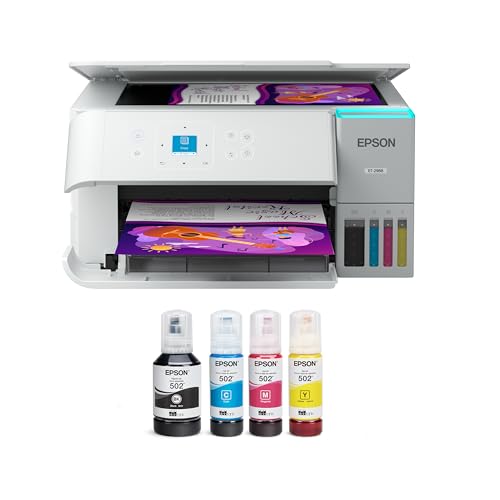
Best Everyday EcoTank – ET-2988 Renewed All-in-One
The renewed Epson EcoTank ET-2988 is a general-purpose color printer for buyers who prioritize economical home printing and productivity features. It is not a dedicated sublimation printer, but its refillable tanks, mobile printing, and automatic duplexing make it useful for everyday documents and photos.
Best For: Home users who want an all-in-one printer with low-maintenance ink tanks and automatic two-sided printing.
Pros:
- Supplied ink is rated for up to 6,600 black or 5,500 color pages.
- Automatic duplex printing helps reduce paper use.
- Wireless mobile printing works with Epson Smart Panel, Apple AirPrint, and Mopria services.
- Includes a scanner, 100-sheet tray, and 1.44-inch color display.
Cons:
- It is a standard inkjet, not a dedicated sublimation printer.
- The renewed unit may be less appealing to shoppers seeking a new printer.
- Epson recommends genuine ink for optimal performance and warranty coverage.
The ET-2988 is a sensible choice when one device needs to handle routine printing, scanning, and copying efficiently. For actual sublimation transfers, however, the dedicated F170 is the more appropriate model in this roundup.
How We Picked the Best Sublimation Printers
We focused on printers and bundles that are suitable for dye-sublimation workflows, paying attention to print size, included supplies, ink system, connectivity, ease of setup, and likely use case. Purpose-built options such as the Epson SureColor F170 and Brother SP-1 are designed specifically for sublimation, while compatible EcoTank models can offer a lower-cost entry point when properly configured for sublimation ink.
We also separated standalone printers from bundles. Extra ink, transfer paper, heat tape, and blanks can make a starter package more convenient, but buyers should confirm exactly what is included and whether the supplies match their intended materials.
Quick Comparison
- Best compact dedicated option: Epson SureColor F170, especially for letter-size transfers and straightforward setup.
- Best starter bundle: Brother SP-1 bundle, which includes supplies for getting started with sample projects.
- Best wide-format flexibility: Epson EcoTank ET-15000 or ET-8550, depending on whether office features or photo-quality output matters more.
- Best budget-oriented entry: A compatible EcoTank model, provided you understand the conversion and warranty implications.
- Best for convenience: A bundle that includes sublimation ink, paper, blanks, and heat-resistant tape.
Key Buying Factors for Sublimation Printers
Print Size and Project Type
Check the maximum paper size before buying. Letter-size printers work well for shirts, mugs, small signs, and many craft projects. Wide-format models are better for larger apparel designs, banners, and projects that require more coverage.
Dedicated Versus Converted Ink Systems
Purpose-built Sublimation Printers are generally easier to set up because their hardware, profiles, and consumables are intended for the process. Converted tank printers may cost less and offer useful all-in-one features, but switching ink types can be complicated and may affect support or warranty coverage.
Ink, Paper, and Running Costs
Compare the price and availability of replacement ink and transfer paper, not just the printer’s upfront cost. High-yield tanks can reduce ongoing expenses, while included starter supplies may lower the cost of your first projects.
Connectivity and Workflow
Wireless printing is convenient for home studios, but verify compatibility with your computer, tablet, design software, and operating system. Reliable color-management settings and the correct sublimation paper profile are often as important as headline resolution.
Who Should Buy Which Sublimation Printers?
Beginners should prioritize a dedicated printer or complete starter bundle with clear instructions and supplies. Frequent crafters may prefer a tank-based model with lower operating costs, provided it is suitable for sublimation use. Small businesses should consider a wide-format printer, dependable connectivity, and easy access to replacement ink and paper. Multi-purpose home users may favor an EcoTank all-in-one that also handles ordinary documents and photos, while dedicated models are the better choice when sublimation is the main goal.