
If you manage large photo libraries, a good dock can make backups faster, migrations simpler, and drive access much easier. The best hard drive docking stations for photo storage let you swap disks quickly, review archives without opening a PC case, and scale as your collection grows.
In this roundup, we focused on models that balance speed, compatibility, capacity, and practical features like dual bays, offline cloning, and USB-C support.
Best 10 Hard Drive Docking Stations for Photo Storage Picks for 2026
Straightforward single-bay pick

- Works with bare 2.5-inch and 3.5-inch SATA drives
- Tool-free hot-swap design for fast drive changes
- Includes 12V power for stable 3.5-inch operation
Best For: Simple photo backups and archive drives
Dual-bay backup and clone pick
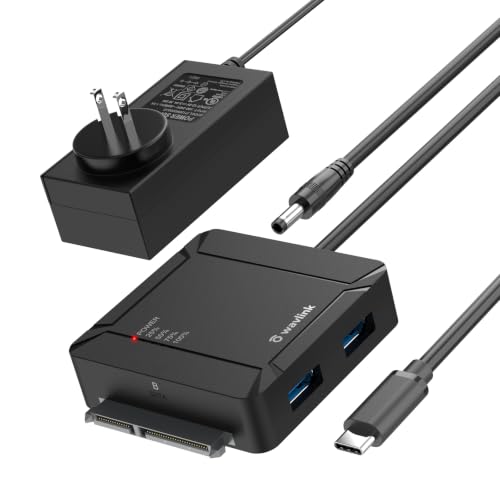
- Offline A-to-B cloning works without a PC
- Dual bays support up to 36TB total capacity
- Includes a 2-port USB 3.0 hub for extra peripherals
Best For: Photo backup workflows that need easy drive duplication
Large-capacity dual-bay option

- Supports two SATA drives with up to 48TB total capacity
- Offline cloning includes LED progress indicators
- Adds 3 USB 3.0 hub ports for accessories
Best For: Large photo archives and backup-focused workflows
Offline Clone Dock
SABRENT Dual-Bay USB-C Dock & Cloner

- Copies one SATA drive to another without a computer
- Mounts two drives as separate volumes over USB-C
- Supports 2.5-inch and 3.5-inch SATA HDDs and SSDs
Best For: Photographers who want a simple two-bay dock with offline cloning
Cooling Clone Dock
UGREEN Dual-Bay Docking Station

- Offline cloning works without a computer
- 360° surround cooling and a dust cover
- Supports two 2.5-inch and 3.5-inch SATA drives
Best For: Photo archivists who want a dual-bay dock with cooling and offline cloning
4-Bay Storage Dock
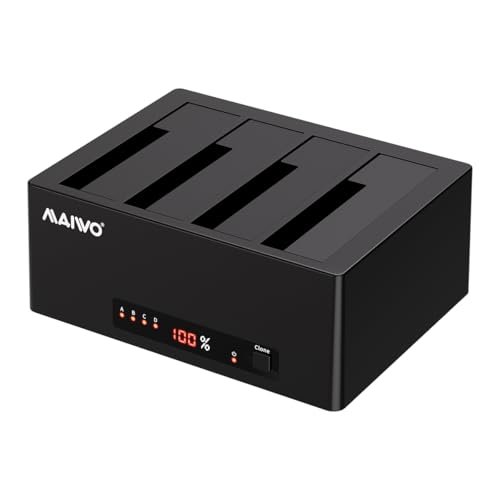
- Holds and accesses four SATA drives at once
- Supports 1-to-3 offline cloning
- Up to 96TB total capacity for large archives
Best For: Photographers and editors consolidating large SATA photo archives
Dual-Bay USB-C Workhorse

- Fits 2.5-inch and 3.5-inch SATA drives
- Tool-free plug-and-play setup
- Supports up to about 30TB drives
Best For: Photographers who want easy drive swaps and large photo archives
Offline Cloner Dock

- Supports 2.5-inch and 3.5-inch SATA drives
- Includes offline cloning for duplication
- USB 3.0 plug-and-play with UASP
Best For: Photo shooters who need simple backups and drive-to-drive copying
USB-C Dual Bay Cloner

- USB 3.0 and USB-C support
- Works with 2.5-inch and 3.5-inch SATA drives
- Includes offline cloning and sleep mode
Best For: Photographers who want USB-C connectivity and easy drive cloning
Straightforward single-bay pick – SABRENT USB 3.0 SATA Dock
If you want a simple option among hard drive docking stations for photo storage, this SABRENT dock keeps the workflow straightforward: drop in a bare SATA drive, connect by USB, and start moving files. It supports 2.5-inch and 3.5-inch SATA HDDs and SSDs, so it works well for archiving photo libraries without a full enclosure.
Best For: Users who want a no-frills, tool-free SATA dock for straightforward photo backups and archive drives.
Pros:
- Supports 2.5-inch and 3.5-inch SATA I/II/III drives and SSDs
- Tool-free, hot-swap design makes drive changes quick
- Includes a 12V power adapter, which is required for 3.5-inch drives
- UASP support can help deliver better transfer performance with a compatible host
Cons:
- Does not support IDE/PATA, M.2, SAS, or drives already in a USB enclosure
- Uses a USB-A host cable, so USB-C-only computers may need an adapter
- S.M.A.R.T. diagnostics are not passed through the USB bridge
For a single-drive photo workflow, this dock is practical and easy to live with, especially if you are moving files from bare SATA drives. It is best suited to users who already know their drive type and want dependable plug-and-play access rather than extra features.
Dual-bay backup and clone pick – WAVLINK USB-C Dual-Bay Cloner
For hard drive docking stations for photo storage, this WAVLINK model stands out because it can both mount two SATA drives and copy one drive to another without a computer. That makes it useful if you want a direct backup routine for a primary photo archive or need to duplicate a drive before changing systems.
Best For: Buyers who want dual-bay storage plus one-button offline cloning for photo backups.
Pros:
- One-button offline clone from drive A to drive B, no PC required
- Dual-bay design supports up to 36TB total capacity
- Built-in 2-port USB 3.0 hub adds everyday convenience
- USB-C connection with UASP support for faster transfers on compatible systems
Cons:
- Offline cloning only works A-to-B, and target drive must be equal or larger
- Requires the included 12V/3A power supply for operation
- For 2.5-inch SSD use on USB-C power bank, the power setup is more limited than wall power
This is a strong choice if your photo workflow includes both storage expansion and exact drive duplication. The clone function adds real value for backup-minded users, while the dual-bay layout makes it easier to keep source and backup drives connected at the same time.
Large-capacity dual-bay option – MAIWO Dual-Bay Cloner Dock
This MAIWO dock is aimed at users who want hard drive docking stations for photo storage with plenty of room to grow. It supports two 2.5-inch or 3.5-inch SATA HDDs or SSDs, offers offline cloning, and adds a built-in USB 3.0 hub for connecting extra gear while you manage files.
Best For: Users who need a dual-bay dock with offline cloning and extra USB ports for photo archiving work.
Pros:
- Supports two SATA drives with up to 48TB total capacity
- Offline cloning works without a computer and includes LED progress indicators
- Three USB 3.0 ports add hub-style convenience
- 12V/3A power supply is included for stable operation
Cons:
- Like other cloners, offline copying is limited to source-to-target duplication
- Uses a USB 3.0 Type-A connection rather than USB-C
- Bulkier than a single-bay dock if you only need occasional drive access
If your photo library is growing quickly, this dock gives you room, cloning tools, and extra connectivity in one unit. It is especially appealing for users who want a larger-capacity workspace for backups, transfers, and recovery tasks.
Compact everyday dock – ORICO 22TB Single-Bay Dock
If you want a compact option among hard drive docking stations for photo storage, this ORICO dock covers the essentials without taking much desk space. It supports 2.5-inch and 3.5-inch SATA drives, offers UASP and TRIM support, and is built for quick access to a single drive for backups or file transfers.
Best For: Anyone who wants a small, easy-to-use single-bay dock for photo backups and drive access.
Pros:
- Supports 2.5-inch and 3.5-inch SATA I/II/III HDDs and SSDs
- UASP and TRIM support can improve transfer efficiency on compatible systems
- Tool-less hot-swap design keeps drive changes simple
- Includes a power supply and 3ft USB-A cable in the box
Cons:
- Single-bay design means no built-in cloning or second-drive backup slot
- Maximum support is 22TB, which is lower than some dual-bay rivals
- Brand-new or unallocated drives must be initialized in Disk Management first
For users who mainly need quick, direct access to a bare SATA drive, this ORICO dock is a compact and capable pick. It is best suited to straightforward photo storage tasks where size and simplicity matter more than advanced cloning features.
Offline Clone Dock – SABRENT Dual-Bay USB-C Dock & Cloner
If you want hard drive docking stations for photo storage that can also duplicate a drive without opening your computer, this SABRENT dual-bay dock is built for that workflow. It mounts two SATA drives as separate volumes over USB-C and also supports offline cloning when you just need a direct copy from one drive to another.
Best For: Photographers who want a simple two-bay dock for active file access and occasional offline drive cloning.
Pros:
- Offline cloning works without a PC, with a one-button copy process.
- Two bays mount as separate drives when connected to a computer.
- Tool-free, hot-swappable design with an access LED for each bay.
- Supports 2.5-inch and 3.5-inch SATA HDDs and SSDs.
Cons:
- Only works with SATA drives, not IDE/PATA or M.2/NVMe.
- Offline cloning is limited to up to 60MBps by design.
- USB-C cable is included, so you may need your own USB-C to USB-A cable if your computer lacks USB-C.
For photo archiving, this dock is a practical middle ground: easy live access to two drives, plus straightforward cloning when you want a second copy. If your storage is SATA-based and you value simplicity, it covers the essentials well.
Cooling Clone Dock – UGREEN Dual-Bay Docking Station
Among hard drive docking stations for photo storage, this UGREEN dual-bay model stands out for users who want a backup-friendly dock with broad SATA support and a focus on heat management. It supports two drives at once, offers offline cloning, and includes a longer USB B to USB C cable for easier desktop setups.
Best For: Photo archivists who want a dual-bay dock with offline cloning, cooling, and simple desktop connectivity.
Pros:
- Offline cloning lets you copy between two drives without a computer.
- Supports 2.5-inch and 3.5-inch SATA III drives, with backward compatibility to SATA II and SATA I.
- Features 360° surround cooling plus a dust cover for protection when idle.
- Includes a 1-meter USB B to USB C cable for more flexible placement.
Cons:
- The notes only specify cloning when source capacity is less than or equal to target capacity.
- Maximum transfer speed is listed at USB 3.0 5Gbps.
- Compatibility details for macOS are limited to older versions in the supplied notes.
This is a sensible dock if your photo workflow centers on SATA drives and you want a little more attention to cooling and storage safety. It’s best suited to straightforward backup and transfer use rather than advanced features.
4-Bay Storage Dock – MAIWO 4 Bay SATA Cloner
If you need hard drive docking stations for photo storage that scale beyond a basic two-bay setup, this MAIWO four-bay dock is built for larger libraries and multi-drive workflows. It can run as direct-attached storage with four simultaneous drives or handle offline cloning from one source drive to multiple targets.
Best For: Photographers and editors consolidating large SATA photo archives across multiple drives.
Pros:
- Four bays let you access up to four SATA drives at once over a single USB connection.
- Supports 1-to-3 offline cloning without connecting to a computer.
- Up to 96TB total capacity, with support for up to 24TB per bay.
- Includes LED clone progress indicators and a stable 12V 7A power supply.
Cons:
- Uses a Micro USB 3.0 Type B connection rather than USB-C.
- Bulkier and more desktop-oriented than smaller dual-bay docks.
- Offline cloning is designed for SATA HDDs and SSDs only.
For large photo archives, this dock is the most expansion-friendly option in the group. It makes the most sense if you want one station for active access, backup duplication, and long-term consolidation of multiple SATA drives.
Dual-Bay USB-C Workhorse – ICY BOX 2-Bay Tool-Free Dock
If you need hard drive docking stations for photo storage that make it easy to move large image libraries between drives, the ICY BOX dual-bay dock is built for frequent access and simple backups. It accepts both 2.5-inch and 3.5-inch SATA SSDs and HDDs, supports tool-free plug-and-play use, and works with Windows, macOS, and Linux without drivers.
Best For: Photographers who want a versatile dual-bay dock for quick drive swaps, backups, and larger SATA photo archives.
Pros:
- Works with both 2.5-inch and 3.5-inch SATA SSDs and HDDs.
- Tool-free design makes drive insertion fast and convenient.
- USB 3.0 with UASP support helps speed up transfers.
- Supports large-capacity drives up to approximately 30TB.
Cons:
- Offline cloning is not listed in the supplied notes.
- Plastic enclosure may feel less rugged than metal alternatives.
For photo workflows that depend on quick access to multiple drives, this dock offers broad compatibility and straightforward operation. Its large-capacity support makes it a practical choice for building and managing growing image libraries.
Offline Cloner Dock – Sabrent Dual-Bay SATA Dock
Among hard drive docking stations for photo storage, the Sabrent dual-bay dock is a straightforward pick if you want quick access to SATA drives and an offline duplicator function. It supports 2.5-inch and 3.5-inch SATA HDDs or SSDs, plugs in without drivers, and offers USB 3.0 speeds for routine file transfers.
Best For: Photo shooters who want a simple dual-bay dock with offline cloning for drive backups and duplication.
Pros:
- Supports both 2.5-inch and 3.5-inch SATA HDDs or SSDs.
- Offline cloning function adds a simple duplication option.
- USB 3.0 and UASP support are built in.
- Plug-and-play design needs no drivers.
Cons:
- Supplied notes list support up to 10TB drives, which is lower than some alternatives.
- Memory storage capacity is listed as 20TB in the details, so capacity specs are mixed in the supplied info.
This dock makes sense if your workflow includes copying one photo drive to another without involving a computer. It stays focused on the basics, which can be ideal when you want simple, dependable storage handling.
USB-C Dual Bay Cloner – WAVLINK 6Gbps Dock
If you’re comparing hard drive docking stations for photo storage, the WAVLINK dual-bay dock stands out for its USB 3.0 and USB-C support plus offline cloning. It works with 2.5-inch and 3.5-inch SATA HDDs and SSDs, supports UASP for faster transfers, and includes a power switch and sleep mode for more controlled use.
Best For: Photographers who want a dual-bay dock with USB-C support and offline clone capability.
Pros:
- Supports USB 3.0 and USB-C connections.
- Works with 2.5-inch and 3.5-inch SATA HDDs and SSDs.
- UASP support can improve transfer performance.
- Includes offline cloning, power control switch, and sleep mode.
Cons:
- Offline cloning is limited to source-to-target copying, with target capacity needing to match or exceed the source.
- Not compatible with M1/M2-based Macs per the supplied notes.
This model is a strong fit when you want a modern connection option and extra convenience features in one dock. For photo libraries that need periodic duplication or direct drive access, it offers a good blend of speed and control.
How We Picked These Hard Drive Docking Stations for Photo Storage
We prioritized docks that work well with 2.5-inch and 3.5-inch SATA HDDs and SSDs, since photo libraries often move between archival hard drives and faster working drives. We also looked for stable power delivery, broad operating-system compatibility, and features that matter for photographers, such as hot-swapping, offline cloning, and enough bandwidth to move large RAW or video-backed image archives efficiently.
For shared workflows, we gave extra weight to dual-bay and multi-bay designs. For single-drive users, simpler docks still made sense if they offered reliable performance and an easy setup.
Quick Comparison
Single-bay docks are best for occasional backups and drive access. Dual-bay models suit photographers who clone drives, compare archive copies, or rotate between active and backup storage. Four-bay options are the strongest pick for larger libraries or long-term archive workflows where capacity and organization matter more than desk space.
Key Buying Factors for Hard Drive Docking Stations for Photo Storage
Drive Compatibility
Make sure the dock supports the drive sizes and interfaces you actually use. Most photo workflows benefit from SATA support across both HDDs and SSDs, plus compatibility with 2.5-inch and 3.5-inch drives.
Connection Type and Speed
USB-C is convenient on newer laptops, while USB 3.0 remains common and capable. If you regularly move huge image archives, look for higher transfer ceilings, UASP support, and a connection that matches your computer’s ports.
Bay Count and Capacity
Choose the smallest bay count that fits your workflow. One bay is enough for simple read/write access. Two bays work well for copying and redundancy. Four bays are better if you maintain multiple project archives or want room to expand.
Cloning and Backup Features
Offline cloning can be useful for making quick duplicate archives without tying up a computer. That said, software-based backups still matter, so a dock should complement, not replace, your broader backup strategy.
Who Should Buy Which Hard Drive Docking Stations for Photo Storage?
If you want a straightforward dock for a single archive drive, a compact single-bay model is usually the best value. If you manage client work, mirror drives, or frequent imports, a dual-bay dock is the most versatile choice. If you store years of RAW files, catalogs, and edited exports, a four-bay dock is worth considering for the added capacity and flexibility.
For most buyers comparing Hard Drive Docking Stations for Photo Storage, the best choice comes down to how often you swap drives, how much data you move, and whether cloning or expansion matters more than having the smallest footprint.