
Choosing the right enclosure can make a noticeable difference in editing speed, cache performance, and how smoothly your footage moves between devices.
This roundup of the best SSD enclosures for video editing focuses on fast interfaces, thermal control, and real-world compatibility for modern creators.
Best 10 SSD Enclosures for Video Editing Picks for 2026
Mobile Recording Pick
ACASIS Magnetic 10Gbps Enclosure

- 4K@60 ProRes recording support
- Magnetic design for mobile use
- Built-in fan and thermal pad
Best For: Phone-based creators who record ProRes directly to SSD
All-Flash RAID Pick
ORICO 5-Bay 2.5-inch Enclosure

- Five bays and up to 40TB capacity
- Seven RAID modes for workflow flexibility
- Includes USB and SD/TF expansion ports
Best For: High-capacity editing setups that need RAID and media offload
Thunderbolt Power Pick

- 40Gbps USB4/Thunderbolt connection
- Built-in fan reduces throttling
- Supports Mac, Windows, and Linux
Best For: High-speed editing on Thunderbolt or USB4 workstations
Ultra-High-Speed Pick
UGREEN 80Gbps M.2 NVMe SSD Enclosure

- Up to 7000 MB/s claimed speed
- 3D aluminum fin cooling design
- Supports M.2 drives up to 8TB
Best For: Editors moving large files at maximum speed
Balanced Performance Pick
Cable Matters 40Gbps USB4 / Thunderbolt 4 SSD Enclosure

- 40Gbps USB4 with Thunderbolt 4/5 support
- Active fan cooling for steadier transfers
- Tool-free setup for quick drive swaps
Best For: Editors wanting speed, cooling, and easy installation
Budget-Friendly Pick
UGREEN SSD Enclosure Tool-Free USB C 10Gbps

- 10Gbps USB 3.2 Gen2 performance
- Tool-free, plug-and-play installation
- Supports NVMe drives up to 8TB
Best For: Budget-conscious editors needing a simple portable enclosure
Cooling Pick
Rosewill 40Gbps M.2 NVMe SSD Enclosure with Fan
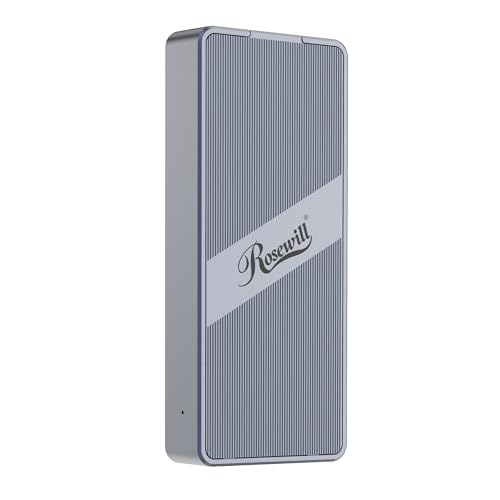
- Built-in fan helps manage heat during long transfers.
- Up to 3187MB/s over the 40Gbps interface.
- Supports NVMe drives up to 8TB.
Best For: Editors who need active cooling for sustained transfers.
Quiet Speed Choice
UGREEN 40Gbps M.2 NVMe Enclosure

- Up to 3600MB/s with ASM2464PD support.
- Fanless fin design for quiet operation.
- Fits NVMe drives up to 8TB in multiple sizes.
Best For: Editors who want quiet, portable high-speed storage.
Easy-Access Pick
Yottamaster 40Gbps NVMe Enclosure

- Tool-free design speeds up SSD changes.
- Stable 2800-3200 MB/s real-world performance.
- Built-in protection for sustained 4K workflows.
Best For: Editors who want quick drive swaps and dependable 4K editing support.
USB4 Speed Pick – SABRENT USB4 NVMe Enclosure
If you want an ssd enclosure for video editing that prioritizes transfer speed, this SABRENT USB4 model is built for heavy files and quick turnaround. It supports USB4 and Thunderbolt 3/4 performance, with backward compatibility for USB-C ports, so it can fit into a wide range of editing setups.
Best For: Editors and creators who want a fast, portable NVMe enclosure for moving large project files and working across USB4 or Thunderbolt systems.
Pros:
- Up to 3,900 MB/s over USB4, with up to 2,700 MB/s on Thunderbolt 3/4.
- Tool-free installation for PCIe NVMe drives in 2230/2242/2260/2280 sizes.
- Active cooling fan helps keep performance stable during large transfers.
- Works with Thunderbolt 3, Thunderbolt 4, USB4, and USB-C hosts.
Cons:
- Does not support SATA M.2 SSDs.
- Best performance depends on having a compatible high-speed host connection.
This is a strong choice if your workflow depends on fast offloads, scratch storage, or moving footage between machines. Its cooling and wide host support make it a practical high-speed enclosure for editors who travel or handle large media files often.
Mobile Recording Pick – ACASIS Magnetic 10Gbps Enclosure
This ssd enclosure for video editing is aimed at mobile creators who want direct recording support and easy attachment to a phone setup. It combines a magnetic design, built-in fan, and aluminum construction, with compatibility for iPhone 15/16/17 Pro models for 4K@60 ProRes recording to SSD.
Best For: iPhone-based video editors, short-form creators, and mobile shooters who need a compact NVMe enclosure for ProRes recording and quick transfers.
Pros:
- Supports 4K@60 ProRes recording to SSD with compatible iPhone Pro models.
- Built-in silent cooling fan and aluminum body with thermal pad for heat control.
- Magnetic attachment helps keep the enclosure secured on the move.
- Portable half-phone-sized design fits easily in a laptop bag.
Cons:
- Only runs at 10Gbps, so it is slower than higher-end USB4 options.
- New SSDs may need to be formatted before use.
- For larger drives or multiple devices, external power may be recommended.
If your workflow centers on phone capture and fast field storage, this enclosure is built for convenience first. It is especially appealing for creators who want a stable, compact option for recording and transferring video without carrying a bigger desktop-style setup.
All-Flash RAID Pick – ORICO 5-Bay 2.5-inch Enclosure
For users comparing ssd enclosures for video editing, this ORICO all-flash system stands out for storage capacity and workflow flexibility rather than raw single-drive speed. It supports 2.5-inch SSDs and HDDs, includes multiple interface ports, and adds RAID options that can help tailor performance or redundancy to the job.
Best For: Editors and photographers who need a multi-bay storage enclosure with RAID options, card slots, and lots of capacity for large media libraries.
Pros:
- Five-bay design supports up to 40TB total capacity.
- Seven RAID modes: RAID 0, 1, 3, 5, 10, JBOD, and CLEAR.
- Two 10Gbps USB ports plus SD and TF 3.0 card slots.
- All-flash, compact build is lighter and more shock-resistant than 3.5-inch setups.
Cons:
- Uses 2.5-inch drives only, not 3.5-inch drives.
- Top transfer speed depends on whether you use PSSD or SATA.
- Bulkier than a single-drive portable enclosure.
This is a strong fit when your editing workflow needs storage expansion, backups, and card offload in one place. It is less about pocket portability and more about giving video production teams a versatile, high-capacity hub.
Thunderbolt Power Pick – ACASIS 40Gbps NVMe Enclosure
If you need an ssd enclosure for video editing that can keep up with demanding transfers, this ACASIS model is built around 40Gbps USB4/Thunderbolt performance and active cooling. It is designed for professional workloads on Mac, Windows, and Linux systems, with support for multiple M.2 sizes and a certified Intel JHL7440 chip for stable connectivity.
Best For: Editors using Thunderbolt or USB4 systems who want a fast NVMe enclosure for large media files, backups, and workstation use.
Pros:
- Up to 40Gbps connection with tested read/write speeds up to 2805/2734 MB/s.
- Built-in fan and heat dissipation holes help reduce thermal throttling.
- Supports Thunderbolt 4, Thunderbolt 3, and backward-compatible USB standards.
- Works with M1/M2/M3 Pro & Max MacBook, iPad Pro, Windows, and Linux.
Cons:
- Fan must be switched on manually.
- Single-drive enclosure only.
- Best performance requires a fast compatible host connection.
This is the most performance-focused option in the group for users who edit large files and want a premium external drive experience. It is especially useful when thermal stability and high sustained throughput matter more than maximizing drive count.
Ultra-High-Speed Pick – UGREEN 80Gbps M.2 NVMe SSD Enclosure
If you need ssd enclosures for video editing and want the fastest transfer headroom in this group, this UGREEN model is built for heavy media workflows. Its dual-chip design with an Intel JHL9480 Thunderbolt controller and JMicron bridge aims for speeds up to 7000 MB/s, while the aluminum body and 3D fin layout are designed to help keep performance steady during long transfers.
Best For: Editors moving large project files who want the highest-speed option here.
Pros:
- Dual-chip architecture targets up to 7000 MB/s for very fast file movement.
- 3D aluminum fin design is built to improve heat dissipation and airflow.
- Supports M.2 2230/2242/2260/2280 SSDs up to 8TB.
- Works with Windows, macOS, Linux, and Android.
Cons:
- Not compatible with SATA (NGFF) or mSATA SSDs.
- SSDs with pre-installed heatsinks are not supported.
- Some thicker SSDs may need a thinner thermal pad to fit properly.
This is the strongest performance-focused enclosure in the list, especially if your workflow depends on very large media transfers and you have a compatible Thunderbolt/USB4 setup. The main tradeoff is stricter SSD fit and compatibility limits, so it’s best matched with a known-compatible NVMe drive.
Balanced Performance Pick – Cable Matters 40Gbps USB4 / Thunderbolt 4 SSD Enclosure
For ssd enclosures for video editing, this Cable Matters model is a practical middle-ground if you want fast 40Gbps transfers without jumping to the most extreme spec. It supports USB4 and Thunderbolt 4/5 hosts, includes active fan cooling for steadier performance, and is aimed at PCIe Gen 4×4 NVMe drives with real-world speeds tested up to 3800MB/s read and 3600MB/s write.
Best For: Editors who want a fast, portable enclosure with active cooling and easy setup.
Pros:
- 40Gbps USB4 support with Thunderbolt 4 and Thunderbolt 5 host compatibility.
- Active temperature-controlled fan helps maintain stable transfers.
- Tool-free installation makes drive swaps quick and convenient.
- Supports 2230/2242/2260/2280 M.2 sizes.
Cons:
- Single-sided M.2 NVMe SSDs only.
- Double-sided drives like some high-capacity models are not supported.
- It may not suit users who need the absolute fastest enclosure available.
This enclosure makes sense when you want strong speed, cooling, and broad host compatibility in one package. It’s a sensible choice for editing workflows where reliability matters as much as raw throughput, especially if your SSD is single-sided.
Budget-Friendly Pick – UGREEN SSD Enclosure Tool-Free USB C 10Gbps
If you want a straightforward option for ssd enclosures for video editing, this UGREEN enclosure keeps the basics covered at 10Gbps. It uses a tool-free design, supports common M.2 NVMe sizes up to 8TB, and includes short-circuit and over-current protection, making it a simple choice for everyday project storage and offload tasks.
Best For: Budget-conscious editors who need a simple portable NVMe enclosure.
Pros:
- 10Gbps USB 3.2 Gen2 transfer rate for general editing workflows.
- Tool-free, plug-and-play design with no drivers required.
- Supports M.2 2230/2240/2260/2280 NVMe drives up to 8TB.
- Includes RTL9210-based protection features and UASP/Trim support.
Cons:
- Slower than 40Gbps and 80Gbps options for very large media transfers.
- Does not support SATA NGFF or mSATA SSDs.
- 10Gbps performance requires a USB C 3.2 Gen2 data cable.
This is the most accessible pick here if your editing needs are lighter or you mainly want dependable external storage for project files. It won’t match the top-speed options, but the tool-free design and broad compatibility make it easy to live with.
Cooling Pick – Rosewill 40Gbps M.2 NVMe SSD Enclosure with Fan
If you want an SSD enclosure for video editing that can keep pace with big file transfers, this Rosewill model is built around sustained speed and cooling. It supports Thunderbolt 3/4 and USB4 connections, reaches up to 3187MB/s in testing, and adds a built-in fan with venting to help manage heat during longer sessions.
Best For: Editors who need a compact enclosure with active cooling for extended transfer and edit sessions.
Pros:
- Built-in fan and vent design help dissipate heat during longer workloads.
- 40Gbps interface and ASM2464PD controller support fast file transfers.
- Supports M.2 NVMe drives up to 8TB in 2230-2280 sizes.
- Compatible with macOS and Windows for flexible workstation use.
Cons:
- SSD is not included.
- Top speed depends on the host system, SSD, and cable quality.
- Active cooling adds another component to manage compared with fanless designs.
For editors moving large clips, project files, or cache data, this enclosure stands out because it focuses on thermal control as much as raw transfer speed. The compact build also makes it easy to carry between studio and field work.
Quiet Speed Choice – UGREEN 40Gbps M.2 NVMe Enclosure
This UGREEN enclosure is a strong fit for ssd enclosures for video editing when you want high throughput without a fan. It uses the ASM2464PD chip, supports Thunderbolt 3/4 and USB4, and is rated up to 3600MB/s, with a double-sided fin design that focuses on quiet heat dissipation.
Best For: Editors who want a fanless, portable enclosure for fast project storage and playback.
Pros:
- Up to 3600MB/s with the ASM2464PD chip.
- Fanless cooling design keeps operation quiet.
- Supports 2230/2242/2260/2280 NVMe drives up to 8TB.
- Includes cable, cooling pad, and disassembly kit.
Cons:
- Needs Thunderbolt 4 hardware and a 40Gbps-rated cable to reach top speed.
- Does not support SATA NGFF or mSATA drives.
- Some SSDs may need thinner thermal pads to fit properly.
If your workflow values silence and portability, this enclosure offers a practical balance of speed and heat management. It is especially useful for editors who shuttle footage between devices and do not want fan noise in a small workspace.
Easy-Access Pick – Yottamaster 40Gbps NVMe Enclosure
For ssd enclosures for video editing, this Yottamaster model is appealing if you want a quick setup and stable high-speed performance. It supports Thunderbolt 4 and USB4 hosts, uses the ASM2464PD controller, and is designed for sustained real-world speeds in the 2800 to 3200 MB/s range when paired with the right 40Gbps connection.
Best For: Editors who want tool-free SSD swaps and dependable performance for 4K workflows.
Pros:
- Tool-free installation makes drive changes fast and simple.
- Transparent cover lets you see the activity LED and fan status.
- Supports 2230/2242/2260/2280 NVMe drives with built-in protection features.
- Designed for stable performance during heavy workloads, including 4K video editing.
Cons:
- Actual speed depends on the host, SSD, and transfer environment.
- Best results require a suitable 40Gbps-rated cable.
- SSD is not included.
This is a sensible choice if you want fast access without fiddly installation steps. The transparent design and built-in protection features make it a good fit for editors who frequently swap drives or move between systems.
How We Picked These SSD Enclosures for Video Editing
For SSD Enclosures for Video Editing, speed is only part of the story. We looked for models with modern interfaces such as USB 10Gbps, USB4, and Thunderbolt-class 40Gbps or higher, plus practical features like tool-free installation, reliable cooling, and strong SSD compatibility. We also considered whether each enclosure makes sense for lightweight proxy work, everyday project storage, or demanding 4K and higher-resolution timelines.
Quick Comparison
In general, 10Gbps enclosures are best for affordable portable edits and standard external storage, while 40Gbps USB4 and Thunderbolt 4 options are better suited to high-bitrate footage, larger caches, and faster scratch-disk performance. If you need the fastest headroom for pro workflows, 80Gbps models are the most future-ready, but they only pay off if your computer supports that bandwidth.
Key Buying Factors for SSD Enclosures for Video Editing
Interface Speed
Match the enclosure to your workflow. A faster enclosure will not help much if your laptop or desktop only supports a slower port. For most editors, 10Gbps is the entry point, 40Gbps is the sweet spot for serious work, and 80Gbps is for users with compatible high-end systems.
Thermals and Sustained Performance
Video editing often involves long writes, not just short file transfers. Aluminum bodies, heat pads, and active cooling can help prevent throttling during large exports, multicam work, or prolonged cache use.
SSD Type and Capacity Support
Make sure the enclosure supports the form factor you already own, most commonly M.2 NVMe. Also check maximum capacity support if you plan to use larger drives for 4K, 6K, or archive-heavy projects.
Portability and Workflow Fit
Some creators need a compact travel drive for field editing, while others want a desk-friendly enclosure for a dedicated scratch disk. Tool-free designs are convenient if you swap drives often, and hub-style models can reduce cable clutter.
Who Should Buy Which SSD Enclosures for Video Editing?
If you edit proxies, 1080p projects, or need a budget-friendly portable drive, a 10Gbps model is usually enough. If you work with 4K footage, large camera originals, or want a fast external editing volume, a 40Gbps enclosure is the best all-around choice. If your setup supports it and you want maximum performance headroom, an 80Gbps enclosure is worth considering. For creators using specialized recording workflows, a model with camera-friendly features or magnetic mounting may be the better fit.
In short, the best choice depends on your footage size, your computer’s port speed, and whether you value portability, cooling, or raw throughput most.