
Choosing the right enclosure can turn a spare M.2 drive into a fast, portable storage upgrade. The best portable SSD enclosures balance speed, thermal control, and broad compatibility without making setup complicated.
Below, we focus on options for everyday backup, gaming libraries, and heavier pro workflows so you can match the enclosure to your drive and device.
Best 10 Portable SSD Enclosures Picks for 2026
Tool-Free NVMe Pick
SABRENT USB-C NVMe Enclosure & Reader

- Flip-open, tool-free installation
- Aluminum cooling for steadier 10Gbps use
- Supports NVMe drives up to 8TB
Best For: Easy, travel-friendly NVMe storage and cloning
Rugged Gaming Pick
ASUS TUF Gaming A1 External M.2 Enclosure
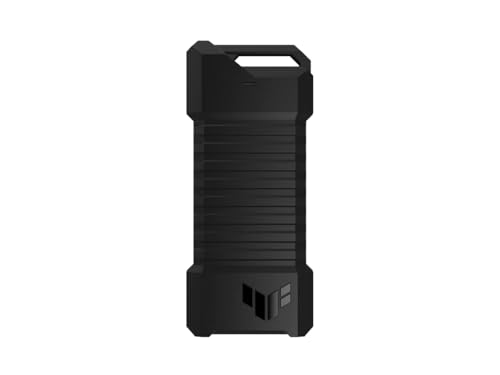
- Supports NVMe PCIe and SATA M.2 drives
- MIL-STD-810H drop resistance with IP68 protection
- Q-latch design for easy SSD mounting
Best For: Durable storage for gaming and rough travel
High-Speed Thunderbolt Pick
UGREEN 40Gbps M.2 NVMe Enclosure

- Up to 3600MB/s with compatible hardware
- USB4 and Thunderbolt 3/4 support
- Advanced fin-based cooling design
Best For: Fast transfers and demanding pro workflows
Compact Value Pick

- Tool-free sandwich installation
- 10Gbps USB 3.2 Gen 2 with UASP
- USB-C cable includes USB-A adapter
Best For: Simple, compact NVMe storage on the go
Budget 10Gbps NVMe Option

- 10Gbps USB 3.1 Gen 2 with UASP
- Supports 2230 to 2280 NVMe drives up to 8TB
- Includes USB-C and USB-A cable options
Best For: Users who want a compact, affordable NVMe enclosure for everyday use
Dual-Format Pick
SABRENT Tool-Free NVMe & SATA M.2 SSD Enclosure

- Works with both NVMe and SATA M.2 SSDs
- Tool-free, bus-powered design
- Up to 10Gbps over USB 3.2 Type-C
Best For: People who need one enclosure for different M.2 drive types
Premium RGB Pick

- USB 3.2 Gen 2 with up to 10 Gbps speed
- Aluminum case with thermal pads for cooling
- Includes USB-C to C and USB-C to A cables
Best For: buyers who want a premium NVMe enclosure with extra cooling and RGB styling
Travel-Friendly Value
UGREEN Tool-Free M.2 NVMe Enclosure

- Tool-free buckle design for fast SSD swaps
- USB 3.2 Gen 2 up to 10 Gbps
- Compact aluminum build with silicone case
Best For: travel-friendly buyers who want simple, tool-free NVMe storage
Cooling and Stability Choice
Plugable Tool-Free NVMe Enclosure

- Temperature-controlled fan plus aluminum body
- USB 3.2 Gen 2 with up to 10 Gbps speed
- Tool-free setup with UASP and TRIM support
Best For: power users who need active cooling for long, heavy transfers
Tool-Free NVMe Pick – SABRENT USB-C NVMe Enclosure & Reader
If you want portable SSD enclosures that are quick to use and easy to carry, this SABRENT model keeps the focus on speed and convenience. It supports NVMe drives only, uses a tool-free flip-open design, and is built for steady 10Gbps transfers with better heat contact than many slide-in styles.
Best For: Users who want a simple, travel-friendly NVMe enclosure for fast everyday storage, cloning, or troubleshooting.
Pros:
- Tool-free flip-open design makes SSD swaps fast and painless
- Aluminum top and direct thermal pad contact help with cooling during long transfers
- Supports NVMe sizes 2230, 2242, 2260, and 2280 up to at least 8TB
- USB-C plug-and-play with no drivers or external power needed
Cons:
- NVMe only, so it will not work with M.2 SATA SSDs
- Rated at 10Gbps, so it is not the fastest option here
Overall, this is a practical pick if you value ease of installation, solid cooling, and dependable portable use over chasing top-tier transfer speeds.
Rugged Gaming Pick – ASUS TUF Gaming A1 External M.2 Enclosure
Among portable SSD enclosures, the ASUS TUF Gaming A1 stands out when durability matters as much as speed. It supports both NVMe PCIe and SATA M.2 drives, uses a Q-latch for easy installation, and is built to handle tough conditions with drop resistance and IP68 protection.
Best For: Gamers and mobile users who want a tough enclosure that can handle rough treatment and broad drive support.
Pros:
- Supports both M.2 NVMe PCIe and SATA SSDs in 2242/2260/2280 sizes
- Q-latch design makes SSD installation straightforward
- MIL-STD-810H drop resistance plus IP68 water and dust resistance
- USB-C 3.2 Gen 2×1 connection delivers up to 10Gbps
Cons:
- Heavier than some compact aluminum enclosures
- 10Gbps speed is solid, but not a high-end performance tier
If you want a tougher enclosure for consoles, laptops, and general portable use, this ASUS model offers a good blend of flexibility and protection.
High-Speed Thunderbolt Pick – UGREEN 40Gbps M.2 NVMe Enclosure
If you are shopping portable SSD enclosures for the fastest possible transfers, this UGREEN model is built for higher-end USB4 and Thunderbolt workflows. It is an NVMe-only enclosure that claims up to 3600MB/s with the right Thunderbolt 4 cable and device, and it adds a dense cooling design to help manage heat.
Best For: Power users who want a high-speed NVMe enclosure for large file transfers, editing, and demanding storage work.
Pros:
- Up to 3600MB/s with USB4/Thunderbolt 3/4 compatibility
- Double-sided fin design and 3D cooling system improve heat dissipation
- Supports NVMe sizes 2230, 2242, 2260, and 2280 up to 8TB
- Works across Windows, Mac, Linux, Android, and multiple device types
Cons:
- Maximum speed requires Thunderbolt 4 cables and devices
- NVMe only, so SATA and mSATA drives are not supported
This is the strongest choice here if speed is your top priority and you already have compatible USB4 or Thunderbolt hardware to take advantage of it.
Compact Value Pick – FIDECO M.2 NVMe SSD Enclosure
For a straightforward option in portable SSD enclosures, this FIDECO model focuses on easy setup and everyday 10Gbps NVMe performance. Its sandwich-style design is tool-free, and the included USB-C cable with USB-A adapter makes it easier to carry one setup for more devices.
Best For: Buyers who want a simple, compact NVMe enclosure that is easy to install and travel with.
Pros:
- Tool-free sandwich design makes installation simple
- Supports NVMe M and M+B key drives in 2230/2242/2260/2280 sizes
- USB 3.2 Gen 2 with UASP supports up to 10Gbps
- USB-C cable includes an attached USB-A adapter for flexible travel use
Cons:
- NVMe only, so it does not support M.2 SATA SSDs
- Best for standard 10Gbps use rather than top-speed workloads
It is a sensible pick if you want a small, easy-to-use enclosure for general portable storage without paying for more advanced performance features.
USB4 Speed Pick – SABRENT USB4 NVMe SSD Enclosure, Tool-Free
If you want one of the fastest portable SSD enclosures for a PCIe NVMe drive, this SABRENT model is built for high-speed transfers and easy daily use. It supports USB4, Thunderbolt 3/4, and USB-C hosts, while the active cooling fan and aluminum construction are aimed at keeping performance steady during large file moves.
Best For: Creators, editors, and mobile users who want top-end speed with a tool-free NVMe setup.
Pros:
- Up to 3,900 MB/s over USB4, with 2,700 MB/s support on Thunderbolt 3/4
- Tool-free installation for PCIe NVMe drives in 2230, 2242, 2260, and 2280 sizes
- Active cooling fan plus aluminum and ABS construction for better thermal control
- Plug-and-play compatibility with Windows and macOS, no external power required
Cons:
- Does not support SATA M.2 SSDs
- Best performance depends on a USB4 or Thunderbolt-capable host and a fast NVMe drive
This is a strong pick if speed and convenience matter more than broad drive compatibility. It is especially compelling for PCIe Gen4 x4 SSDs and users who regularly move large files.
Budget 10Gbps NVMe Option – ORICO M.2 NVMe SSD Enclosure
This ORICO model is a practical choice if you want a straightforward portable SSD enclosure for a PCIe NVMe drive without paying for USB4 speeds. It uses USB 3.1 Gen 2 with UASP support, includes both USB-C to C and USB-C to A connection options, and is sized for easy carrying.
Best For: Users who want a compact 10Gbps NVMe enclosure for laptops, desktops, and other USB-C or USB-A hosts.
Pros:
- 10Gbps USB 3.1 Gen 2 interface with UASP support
- Works with NVMe M.2 drives in 2230, 2242, 2260, and 2280 sizes up to 8TB
- Includes USB-C to C and USB-C to A cable options
- Compact aluminum-and-plastic build designed for portability and heat dissipation
Cons:
- Only supports PCIe NVMe M-key M.2 SSDs, not SATA-based M.2 drives
- Real-world speed is far below USB4 and depends on the host and drive
For general-purpose external storage, this enclosure covers the basics well and keeps setup simple. It is a sensible pick when you want broad cable compatibility and a small footprint rather than maximum throughput.
Dual-Format Pick – SABRENT Tool-Free NVMe & SATA M.2 SSD Enclosure
If you need a flexible portable SSD enclosure that can handle either NVMe or SATA M.2 drives, this SABRENT case stands out for compatibility. It is tool-free, bus powered, and rated for up to 10Gbps over USB 3.2 Type-C, making it a convenient option for mixed drive collections.
Best For: Anyone who wants one enclosure that works with both NVMe and SATA M.2 SSDs.
Pros:
- Supports both M.2 PCIe NVMe and M.2 SATA SSDs
- Tool-free design makes drive swaps quick and easy
- Up to 10Gbps transfer speeds, with up to 1000MB/s in real use
- Slim aluminum build with thermal pad for heat transfer
Cons:
- Does not support 2.5-inch SATA drives or mSATA
- No room for M.2 drives with a pre-installed heatsink
This is the most versatile option in the group if you move drives between systems or reuse both SATA and NVMe M.2 SSDs. The tradeoff is that it tops out at USB 3.2 speeds rather than USB4 performance.
Premium RGB Pick – ASUS ROG Strix Arion
If you want portable SSD enclosures with a premium feel, the ASUS ROG Strix Arion focuses on speed, cooling, and easy everyday use. It supports M.2 NVMe drives in 2230, 2242, 2260, and 2280 sizes, connects over USB 3.2 Gen 2, and includes both USB-C to C and USB-C to A cables.
Best For: Users who want a stylish aluminum enclosure with included cables and thermal support for NVMe drives.
Pros:
- USB 3.2 Gen 2 connection supports up to 10 Gbps transfer speeds
- Aluminum alloy body with thermal pads helps pull heat away from the drive
- Includes both USB-C to USB-C and USB-C to USB-A cables
- Fits NVMe M.2 drives in 2230/2242/2260/2280 sizes
Cons:
- NVMe SSD is not included
- Designed for PCIe NVMe drives, not SATA SSDs
- RGB lighting may be unnecessary for buyers who want a plain enclosure
This is a strong pick if you care about a rugged aluminum build and want a portable enclosure that is ready to use out of the box. The included cable set and thermal design make it practical for laptop storage upgrades and fast file transfers.
Travel-Friendly Value – UGREEN Tool-Free M.2 NVMe Enclosure
Among portable SSD enclosures, the UGREEN model is built for fast setup and easy travel use. It supports M.2 NVMe drives in 2230, 2242, 2260, and 2280 sizes, offers USB 3.2 Gen 2 speeds up to 10 Gbps, and uses a tool-free buckle design so you can swap drives quickly.
Best For: Travelers and everyday users who want a simple, compact NVMe enclosure with quick installation.
Pros:
- Tool-free design makes SSD installation quick and easy
- USB 3.2 Gen 2 supports up to 10 Gbps transfer speeds
- Compact aluminum body with extra silicone case for portability
- Supports UASP and TRIM with an RTL9210 chip for stability
Cons:
- Does not support SATA NGFF SSDs or mSATA SSDs
- 10 Gbps performance requires a matching USB-C 3.2 Gen 2 cable
- No mention of included dual cable options like some competitors
This enclosure is a straightforward choice if you want quick drive changes and a small footprint. Its broad OS compatibility and protection features make it a practical option for portable storage across multiple devices.
Cooling and Stability Choice – Plugable Tool-Free NVMe Enclosure
If you are comparing portable SSD enclosures for sustained transfers, the Plugable M.2 NVMe enclosure stands out for cooling. It combines a temperature-controlled fan with an aluminum body, supports USB 3.2 Gen 2 speeds up to 10 Gbps, and is designed for M-Key and B+M Key NVMe drives in 2242, 2260, and 2280 sizes.
Best For: Power users moving large files who want active cooling and stable transfer performance.
Pros:
- Dual cooling system uses both a fan and aluminum heat dissipation
- USB 3.2 Gen 2 supports up to 10 Gbps transfers
- Tool-free, driver-free setup with USB-C and USB-A cables included
- Supports UASP and TRIM for more efficient data transmission
Cons:
- Does not support NGFF SATA SSDs
- Active cooling may be more than some casual users need
- Limited to 2242/2260/2280 NVMe drive sizes
This is the most cooling-oriented option in the group, especially if you often transfer very large files and want performance to stay consistent. The included fan and aluminum shell are aimed at reducing thermal throttling during heavier workloads.
How We Picked Portable SSD Enclosures
We focused on the factors that matter most in real-world use: interface speed, supported drive sizes, NVMe versus SATA compatibility, build quality, and how easy the enclosure is to install and reuse. We also gave extra weight to features like tool-free access, thermal design, and cable support that can affect sustained performance.
Quick Comparison
Not every enclosure is built for the same job. USB 3.2 Gen 2 models are a strong fit for most users and can deliver excellent everyday performance. USB4 and 40Gbps options are better for faster drives and newer laptops or desktops that can actually take advantage of the added bandwidth. If you need a simple external drive for backups or media, a basic 10Gbps model is often the best value.
Key Buying Factors for Portable SSD Enclosures
Interface Speed
Match the enclosure’s connection to your host device and SSD. A fast NVMe drive in a slower enclosure will be bottlenecked, so there is no need to overspend on premium bandwidth unless your workflow needs it.
Drive Compatibility
Check whether the enclosure supports NVMe, SATA, or both. Also verify the supported M.2 lengths, especially if you use smaller 2230 drives or full-length 2280 models. Some Portable SSD Enclosures are limited to specific keying or drive types.
Thermals and Durability
Aluminum shells, thermal pads, and sensible airflow help maintain performance during long transfers. Rugged or sealed designs are worth considering if the enclosure will travel often or face outdoor use.
Ease of Use
Tool-free designs and clear drive retention systems make upgrades faster and reduce the chance of installation mistakes. If you swap drives often, this matters more than it may seem at first.
Who Should Buy Which Portable SSD Enclosures?
If you want the best all-around value, choose a 10Gbps NVMe enclosure with tool-free assembly. If you are working with high-end laptops, fast external storage needs, or large file transfers, step up to USB4 or 40Gbps. Creators and gamers who need dependable everyday storage should prioritize thermals and enclosure fit, while travelers may prefer more rugged Portable SSD Enclosures with added protection and a compact footprint.
In short, the best choice is the one that matches your SSD type, your device’s port speed, and how you plan to use the drive day to day.