
The FEELWORLD FW759 Pro review is really about one thing: whether a compact external monitor makes beginner shooting easier.
For DSLR, mirrorless, and camcorder users who want a bigger view and basic exposure tools, it has a straightforward value proposition.
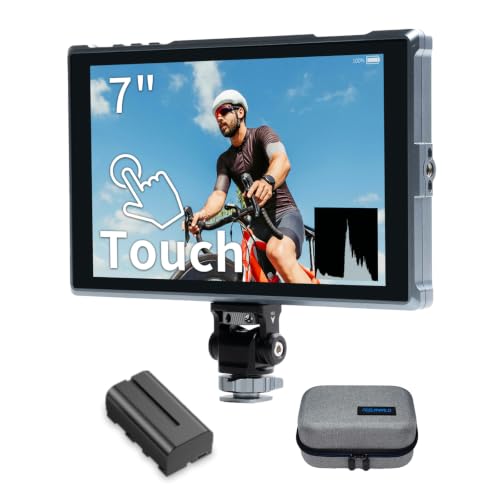
FW759 Pro Review Summary
The FEELWORLD FW759 Pro is a sensible pick for creators who have outgrown their camera’s small rear screen and want a simple on-rig display for framing, focus checking, and exposure judgment.
It is especially appealing for beginner videographers, vloggers, livestreamers, and solo shooters who need practical monitoring without a complicated setup.
Best fit: creators building a first serious video rig, not buyers looking for a premium production monitor with every advanced workflow feature.
Review Scorecard
| Category | Score | Buyer-Focused Assessment |
|---|---|---|
| Screen usefulness | 8/10 | The 7-inch IPS display gives a larger, clearer viewing area than an in-camera screen. |
| Exposure tools | 8/10 | Histogram, zebra, focus assist, and false color cover the basics most creators actually use. |
| Portability | 8/10 | The listing emphasizes a slim 300g design that suits handheld, gimbal, and mobile rigs. |
| Compatibility | 9/10 | HDMI connectivity and support for DSLR, mirrorless, and camcorder setups make it broadly usable. |
| Power flexibility | 8/10 | NP-F, DC, and Type-C options reduce friction when building a rig. |
| Outdoor practicality | 7/10 | The included sunshade helps, though a 400-nit class monitor is still more situational than bright pro displays. |
| Beginner value | 9/10 | It focuses on the features new shooters need most, without forcing an overcomplicated workflow. |
Verdict: the FW759 Pro looks like a practical, budget-conscious field monitor for people who want a better view of their shot and a few reliable exposure tools.
Key Features and Specifications of FW759 Pro
The headline feature is the 7-inch IPS screen with 1280 x 800 resolution.
That size is large enough to improve composition checks, menu visibility, and focus judgment while staying small enough to mount cleanly on a camera cage or handle setup.
The listing also highlights 400 nits of brightness, which is usable for indoor work and some shaded outdoor setups.
That is not the same thing as a high-end daylight-bright monitor, so the included sunshade matters more here than it would on a brighter display.
Useful monitoring tools include:
- Histogram
- Zebra pattern
- Focus assist
- False color
Those are the core features that help you catch clipped highlights, underexposure, and soft focus before you leave the shoot.
For a beginner, that matters more than a long list of menu options that go unused.
The monitor is described as lightweight at 300g, which is important on smaller rigs.
Weight adds up quickly once you include a camera, lens, battery, cage, and mount, so a lighter monitor is easier to live with during handheld work or on a gimbal.
Power and connectivity are flexible as well:
- HDMI in/out
- NP-F battery support
- DC power
- Type-C power
That combination makes the FW759 Pro easier to slot into different setups without making you buy a totally new power ecosystem.
The listing also says it comes with an F550 battery and bag, which is useful if you are starting from scratch and want fewer immediate accessory purchases.
Pros and Cons of FW759 Pro
Pros
- Larger 7-inch screen makes framing and focus evaluation easier than a camera LCD
- IPS panel is a sensible choice for color and viewing consistency in this class
- Exposure aids cover the monitoring basics beginners actually need
- Lightweight design should be manageable on compact rigs
- HDMI plus multiple power options make integration flexible
- Included sunshade and battery bundle add practical value for first-time buyers
Cons
- 400-nit brightness is helpful, but not ideal for very bright outdoor shooting
- The feature set is focused more on fundamentals than on advanced production workflows
- Buyers wanting a premium, ultra-bright on-camera monitor may want to look higher up the ladder
- The listing is clearly positioned for beginners, so experienced operators may outgrow it quickly
Who Should Buy FW759 Pro?
Buy the FW759 Pro if you are building a video setup around a DSLR, mirrorless camera, or camcorder and want a bigger screen for better judgment on set.
It makes sense for creators who film interviews, tutorials, livestreams, event coverage, and short-form content where framing and focus checks matter more than cinematic monitoring features.
It also fits buyers who prefer a relatively simple monitor rather than a tool packed with niche options.
If you are transitioning from a camera’s rear LCD to your first external monitor, this is the type of product that should feel immediately useful.
You should probably skip it if you already own a brighter monitor with more advanced monitoring controls, or if you shoot frequently in harsh daylight and need the strongest possible visibility.
It is also not the obvious choice for someone who wants the most rugged or most feature-dense solution on the market.
Using FW759 Pro on a Video Rig
Framing and Focus
The main payoff from a monitor like this is simple: you can actually see what you are doing.
A 7-inch screen gives you more room to judge composition, track subjects, and verify that focus is where you expect it to be.
Exposure Checking
Histogram, zebra, and false color are the kind of tools that keep a bad exposure from becoming an expensive mistake.
They do not replace experience, but they make exposure decisions much faster and more confident during real shooting.
Rig Integration
The light weight and HDMI-based setup suggest an easy fit on compact rigs.
That matters if you move between handheld work, tripod setups, and mobile shooting, because the monitor should support the rig instead of dominating it.
Outdoor Visibility
The included sunshade is a meaningful accessory here.
The monitor’s brightness is usable, but buyers should still expect best results in controlled light, shade, or setups where the hood can do real work.
Alternatives to FW759 Pro
If you want a similar field-monitor experience, compare the FW759 Pro with the FEELWORLD F6 Plus, which is another familiar on-camera monitor line from the same brand.
For buyers who want a broader ecosystem and often stronger visibility options, the Lilliput camera monitor lineup is worth a look.
If you want a compact monitor from a widely recognized accessory brand, the SmallHD on-camera monitor range is the premium end of the category.
If budget and utility matter most, it is also reasonable to compare against other 7 inch field monitors that include basic exposure tools and HDMI connectivity.
Is FW759 Pro Worth It?
Yes, if what you need is a practical first field monitor that improves framing, focus checking, and exposure confidence without overcomplicating your rig.
The FEELWORLD FW759 Pro is worth it for beginner and intermediate creators who value a larger screen, core monitoring tools, flexible power, and a lightweight build more than premium-bright performance.
If your work is mostly indoors, in shade, or in controlled environments, this looks like a solid buy.
If you need maximum daylight visibility or a more advanced monitoring package, it makes more sense to move up to a higher-tier option instead.