
If you need crisp live imaging for PCB repair, lab analysis, or precision inspection, the right industrial microscope camera can make a big difference. The best models balance resolution, frame rate, mount compatibility, and output options for your workflow.
Below, we focus on practical buying considerations so you can choose a camera that fits your microscope, your display setup, and the level of detail your work demands.
Best 10 Industrial Microscope Camera Picks for 2026
High-Resolution 4K Pickup
48MP HDMI/USB Industrial Microscope

- 48MP stills and 4K video recording
- HDMI and Type-C output for 1080P viewing
- 150X zoom lens with adjustable ring light
Best For: Electronics repair and bench inspection
Remote-Control HDMI Choice
BTER 4K Industrial Microscope Camera

- 4K at 30FPS with CMOS sensor
- Remote menu control for easier operation
- HDMI display plus Type-C computer connection
Best For: Lab demonstrations and industrial viewing
USB Inspection Lens
16MP 4X Zoom Industrial Camera
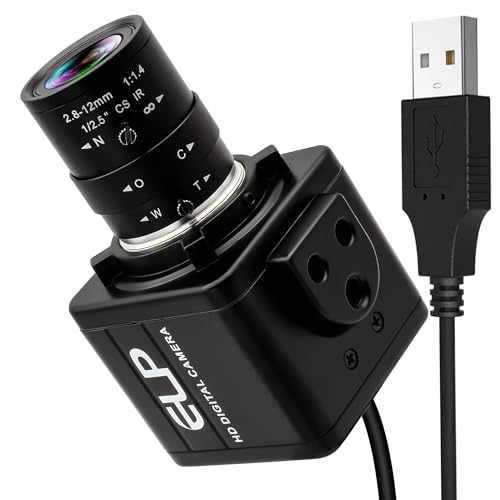
- 16MP image sensor for detailed capture
- 2.8-12mm lens with 4X optical zoom
- Plug-and-play USB use with major software support
Best For: USB microscope setups and machine vision
Workbench Viewing Kit
13MP HDMI/VGA Industrial Microscope

- 13MP camera with 1080P HD imaging
- HDMI and VGA outputs for monitor viewing
- Metal base, 130X lens, and LED ring light
Best For: Circuit board inspection and repair benches
4K USB Imaging

- 8.3MP CMOS sensor for detailed imaging
- 4K at 30 fps and 1080P at 60 fps output
- Driver-free USB2.0 with freeze and line tools
Best For: Bench users who want easy USB connectivity and 4K capture
Dual-Output Repair Cam
4K HDMI USB Industrial Microscope Camera

- 4K HDMI at 30 fps for live viewing
- USB works with Windows, Mac, and Linux
- C-mount design suits microscope adapters
Best For: PCB repair and inspection benches needing HDMI display
High-Detail C-Mount

- 37MP imaging for high-detail viewing
- 1080P at 60 fps video capture
- Includes conversion adapter and freeze function
Best For: High-detail microscope setups that need easy mounting
Precision 4K Pick
60MP 4K HDMI USB Industrial Video Microscope

- 60MP photos and 4K HDMI/USB output
- 150X zoom with up to 1000mm working distance
- 56-LED adjustable ring light and flexible stand
Best For: Electronics repair and PCB inspection with a roomy live-view setup
Value HDMI Choice
13MP 1080P HDMI VGA Industrial Video Microscope

- 13MP sensor with 1080P HDMI and VGA output
- 150X zoom C-mount lens with long working distance
- 56-LED adjustable ring light and flexible stand
Best For: Practical buyers who want core inspection features at 1080P
Balanced 4K Option
60MP 4K HDMI USB Industrial Video Microscope

- 60MP images with 4K HDMI/USB output
- 150X zoom lens with 1000mm working distance
- Adjustable 56-LED ring light and 4-part stand
Best For: Users who want high-detail inspection with a comfortable working setup
High-Resolution 4K Pickup – 48MP HDMI/USB Industrial Microscope
This industrial microscope camera is built for users who want strong image detail and flexible viewing options on a bench setup. With 4K recording, 48MP stills, HDMI and Type-C output, and a 150X C-mount zoom lens, it fits electronics repair, sample inspection, and other close-up work where clarity matters.
Best For: Electronics repair, bench inspection, and users who want 4K output with a flexible stand.
Pros:
- Outputs 1080P HD through HDMI and Type-C, with 4K video recording and 48MP photos.
- 150X zoom C-mount lens supports up to 1000mm working distance and 1-150X display magnification.
- Includes a 56-LED ring light with adjustable brightness for clearer image capture.
- Foldable stand with multiple adjustable sections helps position the sample more easily.
Cons:
- Remote control is only usable in HDMI output mode.
- TF card storage is limited to up to 64G.
- Package does not include remote control batteries.
Overall, this is a practical industrial microscope camera for users who want a full-featured setup with strong video output, adjustable lighting, and a flexible stand. It is especially appealing if you need a more complete bench solution rather than a bare camera module.
Remote-Control HDMI Choice – BTER 4K Industrial Microscope Camera
If you need an industrial microscope camera for shared viewing and straightforward HDMI use, this BTER model keeps the setup focused on high-definition output and remote operation. It offers 4K at 30FPS, a CS-interface camera design, and support for photo, video, measurement, and memory-card capture.
Best For: Lab demonstrations, industrial viewing, and situations where remote menu control is useful.
Pros:
- 4K resolution at 30FPS with a high-sensitivity CMOS sensor.
- Remote control supports menu operation for easier shooting and viewing.
- Supports photo, video, measurement, and simultaneous output.
- Can connect to a monitor by HDMI or to a computer through Type-C.
Cons:
- Type-C computer use requires software download.
- Maximum magnification is listed at 400X, but the notes focus more on camera output than optics.
- Does not include a built-in screen.
For buyers who want a practical HDMI microscope camera rather than a full microscope body, this model covers the core use cases well. It is geared toward image sharing, basic measurement, and convenient remote control in lab or industrial settings.
USB Inspection Lens – 16MP 4X Zoom Industrial Camera
This industrial microscope camera is a good fit if you want a USB-connected option for inspection, documentation, or live viewing. The 16MP sensor and 2.8-12mm varifocal CS-mount lens give you manual control over focal length, zoom, and focus for a wide range of close-up tasks.
Best For: USB microscope setups, machine vision projects, and plug-and-play inspection on computers.
Pros:
- 16MP sensor delivers sharp high-resolution images.
- 2.8-12mm varifocal lens provides 4X optical zoom and manual focus control.
- UVC plug-and-play design works with Windows, Linux, and Jetson Nano.
- Compatible with OpenCV, Lightburn, live streaming software, and monitoring apps.
Cons:
- Manual focus and manual zoom may be less convenient for fast workflow changes.
- USB design is aimed at computer use, not standalone viewing.
- It is not described as water resistant.
For users building a USB-based industrial microscope camera setup, this model offers strong compatibility and flexible optics. It is especially useful when software integration matters as much as image capture quality.
Workbench Viewing Kit – 13MP HDMI/VGA Industrial Microscope
For bench work that needs a straightforward industrial microscope camera, this NICE-POWER model combines 1080P imaging with HDMI and VGA output. It also includes a 130X zoom C-mount lens, a bright ring light, and a stable metal base, making it suited to repair and inspection tasks where positioning and visibility are important.
Best For: Circuit board inspection, repair benches, and users who want HDMI plus VGA output.
Pros:
- 13MP camera with 1080P HD digital imaging.
- HDMI and VGA output support larger-screen viewing.
- 130X zoom C-mount lens offers up to 220mm working distance and easy focus adjustment.
- 56 adjustable LED ring lights and a stable metal base improve visibility and setup stability.
Cons:
- Biological use is listed as not applicable to cells.
- Remote control batteries are not included.
- It is a bench-style system, so it is not intended for handheld use.
This is a sensible industrial microscope camera package for users who want a sturdy workstation setup with simple display connections. The included base, lighting, and HDMI/VGA support make it practical for repair and QC-style tasks.
4K USB Imaging – 4K HD Microscope Camera 8.3MP
If you need an industrial microscope camera for sharp stills, smooth 4K capture, and simple USB setup, this 8.3MP model is aimed at practical bench work. It offers 3840 x 2160 output at 30 fps, 1080P at 60 fps, and driver-free USB2.0 connectivity for straightforward use in digital video and photo workflows.
Best For: Users who want a USB microscope camera for 4K imaging, quick transfer, and flexible on-screen measurement tools.
Pros:
- 8.3MP CMOS sensor for detailed image capture
- 4K HDMI-style display output at 30 fps and 1080P at 60 fps
- Driver-free USB2.0 output for easy connectivity
- Includes one-touch freeze/unfreeze and 16 adjustable line sets
Cons:
- USB output is limited to 4K at 30 fps, not 60 fps
- Memory card support is capped at 64GB
- Best suited to supported microscope setups rather than all-purpose cameras
Overall, this is a solid fit if you want a feature-rich industrial microscope camera with 4K capture, easy USB operation, and useful measurement overlays. Its strength is in clear imaging and convenience rather than broad system flexibility.
Dual-Output Repair Cam – 4K HDMI USB Industrial Microscope Camera
This industrial microscope camera is built for repair and inspection work where HDMI viewing or PC capture may be needed. It supports 4K HDMI output at 30 fps, USB output at 1080P@30 fps, and works with Windows, Mac, and Linux software for calibration and display on a computer.
Best For: Repair benches and inspection setups that need HDMI monitoring plus optional USB computer use.
Pros:
- True 4K HDMI output at 30 fps
- USB output for PC use with Windows, Mac, and Linux support
- Supports calibration through the included software
- C-mount design works with compatible microscope and lens adapters
Cons:
- HDMI and USB cannot be used at the same time
- USB mode is limited to 1080P@30 fps and fixed exposure/gain/white balance
- TF card formatting is required before use
For buyers who want a flexible industrial microscope camera for PCB repair, soldering, and machine inspection, this model stands out for its dual-output design and calibration support. The trade-off is that USB mode is more limited than HDMI mode, so it works best when you prioritize live bench viewing.
High-Detail C-Mount – 37MP USB Microscope Camera
If image detail matters most, this industrial microscope camera is positioned as a high-resolution option for microscope setups. It offers 37MP imaging, 1080P at 60 fps, and both HDMI Type A and USB2.0 interfaces, giving you a straightforward path to high-definition viewing and capture.
Best For: Users who want a high-resolution microscope camera with standard mounting support and simple operation.
Pros:
- 37MP high-definition imaging for clear visuals
- 1080P at 60 fps for smoother video capture
- Includes a conversion adapter for easier mounting
- Supports digital zoom, freeze, and adjustable RGB/brightness control
Cons:
- Plastic enclosure is less rugged than metal-bodied models
- Details list HDMI output, but USB2.0 is also the primary interface noted
- Higher resolution may be more than needed for basic inspection tasks
This model makes sense when you want a high-pixel industrial microscope camera for clear inspection work and flexible adjustment options. Its biggest appeal is the combination of 37MP resolution, 60 fps video, and mounting convenience through the included adapter.
Precision 4K Pick – 60MP 4K HDMI USB Industrial Video Microscope
If you need an industrial microscope camera for serious electronics work, this model focuses on clarity, workspace, and easy live viewing. Its 60MP sensor, 4K HDMI/USB output, and long 1000mm working distance make it well suited for soldering, PCB inspection, and other bench tasks where you need both detail and room to work.
Best For: Electronics repair, soldering, and PCB inspection with a large-screen workflow.
Pros:
- 60MP photos and 4K HDMI/USB video output for detailed inspection
- 150X continuous zoom with a maximum 1000mm working distance
- 56-LED ring light with adjustable brightness to reduce glare on reflective surfaces
- 4-part adjustable stand helps position the camera for hands-free work
Cons:
- Remote control works only in HDMI mode
- Remote control battery is not included
Overall, this is the strongest pick in the group if your priority is high-resolution imaging and a comfortable operating distance. The combination of 4K output, adjustable lighting, and a flexible stand makes it practical for detailed bench work and documentation.
Value HDMI Choice – 13MP 1080P HDMI VGA Industrial Video Microscope
This industrial microscope camera is aimed at users who want a straightforward inspection setup without the higher-resolution price tier. It offers a 13MP sensor, 1080P HDMI/VGA output, and the same 150X C-mount zoom range, making it a practical fit for electronics repair and general close-up observation.
Best For: Buyers who want a simpler 1080P microscope camera for repair and inspection.
Pros:
- 13MP camera with 1080P HD output through HDMI and VGA
- 150X zoom C-mount lens with up to 1000mm working distance
- 56-LED ring light with adjustable brightness up to 60,000 Lux
- Flexible 4-part stand supports different viewing positions
Cons:
- Lower resolution than the 4K model in this roundup
- Remote control functions only in HDMI output mode
- Remote control battery is not included
If your priority is dependable inspection performance over maximum image resolution, this model covers the essentials well. It keeps the same core workflow features as the higher-end unit, including adjustable light and a flexible stand, while staying centered on 1080P output.
Balanced 4K Option – 60MP 4K HDMI USB Industrial Video Microscope
This industrial microscope camera delivers the same high-detail workflow as a premium bench microscope, with 60MP stills, 4K HDMI/USB output, and a 150X zoom C-mount lens. It is built for electronics repair, PCB inspection, and close-up observation where seeing fine detail and keeping space under the lens both matter.
Best For: Detail-focused bench work that benefits from 4K viewing and a long working distance.
Pros:
- 60MP imaging with 4K HDMI/USB video output
- 150X continuous zoom and up to 1000mm working distance
- 56-LED adjustable ring light helps cut glare on metal and PCB surfaces
- 4-part adjustable stand supports comfortable hands-free use
Cons:
- Remote control works only in HDMI mode
- Remote control battery is not included
In practical use, this model offers the same core advantages as the other 4K unit: high-resolution viewing, long reach, and flexible positioning. It is a strong fit if you want a serious industrial microscope camera for soldering and inspection without giving up workspace.
How We Picked the Best Industrial Microscope Camera
We prioritized image quality, connection flexibility, compatibility with common C-mount setups, and features that matter in real workspaces, such as HDMI output, USB support, and included lighting or stands. We also looked for options that suit both inspection and documentation tasks.
Quick Comparison
If you want the simplest setup, HDMI models are often best for direct monitor viewing with low lag. If you need recording, streaming, or computer-based analysis, a USB-capable Industrial Microscope Camera is usually the better fit. Higher megapixel counts can help with still images, but sensor quality and optics matter just as much.
Key Buying Factors for an Industrial Microscope Camera
Resolution and Real-World Detail
Higher resolution helps when you need to inspect fine solder joints, trace markings, or small defects. For live work, though, a stable, well-tuned image is often more useful than headline megapixels alone.
Frame Rate and Latency
For soldering, rework, and moving parts, smooth motion matters. Look for a camera with enough frame rate to avoid lag and make hand-eye coordination easier.
Connectivity and Workflow
HDMI is ideal for plug-and-play monitoring. USB is better for software capture, measurement, and cross-platform use. Some users benefit from having both so they can switch between a monitor and a PC-based workflow.
Mounting and Compatibility
Check whether your microscope or lens system uses a C-mount or another adapter standard. A mismatch here can be the difference between a fast setup and a frustrating one.
Lighting and Stabilization
Built-in ring lights, metal bases, and sturdy stands can improve visibility and reduce vibration. These extras are especially helpful in industrial and electronics settings where clarity and repeatability matter.
Who Should Buy Which Industrial Microscope Camera?
Choose a higher-resolution Industrial Microscope Camera if your work depends on detailed image capture, documentation, or client reporting. Pick a lower-lag HDMI model if you mainly need a live view for repair or assembly. If you work in software-driven inspection, streaming, or lab analysis, a USB model with broad system support may be the best fit. For electronics technicians, the most practical choice is often a camera with both HDMI and USB, plus a mount and lighting setup that matches your bench.