
Choosing a microscope camera with C mount adapter is about more than megapixels. You also need the right sensor, mounting size, software support, and output options for your lab or workshop.
This roundup focuses on practical picks that balance image quality, compatibility, and ease of use so you can connect the camera, capture clean results, and get back to work faster.
Best 10 Microscope Camera with C Mount Adapter Picks for 2026
Dual-Output 4K Choice
Full 4K HDMI/USB Microscope Camera with C-Mount Adapters

- 4K HDMI at 30fps with 1080P at 60fps
- USB-C output up to 3840x2160 at 30fps
- Includes 25mm, 30mm, and 30.5mm adapters
Best For: Live HDMI viewing plus USB capture with broad C-mount compatibility
Simple USB Imaging Pick
AmScope 10MP USB C-Mount Microscope Camera

- 10MP CMOS sensor for detailed images
- Includes 0.5X reduction lens and 2 adapters
- Software offers stitching, EDF, and measurement
Best For: Routine microscope imaging with included software tools
Industrial Dual-Output Option
16MP USB/HDMI Microscope Camera with 0.5X Adapter

- 16MP resolution with USB 2.0 and HDMI outputs
- Live image can be shown on monitor, projector, or TV
- Includes 0.5X C-mount adapter
Best For: Dual-screen viewing and microscope integration
Adapter-Only Budget Pick
Garosa 0.5X C-Mount Microscope Adapter

- 0.5X reduction for a wider field of view
- ABS plastic construction
- Designed for CCD interface shrink lens setups
Best For: Adding 0.5X adaptation to an existing microscope setup
Industrial 4K Option
Walfront USB Industrial Microscope Camera

- 12MP camera with 0.5X lens for wider viewing
- Includes two adapters for multiple microscope sizes
- Supports photo and recording for repair work
Best For: buyers needing a versatile industrial microscope camera with adapter support
Compact Mount Adapter
Hilitand C/CS Port Adapter Ring

- Simple metal ring for microscope-to-camera mounting
- Lightweight, compact, and easy to install
- Good replacement part for damaged adapters
Best For: people who only need a basic C/CS port adapter ring
USB 3.0 Imaging Pick
AmScope MU503 5MP Microscope Camera

- 5MP USB 3.0 camera for stills and live video
- Includes 0.5X reduction lens and multiple fit sizes
- Software adds stitching, EDF, recording, and measurement
Best For: people who want PC-based microscope imaging with extra software tools
Industrial HDMI/USB Camera
37MP 1080P Industrial Microscope Camera
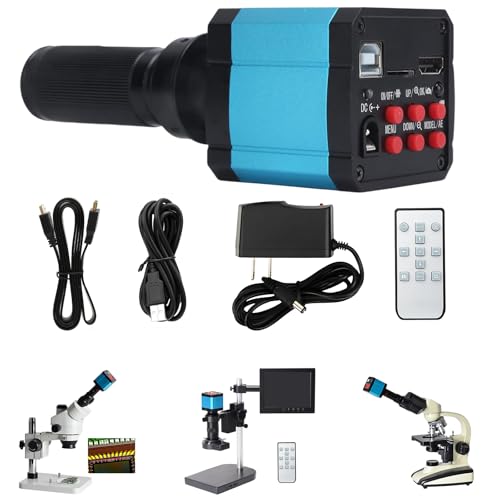
- HDMI and USB outputs for flexible viewing
- Includes a conversion adapter for setup
- Durable build for frequent industrial use
Best For: Industrial inspection and electronics quality control
Wide-View Adapter Set
0.5× C-Mount Microscope Adapter Set

- 0.5× magnification widens the field of view
- Fits 23.2mm, 30mm, and 30.5mm interfaces
- Compact tube with anti-reflective coating
Best For: Connecting a CCD camera or digital eyepiece to a microscope
Adjustable Stand Kit
48MP 4K Adjustable C-Mount Microscope Set

- Heavy-duty arm and clamp for easy positioning
- Supports height and angle adjustments
- Includes a 48MP 4K/1080P camera
Best For: Soldering, repair, and bench-mounted inspection
Dual-Output 4K Choice – Full 4K HDMI/USB Microscope Camera with C-Mount Adapters
If you want a microscope camera with C mount adapter for both bench viewing and recording, this model stands out for its dual-output design. It supports 4K at 30fps through HDMI and up to 3840×2160 at 30fps through USB, with included 25mm, 30mm, and 30.5mm adapters for broad microscope compatibility.
Best For: Users who need a high-resolution camera for live HDMI display and USB capture on Windows or Mac setups.
Pros:
- 4K HDMI output at 30fps and 1080P at 60fps for live viewing
- USB-C connection provides high-speed imaging and up to 3840×2160 at 30fps
- Includes 25mm, 30mm, and 30.5mm C-mount adapters
- Free software is provided for Windows and Mac systems
Cons:
- 4K output requires HDMI mode, not USB mode
- Exposure, gain, and color are not adjustable over USB output
- Some Mac versions may not be compatible with the software
This is a strong choice if your priority is a versatile imaging setup with both monitor-based viewing and computer capture. The included adapter set and 4K HDMI performance make it especially useful for users upgrading an existing microscope.
Simple USB Imaging Pick – AmScope 10MP USB C-Mount Microscope Camera
For buyers looking for a straightforward microscope camera with C mount adapter support, this AmScope model focuses on dependable USB capture and software tools. Its 10MP CMOS sensor, USB 2.0 connectivity, and included 0.5X reduction lens make it a practical fit for routine documentation and analysis.
Best For: Users who want a simple USB microscope camera with included optics and measurement software.
Pros:
- 10MP CMOS sensor for detailed still imaging
- USB 2.0 connectivity for easy computer hookup
- Includes a 0.5X reduction lens and 2 adapters
- Software includes stitching, EDF, and measurement functions
Cons:
- USB 2.0 is less modern than newer high-speed connections
- No HDMI output is listed for direct monitor viewing
- Designed for PC use, so it may be less flexible for mixed-device setups
This model is best if you value software-assisted imaging more than maximum video performance. The included reduction lens and adapters help simplify installation on compatible microscopes.
Industrial Dual-Output Option – 16MP USB/HDMI Microscope Camera with 0.5X Adapter
16MP 1080P 60FPS USB C-mount Digital Industry Video Microscope Camera with HDMI Cable
Check Price On AmazonThis microscope camera with C mount adapter support is aimed at users who want live display and computer connectivity in one unit. It offers USB 2.0 and HDMI outputs, can show the live image on an HDMI monitor, projector, or TV, and includes a 0.5X C-mount adapter for fitting CCD cameras or digital eyepieces.
Best For: Users who want an industrial-style microscope camera with dual outputs and a included C-mount adapter.
Pros:
- 16MP camera for high-resolution imaging
- Supports both USB 2.0 and HDMI output
- Can display live images on HDMI monitors, projectors, or TVs
- Includes a 0.5X C-mount adapter for microscope connection
Cons:
- USB specification is listed as USB2.0 rather than a faster standard
- Requires use with a microscope
- No software features are highlighted in the supplied notes
If you need a camera that can feed a screen directly while still connecting to a computer, this is a practical option. Its bundled adapter makes it easier to integrate with compatible microscope setups.
Adapter-Only Budget Pick – Garosa 0.5X C-Mount Microscope Adapter
If you only need a microscope camera with C mount adapter compatibility rather than a full camera, this Garosa piece is a simple 0.5X reducer. It is designed to widen the observable field and is made from ABS plastic for a compact, durable fit.
Best For: Users who need a basic 0.5X C-mount adapter to pair with a compatible microscope camera setup.
Pros:
- 0.5X magnification helps widen the microscope field of view
- Compact design for use with the lens barrel
- Made from ABS plastic for durability
- Compatible with CCD interface shrink lens setups
Cons:
- It is an adapter, not a camera
- Does not add imaging features like recording or software control
- Compatibility depends on the microscope and connected device
This is a good add-on when your main need is optical adaptation rather than image capture. It makes the most sense as a companion part for an existing microscope camera system.
Industrial 4K Option – Walfront USB Industrial Microscope Camera
If you need a microscope camera with C mount adapter for bench work, PCB inspection, or general lab viewing, this Walfront model focuses on broad compatibility and a wider field of view. The included 0.5X lens and two adapters make it easier to fit different microscope setups, while the 12MP 4K-capable camera is built for high-definition photo and recording use.
Best For: Users who want a versatile industrial microscope camera with included adapters and a wider view for repair or inspection work.
Pros:
- Includes a 0.5X lens for a wider field of view.
- Comes with two adapters: 23.2mm to 30mm and 30.5mm.
- Can be mounted in binocular or trinocular microscopes and used in biological or stereo eyepiece setups.
- Supports timing photos and recording for detailed documentation.
Cons:
- Listed as corded electric, so it is not a standalone portable camera.
- Focused on microscope use rather than general-purpose imaging.
- Compatibility depends on matching the included adapters to your scope.
This is a practical pick if you want an all-in-one microscope camera with C mount adapter support and a wider capture area. The aluminum alloy build also suggests a durable choice for frequent shop or lab use.
Compact Mount Adapter – Hilitand C/CS Port Adapter Ring
If your goal is to connect a microscope camera with C mount adapter support to a compatible scope, this Hilitand ring is a simple conversion piece rather than a full camera. Its compact metal design is meant to be easy to install, easy to carry, and practical for replacing a damaged adapter ring.
Best For: Users who only need a compact metal adapter ring for microscope-to-camera C/CS port compatibility.
Pros:
- Lightweight and compact for easy carrying and storage.
- Metal construction for sturdiness and durability.
- Designed for simple installation and replacement.
- Suitable for microscope to camera C/CS port use.
Cons:
- Does not include a camera or imaging sensor.
- Very basic feature set compared with full microscope camera kits.
- Compatibility is limited to the stated C/CS port use case.
This adapter ring makes sense when you already have the camera and just need the mounting interface. It is the most minimal option in the group, so it fits straightforward setup or replacement jobs.
USB 3.0 Imaging Pick – AmScope MU503 5MP Microscope Camera
For users who want a microscope camera with C mount adapter support plus computer-based imaging tools, the AmScope MU503 offers a 5MP USB 3.0 setup with a 0.5X reduction lens included. It is aimed at live viewing, still capture, and software-assisted work, making it a strong fit when you need more than just basic image output.
Best For: Users who want a USB microscope camera for live video, image capture, and software features on a computer.
Pros:
- USB 3.0 connectivity for high-speed image capture and live streaming.
- Includes a 0.5X reduction lens and fits 23mm, 30mm, 30.5mm, and C-mount sizes.
- Software includes stitching, EDF, recording, fusion, and measurement tools.
- Compatible with Windows XP/Vista/7/8 and Linux.
Cons:
- Requires a computer to use, since it is not a standalone camera.
- Features are geared toward PC-based workflows rather than simple plug-and-play viewing.
- May be more than needed if you only want a basic mounting adapter.
This model stands out for users who want imaging control and software features alongside C-mount compatibility. If your workflow involves documentation, live video, or measurement on a PC, it is the most feature-rich option here.
Industrial HDMI/USB Camera – 37MP 1080P Industrial Microscope Camera
If you need a microscope camera with C mount adapter for inspection work, this industrial model focuses on clear digital viewing and flexible connectivity. It combines HDMI and USB outputs with a conversion adapter, making it easier to view magnified samples on monitors or computers while documenting fine details.
Best For: Industrial quality control, electronics work, and material surface inspection where flexible display options matter.
Pros:
- HDMI and USB interfaces support monitors, computers, and other devices.
- Includes a conversion adapter for easier setup in industrial workflows.
- Built with durable materials for frequent use in demanding environments.
- Designed for real-time viewing and documentation through a C-mount connection.
Cons:
- Focused on industrial observation rather than general hobby use.
- Requires compatible C-mount and display/workstation setup.
Overall, this camera is a practical choice when you want a microscope camera with C mount adapter that can handle inspection tasks and straightforward digital output. Its strength is flexible integration rather than a broad feature set.
Wide-View Adapter Set – 0.5× C-Mount Microscope Adapter Set
For anyone looking for a microscope camera with C mount adapter setup, this 0.5× lens adapter is meant to connect a CCD camera or digital eyepiece to compatible microscopes. It also provides a wider field of view, which can make sample framing easier during everyday viewing and documentation.
Best For: Users who need a compact adapter to connect a camera or digital eyepiece and widen the view.
Pros:
- 0.5× magnification helps provide a wider field of view.
- Includes 23.2mm to 30mm and 23.2mm to 30.5mm adapters.
- Compact lens tube makes insertion depth easier to control.
- Blue anti-reflective coating is designed to improve transmittance and clarity.
Cons:
- It is an adapter only, not a full camera.
- Must match your microscope’s eyepiece and camera interface sizes.
This is a useful accessory if your goal is to adapt a microscope camera with C mount adapter style connection to a compatible eyepiece position. It is best viewed as a practical fit-and-view solution rather than a standalone imaging system.
Adjustable Stand Kit – 48MP 4K Adjustable C-Mount Microscope Set
If you want a microscope camera with C mount adapter for bench work, this set combines a high-magnification digital camera with an adjustable heavy-duty arm and clamp. The stand lets you swing the microscope into place, raise or lower the lens, and change the viewing angle for soldering, repair, or close inspection tasks.
Best For: Electronics repair, soldering, and bench-based inspection where adjustable positioning is important.
Pros:
- Adjustable metal arm and clamp make positioning simple.
- Supports height and angle changes for better sample viewing.
- Compatible with PC, laptop, and television use.
- Includes a 48MP 4K/1080P digital camera in the set.
Cons:
- The full setup may be more than you need for basic viewing.
- Heavier stand system is less portable than simpler adapters.
As a workstation-oriented option, this set suits users who need stable positioning as much as image capture. It is a strong pick when a microscope camera with C mount adapter needs to support hands-on repair and detailed observation.
How We Picked the Best Microscope Camera with C Mount Adapter
We prioritized real-world usability first: mount compatibility, image quality, video smoothness, software support, and whether the camera suits teaching, inspection, or documentation. For a Microscope Camera with C Mount Adapter, we also checked whether the included optics or adapter chain would work with common trinocular and industrial microscopes.
Quick Comparison
In general, higher megapixel models are better for still-image detail and cropping, while faster frame rates matter more for live viewing, motion analysis, and hands-on inspection. HDMI models are often simplest for direct display, while USB models are usually better if you want recording, editing, or computer-based measurement tools.
Key Buying Factors for a Microscope Camera with C Mount Adapter
Sensor and Resolution
Choose resolution based on your task. For documentation and teaching, 5MP to 12MP is often enough. For large, detailed captures or heavy cropping, higher-resolution cameras can help, but only if the optics can support the detail you expect.
Frame Rate and Output
If you need smooth live motion, look closely at FPS and output type. HDMI is convenient for direct viewing. USB can be better for software features, file storage, and measurement workflows. If your work is mostly static imaging, frame rate is less critical than sharpness and color accuracy.
Adapter and Reduction Lens
A Microscope Camera with C Mount Adapter may still need the correct reduction lens or ring to match your microscope’s image circle and eyepiece port. Common sizes such as 0.5X or 1X affect field of view, magnification balance, and how much of the sensor is used.
Compatibility and Software
Check operating system support before buying, especially if you need Mac compatibility or legacy Windows support. Also confirm whether the camera includes measurement software, calibration tools, or driver requirements that fit your workflow.
Who Should Buy Which Microscope Camera with C Mount Adapter?
Choose a USB camera if you want capture, storage, and software control on a computer. Choose an HDMI model if you need fast, simple live viewing on a monitor. Choose a higher-resolution industrial camera if detail and inspection are priorities. If your microscope setup already has an adapter path, make sure the included C mount parts match your port size and optical needs before you buy.