
Choosing a professional overhead document camera comes down to more than resolution. The right model should deliver clear text, smooth autofocus, strong lighting, and reliable compatibility with your classroom or conference setup.
Below, we’ve rounded up 10 strong options for teachers, trainers, presenters, and remote workers who need a dependable way to show documents, objects, and live demonstrations.
Best 10 Professional Overhead Document Camera Picks for 2026
Ultra HD Classroom Pick

- 8MP sensor with ultra HD capture up to 3264 x 2448
- Streams up to 30 fps at Full HD for smoother demos
- Compatible with Mac, Windows, and Chromebook
Best For: Teachers and presenters who want a reliable plug-and-play USB camera
Portable Teaching Option
AVerVision F17-8M FlexArm Camera

- Portable design for classroom movement
- FlexArm helps with angle adjustments
- Built for high HD lesson presentation
Best For: Teachers who want a simple portable camera for active lessons
Large-Format Pro Choice

- 4K capture with a 13MP Sony sensor
- A3-sized area for large documents and artwork
- Documate software adds annotation, OCR, and recording
Best For: Educators and art instructors presenting large-format materials
Audio-Focused Pick
IPEVO V4K PRO USB Document Camera
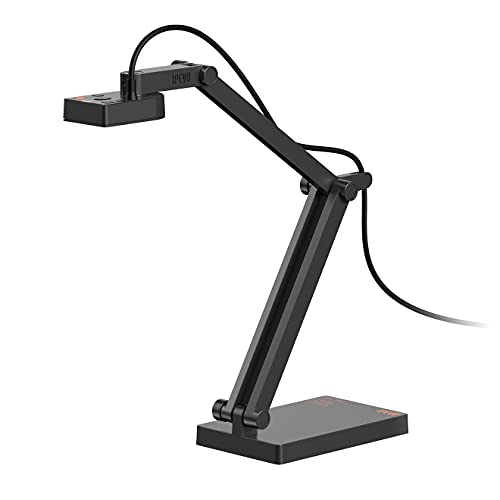
- 8MP ultra HD camera with up to 3264 x 2448p capture
- AI-enhanced mic helps reduce background noise
- Built-in LED light and plug-and-play compatibility
Best For: Remote teachers and presenters who want clearer voice capture
Portable Classroom Visualiser
THUSTAR 8MP 4K USB Document Camera

- 8MP capture with 4K video output
- Foldable A3-size visualiser with LED lighting
- Dual mics and USB plug-and-play setup
Best For: Teachers and remote presenters who want a compact USB overhead camera
Premium Classroom Zoomer
ELMO TT-12G 4K Interactive Document Camera
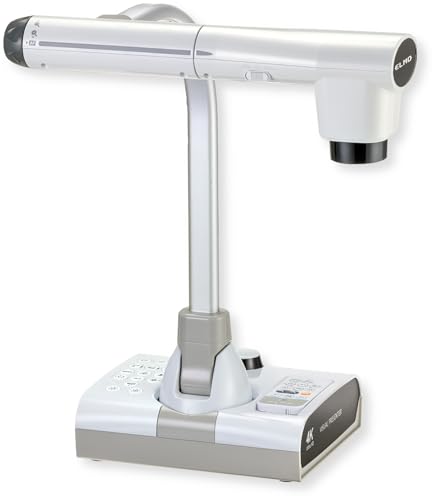
- 4K Ultra HD with 12MP sensor
- 192x total zoom for fine detail work
- HDMI, USB, and VGA output options
Best For: Classrooms needing premium imaging and broad connectivity
Budget Teaching Visualiser
Kitchbai 8MP 4K USB Document Camera

- 8MP capture with 2448P video output
- Foldable A3 visualiser with LED lighting
- Dual microphones and USB plug-and-play
Best For: Teachers wanting a simple, budget-friendly overhead camera
Portable Manual-Focus Pick
USB Document Camera for Teachers, Foldable Webcam

- 3-in-1 document camera, visualiser, and webcam
- Manual focus with 1080p capture and 360° rotation
- Foldable design with built-in mic and USB-C support
Best For: Teachers and office users who want a compact overhead camera with manual focus
Auto-Focus Classroom Option
Document Camera with LED Light

- 3-in-1 document camera, webcam, and visualiser
- Autofocus plus 5-level LED fill light
- Image invert control for teaching and demos
Best For: Classroom users who want simple autofocus and adjustable lighting
Premium 4K Teaching Pick
4K Document Camera with Alloy Stand

- 8MP 4K capture for crisp overhead detail
- Multi-joint arm with top, side, and selfie views
- A4/A3 support plus autofocus and LED light
Best For: Teachers and professionals who want sharper imaging and a sturdier stand
Ultra HD Classroom Pick – IPEVO V4K USB Document Camera
The IPEVO V4K is a strong professional overhead document camera for live demos, remote teaching, and web conferencing when you want crisp image quality without a complicated setup. Its 8MP sensor, fast autofocus, and 30 fps performance make it a practical choice for teachers and presenters who switch materials often.
Best For: Educators and presenters who need a reliable, plug-and-play USB document camera for everyday classroom and online use.
Pros:
- 8MP sensor captures up to 3264 x 2448 ultra HD images.
- Streams up to 30 fps at Full HD for smoother live presentations.
- Fast focusing helps reduce interruptions when changing materials.
- Compatible with Mac, Windows, and Chromebook.
Cons:
- No built-in zoom.
- Maximum capture area may be limiting for oversized materials.
- Best Full HD performance depends on system requirements.
Overall, the V4K is a solid pick if you want dependable image quality and broad compatibility in a lightweight USB document camera. It is especially appealing for users who value speed, simplicity, and clear visuals in day-to-day teaching or presenting.
Portable Teaching Option – AVerVision F17-8M FlexArm Camera
The AVerVision F17-8M is a portable overhead document camera aimed at teachers who want a simple way to present materials in high HD quality. Its flex-arm design makes it a practical fit for dynamic lessons and classroom demonstrations where repositioning matters.
Best For: Teachers who need a portable document camera for active lessons and straightforward classroom presentation.
Pros:
- Portable design supports easy movement between rooms or setups.
- FlexArm build is useful for adjusting the camera angle during lessons.
- Designed for high HD quality classroom presentation.
Cons:
- Supplied details are limited on resolution and software features.
- Weighs 7.45 pounds, so it is less lightweight than some rivals.
- Requires 2 AAA batteries.
If you want a straightforward teaching camera with a flexible arm and a classroom-friendly focus, the F17-8M is worth considering. It is best suited to users who value portability and lesson versatility more than advanced spec sheets.
Large-Format Pro Choice – INS-2 4K A3 Document Camera
The INS-2 is a professional overhead document camera built for large documents, artwork, and two-page spreads. With 4K capture, a 13MP sensor, and features like built-in LED lighting and autofocus, it is designed for users who need clear presentation quality in larger classroom or exhibition settings.
Best For: Professional educators and art instructors presenting large-format materials, artwork, or big-screen lessons.
Pros:
- 4K Ultra HD capture with a 13MP Sony sensor.
- A3-compatible capture area for large documents and artwork.
- Built-in LED light, anti-glare sheet, and dual autofocus support clear output.
- Documate software adds zoom, annotation, recording, scanning, whiteboard tools, and OCR.
Cons:
- More feature-heavy than a basic plug-and-play camera.
- Best software experience depends on downloading the latest Documate version.
- At 2.3 pounds, it is not the lightest option in this group.
For buyers who need more than a basic document camera, the INS-2 offers a strong mix of image quality, flexibility, and teaching tools. It stands out when large-format capture and presentation software are both important.
Audio-Focused Pick – IPEVO V4K PRO USB Document Camera
The IPEVO V4K PRO is a professional overhead document camera for users who want clear visuals plus better voice pickup during lessons, meetings, or streams. It keeps the same 8MP ultra HD image quality line as the V4K while adding an AI-enhanced microphone and built-in LED light for more polished presentations.
Best For: Classroom visualization, online teaching, and work-from-home presenters who want clearer voice capture alongside sharp video.
Pros:
- 8MP sensor delivers ultra HD images up to 3264 x 2448p.
- AI-enhanced mic helps filter background noise for clearer speech.
- Built-in LED light supports darker rooms.
- Plug-and-play compatibility with Mac, Windows, and Chromebooks.
Cons:
- Requires a USB Type-A port.
- No optical zoom is listed in the supplied notes.
- Best capture area is still limited to 13.46″ x 10.04″.
The V4K PRO is a smart upgrade if audio clarity matters as much as image quality. It is especially useful for remote teaching and conferencing where background noise can make a standard document camera less effective.
Portable Classroom Visualiser – THUSTAR 8MP 4K USB Document Camera
If you need a professional overhead document camera for live demos, distance learning, or classroom sharing, this THUSTAR model focuses on practicality: 8MP capture, 4K video output, and a foldable body that is easy to move between rooms. It is built for simple USB use on Windows, macOS, and Chrome OS, with image invert controls and adjustable LED lighting to help keep documents readable in changing conditions.
Best For: Teachers, trainers, and remote presenters who want a compact overhead camera with flexible lighting and easy plug-and-play setup.
Pros:
- 8MP/2448P capture with 30fps output for clear document sharing.
- 3-level LED lighting and manual brightness controls for difficult lighting.
- Foldable, multi-joint design covers A3-sized material and is easy to carry.
- Built-in dual microphones and broad app compatibility for calls and demos.
Cons:
- USB-only design may be less flexible than models with HDMI/VGA outputs.
- Its compact form factor is geared more toward portability than heavy-duty studio use.
This is a strong value option if your priority is a straightforward overhead camera that can handle teaching, web conferencing, and casual demonstrations without a complicated setup.
Premium Classroom Zoomer – ELMO TT-12G 4K Interactive Document Camera
For buyers looking for a professional overhead document camera with more installation flexibility, the ELMO TT-12G stands out with 4K Ultra HD imaging, a 12MP sensor, and support for HDMI, USB, and VGA. Its large capture area, flexible multi-angle arm, and 192x total zoom make it suited to lessons or presentations where detail matters and the camera needs to adapt to different objects quickly.
Best For: Classrooms, training rooms, and distance-learning setups that need premium image quality and legacy-plus-modern connectivity.
Pros:
- 4K Ultra HD output with a 12MP sensor for sharp image capture.
- 192x total zoom helps reveal very fine details.
- HDMI, USB, and VGA outputs support both modern and legacy systems.
- Flexible arm, one-touch autofocus, and integrated LED lighting improve day-to-day use.
Cons:
- Heavier and larger than compact USB-only document cameras.
- More of an installed classroom tool than a quick grab-and-go option.
This model makes sense if you want a high-end overhead camera for teaching spaces where zoom range, output options, and image clarity are more important than portability.
Budget Teaching Visualiser – Kitchbai 8MP 4K USB Document Camera
This Kitchbai overhead document camera is aimed at teachers and remote presenters who want a straightforward USB visualiser with useful classroom features. It offers 8MP capture, 4K-class output listed at 2448P, a foldable multi-joint design, and built-in dual microphones, making it a practical choice for live demos, online lessons, and quick document sharing.
Best For: Teachers and presenters who want an affordable, easy-to-use professional overhead document camera with solid everyday features.
Pros:
- 8MP/2448P capture at 30fps for clear live demonstrations.
- Manual image invert controls let you correct orientation as needed.
- 3-level LED lighting and brightness buttons help in darker rooms.
- Foldable, A3-size design and dual microphones add classroom practicality.
Cons:
- USB-focused setup may not suit users who need HDMI or VGA output.
- Manual zoom and compact design suggest a simpler feature set than premium models.
If you want a no-fuss overhead camera for teaching or web conferencing, this model covers the essentials well and keeps setup simple across Windows, macOS, and Chrome OS.
Portable Manual-Focus Pick – USB Document Camera for Teachers, Foldable Webcam
USB Document Camera for Teachers,Manual Focus Webcam with Mic,Fold for Mac/Windows/Chromebook
Check Price On AmazonIf you want a professional overhead document camera that can also double as a webcam, this 3-in-1 USB model is a practical, budget-friendly option. It offers manual focus, a foldable design, and 360-degree rotation, making it easy to position for live demos, classroom pages, or desk-based presentations.
Best For: Teachers, tutors, and home-office users who want a compact overhead camera with flexible positioning and manual focus control.
Pros:
- 3-in-1 design works as a document camera, visualiser, and webcam.
- Manual focus helps reduce blur and improve image precision.
- Foldable body and 20.4-inch height make it easy to store and adjust.
- Built-in microphone and USB-C support add convenience for calls and lessons.
Cons:
- Max resolution is 1080p, so it is not the sharpest option in this group.
- Requires a connected computer and does not support mobile devices like phones or iPads.
- Manual focus may be less convenient than autofocus for fast-paced use.
This is a sensible choice if you value flexibility, portability, and simple compatibility with common teaching and meeting platforms. It is less premium than 4K alternatives, but it covers the core overhead presentation needs well.
Auto-Focus Classroom Option – Document Camera with LED Light
This professional overhead document camera is built for teaching, distance learning, and live demonstrations. It combines a 3-in-1 webcam and visualiser setup with autofocus, image invert control, and 5-level LED fill light, which helps it stay usable across brighter and dimmer rooms.
Best For: Educators and presenters who need an easy-to-use overhead camera with autofocus and adjustable lighting.
Pros:
- Autofocus makes it easier to switch between objects without manual adjustment.
- 5-level LED fill light helps improve visibility in low-light environments.
- Image invert and mirror control are useful for teaching and live presentation setup.
- High maximum resolution and plug-and-play USB-C compatibility support broad use.
Cons:
- The product notes emphasize 1080p video capture, so it is not a top-resolution pick for the price tier.
- The hose-style structure may appeal less to users who prefer a rigid arm.
- Still requires a compatible computer rather than standalone mobile use.
For classrooms and online teaching, this model stands out because it focuses on the basics that matter most: quick focusing, adjustable light, and simple flipping of the image. It is a well-rounded overhead camera for everyday presentation use.
Premium 4K Teaching Pick – 4K Document Camera with Alloy Stand
If you need a professional overhead document camera with higher-end image quality, this 4K model is the strongest option here. It pairs 8MP imaging with a foldable alloy stand, autofocus, LED fill light, and support for A4 and A3 materials, making it a versatile pick for lessons, meetings, and recording.
Best For: Teachers, trainers, and professionals who want the sharpest overhead image and a sturdier build.
Pros:
- 8MP imaging and 2160p capture deliver the highest clarity in this group.
- Adjustable multi-joint arm supports top view, side view, and selfie mode.
- A4 and A3 support makes it easier to present larger worksheets and posters.
- Alloy construction, autofocus, and 3-level LED light improve daily usability.
Cons:
- Likely more than casual users need if basic document capture is enough.
- More premium feature set may make it a less budget-friendly choice.
- As with other USB models, it depends on a connected computer for use.
Among the three, this is the most capable overhead camera for image quality and presentation flexibility. If you want a more polished setup for classroom display or professional demos, it is the clear standout.
How We Picked the Best Professional Overhead Document Camera
We focused on models that balance image quality, ease of use, and real-world flexibility. For a Professional Overhead Document Camera, that means dependable autofocus or manual focus control, enough sensor detail for small text, usable built-in lighting, and simple connection options for common devices and platforms.
We also prioritized practical factors like portability, arm design, A3 or A4 capture support, microphone quality when included, and compatibility with macOS, Windows, Chromebook, and popular conferencing tools.
Quick Comparison
If you want the fastest path to a decision, think in three tiers: entry-level USB cameras for basic teaching and video calls, midrange models with better optics and lighting for more polished presentations, and premium 4K or interactive units for frequent use in classrooms, labs, or professional training environments.
In most cases, the best value comes from a camera that offers sharp text reproduction, stable positioning, and easy plug-and-play setup rather than one that simply advertises the highest megapixel count.
Key Buying Factors for a Professional Overhead Document Camera
Image Quality and Resolution
Look for enough resolution to keep handwritten notes, diagrams, and small print legible. Higher resolution helps, but sensor quality, lens clarity, and lighting matter just as much.
Focus and Viewing Area
Autofocus is ideal for frequent page changes and object demos. Manual focus can work well if you need more control. Also check whether the camera supports the full paper size you use most often, especially A3 or larger materials.
Lighting and Exposure
Built-in LEDs can improve visibility in dim rooms, but they should be adjustable to avoid glare on glossy paper. Exposure control is useful when you switch between documents and 3D objects.
Mounting, Portability, and Build
A foldable or flexible arm is helpful for travel and storage, while a heavier base can improve stability on a desk. If you move between rooms, portability may matter more than an all-metal design.
Connectivity and Software
Confirm whether you need USB-only use or HDMI/VGA output as well. If you teach or present online, make sure the camera works smoothly with Zoom, Teams, Meet, and your operating system.
Who Should Buy Which Professional Overhead Document Camera?
Teachers and trainers usually benefit most from an easy plug-and-play model with autofocus, good LEDs, and broad software compatibility. Remote workers and streamers should prioritize mic quality, stable image output, and webcam versatility. If you need advanced classroom integration or frequent live demonstrations, a higher-end Professional Overhead Document Camera with stronger optics and multi-input support is often worth the extra cost.
For occasional use, choose a simpler model that is quick to set up and easy to store. For daily use, invest in better focus, sturdier hardware, and more consistent image quality so the camera stays dependable over time.