
Choosing a document camera for library archives is about more than resolution. You need clear imaging, gentle handling, reliable flattening, and capture tools that make scanning books, records, and special collections practical.
This roundup focuses on models that help librarians, archivists, and researchers digitize materials efficiently while protecting originals and preserving readable detail.
Best 10 Document Camera for Library Archives Picks for 2026
Premium Archiving Pick
VIISAN K48 48MP A3 Overhead Scanner

- 48MP capture with up to 600 DPI
- OCR, page flattening, and page splitting
- 4K USB document camera mode
Best For: Libraries and archives needing high-detail digitization
Lightweight Presentation Pick
Lumens DC125 HD Document Camera
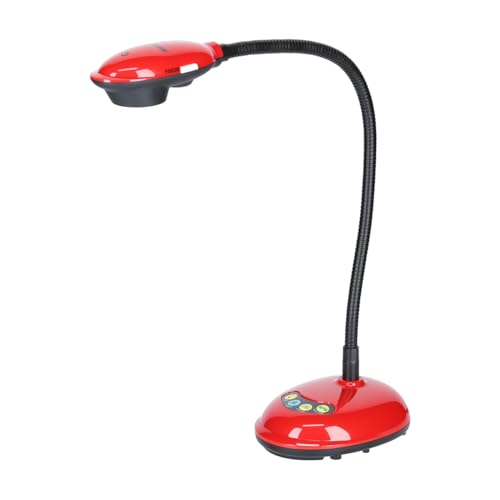
- 1080p/720p capture at 30 fps
- Autofocus for quick document viewing
- Lightweight USB laptop setup
Best For: Lightweight library presentation and basic document display
Budget Archive Capture Pick
VIISAN DL16 A3 Overhead Scanner

- A3 scanning for books and large documents
- 16MP camera with 300 DPI output
- Anti-glare LED lighting and OCR support
Best For: Standard library archive digitization on a simpler budget
Portable 4K Visual Presenter Pick

- 4K Ultra HD capture at 30 fps
- Foldable 1.2 lb portable design
- Large 14.7 x 11.1 inch imaging area
Best For: Portable archive presentations and live document sharing
Large-Format Archiving Pick

- A2 capture for oversized archival materials
- 26MP scans with auto-flatten and finger removal
- OCR exports to editable document formats
Best For: Archive teams scanning manuscripts, newspapers, and maps
Flexible Presentation Pick
AVer Portable flexarm Document Camera

- Flexible gooseneck arm for positioning
- 13MP camera with 4K resolution
- 23x total zoom for close detail viewing
Best For: Libraries needing a portable camera for demos and viewing
High-Detail Digitizing Pick

- 38MP sensor with A3 scanning support
- Laser curve-flattening for bound pages
- OCR for 180+ languages and searchable files
Best For: Fast archival digitization with strong OCR and detail
Professional 4K Large-Format Pick
INS-2 UHD 4K 13MP Document Camera

- 4K UHD capture with 13MP sensor
- Supports A3-size documents and artwork
- LED light, autofocus, and OCR tools
Best For: Archival and classroom users handling large-format materials
Reliable Everyday Streamer
IPEVO V4K 8MP USB Document Camera

- 8MP capture with smooth live streaming
- Fast autofocus for frequent material changes
- Compatible with Mac, Windows, and Chromebook
Best For: Daily live demos and remote teaching in mixed-device environments
Portable OCR Scanner Pick
NetumScan 13MP Book Document Camera

- 13MP capture with built-in LED lighting
- AI OCR with auto correction and PDF/text output
- Foldable aluminum body for portability
Best For: Portable scanning and live projection for A4 materials
Premium Archiving Pick – VIISAN K48 48MP A3 Overhead Scanner
If you need a document camera for library archives that can also handle serious digitizing, the VIISAN K48 is built for high-detail capture. Its 48MP sensor, A3 overhead format, OCR support, and page-flattening tools make it a strong fit for books, reports, and archive files that need clean, searchable digital copies.
Best For: Libraries, archives, and offices that need high-resolution overhead scanning and live document-camera use.
Pros:
- 48MP capture with up to 600 DPI for fine text and detailed pages
- AI-assisted page flattening and auto page splitting help speed up book scanning
- OCR support creates searchable PDFs and editable documents
- Also works as a 4K@30fps USB document camera for teaching or review
Cons:
- Designed as a desktop unit rather than a portable grab-and-go camera
- Advanced scanning workflow may be more than casual users need
The K48 stands out when image quality and archive workflow matter more than simplicity. For teams digitizing books and reference materials, it offers a useful mix of scanning precision and live presentation capability.
Lightweight Presentation Pick – Lumens DC125 HD Document Camera
The Lumens DC125 is a practical document camera for library archives when you want a lighter setup with straightforward USB connectivity. It records in 1080p or 720p at 30 fps and includes autofocus, making it suitable for quick overhead capture, laptop-based presentations, and everyday document review.
Best For: Library staff and educators who want a lightweight USB document camera for basic archive display and presentation use.
Pros:
- 1080p and 720p video capture at 30 frames per second
- Autofocus helps keep documents clear during live use
- USB connectivity keeps setup simple with a laptop
- Lightweight design is easier to move between work areas
Cons:
- Effective still resolution is modest compared with higher-resolution scanners
- More focused on presentation than archive-grade digitization features
For libraries that need a compact camera for showing documents rather than creating highly detailed archival scans, the DC125 is a sensible choice. It emphasizes ease of use and portability over advanced capture tools.
Budget Archive Capture Pick – VIISAN DL16 A3 Overhead Scanner
If your priority is a document camera for library archives with a straightforward overhead workflow, the VIISAN DL16 is a practical A3 option. Its 16MP camera, 300 DPI output, OCR support, and anti-glare lighting are aimed at capturing books, artwork, and large documents for organized digital storage.
Best For: Libraries, offices, and home users who need an A3 overhead scanner for standard archive digitization.
Pros:
- A3 overhead format handles books, oversized pages, and large documents
- 16MP camera with up to 300 DPI for clear everyday scanning
- Anti-glare LED lighting helps reduce shadows on glossy or uneven pages
- OCR support helps create searchable files for storage and reference
Cons:
- 300 DPI is lower than higher-end archival scanners
- Less suited to users who need advanced live presentation features
The DL16 is a strong fit when you need dependable overhead capture without moving into premium scan specs. It covers the core archive tasks well and keeps the workflow simple for library or office use.
Portable 4K Visual Presenter Pick – ELMO MX-P3 4K Document Camera
The ELMO MX-P3 is a polished document camera for library archives when you want 4K capture and a highly portable design. With a foldable body, one-push autofocus, and a large imaging area, it works well for showing documents, objects, and oversized pages in a fast-moving reference or presentation setting.
Best For: Librarians, presenters, and educators who need a portable 4K document camera for displaying archive materials.
Pros:
- 4K Ultra HD capture at 30 fps for sharp detail
- Foldable 1.2 lb design is easy to transport and set up
- One-push autofocus simplifies quick presentations
- Large 14.7 x 11.1 inch imaging area suits bigger documents
Cons:
- More presentation-oriented than dedicated archival scanning software
- Compact design may not suit fixed high-volume digitization stations
The MX-P3 is best when mobility and visual clarity matter more than batch scanning tools. For archive walkthroughs, teaching, or live document sharing, it offers a refined and flexible capture experience.
Large-Format Archiving Pick – VIISAN A2/A3 Overhead Scanner
If you need a document camera for library archives, the VIISAN S21 is built for oversized materials like manuscripts, newspapers, journals, and maps. Its A2 capture area and adjustable A2/A3 overhead design make it a practical choice when you want full-page coverage without unbinding fragile items.
Best For: Archiving teams that need an overhead scanner for large-format books, manuscripts, newspapers, and maps.
Pros:
- A2 capture size handles large archival items up to 594 x 420 mm.
- 26MP resolution with software-enhanced up to 600 DPI for detailed captures.
- Auto-flatten, finger removal, edge repair, and split-page features help clean up book scans.
- Built-in LED lighting helps in darker scanning setups.
Cons:
- Bundled OfficeCam software is not compatible with ARM-based Windows devices like Surface Pro X.
- Glary papers are not recommended.
- Built-in LEDs are not recommended for use in bright light.
For archive work that prioritizes size and page-correction tools, this model is well matched to bound or oversized historical material. It also supports OCR output to editable formats, which can help streamline cataloging and digitization workflows.
Flexible Presentation Pick – AVer Portable flexarm Document Camera
For a document camera for library archives that also needs to work in meetings or live demonstrations, the AVer Portable flexarm model offers a flexible gooseneck arm and a 13-megapixel camera. Its 4K resolution and 23x total zoom make it useful when you need to show close detail from books, objects, or documents.
Best For: Libraries that want a portable document camera for presentations, demonstrations, and moderate-detail archival viewing.
Pros:
- Flexible gooseneck arm makes positioning easier over books and documents.
- 13MP camera with 4K resolution supports detailed image capture.
- 23x total zoom helps enlarge small text or features.
- Portable form factor can suit shared library spaces.
Cons:
- Supplied notes do not mention OCR or auto-flatten features.
- Weight of 8.28 pounds may be less ideal for frequent moving.
- Not described as a large-format A2/A3 scanner.
This is a strong pick if your archive workflow includes live display as much as digitization. It appears better suited to flexible viewing and presentation than to high-volume book cleanup features.
High-Detail Digitizing Pick – CZUR ET MAX Book Scanner
When you need a document camera for library archives that focuses on speed and image detail, the CZUR ET MAX is a capable option. It supports A3 scanning, uses a 38MP sensor, and includes laser curve-flattening technology to help produce cleaner scans from bound materials.
Best For: Archival digitization projects that need fast A3 scanning, strong OCR support, and broad operating system compatibility.
Pros:
- 38MP sensor with 7168 x 5376 resolution for high-detail captures.
- Laser curve-flattening helps reduce distortion on bound pages.
- OCR supports 180+ languages and can output editable and searchable files.
- Works with Windows, macOS, and Linux, with HDMI output for live projection.
Cons:
- Not recommended for glossy or highly reflective materials.
- Linux support is limited to Ubuntu 20.04 to 24.04.
- Arabic OCR support is limited by OS and model conditions noted by the manufacturer.
For libraries building searchable digital archives, this model stands out for resolution, OCR, and compatibility. Its 1.5-second page scan speed can also help when you have a lot of material to process.
Professional 4K Large-Format Pick – INS-2 UHD 4K 13MP Document Camera
If you need a document camera for library archives that can handle oversized pages, two-page spreads, and artwork, the INS-2 is built for that kind of work. Its 4K capture, A3 support, and flexible arm make it a strong fit for display tables, preservation demos, and classroom-style presentations.
Best For: Educators, archivists, and presenters who need large-format capture with crisp detail.
Pros:
- 13MP sensor records 4K Ultra HD images at 3840 x 2160.
- A3 capture area and multi-joint arm support larger documents and artwork.
- Built-in LED light, anti-glare sheet, dual autofocus, and brightness control help with clear viewing.
- Documate software adds zoom, annotation, recording, scanning, OCR, and whiteboard tools.
Cons:
- At 2.3 pounds, it is not the most compact option.
- Best fit is for desktop setups rather than ultra-portable use.
For archival rooms that need reliable, high-detail presentation of large materials, this model offers a practical balance of image quality and teaching features. It is especially useful when you want one device for live display, scanning, and simple recording.
Reliable Everyday Streamer – IPEVO V4K 8MP USB Document Camera
The IPEVO V4K is a solid document camera for library archives when you want dependable live display and easy compatibility across Mac, Windows, and Chromebook setups. Its 8MP sensor and fast focusing make it a practical choice for frequent page changes, demos, and remote viewing.
Best For: Libraries, teachers, and remote presenters who need a straightforward USB document camera for daily use.
Pros:
- 8MP camera captures up to 3264 x 2448 resolution.
- High frame rate supports smooth live streaming up to 30 fps at Full HD.
- Fast autofocus helps reduce interruptions when switching materials.
- Works with Mac, PC, and Chromebook environments.
Cons:
- Max shooting area is smaller than some large-format competitors.
- No zoom feature is listed.
If your priority is a stable, easy-to-use camera for everyday archival demonstrations, this model covers the basics well. It leans more toward dependable live presentation than advanced document-workflow extras.
Portable OCR Scanner Pick – NetumScan 13MP Book Document Camera
For a document camera for library archives that also supports scanning workflows, the NetumScan model stands out for its OCR features and portable foldable design. It is built to capture A4-sized materials, project them in real time, and convert pages into word, PDF, or text formats.
Best For: Archival staff and educators who want a compact camera with scanning and OCR tools.
Pros:
- 13MP CMOS sensor and built-in LED light support clear image capture.
- AI-powered OCR and automatic correction help convert and straighten pages quickly.
- Foldable aluminum alloy body makes it easy to carry and store.
- Supports live projection, video recording, and A4 capture size.
Cons:
- Capture size is limited to A4, so it is not ideal for larger spreads.
- Software installation is required before use.
This is a good match if your archive work involves both display and digitization in a compact form factor. It is less about oversized materials and more about efficient scanning, projection, and portability.
How We Picked the Best Document Camera for Library Archives
We prioritized image quality, capture size, OCR support, auto-flattening, lighting control, and compatibility across common operating systems. For archival work, we also looked for features that reduce glare, improve edge clarity, and support oversized or bound materials.
Quick Comparison
In a Document Camera for Library Archives, the best choice depends on the collection. High-resolution scanner-camera hybrids are better for books and fragile documents, while portable visual presenters are more flexible for live display, quick reference capture, and shared workspaces.
Key Buying Factors for Document Camera for Library Archives
Resolution and Detail
Higher megapixels and stronger DPI ratings matter when you need legible text, marginal notes, stamps, and faint historical print. If you plan to archive materials for future reference, choose the clearest imaging system you can reasonably support.
Flattening and Distortion Correction
Books, bound volumes, and curled pages benefit from auto page flattening, curve correction, and fingerprint or shadow removal. These tools can save hours in post-processing and improve readability.
Lighting and Glare Control
Built-in LED lighting should be even and adjustable. Anti-glare performance is especially important for glossy pages, laminated inserts, and aging paper with reflective surfaces.
Capture Size and Workspace Fit
Archival collections vary widely, so check whether the camera supports A3, A2, or other large-format materials. Also consider the footprint of the stand or arm, especially if the archive desk space is limited.
OCR and File Workflow
OCR can turn images into searchable text, which is useful for indexing and research access. If your team works across different systems, confirm support for Windows, macOS, Chromebook, or Linux before buying.
Who Should Buy Which Document Camera for Library Archives?
If you need the most archival-friendly setup, choose a higher-resolution scanner-camera model with flattening, OCR, and large-format support. If portability and shared presentations matter more than deep digitization, a lighter flexarm or USB document camera may be the better fit. For mixed-use library environments, the best Document Camera for Library Archives is usually the one that balances clarity, speed, and workflow simplicity with the least handling risk for the materials you preserve.