
When clarity matters in front of a judge or jury, the right document camera can make exhibits easier to see, explain, and compare in real time.
This roundup highlights the best document camera for courtroom presentations based on image quality, connectivity, portability, and practical features that support fast, reliable evidence display.
Best 10 Document Camera for Courtroom Presentations Picks for 2026
Large-Format 4K Option
INS-2 UHD 4K 13MP Document Camera

- 4K UHD with a 13MP Sony sensor
- A3-sized capture area for larger documents
- LED light, anti-glare sheet, and dual autofocus
Best For: Large documents, artwork, and classroom or exhibit presentations
Simple HD Presentation Pick
DC125 Ladibug 30fps HD Document Camera
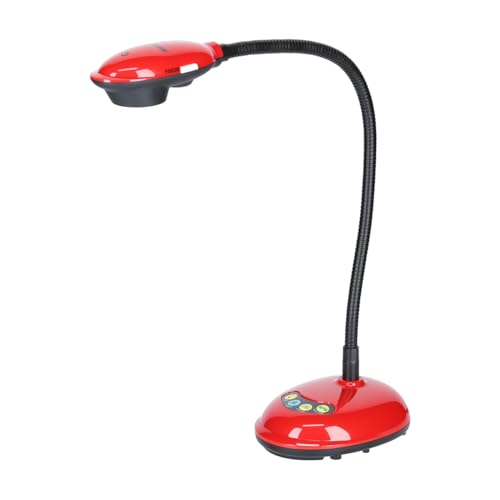
- 1080p video capture at 30 fps
- USB and HDMI connectivity
- Autofocus for straightforward use
Best For: Basic HD presentations and users who value simple setup
Compact High-Detail Choice
IPEVO V4K 8MP USB Document Camera

- 8MP sensor with up to 3264 x 2448 capture
- Up to 30 fps at Full HD for smooth streaming
- Fast focus and broad OS compatibility
Best For: Portable live demos, web conferencing, and frequent material changes
Premium Portable 4K Pick
ELMO MX-P3 4K Visual Presenter

- 4K Ultra HD at 30 fps
- USB-C, HDMI, and RGB connectivity
- 1.2 lb foldable design with autofocus
Best For: Portable professional presentations that need premium image quality
Courtroom Presentation Visualizer
THUSTAR 8MP USB Document Camera

- 8MP capture with 2448P output
- 3-level LED lighting and brightness control
- Foldable A3-size design with autofocus
Best For: Computer-based courtroom exhibit display and close-up document viewing
HDMI Courtroom Visual Camera
Epson DC-21 High-Definition Document Camera

- 1080p output with HDMI connectivity
- 12x optical zoom plus 10x digital zoom
- Includes microscope adapter and carrying case
Best For: Dedicated courtroom AV systems that need HDMI and zoom
Portable Exhibit Camera
PAKOTOO USB Document Camera for Teachers

- 3-in-1 document camera and webcam design
- A3 coverage with macro focus to 3.94 inches
- LED fill light and exposure adjustment
Best For: Versatile USB use in smaller courtroom or remote presentation setups
Fast Scan Pad
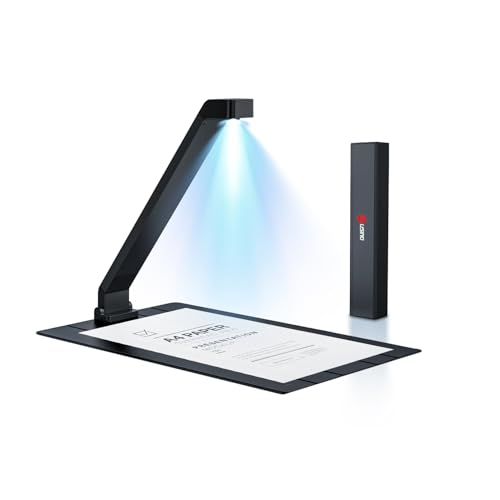
- 16MP, 380 DPI, 1-second scans
- OCR plus Word/Excel/PDF export
- Folds flat for easy carrying
Best For: quick paper digitization and editable files
Courtroom Presenter Cam
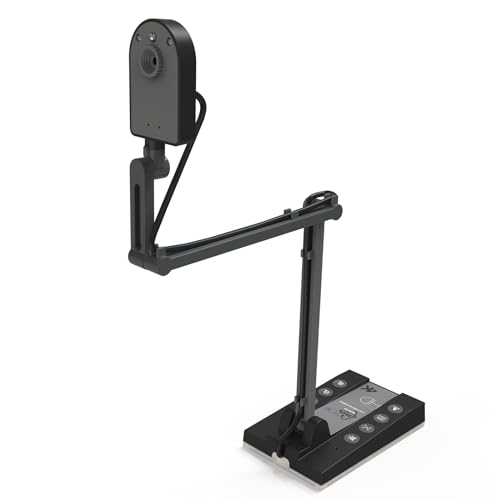
- HDMI and USB output for displays
- 15MP sensor with up to 4K/15Hz
- Built-in LED light for dim rooms
Best For: live exhibit display on monitors or projectors
Budget Live Presenter

- Foldable body for easy storage
- Manual focus with up to 1080P/30fps
- Built-in mic and USB-C cable
Best For: basic live presentation from a computer
Large-Format 4K Option – INS-2 UHD 4K 13MP Document Camera
If you need a document camera for courtroom presentations that can also handle oversized exhibits, the INS-2 is built for clear, flexible capture. Its 4K UHD output, A3-sized imaging area, and built-in LED make it a strong fit when you want documents, artwork, or two-page spreads visible without constant repositioning.
Best For: Educators, presenters, and exhibitors who need large-format capture with plug-and-play convenience.
Pros:
- 13MP Sony sensor records up to 4K UHD at 30 fps for detailed display.
- A3 capture area and multi-joint arm make it easier to frame large pages and exhibits.
- Built-in LED, anti-glare sheet, brightness control, and dual autofocus support cleaner presentations.
- Documate software adds annotation, recording, scanning, whiteboard tools, and OCR.
Cons:
- At 2.3 pounds, it is not the most travel-friendly option.
- Best suited to USB-based setups rather than standalone use.
Overall, this model stands out when image quality and larger capture size matter more than portability. It is a practical choice for formal presentations where clarity and reliable software tools help keep attention on the evidence or material being shown.
Simple HD Presentation Pick – DC125 Ladibug 30fps HD Document Camera
For a document camera for courtroom presentations that needs straightforward HD output, the DC125 keeps things simple and reliable. It offers 1080p capture, 30 fps performance, and USB connectivity, making it a practical pick when you want to show printed material without a lot of setup complexity.
Best For: Users who want a lightweight, USB-connected HD document camera for everyday presentation use.
Pros:
- Captures video at up to 1080p with 30 fps for smooth presentation playback.
- USB and HDMI connectivity support flexible setup options.
- Autofocus helps keep documents in view without frequent manual adjustment.
- Compact design is easier to place on a desk or move between rooms.
Cons:
- 1.98MP still resolution is much lower than newer 4K models.
- Designed around basic HD use rather than advanced imaging tools.
This is a sensible choice if you mainly need dependable document display rather than premium image detail. It should work well in situations where a clean, uncomplicated presentation setup is more important than high-resolution close-ups.
Compact High-Detail Choice – IPEVO V4K 8MP USB Document Camera
The IPEVO V4K is a strong document camera for courtroom presentations when you want high-resolution capture in a compact package. Its 8MP sensor, up to 30 fps streaming at Full HD, and fast focusing make it well suited to showing documents, small objects, or close-up evidence with minimal interruption.
Best For: Presenters who want a compact, fast-focusing USB document camera for live demos and conferencing.
Pros:
- 8MP Sony CMOS sensor captures up to 3264 x 2448 images.
- Streams up to 30 fps at Full HD for smooth live viewing.
- Fast focus helps reduce delays when switching between materials.
- Works with Mac, Windows, and Chromebook setups.
Cons:
- No zoom feature is included.
- Best results for high-resolution live output depend on a capable host computer.
As a compact everyday presenter, the V4K balances portability and image quality well. It is especially useful when you need a dependable USB camera that can move quickly from one item to the next without fuss.
Premium Portable 4K Pick – ELMO MX-P3 4K Visual Presenter
If your document camera for courtroom presentations needs premium image quality and flexible connectivity, the ELMO MX-P3 is positioned at the high end. It delivers 4K Ultra HD at 30 fps, supports USB-C, HDMI, and RGB connections, and folds into a lightweight body that is easier to transport than bulkier presenter units.
Best For: Users who want a premium 4K visual presenter with broad connectivity and a portable design.
Pros:
- 4K Ultra HD resolution at 30 fps provides sharp, detailed presentation output.
- USB-C, HDMI, and RGB connectivity offer broad setup compatibility.
- Lightweight 1.2 lb body and foldable design improve portability.
- One-push autofocus helps keep presentations moving smoothly.
Cons:
- Higher-end feature set may be more than casual users need.
- Uses SD card media, so it is not the simplest option if you only want a basic USB device.
This model makes sense when clarity, portability, and integration options all matter. It is a strong fit for formal presentation settings where polished visuals and quick setup are worth paying for.
Courtroom Presentation Visualizer – THUSTAR 8MP USB Document Camera
If you need a document camera for courtroom presentations, this THUSTAR model is built for showing papers, exhibits, and close-up details clearly on a live feed. It offers 8MP resolution, 30 fps output, autofocus, adjustable image inversion, and 3-level LED lighting, which makes it practical when you need readable visuals in changing room lighting.
Best For: Attorneys, paralegals, and presenters who want a foldable, plug-and-play visualizer for exhibits and documents.
Pros:
- 8MP capture with up to 2448P output and 30 fps for clear document display.
- Manual image inversion and one-touch autofocus help keep courtroom visuals oriented and sharp.
- 3-level LED lights and brightness controls improve visibility in dim or uneven lighting.
- Foldable A3-size design is easy to carry and set up on a small desk or podium.
Cons:
- Best suited to USB-connected use rather than HDMI-based courtroom systems.
- Built-in microphones are included, but the product is primarily a visual presentation tool.
For courtroom work, the strongest appeal here is flexibility: it can handle documents, small objects, and live demos without taking much space. If your setup relies on a computer and you want straightforward image controls, this is a solid budget-friendly visualizer option.
HDMI Courtroom Visual Camera – Epson DC-21 High-Definition Document Camera
For a document camera for courtroom presentations, the Epson DC-21 stands out if you want HDMI connectivity and optical zoom for showing evidence, documents, or small items on a larger display. It records in 1080p, includes 12x optical zoom plus 10x digital zoom, and comes with a microscope adapter for close inspection work.
Best For: Courtrooms, hearing rooms, and presentation setups that need HDMI output and zoom flexibility.
Pros:
- HDMI connectivity makes it easy to connect to compatible displays and presentation systems.
- 12x optical zoom and 10x digital zoom provide strong detail control.
- 1080p resolution is suitable for clear document and exhibit presentation.
- Includes a microscope adapter, remote control, software, and a carrying case.
Cons:
- Heavier and less portable than compact USB-only document cameras.
- Designed for devices with HDMI input, so it is less flexible for simple laptop-only setups.
The DC-21 is a strong choice when your courtroom workflow depends on a dedicated presentation connection rather than a lightweight USB accessory. Its zoom range and included accessories make it a practical pick for detailed exhibit viewing and more formal AV setups.
Portable Exhibit Camera – PAKOTOO USB Document Camera for Teachers
This USB document camera for courtroom presentations is a practical option if you want a compact visualizer that can also double as a webcam. It supports A3-size materials, offers autofocus, image inversion, 3-level LED fill light, and 5-level exposure adjustment, which helps when exhibits need to stay visible under tough room lighting.
Best For: Small legal teams or presenters who want a versatile USB camera for exhibits and remote display.
Pros:
- 3-in-1 design works as a document camera, webcam, or live presentation camera.
- A3 coverage and macro focus to 3.94 inches handle documents and close-up items.
- 3-level LED fill light plus adjustable exposure help in dark or bright rooms.
- Compatible with Windows, Mac, and Chromebooks, with USB-C support for newer devices.
Cons:
- Not plug-and-play, so you must select the camera manually in your system.
- Resolution is 5MP/1944P rather than the higher-end options found on some rivals.
For courtroom use, the PAKOTOO emphasizes versatility and easy handling over premium specs. It is a good fit if you want one device that can switch between exhibit display and general webcam duties without adding much setup bulk.
Fast Scan Pad – JOYUSING Scanpad100 Pro
If you need a document camera for courtroom presentations that prioritizes fast capture of paper exhibits, the JOYUSING Scanpad100 Pro is built for quick scanning rather than live overhead presentation. Its 16MP sensor, 1-second-per-scan workflow, OCR text recognition, and AI enhancement make it a practical choice for turning paper into shareable files during prep or after a hearing.
Best For: Legal teams or offices that want a compact USB document scanner for rapid paper digitization, editable PDFs, and simple Win/Mac compatibility.
Pros:
- 16MP and 380 DPI output with 1-second-per-scan performance
- OCR and one-click export to Word, Excel, PDF, and editable PDF
- Folds into a slim, portable form for easy storage and travel
- Supports Windows and Mac over USB Type-C
Cons:
- Not recommended for books
- Not ideal for very glossy paper
- Designed more for scanning than live courtroom camera use
For courtroom workflows focused on paper intake, this model stands out for speed and portability. If your main need is quickly converting printed exhibits into editable digital files, it offers a strong, simple setup.
Courtroom Presenter Cam – TreasLin 15MP Doc Camera
This document camera for courtroom presentations is aimed at live display use, whether you are projecting exhibits in a hearing room or sharing documents in a video call. The TreasLin camera offers 15MP imaging, up to 4K at 15Hz over USB, HDMI output for direct connection to a monitor or projector, and a built-in LED light for darker rooms.
Best For: Presenters who want a courtroom-ready document camera with HDMI output, multi-OS support, and solid live image quality.
Pros:
- 15MP sensor with up to 4K/15Hz USB output
- HDMI and USB connectivity for monitors, TVs, and projectors
- Works with Windows, Mac, Chrome OS, and Linux
- Built-in LED light helps in low-light environments
Cons:
- Mac HDMI use requires a USB-C adapter
- TF card storage is only available when using HDMI mode
- 4K output is limited to 15Hz
For courtroom display setups, this model is the most presentation-oriented option in the group thanks to HDMI support and broad software compatibility. It is a practical pick when you need to show paper exhibits or 3D objects live on a larger screen.
Budget Live Presenter – USB Doc Camera with Mic
USB Document Camera for Teachers,Manual Focus Webcam with Mic,Fold for Mac/Windows/Chromebook
Check Price On AmazonIf you want a document camera for courtroom presentations on a tighter budget, this USB model focuses on simple live capture and broad compatibility. It offers a foldable design, manual focus, a 1080P/30fps maximum, and a built-in microphone, making it suitable for basic visual presentation and remote sessions from a computer.
Best For: Users who need a compact, manual-focus USB document camera for straightforward live presentation and conferencing.
Pros:
- Foldable design makes it easy to store and carry
- Manual focus helps fine-tune clarity on real objects
- Supports up to 1080P at 30 fps
- Built-in microphone and USB-C cable included
Cons:
- Only 2MP sensor, so image quality is more basic than higher-end models
- Must be connected to a computer and does not support mobile devices
- No HDMI output for direct projector or monitor connection
This is a practical entry-level option for simple courtroom-style presentations where portability and ease of use matter more than premium resolution. It makes the most sense for users who already plan to run everything through a computer.
How We Picked the Best Document Camera for Courtroom Presentations
We focused on models that are easy to deploy in a courtroom setting, with strong image resolution, dependable autofocus or manual focus control, and broad compatibility with common presentation setups. We also considered how well each Document Camera for Courtroom Presentations handles paper exhibits, photos, 3D objects, and quick switching between devices.
Durability, lighting, zoom flexibility, and plug-and-play setup mattered too, since legal environments leave little room for troubleshooting.
Quick Comparison
Higher-resolution cameras are better when you need fine detail on contracts, photos, labels, or handwritten notes. USB models are usually the simplest for laptop-based setups, while HDMI-capable options can be better for dedicated AV systems. Portable units are useful for traveling attorneys or multi-room use, while heavier desktop models often offer steadier positioning.
Key Buying Factors for Document Camera for Courtroom Presentations
Image Quality
Look for at least 8MP if you want crisp text and clear evidence display. For more demanding visual detail, 13MP, 15MP, or 4K-class cameras can help preserve readability when enlarging documents on screen.
Focus and Lighting
Autofocus is convenient when you need fast transitions between exhibits, but manual focus can be useful for staying locked on static documents. Built-in LED lights help in rooms with uneven lighting, especially when showing glossy or textured items.
Connectivity and Compatibility
A reliable courtroom setup should work with your existing devices. Check for Mac, Windows, and Chromebook support, plus USB-C or HDMI options if you need to connect to modern laptops or presentation systems.
Size, Portability, and Setup
Foldable or lightweight designs are easier to transport between courtrooms or conference rooms. If you only need a stationary setup, a larger base can improve stability during questioning and evidence review.
Extra Features That Matter
Mic inputs, webcam modes, image inversion, OCR, and remote controls can add flexibility, but they should not outweigh the basics: clear visuals, fast setup, and dependable performance.
Who Should Buy Which Document Camera for Courtroom Presentations?
If you need maximum detail for complex exhibits, choose a higher-resolution model with strong focusing and good light control. If portability and simplicity are your priorities, a compact USB camera is often the best fit. If your courtroom or hearing room uses mixed AV hardware, consider a model with both USB and HDMI support. For legal teams that also need scanning or digitizing documents, a camera with OCR or scan-oriented features may be the most versatile choice.
In short, the best option depends on whether you value resolution, mobility, or system compatibility most. Matching those priorities to your courtroom workflow will make the camera far more useful in practice.