
A good document camera for art demonstrations makes it easier to show brushwork, sketching, color mixing, and step-by-step techniques in real time. The best models deliver sharp overhead detail, reliable focus, and simple connectivity.
Below, we’ve focused on options that are practical for classrooms, studios, and remote teaching, with attention to image quality, lighting, and compatibility across common devices.
Best 10 Document Camera for Art Demonstrations Picks for 2026
Pro Classroom Pick
INS-2 UHD 4K 13MP Document Camera

- 4K 13MP capture with A3 coverage
- Built-in LED and anti-glare support
- Documate adds annotation and OCR
Best For: Professional educators and art instructors needing detailed large-format capture
Remote Demo Choice
TreasLin 15MP HDMI/USB-C Document Camera
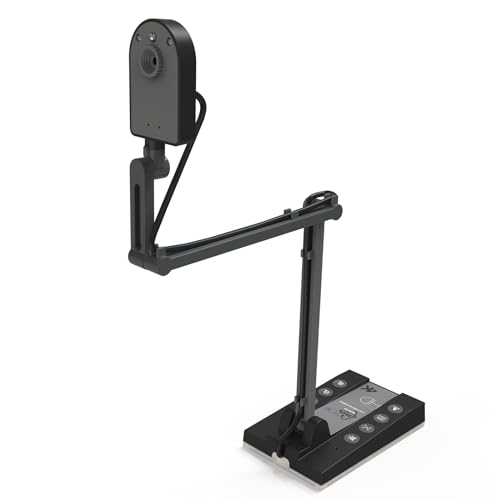
- 15MP sensor with 4K-capable output
- USB and HDMI connection options
- A3-size capture with LED light
Best For: Teachers who need flexible classroom and remote demo connectivity
Compact Teaching Favorite
THUSTAR 8MP 4K Document Camera

- Foldable design saves desk space
- 3-level LED lighting with manual brightness
- Built-in dual microphones for clearer sound
Best For: Teachers wanting a portable camera for live demos and distance learning
Budget Minimalist Pick
USB Manual Focus Document Camera

- Foldable body with 360-degree rotation
- Manual focus for closer control
- Built-in mic and USB-C support
Best For: Budget users needing a simple webcam-style demo camera
Editor Pick
4K 8MP Visualiser with 3-Level Lighting

- 8MP video up to 2448P at 30 fps
- A3 coverage with macro close focus
- 3-level LED light and manual image invert
Best For: Artists and teachers who want flexible overhead framing
Reliability Pick
IPEVO V4K for Smooth Live Demos

- 8MP capture up to 3264 x 2448
- Up to 30 fps Full HD streaming
- Fast focus with Sony CMOS sensor
Best For: Live teaching and remote demos with smooth performance
Budget Utility
A3 Doc Camera with LED Fill Light

- 3-in-1 camera, webcam, and doc mode
- A3 area with adjustable hose-style arm
- LED fill light plus autofocus and macro close-up
Best For: Classroom demos and remote art lessons on a budget
Portable 3-in-1 Teaching Camera

- 3-in-1 document camera, webcam, and visualiser
- Manual focus and rotating lens suit close-up demos
- Lightweight build with weighted base for stable use
Best For: Artists and educators who want a portable live-demo camera
High-Detail Classroom Visualizer
PAKOTOO 8MP USB Document Camera

- 2448P resolution and 8MP sensor for detailed overhead views
- Autofocus plus macro capture works for art close-ups
- LED brightness and exposure settings help in dim rooms
Best For: Instructors needing a larger capture area with strong image detail
Autofocus Demo Camera

- Autofocus helps keep artwork clear during live demos
- Adjustable LED lighting supports dim classroom settings
- 3-in-1 setup works for teaching, webcam, and overhead use
Best For: Live art demos where quick focus and lighting control matter
Pro Classroom Pick – INS-2 UHD 4K 13MP Document Camera
If you need a document camera for art demonstrations that can handle large sketches, two-page spreads, and finished pieces, the INS-2 is built for that job. Its 4K capture, A3-size coverage, and flexible arm make it a strong fit for teachers who want a clear overhead view without fuss.
Best For: Professional educators and art instructors who need clean, detailed capture of artwork, large documents, and classroom demos.
Pros:
- 13MP Sony sensor with 4K Ultra HD capture at 30fps
- A3-size coverage with a multi-joint arm for flexible positioning
- Built-in LED light, anti-glare sheet, and brightness control
- Documate software adds annotation, recording, OCR, and whiteboard tools
Cons:
- Uses a USB-A cable, so some setups may need an adapter
- Feature-rich software may be more than casual users need
For art teachers who want a polished, classroom-ready presentation tool, this model stands out for its larger capture area and professional teaching features. It is especially useful when the lesson involves paper formats bigger than standard letter size or when image detail matters.
Remote Demo Choice – TreasLin 15MP HDMI/USB-C Document Camera
The TreasLin document camera for art demonstrations is a practical option if you want both USB and HDMI output. With A3-size coverage, 15MP capture, and built-in LED lighting, it works well for classroom projection, live teaching, and video meetings.
Best For: Teachers and presenters who want flexible HDMI or USB use for classrooms, online classes, and live demos.
Pros:
- 15MP CMOS sensor with up to 4K dynamic resolution support
- Works over USB or direct HDMI to a monitor, TV, or projector
- A3-size capture area suits books, worksheets, and artwork
- Built-in LED light helps in dimmer settings
Cons:
- 4K mode is listed at 15Hz, which is less ideal for motion-heavy use
- USB-C adapter may be required for some Mac setups
This is a versatile pick for instructors who move between in-room teaching and remote presentations. The HDMI option makes it especially convenient when you want to connect straight to a display without extra software steps.
Compact Teaching Favorite – THUSTAR 8MP 4K Document Camera
If you want a document camera for art demonstrations that is compact but still feature-packed, the THUSTAR is worth a look. It offers A3-size coverage, adjustable brightness, and a foldable design, making it a handy choice for desks, studios, and small classrooms.
Best For: Teachers and presenters who want a foldable, easy-to-carry camera for live demos and distance education.
Pros:
- 8MP capture with up to 2448P output and 30fps transmission
- Foldable design with multi-joint support for flexible positioning
- Three-level LED lighting plus manual brightness controls
- Built-in dual microphones help improve audio quality
Cons:
- 8MP resolution is lower than some 13MP and 15MP rivals
- Maximum capture area listing appears unusual in the supplied notes
For art lessons where portability matters, this model offers a solid mix of lighting control and easy storage. It is a sensible pick if you want something that can move between home, classroom, and live stream setups without taking much space.
Budget Minimalist Pick – USB Manual Focus Document Camera
USB Document Camera for Teachers,Manual Focus Webcam with Mic,Fold for Mac/Windows/Chromebook
Check Price On AmazonThis document camera for art demonstrations keeps things simple with manual focus, a flexible structure, and webcam-style use. It is a lower-resolution option, but the height and rotation range can still make it useful for showing sketches, small objects, and step-by-step work.
Best For: Budget-minded users who want a basic, flexible camera for web meetings, tutoring, and simple demonstrations.
Pros:
- Foldable design with a tall 20.4-inch height and 360-degree rotation
- Manual focus can help lock in clearer close-up presentation shots
- Built-in microphone supports video calls and online teaching
- Works with Windows, Mac, and Chromebook through USB-C cable support
Cons:
- 2MP resolution is much lower than higher-end document cameras
- Does not support mobile devices like iPads or phones
This is the most basic pick in the group, so it makes sense when price and simplicity matter more than image detail. For light-duty art demos or online tutoring, it provides a flexible setup without adding unnecessary complexity.
Editor Pick – 4K 8MP Visualiser with 3-Level Lighting
If you need a document camera for art demonstrations, this model is built for clear overhead capture of sketches, mixed media, and step-by-step work. The 8MP sensor, A3 coverage, macro close focus, and adjustable brightness make it a practical fit when you want viewers to see detail without constant setup changes.
Best For: Artists, teachers, and presenters who want flexible overhead framing with strong image control.
Pros:
- 8MP capture with up to 2448P output and 30 fps live transmission.
- Manual image inversion and left/right adjustment for presentation flexibility.
- 3-level LED brightness and 10-step brightness control help in difficult lighting.
- Foldable, multi-joint design is easy to store and reposition.
Cons:
- Requires a USB connection for use.
- Some setup may be needed to dial in image orientation and lighting.
Overall, this is a strong all-around choice if your art demos need reliable overhead detail, light control, and broad compatibility across common platforms.
Reliability Pick – IPEVO V4K for Smooth Live Demos
The IPEVO V4K is a practical document camera for art demonstrations when you want steady live streaming and strong color handling. Its 8MP sensor, fast focusing, and high frame rate make it well suited to switching between tools, pages, or artwork during a lesson or remote demo.
Best For: Users who want a dependable, high-quality camera for live teaching and demonstration work.
Pros:
- 8MP sensor captures up to 3264 x 2448 images.
- Streams at up to 30 fps at Full HD for smoother live demos.
- Fast focusing helps reduce interruptions when changing materials.
- Sony CMOS sensor is designed for noise reduction and color reproduction.
Cons:
- Max capture performance depends on your computer’s system requirements.
- No zoom feature is included.
If color accuracy and dependable live performance matter most, this model stands out as a polished option for classroom and remote art instruction.
Budget Utility – A3 Doc Camera with LED Fill Light
This document camera for art demonstrations is a useful budget-minded option if you want overhead capture, webcam mode, and simple lighting help in one unit. The A3 format, autofocus, macro close-up support, and dual-use design make it practical for showing artwork, supplies, and detailed hand movements.
Best For: Classroom demos and remote art lessons that need a flexible, lower-resolution camera with helpful lighting.
Pros:
- 3-in-1 design works as a document camera, webcam, and presentation camera.
- A3 capture area and hose-style arm allow flexible angle adjustment.
- 3-level LED fill light and exposure adjustment help in dim environments.
- Autofocus and macro capture down to 3.94 inches support detail shots.
Cons:
- Not plug and play on every system; setup may require selecting the USB camera source.
- 5MP/1080p output is lower than higher-end 8MP models.
For users who want versatility and useful lighting more than top-tier resolution, this is a sensible pick for everyday art teaching and video calls.
Portable 3-in-1 Teaching Camera – AIKOR USB Document Camera
If you want a document camera for art demonstrations that can also double as a webcam, this AIKOR model is built for flexible live use. Its manual focus design, 360-degree rotating camera, and weighted base make it practical for showing sketches, materials, and step-by-step techniques from different angles without constant repositioning.
Best For: Artists, teachers, and presenters who need a lightweight, adjustable camera for live demos and online classes.
Pros:
- 3-in-1 design works as a document camera, webcam, and visualiser.
- Manual focus is aimed at keeping close-up art details sharp and stable.
- Flexible hose and 360-degree rotation help capture angled demonstrations.
- USB-C compatibility supports MacBook, Windows, and Chromebook setups.
Cons:
- Does not support mobile devices like iPads or phones.
- Manual focus means you adjust it yourself instead of relying on autofocus.
- Needs a computer connection to operate.
Overall, this is a solid pick if you value portability and hands-on control during art demonstrations. The 1080p output, built-in mic, and stable base make it a versatile choice for teaching craft techniques, sketching, and live walkthroughs.
High-Detail Classroom Visualizer – PAKOTOO 8MP USB Document Camera
For a document camera for art demonstrations where image detail matters, this PAKOTOO model focuses on higher resolution, autofocus, and broad capture area. It covers A3-sized materials, includes adjustable LED lighting, and can flip images without software, which is useful when showing drawings, printed references, or finished pieces during a lesson.
Best For: Teachers and art instructors who need a high-resolution overhead camera for larger work surfaces.
Pros:
- 8MP camera with 2448P resolution for detailed overhead capture.
- Autofocus and macro capture support close-up artwork and small objects.
- 3-level LED lighting and exposure controls help in changing room conditions.
- Can cover A3 paper size and folds for easier carrying and storage.
Cons:
- Not plug and play; you must select the USB camera in your system.
- Does not support zoom or HDMI.
- Not compatible with iPad.
This is the strongest option here if your art demos need a larger viewing area and more image control. The combination of autofocus, image inversion, and adjustable lighting makes it well suited to structured classroom instruction and detailed demonstrations.
Autofocus Demo Camera – Kitchbai 3-in-1 Visualiser
This document camera for art demonstrations is built for quick switching between teaching, webcam use, and overhead viewing. With autofocus, adjustable LED lighting, and image inversion, it gives you the tools to show drawings and materials clearly while adapting to different classroom or home studio lighting setups.
Best For: Live demonstrators who want automatic focus and easy lighting control during art lessons.
Pros:
- 3-in-1 design works as a document camera, webcam, and visualiser.
- Autofocus helps keep shifting artwork or tools clear during demos.
- 5-level fill light and adjustable LED brightness help in low light.
- Image invert button supports mirrored or flipped presentation views.
Cons:
- Uses USB connection only, so it relies on a computer.
- Resolution is listed as 1080p in the details despite higher still resolution specs.
- Does not mention support for mobile devices.
As an art demo camera, this model stands out for convenience: autofocus and quick lighting adjustments reduce setup friction. If you want a flexible teaching tool for live instruction, online classes, or streamed demonstrations, it covers the basics well.
How We Picked the Best Document Camera for Art Demonstrations
We prioritized cameras that are well suited to a Document Camera for Art Demonstrations, with clear overhead capture, stable positioning, and enough resolution to show fine lines and texture. We also looked for useful teaching features such as built-in LED lighting, autofocus or dependable manual focus, image inversion, and wide compatibility with Mac, Windows, and Chromebook systems.
Quick Comparison
The strongest choices in this group tend to fall into three categories: higher-resolution models for showing detail, flexible classroom cameras with dual microphones and LED illumination, and simpler plug-and-play options for users who value ease over extras. If you plan to demonstrate detailed ink work, small mixed-media pieces, or color accuracy, a sharper sensor and better lighting matter most.
Key Buying Factors for a Document Camera for Art Demonstrations
Image Quality and Detail
Look for a camera that can capture fine strokes, labels, and texture without excessive blur. For art teaching, higher resolution helps, but sensor quality and focus performance are just as important as the megapixel number.
Lighting and Color Visibility
Built-in LEDs are useful when your workspace has shadows or uneven light. Adjustable brightness can help preserve color accuracy and reduce glare on glossy paper or wet media.
Focus and Framing
Autofocus is convenient when moving between materials, while manual focus can work well if you keep the camera fixed. A3-size capture is especially helpful for sketchbooks, worksheets, and larger compositions.
Connection and Classroom Use
USB-C, USB-A, and HDMI support can make setup easier across different devices and teaching environments. If you stream lessons or switch between live demos and video calls, compatibility with Zoom, conferencing apps, and school-issued laptops is worth checking.
Who Should Buy Which Document Camera for Art Demonstrations?
If you want the clearest close-up presentation for detailed art instruction, choose a higher-resolution, autofocus model with strong lighting. If you need a reliable everyday classroom tool, a foldable USB camera with simple controls is often the best value. For hybrid teaching or remote demonstrations, prioritize plug-and-play setup, stable image inversion, and dual microphones so your instructions stay easy to follow.
For most buyers, the best Document Camera for Art Demonstrations is the one that balances sharp overhead imaging, straightforward controls, and compatibility with the devices you already use.