
A 3-in-1 SD card reader review starts with one simple question: does the adapter actually reduce friction when you need to move photos fast?
This one is built for that job, especially if you bounce between iPhone, iPad, Mac, and other USB-C or USB-A devices.
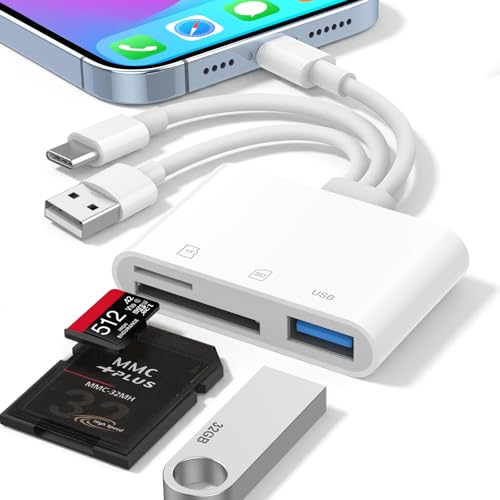
SD Card Reader Review Summary
The 3-in-1 SD Card Reader makes sense for photographers, travelers, and anyone who wants one compact adapter instead of carrying separate dongles.
Its value comes from broad device coverage, native plug-and-play behavior, and support for both SD and Micro SD cards, which makes it a practical transfer tool rather than a niche accessory.
It is especially appealing if you want a simple way to import camera files into Apple devices or copy them onto a laptop without installing extra software.
The listing also positions it as an MFi-certified option with USB-C, Lightning, and USB-A male connectors, so it is clearly aimed at mixed-device users who need one reader to cover several workflows.
Review Scorecard
| Category | Score | Buyer-focused rationale |
|---|---|---|
| Device Compatibility | 9 | Built for Lightning, USB-C, and USB-A use across iPhone, iPad, Mac, and laptops. |
| Ease of Use | 9 | Plug-and-play operation with no app or driver requirement lowers friction. |
| File Transfer Utility | 8 | Supports bidirectional transfer and is positioned for 4K video, RAW photos, and large files. |
| Card Support | 8 | Accepts SD and Micro SD formats, including higher-capacity variants up to 1TB. |
| Workflow Flexibility | 9 | The extra USB-A OTG port expands use beyond memory cards. |
| Traveler Appeal | 8 | All-in-one connector design reduces the need to pack multiple adapters. |
Verdict: this is a strong buy if your priority is convenience, compatibility, and quick file movement across mixed devices.
Key Features and Specifications of SD Card Reader
The core feature set is straightforward.
The reader combines Lightning, USB-C, and USB-A male ports in one body, so it can connect to newer iPhones, iPads, Macs, and USB-A computers without a separate adapter chain.
That design matters because it lets one accessory travel with you across multiple ecosystems.
It supports SD and Micro SD cards, including SDHC, SDXC, Micro SDHC, and Micro SDXC formats up to 1TB.
The listing also says it works with exFAT and FAT32, with FAT32 limited to single files under 4GB.
That is useful context for people moving cameras files, especially if they work with mixed media types.
The card reader is also described as plug and play, with no app, Wi-Fi, or driver installation required.
For Apple users, the promise is direct import and viewing through the native Files or Photos app, which is exactly the kind of low-friction workflow many buyers want from this category.
The extra USB-A female OTG port makes the accessory broader than a card reader alone.
The listing says it can connect flash drives, digital cameras, keyboards, and mice, though it also notes that printers are not supported.
That makes the product more like a small connectivity hub for light field use than a one-purpose dongle.
Pros and Cons of SD Card Reader
Pros
- Wide host compatibility across Lightning, USB-C, and USB-A devices.
- Simple plug-and-play use with no app or driver requirement.
- Dual card slot support for SD and Micro SD media.
- OTG functionality expands usefulness beyond memory cards.
- Useful for photographers who need fast import and backup workflows.
Cons
- The listing is focused on compatibility claims, not on detailed speed numbers.
- Printer support is explicitly excluded.
- The broad feature set may be more than casual users need if they only transfer files occasionally.
- Buyers who only use one device type may not need the extra connector flexibility.
Who Should Buy SD Card Reader?
This reader is a good fit for photographers, content creators, and travelers who move images and video between a camera card and multiple devices.
If you shoot on SD or Micro SD and regularly want to import to an iPhone, iPad, Mac, or USB-C laptop, the convenience here is obvious.
It also makes sense for people who work in mixed-device environments.
The combination of Lightning, USB-C, and USB-A support is a practical advantage if your workflow changes from desk to field or from new Apple hardware to older computers.
You should probably skip it if you only ever use one modern USB-C device and do not need card expansion or OTG support.
In that case, a simpler single-port reader may be enough.
How the 3-in-1 Design Works in Real Workflows
One Reader, Multiple Hosts
The main appeal is that you can use one accessory across several device families.
That reduces bag clutter and avoids the common problem of realizing your reader only works with one port standard.
Camera Card Import
For camera users, the reader is built around fast access to SD and Micro SD media.
The listing emphasizes direct transfer into Apple apps, which suggests a workflow centered on quick review, copying, and editing rather than extra software steps.
OTG Expansion Beyond Cards
The USB-A female port gives the reader a second life as a lightweight OTG accessory.
That is useful if you want to connect simple peripherals or move data from a flash drive without swapping hardware.
File Handling for Larger Media
The support for bidirectional transfer and common file systems makes this relevant for larger photo and video libraries.
The listing specifically calls out 4K video and RAW photos, so it is clearly aimed at users with heavier media than casual phone snapshots.
Alternatives to SD Card Reader
If you only need a straightforward single-purpose reader, a Apple USB-C SD Card Reader is the obvious premium alternative.
For users who want a compact multi-format option, a Anker SD card reader is worth comparing because the brand is well known for practical accessory design.
If you want broader connector and storage flexibility, look at a UGREEN card reader or a uni card reader.
Both are common Amazon search targets in this category and usually compete on portability and everyday convenience.
For photographers who want a more camera-first setup, a dedicated multi card reader may be a better match if you regularly handle several memory formats.
Is SD Card Reader Worth It?
Yes, if you want one reader that works across more than one device family. The strongest case for this product is not raw specialization; it is the ability to cover Lightning, USB-C, and USB-A with one compact accessory while still handling SD and Micro SD media.
That makes it a sensible buy for photographers and mobile creators who need practical transfer flexibility more than a fancy feature list.
If you value simple plug-and-play use, broad compatibility, and the option to move cards between Apple devices and laptops, this reader is worth considering.
If your workflow is narrow and you only need one port standard, there are simpler alternatives.
But for mixed-device users, this is a useful, low-friction tool that solves a real problem.