
Wireless video receivers make it easier to send HDMI signals to displays, projectors, monitors, and capture systems without running long cables. The right kit depends on range, resolution, latency, receiver count, and how reliably it handles your environment.
We compared 10 wireless HDMI systems across home entertainment, classrooms, conference rooms, live production, and camera-monitoring use cases to help you choose a practical match for your setup.
Best 10 Wireless Video Receivers Picks for 2026
Professional Multi-Receiver Pick

- 4K30 transmission with 1,300-foot line-of-sight range
- Supports up to four receivers for team monitoring
- HDMI loopout and UVC live-streaming support
Best For: Film production, broadcasting, and collaborative monitoring
Easy Multi-Screen Value

- Includes two receivers and supports up to six
- 1080p60 output with 4K input decoding
- LED display simplifies setup and troubleshooting
Best For: Home, office, and portable multi-display casting
Live-Streaming Flexibility Pick
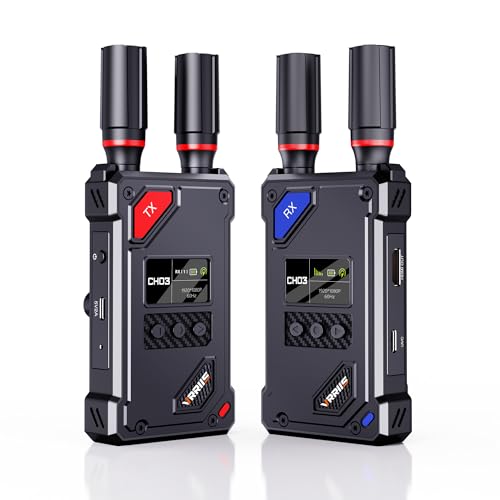
- UVC output supports OBS and other streaming platforms
- 20 channels allow manual interference management
- NP-F, USB-C, and adapter power options
Best For: Field camera work and computer-based live streaming
Four-Display Starter Kit

- Includes four receivers and supports up to eight
- 1080p60 output with 4K input decoding
- Pre-paired setup with included HDMI adapters
Best For: Conference rooms, classrooms, churches, and home multi-screen setups
Best All-in-One Wireless Video Hub
7-Inch Monitor HDMI Transmitter
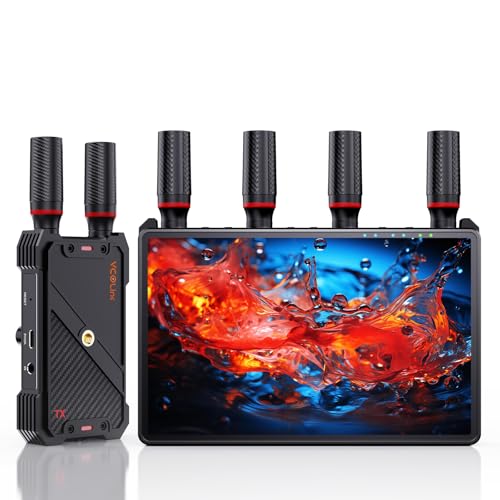
- Built-in 7-inch monitoring screen
- Supports up to five receivers
- 1080p/60Hz with under 0.05s latency
Best For: Filming crews and multi-viewer production setups
Best Plug-and-Play Office Pick

- Includes two receivers for multi-screen sharing
- 4K input with 1080p/60Hz output
- No app, Wi-Fi, or Bluetooth pairing required
Best For: Classrooms, conference rooms, and home theaters
Best Flexible Monitoring Setup

- 1080p/60Hz with claimed 0.05s latency
- Dual HDMI output on the receiver
- Supports NP-F and USB-C power options
Best For: Camera monitoring and multi-display production setups
Best Plug-and-Play Pick
Compact Wireless HDMI Extender
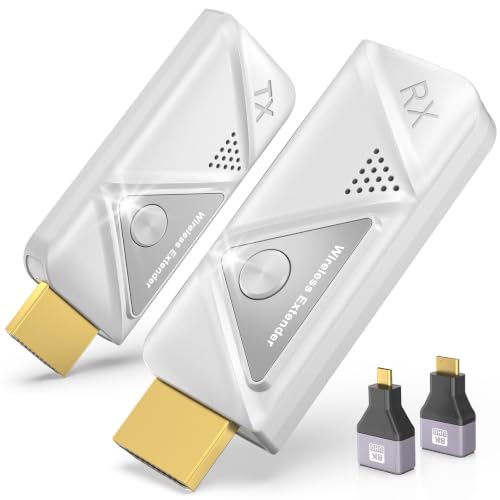
- Simple plug-and-play setup
- 328-foot stated range
- 4K decoding with 1080p output
Best For: Travel, presentations, and easy home HDMI mirroring
Best for Multi-Display Expansion

- Loop-out for local monitoring
- IR remote-control support
- Supports up to four receivers
Best For: Conference rooms, churches, and expandable display systems
Best Long-Range Option
1300-Foot Wireless HDMI Extender

- Up to 1,300-foot open-field range
- 1080p at 60Hz with low latency
- Loop-out and IR control included
Best For: Large spaces and long-distance HDMI installations
Professional Multi-Receiver Pick – Hollyland Pyro H
For production teams comparing wireless video receivers, the Hollyland Pyro H stands out with 4K30 transmission, dual-band operation, smart channel scanning, and support for up to four receivers. Its HDMI loopout and UVC support also make it useful for both on-set monitoring and computer-based live streaming.
Best For: Film crews, live broadcasters, and multi-person monitoring setups that need extended range and flexible connectivity.
Pros:
- Transmits up to 4K30 with up to 1,300 feet of line-of-sight range.
- Supports up to four receivers for collaborative monitoring.
- Includes HDMI input, output, loopout, and UVC live-streaming support.
- Smart channel scan works across 2.4GHz and 5GHz bands.
Cons:
- The kit includes only one transmitter and one receiver.
- Its 60ms latency may not suit applications requiring nearly instantaneous monitoring.
The Pyro H is a strong choice when range, 4K capability, and scalable monitoring matter more than the simplest home setup. It is particularly well suited to professional workflows with several viewers or a live-streaming computer.
Easy Multi-Screen Value – Wireless HDMI 1TX+2RX Kit
This wireless video receiver kit is designed for straightforward multi-screen casting. It includes one transmitter and two receivers, supports up to six receivers, and uses an LED display to show connection and signal information during setup.
Best For: Home entertainment, office presentations, and users who want plug-and-play wireless HDMI to multiple displays.
Pros:
- Includes two receivers and can support up to six receivers total.
- Outputs 1080p at 60Hz from compatible 4K-input sources.
- LED status display shows connection, signal strength, output mode, and power information.
- Compact carrying case supports travel and presentation use.
Cons:
- Both transmitter and receivers require wired power.
- Walls and other obstacles can reduce the stated transmission range.
- It outputs at 1080p rather than 4K.
With its included dual receivers and clear status screen, this kit favors convenience over advanced production features. It is a practical option for sending one HDMI source to several TVs, monitors, or projectors without installing drivers.
Live-Streaming Flexibility Pick – Vrriis Wireless Video System
Among wireless video receivers for live production, the Vrriis system focuses on channel control and streaming connectivity. It offers 20 manually adjustable channels, UVC output for platforms such as OBS, HDMI loopout, and multiple power options for camera-based use.
Best For: Camera operators and streamers who need UVC output, manual interference control, and battery-compatible field operation.
Pros:
- Provides up to 1,500 feet of line-of-sight range and 0.05-second latency in suitable conditions.
- Offers 20 adjustable channels with LCD signal and interference information.
- UVC output enables computer streaming without a separate capture device.
- Supports NP-F batteries as well as USB-C and adapter power.
Cons:
- The kit is limited to 1080p at 60Hz.
- NP-F batteries are not included.
- Walls, metal, brick, and glass can significantly reduce range.
The Vrriis system is compelling for mobile production because it combines low stated latency with UVC output and flexible power. Its manual channel selection is also useful when automatic frequency selection is not enough in a crowded environment.
Four-Display Starter Kit – Wireless HDMI 1TX+4RX
This wireless video receiver bundle is built for simultaneous distribution to multiple screens. One transmitter and four pre-paired receivers are included, with support for up to eight receivers, 1080p60 output, dual-band transmission, and LED diagnostics.
Best For: Conference rooms, classrooms, churches, and home setups that need one source displayed across several screens.
Pros:
- Includes four receivers and supports expansion to eight receivers.
- Delivers 1080p at 60fps from sources with 4K input.
- Pre-paired, plug-and-play design requires no Wi-Fi, apps, or drivers for core operation.
- Includes USB-C, Micro HDMI, and Mini HDMI adapters for broader source compatibility.
Cons:
- The stated range is up to 165 feet and may fall to about 50 feet through obstacles.
- Each unit requires a 5V/1A USB power source.
- It does not support satellite receivers such as Dish Wally and Dish Hopper.
The included four receivers make this a convenient choice for larger multi-display installations. It prioritizes simple deployment and broad device compatibility, while users should plan carefully for power outlets and obstacle-related range loss.
Best All-in-One Wireless Video Hub – 7-Inch Monitor HDMI Transmitter
For production teams that need more than a basic point-to-point link, this wireless video receiver system combines a built-in 7-inch monitor with HDMI output and support for up to five receivers. It transmits 1080p video at up to 60Hz over a claimed 1,312 feet in line-of-sight conditions, with latency under 0.05 seconds.
Best For: Filming crews, live production, studio monitoring, and multi-viewer on-set collaboration.
Pros:
- Built-in 7-inch HD screen reduces the need for a separate monitor.
- Supports one transmitter to as many as five receivers.
- Offers HDMI loop out, IR remote control, and headphone monitoring.
- Can use NP-F batteries, USB-C power, or a power bank.
Cons:
- External HDMI cable is not included.
- Smartphone and tablet use requires a Type-C-to-HDMI cable.
- The 1,312-foot range is specified for line-of-sight use.
This is a particularly capable choice among wireless video receivers when private monitoring, shared displays, and flexible power options matter more than keeping the setup minimal.
Best Plug-and-Play Office Pick – Coolpie Wireless HDMI System
This Coolpie kit is designed for straightforward screen sharing without apps, Wi-Fi, or Bluetooth pairing. It includes one transmitter and two wireless video receivers, supports 4K input with 1080p/60Hz output, and provides a claimed range of up to 350 feet in open spaces.
Best For: Conference rooms, classrooms, presentations, home theaters, and multi-screen displays.
Pros:
- One transmitter can mirror to two receivers simultaneously.
- Automatic pairing provides a simple plug-and-play setup.
- Aluminum-alloy construction and ventilation are designed for extended operation.
- Claims approximately 0.1-second latency and up to 350 feet of open-space range.
Cons:
- Requires a power supply for operation.
- Outputs at 1080p/60Hz even when accepting a 4K input.
- Solid barriers can reduce the stated transmission range.
Choose this system if easy deployment and two-screen sharing are the priorities. Its app-free operation is especially practical for classrooms and offices where users may not want a complicated setup.
Best Flexible Monitoring Setup – 1300FT Wireless HDMI Receiver
This Vrriis wireless video receiver kit focuses on range, monitoring flexibility, and portable power. It supports 1080p/60Hz transmission with claimed 0.05-second latency, includes transmitter loop out, and provides dual HDMI outputs on the receiver for connecting two displays.
Best For: DSLR monitoring, streaming, sports or gaming setups, and installations that need local and remote screens.
Pros:
- Claims up to 1,300 feet of line-of-sight transmission range.
- Provides transmitter loop out and two HDMI outputs on the receiver.
- Supports IR control for operating the HDMI source from another location.
- Works with NP-F batteries, USB-C power, adapters, or portable rechargeable power.
Cons:
- Walls, metal, brick, and glass can significantly reduce coverage.
- Batteries are not included.
- Adding more receivers can reduce transmission distance.
Among wireless video receivers, this model stands out for users who need multiple display connections and several powering methods. It is a practical fit for mobile production, though the advertised range depends heavily on a clear path.
Best Plug-and-Play Pick – Compact Wireless HDMI Extender
This compact wireless HDMI extender is a practical choice among wireless video receivers when you want a simple connection without an app, Bluetooth, Wi-Fi setup, or complicated configuration. It supports duplicate and extended display modes and can connect sources such as laptops, cameras, and set-top boxes to HDMI displays.
Best For: Travel, presentations, teaching, home entertainment, and users who prioritize easy setup.
Pros:
- Plug-and-play setup with no app or configuration required.
- Supports up to 328 feet of transmission in suitable conditions using 2.4GHz/5GHz transmission.
- Decodes 4K signals and outputs up to 1080p at 60Hz.
- Includes Micro HDMI and Mini HDMI adapters for added source compatibility.
Cons:
- Walls and other obstacles can reduce range and transmission speed.
- Supports one-to-one transmission rather than mixed one-to-two use.
- Mobile devices require HDMI signal output support.
Choose this model if portability and straightforward operation matter more than multi-receiver expansion. Its included adapters and lightweight design make it especially convenient for mobile presentations and flexible home setups.
Best for Multi-Display Expansion – 820-Foot Wireless HDMI Kit
This wireless HDMI kit stands out among wireless video receivers for its loop-out connection, IR control, and support for multiple receivers. It transmits 1080p video at up to 60Hz and is designed for connecting HDMI sources such as laptops, cameras, set-top boxes, and game systems to a remote TV or projector.
Best For: Offices, conference rooms, churches, and home setups that may need additional displays.
Pros:
- Supports up to 820 feet in an open field without interference.
- Transmitter loop-out allows a local display for monitoring.
- IR cables enable remote control of the source device from the receiver location.
- Can support up to one transmitter and four receivers with added receivers.
Cons:
- Walls, glass, and other obstructions can significantly reduce coverage.
- Transmission distance decreases as additional receivers are added.
- Video output is limited to 1080p at 60Hz.
This is a strong fit when installation flexibility matters, particularly if you need a local monitor or remote source control. Its multi-receiver capability adds expansion potential, though the stated range changes with each added receiver.
Best Long-Range Option – 1300-Foot Wireless HDMI Extender
For buyers comparing wireless video receivers by transmission distance, this extender offers a stated range of up to 1,300 feet in an open field without interference. It delivers 1080p at 60Hz, includes loop-out and IR remote-control support, and is designed for HDMI-equipped TVs and projectors.
Best For: Large offices, conference spaces, church projection, and long-distance point-to-point HDMI connections.
Pros:
- Offers a stated 1,300-foot open-field transmission range.
- Supports 1080p at 60Hz with claimed 0.05-second latency.
- Loop-out provides a local monitoring display at the transmitter.
- Supports up to five receivers, with range varying as receivers are added.
Cons:
- Metal, walls, bricks, and glass can shorten coverage or cause signal loss.
- Additional receivers reduce the available transmission distance.
- Does not provide 4K output; the supported resolution is 1080p.
This model makes the most sense when range is the primary requirement and the installation has a relatively clear signal path. The added loop-out and IR features make it more useful for managed AV setups than a basic wireless HDMI link.
How We Picked These Wireless Video Receivers
We focused on the specifications that have the greatest effect on real-world usability: supported input and output resolutions, stated transmission distance, latency, receiver capacity, connection bands, loop-out support, and setup requirements. We also considered whether each system is better suited to a single display, multiple screens, live video, presentations, or general HDMI extension.
Wireless range claims are typically measured in open conditions. Walls, furniture, neighboring Wi-Fi networks, and other interference can reduce actual performance, so treat published distances as a comparison point rather than a guarantee.
Quick Comparison
- Best for advanced wireless video: Hollyland Pyro H, with dual-band operation, 4K30 support, and multi-receiver capability.
- Best for multi-display installations: Kits supporting two, four, or more receivers can distribute one source across several screens.
- Best for live workflows: Models with UVC output, manual channel selection, or loop-out connections offer more integration options.
- Best for straightforward HDMI extension: Plug-and-play 1080p systems are usually the simplest choice for presentations and home use.
Key Buying Factors for Wireless Video Receivers
Resolution and Compatibility
Check both the transmitter’s input limit and the receiver’s output resolution. A system advertising 4K input may still output 1080p, so confirm whether it passes through, scales, or only supports Full HD at the display. Verify HDMI compatibility with your laptop, camera, game console, projector, or streaming device.
Range, Latency, and Stability
Longer stated range can help in large rooms, but low latency matters more for gaming, live camera monitoring, and interactive presentations. Dual-band systems may provide greater flexibility in busy wireless environments. For dependable performance, maintain a clear line of sight where possible and avoid placing units behind equipment or inside cabinets.
Receiver Count and Expansion
If one source must feed several displays, choose a system designed for multiple receivers rather than relying on splitters or separate kits. Confirm the maximum supported receiver count and whether additional receivers are sold separately.
Loop Out, UVC, and Controls
HDMI loop-out lets you keep a local display connected while transmitting to another screen. UVC output can simplify computer-based capture or live streaming. Manual channel selection, LED status displays, IR support, and included mounting or power accessories can also improve day-to-day operation.
Who Should Buy Which Wireless Video Receivers?
Choose the Hollyland Pyro H if you need a more capable system for camera work, professional monitoring, or flexible multi-receiver deployment. For classrooms, conference rooms, and simple presentation setups, a plug-and-play 1080p kit is often sufficient and easier to manage.
Buy a multi-receiver package when several screens need the same source. Select a model with loop-out for a local preview or daisy-free monitoring arrangement, and consider UVC output when the receiver will feed a computer for streaming or recording. For gaming or fast-moving video, prioritize the lowest practical latency over maximum advertised distance.