
Wireless video receivers with HDMI make it easier to send a source device’s picture and sound to a TV, projector, monitor, or secondary display without running a long cable. The right kit can simplify presentations, home theater setups, classroom instruction, and multi-screen viewing.
This roundup compares 10 options with different ranges, output resolutions, receiver counts, loop-out features, wireless bands, and monitor support. Use the buying guide below to narrow the list based on your room layout, display requirements, and budget.
Best 10 Wireless Video Receivers with Hdmi Picks for 2026
Best Plug-and-Play Pick
4K Wireless HDMI Transmitter and Receiver Kit

- 1080p at 60Hz with no app or driver
- USB-C and mini HDMI accessories included
- One receiver supports up to eight transmitters
Best For: Simple home, classroom, and presentation mirroring
Best for On-Set Monitoring
Wireless HDMI Kit with 7-Inch Monitor
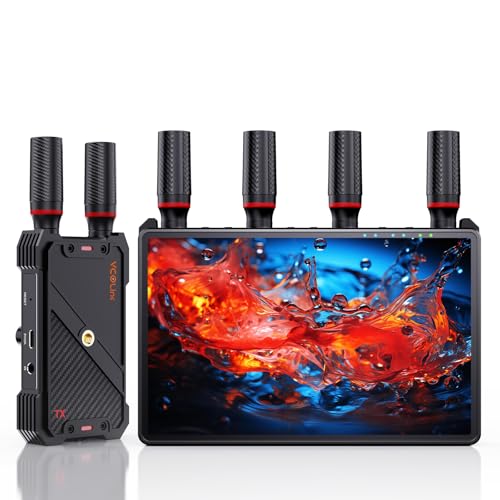
- Built-in 7-inch monitoring display
- 1080p60 with claimed under-0.05-second latency
- One transmitter supports up to five receivers
Best For: Filming, live production, and collaborative monitoring
Best Multi-Display Value
Wireless HDMI Kit with Two Receivers

- Includes two receivers and supports up to six
- Dual-band 2.4GHz/5.8GHz transmission
- Adapters cover USB-C, micro HDMI, and mini HDMI
Best For: Multi-screen home, classroom, and commercial installations
Best Long-Range Production Extender

- Claims 1300-foot line-of-sight range
- 1080p60 with claimed 0.05-second latency
- Loop out, dual HDMI output, and IR support
Best For: Camera monitoring, streaming, and long-distance installations
Dual-Display Choice
SVBONY TransAir3 Wireless HDMI Kit
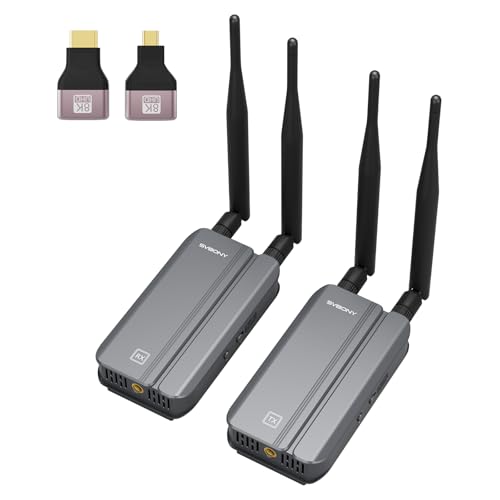
- 1080p/60Hz wireless video with factory pairing
- Two receiver HDMI outputs for synchronized displays
- IR control, loop-out, and advertised 1,000-foot range
Best For: Office presentations, monitoring, and home viewing
Multi-Screen Pick
Wireless HDMI Kit with Two Receivers

- Includes one transmitter and two receivers
- Can support up to six receivers
- 4K input decoding with 1080p/60Hz output
Best For: Multi-screen presentations and commercial displays
Long-Range Flexible Option

- Advertised 400-foot/120-meter transmission range
- Mirroring and extended-display modes
- Dual-band operation with 1080p/60Hz output
Best For: Large rooms, events, offices, and home theaters
Long-Range Pick
Vrriis 250m Wireless HDMI Extender

- Up to 250m open-field range
- 1080p/60Hz with loop-out and IR
- Supports up to four receivers
Best For: Large spaces and multi-display setups
Travel-Friendly Choice
Compact 100m Wireless HDMI Kit

- 1080p/60Hz output with 4K decoding
- No Wi-Fi, app, or Bluetooth required
- Includes Micro and Mini HDMI adapters
Best For: Portable presentations and temporary setups
Flexible Multi-Source Pick

- 4K decoding with 1080p/60Hz output
- One receiver can support up to eight transmitters
- LED display and mirror/extend modes
Best For: Multi-source offices, classrooms, and events
Best Plug-and-Play Pick – 4K Wireless HDMI Transmitter and Receiver Kit
If you want wireless video receivers with HDMI for everyday screen mirroring, this kit emphasizes simple setup and broad device compatibility. It supports up to 1080p at 60Hz, includes USB-C, mini HDMI, and HDMI accessories, and is rated for transmission up to 165 feet in open conditions.
Best For: Home entertainment, presentations, classroom use, and casual gaming where plug-and-play mirroring matters.
Pros:
- No driver or app is required for setup.
- Supports 1080p at 60Hz and 3D content.
- Includes USB-C, mini HDMI, and standard HDMI connectivity accessories.
- One receiver can pair with up to eight transmitters.
Cons:
- The advertised 165-foot range can drop substantially through cement walls or between floors.
- The kit does not include a 5V/2A charger.
- Despite the title mentioning 4K, the supplied notes specify video support up to 1080p at 60Hz.
This is a flexible starter kit for users who prioritize easy pairing and compatibility with laptops, phones, cameras, and other HDMI sources. Its practical range will depend heavily on the building layout.
Best for On-Set Monitoring – Wireless HDMI Kit with 7-Inch Monitor
Among wireless video receivers with HDMI, this system stands out for production workflows because the receiver includes a built-in 7-inch monitor. It delivers 1080p at 60Hz with claimed ultra-low latency, supports HDMI output to another display, and can broadcast from one transmitter to as many as five receivers.
Best For: Filming, live production, studio monitoring, and collaborative on-set viewing.
Pros:
- Built-in 7-inch screen provides monitoring without an additional display.
- Supports 1080p at 60Hz with claimed latency below 0.05 seconds.
- One transmitter can connect with up to five receivers.
- Offers HDMI loop out, IR remote control, headphone monitoring, and flexible power options.
Cons:
- An HDMI cable for connecting an external monitor is not included.
- Smartphone and tablet use requires a Type-C-to-HDMI cable.
- The 1312-foot range is specified for line-of-sight conditions.
The integrated monitor and multi-receiver support make this a specialized choice rather than a basic living-room extender. It is particularly useful when camera operators, directors, and clients need simultaneous local and external monitoring.
Best Multi-Display Value – Wireless HDMI Kit with Two Receivers
This wireless HDMI system is designed for sending one source to multiple screens, making it a practical option when comparing wireless video receivers with HDMI for conference rooms, entertainment spaces, or classrooms. The supplied kit includes two receivers, supports expansion to as many as six, and claims up to 165 feet in open environments.
Best For: Multi-screen setups such as home theaters, bars, conference rooms, classrooms, and churches.
Pros:
- Includes two receivers and can expand to up to six screens.
- Supports dual-band 2.4GHz/5.8GHz transmission.
- Includes USB-C-to-HDMI, micro HDMI, and mini HDMI adapters.
- Uses a plug-and-play transmitter-to-display setup.
Cons:
- It cannot transmit from one TV to another TV.
- Range may decrease to about 50 feet when passing through walls.
- The supplied notes recommend a 5V/1A charger for stable power, which may need to be provided separately.
Choose this model when the main goal is duplicating a source across several displays. Its included adapters broaden compatibility, while the wall-related range limitation is important for installations with multiple rooms.
Best Long-Range Production Extender – 1080p Wireless HDMI System
For buyers seeking wireless video receivers with HDMI for camera or production use, this system combines a claimed 1300-foot line-of-sight range with 1080p at 60Hz transmission. It also provides transmitter loop out, dual HDMI output on the receiver, IR support, and several portable power options.
Best For: DSLR monitoring, live streaming, sports viewing, and installations needing local and remote displays.
Pros:
- Claims up to 1300 feet of transmission in an unobstructed field.
- Supports 1080p at 60Hz with claimed 0.05-second latency.
- Transmitter loop out and receiver dual HDMI output support flexible monitoring.
- Can run from NP-F batteries, USB-C power, adapters, or portable rechargeable power.
Cons:
- Walls, metal, brick, and glass can significantly reduce signal coverage.
- Batteries are not included.
- The notes state that transmission distance decreases as additional receivers are added.
This is a strong fit for users who need production-oriented routing and flexible powering rather than a basic consumer mirroring device. Treat the headline range as a line-of-sight figure and plan around obstacles.
Dual-Display Choice – SVBONY TransAir3 Wireless HDMI Kit
For shoppers comparing wireless video receivers with hdmi, the SVBONY TransAir3 stands out for plug-and-play 1080p transmission, dual HDMI outputs, and an HDMI loop-out on the transmitter. It is factory-paired and requires no software installation.
Best For: Office presentations, monitoring two displays, home viewing, and setups that need remote-control passthrough.
Pros:
- Supports up to 1080p at 60Hz with a stated 0.06-second latency.
- Receiver has two HDMI outputs for synchronized dual-screen display.
- Factory pairing, automatic channel selection across nine 5.2–5.8GHz channels, and IR control support.
- Advertised transmission distance reaches up to 1,000 feet in open, interference-free areas.
Cons:
- NP-F batteries are not included, and Type-C operation requires an external power supply.
- The notes do not recommend it for gaming when smooth operation is critical.
- The maximum range depends on open, interference-free conditions.
The TransAir3 is a practical choice when dual-display output and source-device control matter more than gaming-focused performance. Its simple setup and loop-out connection also suit demonstrations and presentations.
Multi-Screen Pick – Wireless HDMI Kit with Two Receivers
This wireless HDMI system is designed for shoppers who need wireless video receivers with hdmi across multiple screens. It includes one transmitter and two receivers, supports up to six receivers, and decodes 4K input for 1080p output at 60Hz.
Best For: Multi-TV presentations, commercial displays, home entertainment, and portable business setups.
Pros:
- One transmitter can connect with up to six receivers for synchronized displays.
- LED screen shows connection status, signal strength, output mode, and power information.
- Supports 1080p at 60Hz output and is designed for plug-and-play operation without drivers.
- Includes a carrying case and works with HDMI devices such as laptops, cameras, projectors, and game consoles.
Cons:
- Both transmitter and receivers require wired power of at least 5V/2A.
- Walls and other solid obstacles can reduce transmission distance and speed.
- Although 4K input decoding is supported, the stated output resolution is 1080p.
Choose this kit if synchronized multi-screen coverage is the priority. Its built-in display simplifies setup, while the included case makes it convenient for presentations and travel.
Long-Range Flexible Option – 400ft Wireless HDMI Extender
Among wireless video receivers with hdmi, this extender is aimed at users who need long-range connectivity and flexible screen modes. It offers mirroring or extended display, dual-band 5G and 2.4G operation, and 1080p output at 60Hz from 4K-decoded content.
Best For: Offices, classrooms, events, home theaters, and portable presentations requiring longer-range HDMI transmission.
Pros:
- Advertised range reaches up to 400 feet or 120 meters.
- Supports both wireless mirroring and extended-display modes.
- Uses 5.8G and 2.4G dual-band transmission with a stated zero-latency design.
- Supports one receiver with up to 12 transmitters and up to five sets in the same environment.
Cons:
- 4K content is decoded but output is specified as 1080p at 60Hz.
- Actual range and stability may vary with obstacles and interference.
- The system still requires compatible HDMI source and display connections.
This model is the most adaptable option for larger spaces or changing presentation layouts. Its mirroring and extended-display modes add flexibility, while multi-transmitter support may benefit event and business deployments.
Long-Range Pick – Vrriis 250m Wireless HDMI Extender
If you need wireless video receivers with hdmi for a large open area, this Vrriis kit stands out with a claimed 250m (820ft) line-of-sight range. It supports up to 1080p at 60Hz, includes a transmitter-side loop-out, and adds IR control for managing the source from the display location.
Best For: Large homes, offices, churches, conference spaces, and setups needing a local monitor plus a remote display.
Pros:
- Long claimed transmission range of up to 250m in an open field.
- Supports 1080p at 60Hz with dual-band 2.4GHz and 5.8GHz transmission.
- Transmitter loop-out supports local monitoring, while IR cables enable remote source control.
- Can support up to four receivers, with additional receivers sold separately.
Cons:
- Walls, glass, and other obstacles can significantly reduce range.
- Transmission distance decreases as more receivers are added.
- Advertised latency is approximately 0.06 seconds, which may matter for highly timing-sensitive gaming.
This is the most feature-rich choice of the three for multi-display installations and long open-space links. Its range claims depend heavily on line-of-sight conditions, so measure the environment before relying on the maximum distance.
Travel-Friendly Choice – Compact 100m Wireless HDMI Kit
For wireless video receivers with hdmi that are easy to move between rooms or locations, this compact kit offers 1080p output, claimed sub-0.01-second delay, and a lightweight design. It does not require Wi-Fi, an app, or Bluetooth, making it practical for presentations, teaching, and temporary displays.
Best For: Presenters, teachers, travelers, small offices, home theaters, and portable event setups.
Pros:
- Plug-and-play operation without Wi-Fi, apps, or Bluetooth.
- Supports 4K decoding with 1080p/60Hz output and mirror or extended display modes.
- Claims up to 100m outdoors and 50m indoors, using 2.4GHz and 5.8GHz bands.
- Lightweight design includes Micro HDMI and Mini HDMI adapters.
Cons:
- Indoor range is substantially shorter than the open-area maximum.
- Walls and obstacles can reduce transmission distance and speed.
- Both the transmitter and receiver must be connected to power.
This kit balances portability and straightforward setup rather than maximum range. It is a sensible fit when you frequently switch between presentations, classrooms, home entertainment, or outdoor viewing locations.
Flexible Multi-Source Pick – 110m Wireless HDMI Extender
This wireless HDMI kit is designed for users who want wireless video receivers with hdmi plus flexible source management. It decodes 4K input to 1080p at 60Hz, offers mirror and extended modes, and can pair one receiver with up to eight transmitters while supporting up to three sets in the same environment.
Best For: Offices, classrooms, events, home theaters, and users switching between multiple HDMI sources.
Pros:
- Supports 4K decoding and 1080p at 60Hz output.
- Claims up to 110m outdoors and 50m indoors with dual-band transmission.
- Supports one receiver with up to eight transmitters and up to three simultaneous sets.
- Includes an LED status display, cooling design, and Micro/Mini HDMI adapters.
Cons:
- It outputs at 1080p, not native 4K.
- Walls can reduce the stated transmission range and speed.
- Its broader multi-transmitter feature set may be unnecessary for a simple one-source setup.
The standout advantage here is expansion: it is better suited to environments where several sources or wireless links must be managed. The LED display and cooling design also add practical monitoring features, though real-world range will depend on obstacles and interference.
How We Picked These Wireless Video Receivers with Hdmi
We compared the selected kits by the specifications that matter most in real installations: supported input and output resolutions, claimed transmission range, latency, receiver capacity, connection stability, loop-out support, remote or IR functionality, and setup complexity. We also considered whether each system is best suited to a single display, several screens, a presentation environment, or a home entertainment setup.
Range figures are manufacturer claims and can vary significantly with walls, interference, antenna placement, and nearby Wi-Fi equipment. A shorter-range model with a stable signal may be more useful than a long-range kit in a crowded wireless environment.
Quick Comparison
- Best for basic plug-and-play use: Choose a simple transmitter-and-receiver kit with straightforward HDMI connections.
- Best for multiple screens: Look for systems supporting two, five, or six receivers, depending on the installation.
- Best for presentations: Prioritize stable transmission, low delay, loop-out, and broad display compatibility.
- Best for home viewing: Consider 4K input support, 1080p output, IR control, and sufficient range for your room.
- Best for monitoring: Models bundled with 7-inch displays can be useful where a dedicated viewing screen is needed.
Key Buying Factors for Wireless Video Receivers with Hdmi
Resolution and Compatibility
Check both the source and display specifications. Many wireless kits accept a 4K signal but output at 1080p, while others are designed specifically for Full HD. Confirm support for your source device, refresh rate, HDCP requirements, and the HDMI version needed by your equipment.
Range and Wireless Performance
Choose a claimed range that exceeds the actual distance between devices, especially when the signal must pass through walls or furniture. Dual-band 2.4GHz and 5GHz systems may provide more flexibility, but placement still affects performance. Keep the transmitter and receiver away from routers, metal surfaces, and other sources of interference.
Latency, Loop-Out, and Multi-Receiver Support
Low latency matters for presentations, live demonstrations, gaming, and camera monitoring. A loop-out port lets you keep a local display connected while transmitting to another screen. If several TVs or monitors need the same source, verify the maximum receiver count and whether additional receivers are sold separately.
Installation and Control Features
Plug-and-play operation is valuable when users frequently move the equipment. LED status displays can simplify troubleshooting, while IR support or a remote may allow control of the source from the receiver location. Confirm that the kit includes the required power adapters and cables.
Who Should Buy Which Wireless Video Receivers with Hdmi?
Home users should favor a compact kit with dependable 1080p output, adequate room-scale range, and simple setup. Businesses and educators should prioritize low latency, loop-out, stable transmission, and compatibility with projectors and conference displays. Multi-screen installations should select a transmitter that supports multiple receivers and verify the system’s expansion limits before buying. Users with 4K sources should carefully distinguish 4K input compatibility from true 4K wireless output. Finally, buyers covering long distances should compare the claimed range with the building layout and expect walls and interference to reduce real-world performance.