
Wireless video receivers can make it easier to send HDMI video from a camera, laptop, streaming device, or media player to a display without running a long cable. The best choice depends on more than advertised range: compatibility, latency, setup, and the number of receivers matter just as much.
We selected 10 wireless video transmission systems for different beginner needs, including simple point-to-point connections, camera monitoring, live streaming, loop-out setups, and multi-TV distribution. Use the guide below to narrow the options by signal type, distance, and everyday usability.
Best 10 Wireless Video Receivers for Beginners Picks for 2026
Best Multi-Source Starter
Dual-Transmitter 4K Wireless HDMI Kit
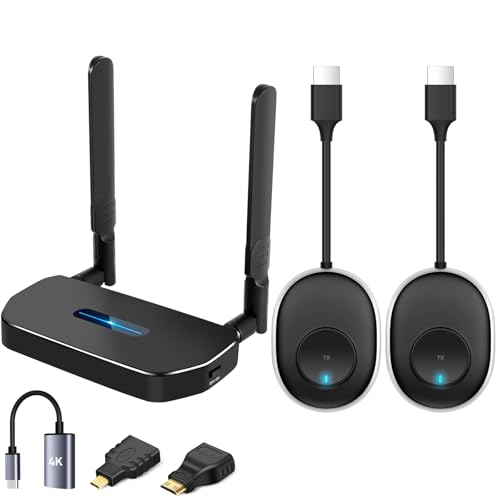
- Two transmitters share one receiver
- Pre-paired plug-and-play setup
- 1080p at 60Hz with dual-band wireless
Best For: Beginners switching between two HDMI source devices
Best for Camera Monitoring
SYNCO XVision Wireless HD System

- 40ms latency for responsive monitoring
- Up to 300m claimed transmission range
- Fanless 2W design with automatic pairing
Best For: Beginners monitoring cameras during events and productions
Best Long-Range HDMI Extender
BovBox 1080p Wireless HDMI Kit

- Up to 1312ft claimed transmission range
- 0.05-second latency at 1080p/60Hz
- Loop-out, IR control, and multi-receiver support
Best For: Beginners distributing HDMI over larger spaces
Best for Beginner Live Streaming
Vrriis UVC Wireless Video System
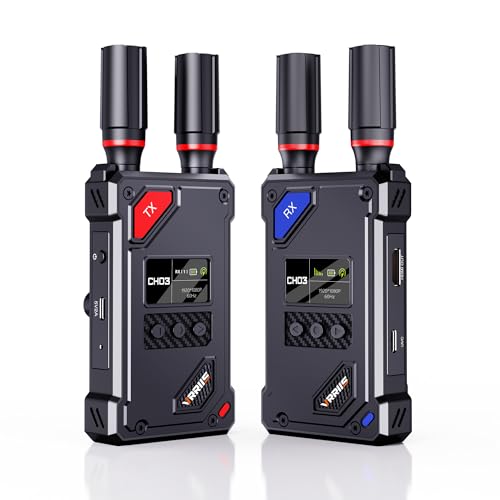
- UVC output works with streaming software such as OBS
- 20 channels with LCD signal information
- 0.05-second latency and flexible power options
Best For: Beginners sending wireless camera video to a streaming computer
Best Multi-Screen Starter

- Pre-paired, app-free setup
- Supports up to four receivers
- 60Hz video with USB-C adapter
Best For: Presentations and multi-TV streaming
Best Long-Range 4K Pick
SVBONY ST1 Wireless Video System

- Up to 1,000-foot open-area range
- 4K/30fps with 0.06-second latency
- Nine selectable 5.8GHz channels
Best For: Camera monitoring and projectors
Best On-Set Monitoring Kit
Wireless HDMI System with 7-Inch Monitor
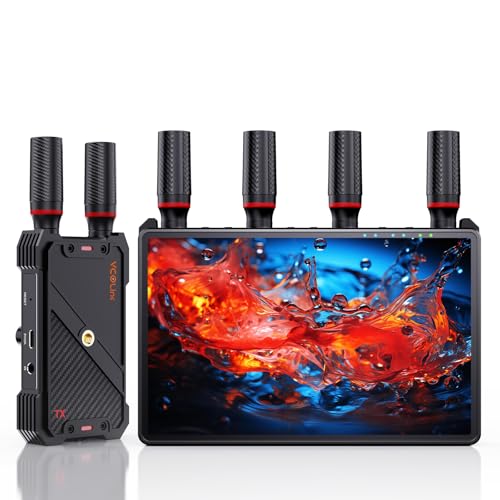
- Built-in 7-inch HD monitoring screen
- Up to five receivers from one transmitter
- 1080p/60Hz with HDMI loop out
Best For: Filming and live-production monitoring
Best with Extra Features
Vrriis WL095P Wireless HDMI System

- Pre-paired plug-and-play setup
- Up to 4K at 30Hz with under 0.1-second stated latency
- Up to 1,150 feet in open conditions
Best For: Beginners needing long-range 4K HDMI transmission
Easy Streaming Choice

- No Bluetooth, Wi-Fi, or apps needed
- 4K at 30Hz receiver support with dual-band wireless
- Includes mini- and micro-HDMI adapters
Best For: Home, classroom, meeting, and multi-source streaming
1080p Production Pick
Vrriis WL082 Wireless HDMI System

- 1080p at 60Hz with stated 0.05-second latency
- Transmitter loop-out and dual receiver HDMI outputs
- IR control and USB-C, adapter, or NP-F battery power
Best For: Monitoring, cameras, events, and responsive Full HD setups
Best Multi-Source Starter – Dual-Transmitter 4K Wireless HDMI Kit
For beginners comparing wireless video receivers for beginners, this kit is a practical choice when two source devices need to share one display. It arrives pre-paired, supports up to 1080p Full HD at 60Hz, and switches between its two transmitters without requiring an app, Bluetooth, or a separate Wi-Fi setup.
Best For: Home theaters, classrooms, meetings, or offices that switch between two computers or other HDMI sources.
Pros:
- Includes two transmitters and one receiver for convenient source switching.
- Plug-and-play design comes pre-paired and requires no additional application.
- Supports 1080p Full HD, dual-band 2.4GHz/5GHz operation, and up to 50m in an open field.
Cons:
- The stated 50m range is reduced to about 3–5m through cement walls or between floors.
- The product notes describe 1080p and 720p support, despite the title’s 4K wording.
This is a beginner-friendly option when flexibility matters more than advanced production features. The extra transmitter is especially useful for presentations and shared displays, while the range should be judged against the walls and layout of the installation.
Best for Camera Monitoring – SYNCO XVision Wireless HD System
Beginners looking for wireless video receivers for beginners in a camera setup may appreciate the SYNCO XVision’s straightforward controls and automatic memory pairing. It provides 1080p/60FPS transmission, a color status display, and a fanless design aimed at quiet shooting.
Best For: Camera operators, interviews, events, live music, and teams that need real-time monitoring.
Pros:
- 40ms latency supports responsive monitoring for focus work and moving subjects.
- Claims up to 300m transmission with signal penetration through walls and crowded Wi-Fi environments.
- Receiver supports 1–9 monitor-only endpoints, while the transmitter includes an HDMI loop-out.
- Fanless 2W operation and a lightweight 119g body reduce noise and portability concerns.
Cons:
- NP-F batteries are required for battery-powered use but are not included.
- This is a 1TX+1RX kit, so additional monitoring endpoints may require extra compatible equipment.
The color display and auto-memory pairing make this one of the more approachable choices for a beginner camera workflow. Its low-power, fanless design is particularly useful where unwanted operating noise could affect recorded audio.
Best Long-Range HDMI Extender – BovBox 1080p Wireless HDMI Kit
For beginners choosing wireless video receivers for beginners for a home, classroom, or presentation space, the BovBox kit combines pre-paired setup with 1080p/60Hz video. Its loop-out, IR remote support, and ability to pair one transmitter with up to five receivers add useful flexibility beyond a basic point-to-point connection.
Best For: Long-distance HDMI distribution, conference rooms, classrooms, home entertainment, and outdoor presentations.
Pros:
- Supports up to 1312ft transmission under suitable conditions, according to the supplied notes.
- Provides 0.05-second latency for gaming and sports viewing.
- Includes transmitter HDMI loop-out for a local monitoring display.
- Supports dual-band 2.4GHz/5GHz operation and up to five receivers from one transmitter.
Cons:
- Adding more receivers reduces the wireless transmission distance.
- Range and stability can vary with the environment, so the maximum distance should not be assumed indoors.
This model is appealing if a beginner wants room to expand beyond one receiving screen. The pre-paired design keeps setup simple, while loop-out and IR control provide practical features for more involved HDMI installations.
Best for Beginner Live Streaming – Vrriis UVC Wireless Video System
Among wireless video receivers for beginners, this Vrriis system stands out for adding UVC output, allowing received footage to reach streaming software such as OBS through the included USB-C cable. It also offers plug-and-play 1080p transmission, manual channel selection, and flexible power options for camera-based setups.
Best For: Beginners streaming camera footage, monitoring presentations, or sending video to multiple receivers.
Pros:
- UVC output can connect the receiver directly to a computer for platforms such as OBS without a separate capture device.
- Offers 20 manually adjustable channels with an LCD showing signal and interference information.
- Claims 1500ft line-of-sight range and 0.05-second latency in an open field without interference.
- Supports NP-F batteries, USB-C 5V/2A power, and adapters.
Cons:
- NP-F batteries are not included.
- Walls, metal, brick, and glass can shorten coverage or cause signal loss.
- Increasing the number of receivers reduces transmission distance.
The UVC connection makes this a useful bridge between wireless camera monitoring and beginner live streaming. Manual channel control adds troubleshooting flexibility, but users should test placement and line of sight before relying on the advertised maximum range.
Best Multi-Screen Starter – Portable Wireless HDMI Pro
For beginners comparing wireless video receivers for beginners, this kit is a practical choice for sending one HDMI source to several displays without an app, driver, or Wi-Fi connection. Its pre-paired components, USB power, dual-band operation, and included USB-C-to-HDMI adapter make setup approachable for laptops, TVs, and monitors.
Best For: Portable presentations, classrooms, meetings, family viewing, and multi-TV setups.
Pros:
- Supports up to four receivers, with recommended setups of up to six screens when using two mobile devices.
- Plug-and-play pre-paired design with 2.4GHz and 5.8GHz operation.
- Offers 60Hz video, claimed 0.1-second latency, and a 165-foot open-area range.
- Includes a USB-C-to-HDMI adapter for compatible newer laptops and devices.
Cons:
- The 165-foot range is specified for open environments; walls can reduce the effective distance.
- Both transmitter and receivers require a USB 5V/1A power source.
- Additional receivers are sold separately for expanded setups.
This is the most beginner-friendly option here for straightforward multi-screen streaming. It is especially appealing when easy installation and several TVs matter more than professional camera-monitoring features.
Best Long-Range 4K Pick – SVBONY ST1 Wireless Video System
The SVBONY ST1 gives beginners a more feature-rich route into wireless video receivers for beginners, combining plug-and-play operation with 4K/30fps support, selectable 5.8GHz channels, and a built-in OLED status screen. It is designed for cameras, projectors, TVs, and production-style monitoring.
Best For: Camera work, presentations, projector connections, live monitoring, and users who need long-range transmission.
Pros:
- Claims up to 1,000 feet of real-time transmission range in open conditions.
- Supports 4K/30fps video and ultra-low claimed latency of 0.06 seconds.
- Nine selectable 5.8GHz channels can help avoid signal congestion.
- Supports one transmitter with up to four receivers and offers dual HDMI output on the receiver.
Cons:
- Added controls and power options may feel less simple than a basic home-use kit.
- An NP-F battery is supported but not included.
- Adding receivers can reduce the open-area range by approximately 50 meters per receiver.
The ST1 is a strong fit for beginners who want room to grow into camera or event workflows. Its OLED display, channel selection, and flexible power support add useful control, though the feature set is more involved than a basic plug-and-play extender.
Best On-Set Monitoring Kit – Wireless HDMI System with 7-Inch Monitor
This all-in-one system stands out among wireless video receivers for beginners because the receiver includes a built-in 7-inch HD monitor. You can monitor without adding a separate screen, then use HDMI output for a larger display, making the kit useful for camera work, live streams, and collaborative viewing.
Best For: Filming, live production, on-set monitoring, and small crews sharing a video feed.
Pros:
- Built-in 7-inch monitor provides immediate viewing without an extra display.
- Claims 1080p at 60Hz, less than 0.05-second latency, and up to 1,312 feet in line-of-sight conditions.
- One transmitter can broadcast to up to five receivers.
- Offers HDMI loop out, IR remote control, headphone monitoring, and multiple power options.
Cons:
- The external HDMI cable for a larger display is not included.
- Smartphone or tablet compatibility requires a Type-C-to-HDMI cable.
- Its production-oriented features may be more than needed for simple living-room streaming.
The built-in screen is the main advantage for beginners who want a complete monitoring setup with fewer accessories. Choose it for filming or crew collaboration; for basic TV casting, its larger design and production features may be unnecessary.
Best with Extra Features – Vrriis WL095P Wireless HDMI System
For beginners comparing wireless video receivers for beginners, the Vrriis WL095P is a straightforward option for sending up to 4K video and synchronized audio from a DSLR, laptop, or other HDMI source. Its pre-paired transmitter and receiver require no app or driver installation.
Best For: Beginners who want long-range 4K HDMI transmission for a TV, monitor, projector, or multiroom setup.
Pros:
- Pre-paired plug-and-play setup with no apps or drivers.
- Supports up to UHD 4K at 30Hz with stated latency below 0.1 second.
- Rated for up to 1,150 feet in an open, interference-free area.
- Receiver includes dual HDMI outputs, and the system can support up to four receivers.
Cons:
- Walls, brick, metal, and glass can significantly reduce range.
- The 4K mode is limited to 30Hz.
- Transmission distance decreases as additional receivers are added.
The WL095P is appealing when range and 4K support matter more than compact simplicity. Beginners should plan for a clear line of sight and confirm that their source and display devices use compatible HDMI connections.
Easy Streaming Choice – AIMIBO 4K Wireless HDMI Kit
The AIMIBO kit is a beginner-friendly choice among wireless video receivers for beginners because it avoids Bluetooth, Wi-Fi, and app setup. Connect the transmitter and receiver to HDMI devices, wait about five seconds, and mirror content to a compatible display.
Best For: Home theaters, classrooms, meetings, gaming setups, and users who need broad device compatibility.
Pros:
- Plug-and-play operation with no Bluetooth, Wi-Fi, or apps required.
- Supports 4K at 30Hz for the receiver and includes 2.4/5GHz dual-band wireless transmission.
- Includes mini- and micro-HDMI adapters for compatible cameras, laptops, and tablets.
- Supports up to eight transmitters paired with one receiver for switching between sources.
Cons:
- Its stated 165-foot range applies to barrier-free conditions.
- Walls or floors can reduce the range to about 32 feet.
- Source and display devices must be connected with the appropriate HDMI adapter or cable.
The AIMIBO stands out for flexible everyday use and included adapters. It is a practical starting point for beginners, provided they do not expect the advertised range to remain unchanged through walls or floors.
1080p Production Pick – Vrriis WL082 Wireless HDMI System
For beginners seeking wireless video receivers for beginners with monitoring features, the Vrriis WL082 combines 1080p transmission with a transmitter loop-out, dual receiver outputs, and IR support. It is designed for real-time viewing from cameras, laptops, and set-top boxes without installing software.
Best For: Camera operators, event setups, sports viewing, and users who need local monitoring or remote source control.
Pros:
- Plug-and-play 1080p at 60Hz transmission with stated 0.05-second latency.
- Transmitter loop-out supports a local monitor while the receiver sends video remotely.
- Receiver has dual HDMI outputs for connecting two screens.
- Supports IR source control and multiple power options, including USB-C, adapters, and NP-F batteries.
Cons:
- It supports Full HD rather than 4K output.
- The 1,300-foot range is specified for open areas without interference.
- NP-F batteries are not included, and added receivers reduce transmission distance.
The WL082 is a strong fit when responsive 1080p monitoring and flexible power are more useful than 4K resolution. Its loop-out and IR features add capability, although beginners should budget separately for compatible batteries if portable operation is needed.
How We Picked the Best Wireless Video Receivers for Beginners
We focused on products that are approachable for first-time buyers while covering several common HDMI use cases. The selection includes transmitter-and-receiver kits for single displays, systems with multiple receivers for distributing one source to several screens, and models designed for cameras or live production.
We compared advertised resolution, transmission distance, latency claims, switching options, loop-out support, remote-control features, and connection flexibility. Because wireless performance varies with walls, interference, and device placement, range figures should be treated as best-case estimates rather than guaranteed indoor results.
Quick Comparison
- For basic TV or projector use: Choose a plug-and-play HDMI kit with one transmitter and one receiver.
- For several displays: Look for packages with multiple receivers or support for adding receivers later.
- For cameras and live streaming: Prioritize low latency, stable transmission, and UVC output when connecting to a computer.
- For presentations: A reliable 1080p system with simple switching is often more practical than a higher-resolution model.
- For flexible installations: Loop-out, IR remote support, and dual-band operation can make daily use easier.
Key Buying Factors for Wireless Video Receivers for Beginners
Resolution and Device Compatibility
Check the source and display connections before buying. Most systems use HDMI, but supported resolutions differ. A transmitter may accept a 4K source while sending only a 1080p signal wirelessly. Confirm whether your camera, laptop, game console, projector, or TV matches the kit’s input and output requirements.
Latency and Signal Stability
Low latency is important for gaming, camera monitoring, and live production. For presentations and ordinary video playback, a small delay may be less noticeable. Keep the transmitter and receiver in open locations when possible, and avoid assuming that a long advertised range will work through multiple walls.
Receiver Count and Switching
A one-to-one kit is usually the simplest starting point. If you want one source on multiple TVs, choose a multi-receiver package or a system that supports additional receivers. Manual channel switching can be useful, but verify that all included units operate on the same system.
Useful Extras
Loop-out lets you keep a wired display connected while also transmitting wirelessly. IR support may allow remote control of a source from the receiver location. UVC output is especially helpful for sending video to compatible streaming software, though computer and operating-system compatibility should be confirmed.
Who Should Buy Which Wireless Video Receivers for Beginners?
New users building a simple setup should start with a compact plug-and-play 1080p or 4K-capable kit and one receiver. It minimizes configuration and is suitable for a TV, projector, or occasional presentation.
Streamers and camera users should prioritize low latency, dependable range, and UVC support if the receiver will connect directly to a computer. A system with manual channel selection can help in crowded wireless environments.
Homes, classrooms, and small businesses with multiple screens should consider a multi-receiver system. Confirm the number of included receivers, supported display resolution, and whether extra receivers can be paired later.
Installers seeking flexibility should look for loop-out, IR control, dual-band operation, and clear status indicators. These features cost more but can reduce cable changes and simplify troubleshooting. Before ordering, verify power requirements, included cables, and the seller’s return policy.