
A dim room can turn an otherwise good video call into a grainy, blurry mess. The right webcam can help, but low-light correction, a built-in ring light, and infrared night vision solve different problems.
These 10 picks cover everyday calls, streaming setups, and USB camera projects. Start with how you plan to use the camera—not the highest resolution printed on the box.
Best 10 Webcams for Low Light Picks for 2026
Best for Flexible Framing
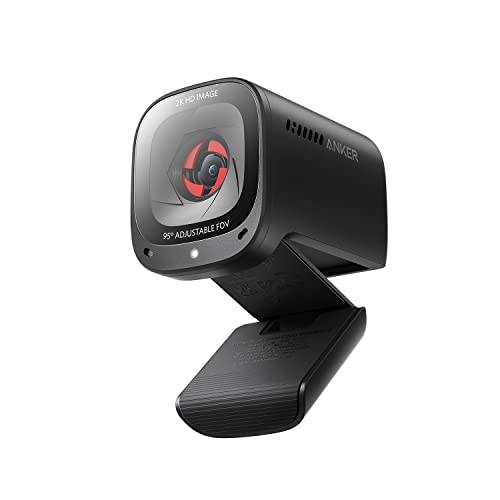
- 2K video with low-light correction
- Three software-selectable viewing angles
- Dual noise-canceling mics and privacy cover
Best For: Dim home offices needing adjustable framing
Best for Lit Streaming

- Adjustable tri-tone ring light
- 4K video or 1080p at 60 fps
- PDAF autofocus and privacy shutter
Best For: Streaming and calls needing built-in fill light
Best for Business Calls

- RightLight 2 correction for dim rooms
- 1080p/30 fps with autofocus
- Teams certification and privacy cover
Best For: Routine work meetings in changing light
Best for Adjustable Fill Light

- Three-color dimmable ring light
- 4K/30 fps or 1080p/60 fps
- TOF autofocus and sliding privacy cover
Best For: Desk setups needing adjustable fill light
Best for Infrared Monitoring
Arducam 1080p Day & Night USB Camera

- Automatic IR-cut switching and 850nm IR LEDs
- Compact 38 × 38mm UVC camera board
- 1080p YUY2 is listed at 5 fps
Best For: DIY day-and-night monitoring projects
Best Adjustable Lens
ELP 1.3MP Low-Light Zoom USB Camera

- 2.8–12mm lens with manual focus
- Stated 0.01-lux minimum illumination
- 1280 × 960 at a listed 15 fps
Best For: Adjustable close-up filming in dim light
Best for Video Calls
Shcngqio 1080p Light-Correcting Webcam

- Automatic brightness and color correction
- 1080p video at a stated 30 fps
- Microphone and sliding privacy cover
Best For: Everyday calls in dim or changing light
Best for Embedded Projects
Arducam STARVIS 2 Mini USB Camera

- 2MP STARVIS 2 low-light sensor
- 1080p at up to 30fps; 95° diagonal view
- Compact, 1.2W UVC module
Best For: Compact embedded vision and robotics projects
Best for Adjustable Framing
ELP IMX323 Varifocal USB Camera
- Manual 2.8–12mm varifocal lens
- Specified 0.01-lux minimum illumination
- 1080p H.264/MJPEG; 3-meter cable
Best For: Fixed installations needing adjustable framing
Best for Night Monitoring
Arducam IMX462 Day & Night USB Camera

- Automatic IR-cut day/night switching
- Six 940nm IR LEDs; stated 3m range
- 1080p at up to 30fps
Best For: Indoor monitoring of nearby scenes after dark
Best for Flexible Framing – Anker PowerConf C200 2K
Among webcams for low light, the Anker PowerConf C200 is a practical choice if you want 2K video without adding a desk light. Its low-light correction is designed to keep calls clear in dim rooms, while software-selectable viewing angles help you control how much of the room appears.
Best For: Home-office calls where adjustable framing and a built-in privacy cover matter.
Pros:
- 2K resolution and low-light correction for detailed video in dim settings.
- Choose a 65°, 78°, or 95° viewing angle through software.
- Dual microphones with AI noise cancellation and a sliding lens cover.
Cons:
- Viewing-angle adjustments require software.
- No built-in light for rooms that need added illumination.
The C200 makes the most sense when you want the camera to adapt to your space rather than illuminate it. Check that its USB connection and supported Windows or macOS version fit your setup.
Best for Lit Streaming – NexiGo N680E Pro 4K
If your search for webcams for low light calls for built-in illumination, the NexiGo N680E Pro combines a 4K sensor with an adjustable ring light. Its three light colors and stepless brightness control let you tune your appearance without a separate lamp.
Best For: Streamers and presenters who want on-camera fill light and the option of 1080p at 60 fps.
Pros:
- Built-in ring light offers three color modes and adjustable brightness.
- Supports 4K video and smoother 1080p/60 fps capture.
- PDAF autofocus, dual noise-reducing microphones, and a privacy shutter.
Cons:
- Available output resolution depends on the camera software.
- USB-A connection may require an adapter on devices without a USB-A port.
The N680E Pro is particularly useful when the room itself is too dark for light correction alone. Its 80° field of view is suited to a single-person setup, and the tripod mount adds placement flexibility.
Best for Business Calls – Logitech C925-E 1080p
The Logitech C925-E is a work-focused pick among webcams for low light. RightLight 2 adjusts the image in dim conditions, while 1080p video at 30 fps and a 78° field of view cover everyday meetings without requiring a built-in lamp.
Best For: Professionals who prioritize straightforward conferencing features and platform compatibility.
Pros:
- RightLight 2 light correction, autofocus, and 1080p/30 fps video.
- Dual omnidirectional microphones and a sliding privacy cover.
- H.264 encoding supports video calls on lower bandwidth; certified for Microsoft Teams.
Cons:
- Limited to 1080p at 30 fps rather than 4K or 60 fps.
- No built-in fill light for very dark spaces.
Choose the C925-E for dependable meeting essentials rather than streaming-oriented extras. Logi Tune also provides controls for zoom, color, and focus if you want to fine-tune the image.
Best for Adjustable Fill Light – Galyimage 866MAX 4K
For shoppers comparing webcams for low light, the Galyimage 866MAX offers a built-in ring light with warm, natural, and white settings. A rotary brightness control lets you add fill light to your desk setup, and the camera supports 4K at 30 fps or 1080p at 60 fps.
Best For: Video calls, classes, or streams where adjustable on-camera lighting is a priority.
Pros:
- Three ring-light color settings with adjustable brightness.
- 4K/30 fps and 1080p/60 fps video options.
- TOF autofocus, dual noise-canceling microphones, and a sliding privacy cover.
Cons:
- The stated maximum frame rate at 4K is 30 fps.
- USB plug-and-play setup offers no listed companion-software controls.
This model is worth considering if you want to control the light at the camera rather than rely solely on image correction. Its 78° viewing angle keeps the framing oriented toward an individual at a desk.
Best for Infrared Monitoring – Arducam 1080p Day & Night USB Camera
Among webcams for low light, this Arducam board is built for day-and-night monitoring rather than a conventional desk setup. Its IR-cut filter switches automatically with the lighting, and its 850nm IR LEDs support infrared capture after dark.
Best For: DIY surveillance, wildlife cameras, or other compact monitoring projects that need infrared night vision.
Pros:
- Automatic day/night IR-cut switching with built-in IR LEDs.
- 2MP sensor supports up to 1920 × 1080 video.
- Compact 38 × 38mm board uses a UVC-compliant USB connection.
Cons:
- Exposed board design is less convenient than a standard clip-on webcam.
- At 1080p, the listed YUY2 frame rate is 5 fps.
- Not water-resistant.
Choose this if seeing a scene in darkness matters more than having a ready-to-mount video-call camera. Check your preferred video format and frame rate before building it into a project.
Best Adjustable Lens – ELP 1.3MP Low-Light Zoom USB Camera
If you need webcams for low light to capture a specific work area, this ELP camera offers a 2.8–12mm varifocal lens you can zoom and focus manually. Its stated minimum illumination is 0.01 lux, making it a practical option to consider for dimly lit close-up work.
Best For: Electronics repair videos, demonstrations, or monitoring setups where adjustable framing matters.
Pros:
- Adjustable 2.8–12mm lens with manual focus and 4× optical zoom.
- Stated 0.01-lux low-light illumination.
- Metal housing has 1/4-inch mounting holes; UVC USB setup requires no extra driver.
Cons:
- Manual focus takes more setup than an automatic webcam.
- Maximum resolution is 1280 × 960, not 1080p.
- The listed frame rate at 1280 × 960 is 15 fps.
This is the more hands-on choice when precise framing is worth the adjustment time. Its lens flexibility is useful for close-ups, but it is less straightforward for casual calls.
Best for Video Calls – Shcngqio 1080p Light-Correcting Webcam
For shoppers comparing webcams for low light in a home office, this Shcngqio model takes a straightforward approach: automatic light correction adjusts brightness and color as room lighting changes. It pairs 1080p video at a stated 30 fps with a built-in microphone and privacy cover.
Best For: Video calls, online teaching, and streaming from rooms with changing or dim lighting.
Pros:
- Automatic light correction adjusts brightness and color.
- 1080p video at a stated 30 fps with a wide-angle lens.
- Built-in noise-reducing microphone, privacy cover, and plug-and-play USB setup.
Cons:
- Fixed focus offers no manual adjustment for close-up shots.
- No infrared night-vision feature is listed.
This is the simplest fit of the three for everyday calls. Light correction can help in a dim room, but it is not a substitute for the infrared monitoring capability of a dedicated night-vision camera.
Best for Embedded Projects – Arducam STARVIS 2 Mini USB Camera
Among webcams for low light, this Arducam module is a practical pick when you need a small camera to build into a project. Its 2MP STARVIS 2 sensor captures 1080p video at up to 30fps, while the 95° diagonal field of view covers a relatively wide scene.
Best For: Robotics, embedded vision, or compact monitoring setups that need a UVC camera.
Pros:
- STARVIS 2 sensor is designed for low-light imaging with reduced noise.
- Compact 19.5 × 15 × 17.3 mm module draws 1.2W.
- Driver-free UVC support for Windows, Linux, Android, and macOS.
Cons:
- Module form factor requires a suitable mount or enclosure for typical desk use.
- Linux users should select MJPG or H.264 for 1080p at 30fps.
Choose this one for size and integration flexibility rather than a conventional clip-on webcam setup.
Best for Adjustable Framing – ELP IMX323 Varifocal USB Camera
If you are comparing webcams for low light but need to set the framing yourself, this ELP camera offers a manually adjustable 2.8–12mm lens. Its Sony IMX323 sensor is specified for illumination as low as 0.01 lux, and it supports 1080p video with H.264 and MJPEG formats.
Best For: Fixed-position surveillance, kiosks, or projects where manual lens adjustment is useful.
Pros:
- 2.8–12mm varifocal lens lets you adjust framing for the installation.
- Specified 0.01-lux minimum illumination targets dim scenes.
- Includes a microphone and 3-meter USB cable.
Cons:
- Manual focus and lens adjustment take setup time.
- Not water-resistant, so outdoor use calls for protection.
This is the more hands-on choice: its adjustable optics suit a planned camera position better than a quick plug-in video-call setup.
Best for Night Monitoring – Arducam IMX462 Day & Night USB Camera
For buyers looking at webcams for low light who also need monitoring after dark, this Arducam model pairs an IMX462 sensor with six 940nm IR LEDs. Its automatic IR-cut switching changes from color to black-and-white in dark conditions, with a stated night-monitoring range of up to 3 meters.
Best For: Indoor day-and-night monitoring within the camera’s stated IR range.
Pros:
- Automatic IR-cut switching handles the day-to-night transition.
- Six 940nm IR LEDs support monitoring up to a stated 3 meters.
- Captures 1080p at up to 30fps with a 95° diagonal field of view.
Cons:
- Fixed focus offers no manual focus adjustment.
- Not water-resistant.
Pick this over a low-light-only module when built-in IR illumination matters; its stated range makes it most relevant to nearby scenes.
How We Picked These Webcams for Low Light
We prioritized features that matter when available light is limited: light correction, adjustable illumination, sensors marketed for low-light capture, and infrared capability for darkness. We also considered practical differences such as autofocus versus manual focus, privacy shutters, microphones, mounting needs, and USB compatibility. The list spans finished webcams and bare camera modules because they serve different buyers; a module may require a case, mount, or more setup. Listed specifications are a starting point, not a guarantee of clean video in every room.
Quick Comparison: Match the Camera to the Job
For routine meetings, start with a conventional webcam such as the Anker PowerConf C200 or Logitech C925-E, which emphasize straightforward desktop use and light correction. If your face needs more illumination, consider a ring-light model such as the NexiGo N680E Pro or the listed 4K ring-light webcam. If you need to see in near-total darkness, look at the Arducam day-and-night IR models instead. The Arducam STARVIS 2 module and ELP low-light USB cameras are better suited to buyers comfortable choosing a lens, mounting a board, or adjusting focus.
Key Buying Factors for Webcams for Low Light
Light Correction Vs. Added Light Vs. Infrared
Software correction brightens an existing image but cannot restore detail the sensor never captured. A ring light puts visible light on your face, often making it the simpler choice for calls in a dark office. IR LEDs can illuminate a scene without visible room lighting, but night-vision footage may not look like a natural, full-color video call. Check whether the camera includes IR LEDs or needs a separate illuminator.
Sensor, Resolution, and Frame Rate
Do not assume 4K automatically beats 1080p in a dim room. Higher resolution is useful only if the sensor, lens, and available light support a clear image. Compare actual output modes and frame rates, and remember that dim conditions can lead to blur or noise even when a camera advertises 60 fps. For calls, a well-lit, consistent 1080p image can be more useful than a soft 4K image.
Focus, Field of View, and Setup
Autofocus helps if you move during calls; manual-focus and zoom lenses offer control for fixed scenes but take time to set. A wide-angle view is convenient for groups yet can reveal more of a cluttered room. Check operating-system support, USB connection, mounting hardware, and whether you need a built-in microphone or privacy cover. Board cameras may need extra parts before they are desk-ready.
Who Should Buy Which Webcams for Low Light?
Frequent callers: choose a plug-and-play model with light correction and the framing you prefer. Streamers in dim rooms: consider a ring light, while allowing space to position it comfortably. Night-monitoring and maker projects: compare the IR-capable Arducam options and low-light ELP or Arducam modules against your enclosure and lens requirements. If color accuracy matters, add visible lighting before relying on aggressive correction or infrared.