
Wireless video can simplify live production by removing long HDMI or SDI cable runs between cameras, switchers, monitors, and streaming computers. The right transmitter should deliver dependable range, low latency, and an output format your setup can actually use.
We selected 10 video transmitters for live streaming across several needs, from compact UVC-ready systems to professional 4K60 HDMI and SDI kits. Use the guide below to compare features before choosing a system for your studio, event, or mobile rig.
Best 10 Video Transmitters for Live Streaming Picks for 2026
Best Professional Crew Monitoring

- 1,200-foot transmission range
- UVC output for computer streaming
- Supports up to four monitoring devices
Best For: Professional productions and multi-person monitoring
Best for Pocket 3 Creators

- Direct USB-C connection for Pocket 3
- UVC and HDMI outputs
- Reverse charging for extended shoots
Best For: DJI Osmo Pocket 3 live streaming and mobile production
Best Simple HDMI Streaming Kit

- Plug-and-play HDMI setup
- Supports up to 4K at 30Hz
- Includes mini- and micro-HDMI adapters
Best For: Home, classroom, meeting, and entertainment setups
Best 4K Production Flexibility

- 4K30 and 1080p60 transmission
- 1,300-foot range with 60ms latency
- UVC streaming and up to four receivers
Best For: Professional live production and collaborative monitoring
Long-Range Pick

- 1080p60 transmission up to 300 meters
- 40ms latency for real-time monitoring
- Quiet 2W design with app-based controls
Best For: Mobile productions and live streams needing long-range 1080p monitoring
Professional 4K Choice

- 4K60 HDMI transmission with SDI support
- Broadcast Mode supports up to 20 receivers
- Built-in UVC and RTMP streaming features
Best For: Professional film and live-production crews needing 4K and multi-receiver workflows
Compact Streaming Pick

- Designed for DJI Osmo Pocket 3
- UVC output reaches 1080p60 on computers
- 20 channels and support for up to five receivers
Best For: Pocket 3 creators streaming wirelessly to OBS or other PC software
All-in-One Monitoring Pick
7-Inch Wireless HDMI Video System
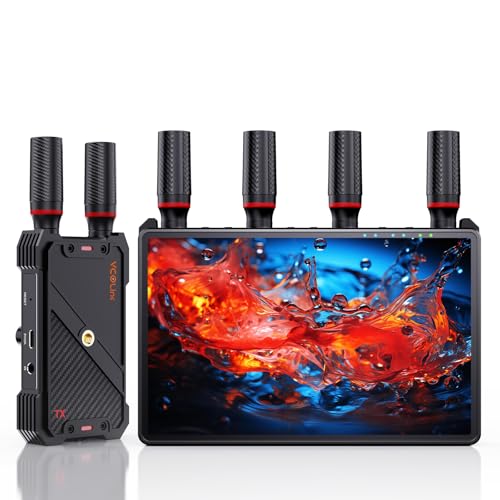
- Built-in 7-inch receiver monitor
- 1-to-5 receiver support with HDMI loop-out
- 1080p60 transmission with claimed under-0.05-second latency
Best For: Crews needing portable, multi-viewer monitoring
Streaming Connectivity Pick
Wireless Video System with UVC Out
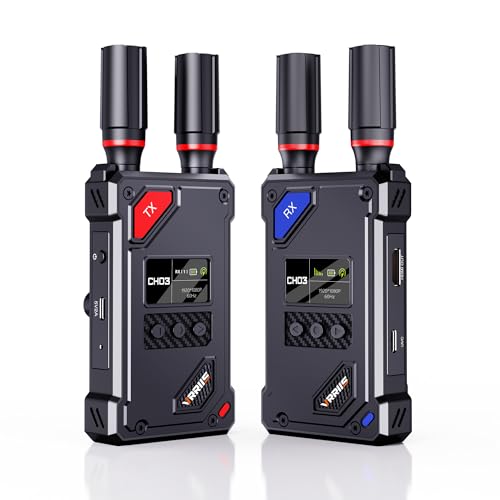
- UVC output for OBS without a separate capture device
- 20 selectable channels with LCD status information
- 1080p60 support and HDMI transmitter loop-out
Best For: Computer-based live streaming from wireless camera feeds
4K Production Pick
Adjustable 4K Wireless HDMI System

- 4K30Hz H.265 transmission
- UVC output up to 1080p60 for OBS
- 1-to-5 receiver support with 20 selectable channels
Best For: 4K monitoring and production-oriented streaming setups
Best Professional Crew Monitoring – Accsoon CineView HE
The Accsoon CineView HE is a strong choice among video transmitters for live streaming when you need long-range, low-latency monitoring and direct computer connectivity. Its dual-band transmission, HDMI loop-out, and receiver UVC output suit multi-person production workflows without requiring a separate capture device.
Best For: Professional shoots, live events, weddings, interviews, and crews monitoring one camera feed across several devices.
Pros:
- Transmits up to 1,200 feet with latency under 0.06 seconds in suitable conditions.
- Receiver UVC output supports streaming to platforms such as OBS and YouTube through a computer.
- One transmitter can connect with up to four receivers or mobile devices.
- Supports HDMI input, zero-latency loop-out, and multiple power options.
Cons:
- Battery and charging cables are not included.
- Its professional feature set may be more than casual users need.
Choose the CineView HE if stable crew monitoring and a streamlined UVC live-streaming workflow matter more than basic plug-and-play screen sharing.
Best for Pocket 3 Creators – Wireless HDMI Creator Combo
Designed specifically for the DJI Osmo Pocket 3, this system stands out among video transmitters for live streaming by combining a direct USB-C connection with UVC and HDMI outputs. It can also accept standard HDMI sources, making it useful beyond Pocket 3 shoots.
Best For: Pocket 3 creators, mobile productions, events, churches, educators, and users who need webcam-style streaming without an HDMI capture card.
Pros:
- Direct USB-C plug-in design for DJI Osmo Pocket 3 use without extra adapters.
- Provides both UVC and HDMI output for computers, displays, switchers, and production equipment.
- Offers up to 1,640 feet of line-of-sight range with 0.05-second latency.
- Includes a built-in display, 20 selectable 5GHz channels, and reverse charging.
Cons:
- Works with horizontal video, not vertical video.
- Walls, metal, brick, and glass can reduce range or cause signal loss.
This is a particularly practical pick for Pocket 3 owners who want a direct route to OBS or other streaming software while retaining HDMI connectivity for monitors and switchers.
Best Simple HDMI Streaming Kit – AIMIBO Wireless HDMI System
The AIMIBO wireless HDMI system is a straightforward option for buyers seeking video transmitters for live streaming, presentations, gaming, or home entertainment. It emphasizes plug-and-play setup, dual-band transmission, and broad HDMI device compatibility rather than advanced production features.
Best For: Home theaters, classrooms, meetings, gaming setups, conferences, and basic wireless HDMI sharing.
Pros:
- Plug-and-play operation requires no Wi-Fi, Bluetooth, or app setup.
- Supports up to 4K at 30Hz for the receiver and 1080p at 60Hz transmission.
- Provides up to 165 feet of range in barrier-free conditions.
- Includes mini-HDMI and micro-HDMI adapters for wider device compatibility.
Cons:
- Range may drop to about 32 feet through walls or floors.
- Its stated 0.1-second latency is higher than the other professional-focused systems here.
- It is oriented toward screen sharing and HDMI distribution rather than dedicated UVC computer streaming.
Consider AIMIBO when ease of installation and flexible HDMI compatibility are the priorities, especially for indoor presentations or entertainment setups with modest range demands.
Best 4K Production Flexibility – Hollyland Pyro H
The Hollyland Pyro H is a versatile choice among video transmitters for live streaming, combining 4K30 transmission, 1080p60 support, HDMI loop-out, and UVC connectivity. Smart channel scanning and multi-receiver support make it well suited to demanding production environments.
Best For: Film production, live broadcasting, ENG/EFP work, live events, and teams that need several people to monitor one camera feed.
Pros:
- Supports video input and output up to 4K at 24, 25, or 30fps.
- Offers up to 1,300 feet of range with 60ms latency in suitable conditions.
- Can transmit to up to four receivers and supports the HollyView monitoring app.
- Includes HDMI input/output and loop-out plus UVC live streaming to a computer.
Cons:
- 4K transmission is limited to 30fps rather than 60fps.
- Its broader production feature set may be unnecessary for simple home use.
The Pyro H is a compelling middle ground for creators who want professional monitoring capabilities, 4K support, and direct UVC streaming in one expandable system.
Long-Range Pick – SYNCO XVision 1080p60
For creators comparing video transmitters for live streaming, the SYNCO XVision emphasizes dependable long-distance 1080p video, practical monitoring, and low operating noise. Its HDMI connectivity, 300-meter stated range, and 40ms latency make it a versatile option for productions where responsive wireless monitoring matters.
Best For: Live streaming, TVC, film production, and large-event setups needing long-range 1080p monitoring.
Pros:
- Supports 1080p at 60fps with a stated transmission range of up to 300 meters.
- 40ms latency supports responsive real-time monitoring for cameras, cranes, and drones.
- Low-power 2W design operates without fan cooling, helping reduce added shooting noise.
- SYNCO Link app offers monitoring, image adjustments, screenshots, saving, and playback.
Cons:
- It is limited to 1080p rather than 4K transmission.
- The system includes one transmitter and one receiver, so larger monitoring networks may require additional equipment.
The XVision is a strong fit when range, portability, and quiet operation are more important than ultra-high-resolution transmission. Its app and flexible NP-F or USB-C power options add useful convenience for mobile crews.
Professional 4K Choice – Hollyland Pyro Ultra
The Hollyland Pyro Ultra is aimed at professional video transmitters for live streaming and production workflows that require 4K60, HDMI and SDI connectivity, and multiple monitoring points. Its Broadcast Mode, focus-oriented latency settings, and built-in UVC and RTMP features make it suitable for more advanced crews.
Best For: Film production, broadcast-style live streaming, focus pulling, and multi-monitor setups.
Pros:
- Supports 4K60 transmission over HDMI and includes HDMI and SDI inputs and outputs.
- Broadcast Mode can distribute video to up to 20 receivers, with a stated line-of-sight range up to 4,900 feet.
- Focus Mode provides approximately 20ms latency at 1080p25/30 and 45ms at 4K60.
- UVC capture and RTMP streaming support direct computer-based production workflows.
Cons:
- The listed package weighs 7.35 pounds, making it less convenient for lightweight kits.
- RTMP streaming is limited to 1080p60, even though the system supports 4K60 transmission.
Choose the Pyro Ultra when professional inputs, high-resolution transmission, and scalable receiver support justify a more substantial setup. Its direct UVC and RTMP capabilities can also reduce the need for separate streaming hardware in compatible workflows.
Compact Streaming Pick – Vrriis Pocket 3 Wireless Kit
For users seeking video transmitters for live streaming with an Osmo Pocket 3, this Vrriis kit combines a Type-C transmitter with a receiver that outputs UVC directly to a computer. It is designed around accessible 1080p streaming, flexible channel selection, and straightforward connections to PCs, TVs, and monitors.
Best For: Osmo Pocket 3 owners who want to stream to OBS or other PC software without a separate video capture device.
Pros:
- Built-in Type-C connection is designed for plug-and-play use with the DJI Osmo Pocket 3.
- UVC output supports up to 1080p at 60Hz for direct computer streaming.
- Offers 20 adjustable channels, an LCD status display, and up to five receivers.
- Supports HDMI loop-out and USB-C or DC power, with reverse charging for the Pocket 3.
Cons:
- The stated 1,640-foot range applies to open, unobstructed line-of-sight conditions; walls and metal can reduce performance.
- It supports 1080p transmission rather than 4K.
This is a practical choice for Pocket 3-based broadcasts, especially when computer streaming and simple monitoring are priorities. The LCD status information and UVC output make setup easier, while the point-to-point design is less suited to obstructed environments.
All-in-One Monitoring Pick – 7-Inch Wireless HDMI Video System
For buyers comparing video transmitters for live streaming, this kit stands out by combining wireless HDMI transmission with a built-in 7-inch receiver monitor. It supports 1080p at 60Hz, claims up to 1,312 feet of line-of-sight range, and includes HDMI loop-out for local monitoring.
Best For: Film crews, live productions, and operators who want built-in monitoring without carrying an extra screen.
Pros:
- Built-in 7-inch HD screen with brightness, volume, headphone, and sleep controls.
- Supports one transmitter to as many as five receivers for multi-viewer monitoring.
- Offers HDMI loop-out, IR remote control, and under 0.05-second claimed latency.
- Can use NP-F batteries, a power bank, or USB-C power, with 1/4-inch mounting.
Cons:
- External HDMI cable is not included for connecting the receiver to a larger display.
- Smartphone or tablet use requires a Type-C-to-HDMI cable.
- The stated range depends on clear line-of-sight conditions.
This is a convenient choice when on-set visibility matters as much as wireless transmission. Its integrated monitor reduces accessory requirements, while the expandable receiver setup suits collaborative shoots and live-event workflows.
Streaming Connectivity Pick – Wireless Video System with UVC Out
Among video transmitters for live streaming, this Vrriis system is designed for a direct computer workflow. Its receiver provides UVC output through the included USB-C cable, allowing use with OBS or another streaming platform without a separate video capture device.
Best For: Streamers and producers who want to send a wireless camera feed directly to a computer while retaining HDMI monitoring.
Pros:
- UVC output supports computer-based streaming through OBS and similar platforms.
- Offers HDMI loop-out for adding a local monitor at the transmitter.
- Includes 20 manually selectable channels with LCD signal and interference information.
- Supports 1080p at 60Hz, multiple power options, and up to five receivers.
Cons:
- Walls, metal, brick, and glass can reduce the claimed 1,500-foot range.
- The system includes one transmitter and one receiver; additional receivers may be needed for multi-device use.
- Batteries are not included.
The UVC connection is the main reason to consider this model for live streaming: it can simplify a camera-to-computer setup. Channel selection is also useful in congested environments, though real-world range will depend heavily on obstacles and interference.
4K Production Pick – Adjustable 4K Wireless HDMI System
This 4K wireless HDMI system is aimed at production setups that need higher-resolution transmission and computer streaming. It supports 4K at 30Hz using H.265, includes UVC output for OBS, and provides 20 selectable 5GHz channels for managing interference.
Best For: Live-streaming and monitoring workflows that prioritize 4K source-to-display quality and multi-receiver viewing.
Pros:
- Supports 4K30Hz transmission and H.265 video encoding.
- UVC output can provide up to 1080p60 to a computer without a capture card.
- One transmitter can send to up to five receivers and includes HDMI loop-out.
- LCD displays show connection status, signal strength, channel, and resolution.
Cons:
- Its approximately 0.1-second latency is not intended for highly responsive applications such as gaming.
- UVC output is limited to up to 1080p60 rather than 4K.
- Batteries are not included, and the system is not water resistant.
This model makes the most sense for production environments where 4K transmission and detailed system status are valuable. The UVC feature simplifies streaming, but buyers should account for its lower computer-output resolution and higher stated latency.
How We Picked These Video Transmitters for Live Streaming
We focused on systems that support practical live-production workflows rather than simple screen mirroring. Our selection considers video resolution and frame-rate support, claimed transmission distance, latency, connection options, receiver capacity, monitoring features, and compatibility with streaming software such as OBS. We also included a range of designs, including HDMI-only kits, UVC-capable transmitters that can connect directly to a computer, and professional systems with SDI or multiple receivers.
Published range and latency figures are best-case claims. Walls, Wi-Fi congestion, interference, line-of-sight, antenna placement, and regional wireless restrictions can reduce real-world performance.
Quick Comparison
- Best for direct computer streaming: Choose a model with UVC output so your computer can recognize the receiver as a camera source without a separate capture device.
- Best for higher-end production: Look for 4K60 support, SDI connectivity, focus or monitoring modes, and robust multi-receiver capability.
- Best for simple HDMI setups: A dedicated HDMI transmitter and receiver can connect a camera to a switcher, monitor, or capture card with minimal configuration.
- Best for multiple displays: Systems supporting several receivers or bundled monitors are useful for directors, presenters, camera operators, and venue screens.
Key Buying Factors for Video Transmitters for Live Streaming
Resolution, Frame Rate, and Signal Type
Confirm that the transmitter supports the output from your camera. A camera set to 4K60 needs a system capable of accepting 4K60; a 1080p livestream may work better with a lower-bandwidth mode. Check whether the ports are HDMI, SDI, or both, and verify connector size and signal compatibility.
Latency and Stability
Low latency matters when presenters, performers, or camera operators need to react in real time. Compare quoted latency, but prioritize stable operation over the smallest advertised number. Dual-band systems and manual channel selection can help in crowded venues, while clear line of sight usually matters more than maximum range claims.
UVC, Loop-Out, and Receiver Options
UVC output is especially useful for laptop-based streaming because it can reduce the need for an external capture card. HDMI loop-out lets you monitor or feed another device, while multiple receivers allow one camera feed to reach several locations. Check whether extra receivers are included or sold separately.
Power and Portability
Review the required power source, battery support, runtime, mounting options, and cable placement. A compact battery-powered kit suits mobile creators, while mains-powered hardware may be preferable for studio or event installations.
Who Should Buy Which Video Transmitters for Live Streaming?
Choose a compact UVC model if you stream from a camera to a laptop and want a straightforward OBS workflow. Choose a dual-band HDMI system for general event streaming, presentations, and camera-to-switcher connections. Choose a 4K system if you need high-resolution recording, future-proofing, or a 4K display path. Choose an SDI-capable professional kit for longer cable-free production workflows, multiple receivers, and more demanding broadcast environments. Finally, choose a multi-receiver or monitor bundle when several crew members or displays need the same live camera feed.