
The right video switcher can turn a home studio into a more capable production space, letting you move between cameras, consoles, presentations, and other sources without constantly reconnecting cables.
This roundup covers 10 options across several use cases, including legacy RCA switching, portable HDMI production, multi-camera streaming, and models with built-in preview screens. Use the buying guide below to match features, connectivity, and workflow to your setup.
Best 10 Video Switchers for Home Studios Picks for 2026
Best All-Around Pick
RGBlink Mini 4-Input HDMI Switcher

- Four HDMI inputs with 2K support
- USB 3.0 webcam output for streaming
- Transitions, PIP, and LAN remote control
Best For: Solo multi-camera streaming in a home studio
Best Simple RCA Pick

- Four composite RCA inputs
- Push-button mechanical switching
- No power supply or software required
Best For: Older RCA-based consoles and media devices
Best Monitoring Features
Mixer Plus 4-Input HDMI Switcher

- Built-in 4-inch multiview screen
- 30 transitions and four scene presets
- PTZ control, keying, PIP, and overlays
Best For: Feature-rich multi-camera home-studio production
Best High-Input RCA Pick

- Eight composite RCA inputs
- Simple mechanical push-button control
- No power or software required
Best For: Large legacy AV and game-console collections
Best Compact 4K Pick
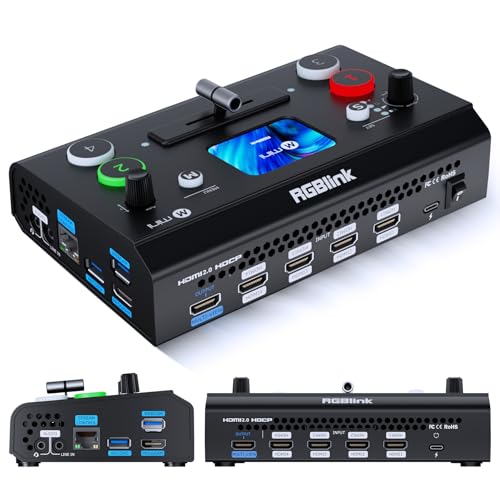
- Four HDMI inputs and dual 1080p outputs
- Touchscreen, T-bar, UVC, and USB recording
- Optional TAO Cloud features and activation
Best For: Compact multi-camera home studios
Best Legacy AV Selector
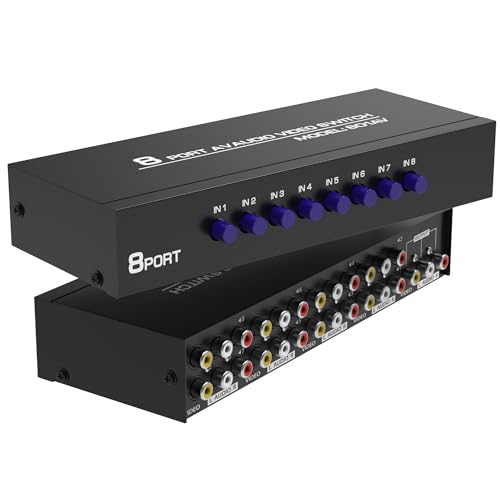
- Eight RCA inputs to one RCA output
- Passive plug-and-play mechanical switching
- Metal case and included RCA cable
Best For: RCA-based legacy AV setups
Best Professional Production Hub
FoMaKo M6 4K HDMI/SDI Switcher

- HDMI and SDI inputs with 4K60 support
- 10.1-inch multiview and integrated PTZ control
- Streaming, recording, overlays, and chroma key
Best For: Advanced multi-camera home studios and live production
Best All-in-One Control

- Built-in 4.5-inch multiview display
- Four HDMI inputs with 30 transitions
- USB 3.0 UVC streaming and PTZ tools
Best For: Multi-camera home studios needing integrated monitoring and production controls
Best for Gaming and Dual Sources
VIXLW Dual 4K Capture Switcher

- Two 4K60 HDMI inputs
- 1080p60 output with USB 3.0 capture
- PiP and PBP layouts for flexible viewing
Best For: Gaming streams and simple two-source home-studio setups
Best for Expanded Productions

- Multi-signal switching with HDMI, USB, webcam, and NDI options
- Records to USB and SD cards
- Advanced audio, PTZ, effects, and remote controls
Best For: Advanced multi-camera studios and event-style live productions
Best All-Around Pick – RGBlink Mini 4-Input HDMI Switcher
For creators comparing video switchers for home studios, the RGBlink Mini is a flexible choice for multi-camera streaming. It accepts up to four HDMI sources, supports 2K input and output, and connects to a computer over USB 3.0 as a webcam for use with streaming software and social platforms.
Best For: Solo streamers and home-studio creators running up to four HDMI cameras with OBS, vMix, or similar software.
Pros:
- Supports four HDMI inputs with 2K input and output.
- USB 3.0 webcam-style output works with streaming software and social platforms.
- Includes 14 transition effects, nine picture-in-picture layouts, and LAN remote control.
- Supports audio embedding and de-embedding.
Cons:
- Onboard recording requires the Mini-Pro or a higher model.
- Its feature set may be more than needed for a simple single-camera setup.
The RGBlink Mini stands out when you want a compact switcher that can handle several HDMI sources while keeping computer-based streaming straightforward. Its remote control and built-in production features add flexibility for solo operation.
Best Simple RCA Pick – Panlong 4-Way AV Switcher
Among video switchers for home studios, the Panlong 4-Way AV Switcher is a basic option for older composite-video equipment. Its four RCA inputs accept yellow-white-red audio/video connections and route one selected source to a display, with push-button operation and no external power or software required.
Best For: Home setups using DVD players, game consoles, cable boxes, or other devices with composite RCA connections.
Pros:
- Provides four RCA inputs and one composite output.
- Mechanical push-button switching is simple to operate.
- Requires no extra power supply or software driver.
- Metal enclosure is designed for stability and longevity.
Cons:
- Uses composite RCA connections rather than HDMI.
- Not intended for modern 2K or computer-based live-streaming workflows.
This Panlong model is best viewed as an uncomplicated source selector rather than a live-production switcher. It makes sense when your equipment already uses yellow-white-red RCA cables and you want quick, manual input selection.
Best Monitoring Features – Mixer Plus 4-Input HDMI Switcher
For home creators who want more production control, the Mixer Plus combines four HDMI inputs with a built-in 4-inch display. It is designed for multi-camera streaming, online classes, events, YouTube, OBS, and Zoom, with multiview monitoring and broadcast-style switching tools in a portable unit.
Best For: Multi-camera home studios that need onboard monitoring, scene presets, overlays, keying, and PTZ camera control.
Pros:
- Built-in 4-inch screen provides real-time multiview monitoring.
- Offers 30 transition effects and four user-defined scene presets.
- Includes chroma key, luma key, PIP, DSK, and logo overlay tools.
- Supports VISCA over IP PTZ control for up to four cameras.
Cons:
- Its advanced controls may be unnecessary for basic source switching.
- The supplied details do not specify recording capability.
The Mixer Plus is a strong fit when monitoring and production features matter as much as input count. Its built-in screen can reduce the need for a separate preview monitor, while the AUX output and production tools allow more customized workflows.
Best High-Input RCA Pick – Panlong 8-Way AV Switcher
If your equipment rack contains many legacy devices, the Panlong 8-Way AV Switcher offers more capacity than most basic video switchers for home studios. It routes one of eight composite RCA sources to a display using straightforward mechanical push-button controls.
Best For: Larger collections of RCA-equipped game consoles, DVD players, cable boxes, and other older AV components.
Pros:
- Provides eight RCA inputs in a single switcher.
- Manual push-button operation is easy to understand.
- Needs no extra power supply or software driver.
- Metal enclosure is designed for stability and longevity.
Cons:
- Limited to composite RCA video and audio connections.
- Does not provide HDMI, USB webcam output, or live-streaming production features.
- Routes one selected source at a time rather than combining camera feeds.
The eight-input Panlong is a practical organizational solution for legacy AV systems. Choose it when input count and simple RCA switching are the priorities, but look to an HDMI production switcher for modern streaming or multi-camera work.
Best Compact 4K Pick – RGBlink Mini V3
For creators comparing video switchers for home studios, the RGBlink Mini V3 offers a compact way to manage up to four HDMI cameras or other sources. Its touchscreen, T-bar, dual HDMI outputs, and UVC webcam mode make it practical for multi-camera streaming and recording.
Best For: Home-studio creators who want a compact HDMI switcher with touchscreen control and optional production features.
Pros:
- Four HDMI inputs with dual 1080p HDMI outputs for program and preview.
- 2.1-inch touchscreen and professional T-bar control in a lightweight design.
- Supports UVC webcam mode, USB recording, PIP, chroma key, logos, and transitions.
Cons:
- Recording and selected advanced functions require optional TAO Cloud activation.
- Stable operation calls for a 35W-or-higher USB-C power adapter.
- Setup requires firmware updating, Ethernet access, and TAO Cloud binding for activation.
The Mini V3 is a strong fit when space and straightforward HDMI workflow matter most. Its optional licensing model lets buyers add certain features as needed, but users should account for that extra setup and cost.
Best Legacy AV Selector – Fosmon 8-Way RCA Switcher
The Fosmon 8-Way RCA Switcher is a simple option for older home-studio or entertainment setups using composite AV connections. It connects up to eight RCA sources to one RCA output and uses mechanical buttons for source selection without external power.
Best For: Users switching between multiple RCA-based devices such as DVD players, retro game consoles, and set-top boxes.
Pros:
- Eight RCA AV inputs feed one RCA AV output.
- Passive, plug-and-play operation requires no additional power source.
- Compact metal housing includes a 32-inch RCA cable and limited lifetime warranty.
Cons:
- Uses RCA composite connections rather than HDMI or modern digital video inputs.
- Provides one output and manual button switching only.
- Its listed compatibility is centered on televisions and legacy AV equipment.
This selector can be useful for a very specific legacy workflow, but it is not a modern live-production mixer. Choose it only if your home studio relies on RCA sources and needs basic manual switching.
Best Professional Production Hub – FoMaKo M6 4K HDMI/SDI Switcher
For advanced video switchers for home studios, the FoMaKo M6 combines HDMI and SDI connectivity with a 10.1-inch multiview screen, streaming, recording, PTZ control, and layered production tools. It is designed for operators who need a more complete live-production workflow than a basic HDMI switcher.
Best For: Larger home studios, churches, educators, and streamers managing multiple HDMI or SDI cameras and advanced live graphics.
Pros:
- Four HDMI inputs and four SDI inputs, with two HDMI inputs supporting 4K60 and 1080p60 output.
- 10.1-inch touchscreen, PTZ joystick control, multiview monitoring, and web-based remote access.
- Supports dual network streaming, chroma key, PIP, logo overlays, recording, and playback.
Cons:
- NDI capability is upgradeable but the license is optional and not included.
- Its extensive controls and production features may be more than a simple home setup needs.
- Recording uses external SD or USB 3.0 storage rather than describing built-in storage.
The M6 is the most capable option here for a multi-source studio that needs PTZ operation, graphics, streaming, and recording in one device. Its professional feature set is compelling, though buyers should budget time for setup and any optional NDI upgrade.
Best All-in-One Control – CineTreak Mixer Plus
For home studios that need hands-on production tools without several extra boxes, the CineTreak Mixer Plus is a versatile choice among video switchers for home studios. It combines four HDMI inputs, an integrated multiview display, USB 3.0 UVC streaming, audio connections, and production effects in one compact unit.
Best For: Home studios producing multi-camera streams, vertical social content, OBS sessions, or PTZ-based productions.
Pros:
- Built-in 4.5-inch display shows inputs, program, preview, resolution, and audio levels.
- Supports four HDMI sources, portrait and landscape modes, and 30 transition effects.
- Includes PTZ control, chroma key, luma key, PIP, DSK, and logo overlay tools.
- USB 3.0 UVC streaming works with OBS and other compatible software without a separate capture card.
Cons:
- PTZ control requires compatible cameras using VISCA over IP.
- Its four-input design may be limiting for larger productions.
- Advanced production features may take time to learn.
The integrated screen and broad production feature set make this a strong fit when space and simplicity matter. It is especially practical for creators who want switching, monitoring, audio, and streaming in one device.
Best for Gaming and Dual Sources – VIXLW Dual 4K Capture Switcher
The VIXLW focuses on simple two-source switching and capture, making it a practical option among video switchers for home studios built around cameras, consoles, or computer sources. It accepts two 4K60 HDMI inputs, provides 1080p60 output, and connects to a computer over USB-C for recording or streaming.
Best For: Gaming streams, dual-camera setups, video calls, and creators who want plug-and-play capture with PiP or PBP layouts.
Pros:
- Handles two simultaneous 4K60 HDMI input sources.
- Supports 1080p60 output and USB 3.0 transmission.
- Offers four PBP layouts and four scalable PiP layouts.
- Works with Windows, macOS, Linux, OBS, and several popular streaming platforms.
Cons:
- Only provides two HDMI input ports for source switching.
- Output is specified at 1080p60 rather than 4K.
- Its feature set is more focused on capture and layouts than full broadcast production.
This compact switcher is appealing for straightforward two-source workflows. Its low-latency design, integrated audio connections, and broad software compatibility make it particularly suitable for gaming and basic home-studio streaming.
Best for Expanded Productions – FoMaKo M1 4K Video Mixer
The FoMaKo M1 is designed for creators who want a deeper production workflow than a basic switcher provides. As one of the more expandable video switchers for home studios, it combines multiple HDMI and USB inputs, recording, audio mixing, PTZ control, streaming options, effects, and remote browser-based operation.
Best For: Advanced home studios, multi-camera productions, event streams, and creators who need recording, audio control, PTZ operation, and remote management.
Pros:
- Supports multiple HDMI and USB sources, webcam input, NDI HX input, and three video outputs.
- Records simultaneously to USB and SD cards and supports USB streaming.
- Provides audio mixing, delay adjustment, ALC, independent channel control, and noise reduction.
- Includes PTZ control, up to 30 transitions, PIP, DSK, chroma key, luma key, and logo insertion.
Cons:
- NDI functionality is upgradeable rather than necessarily included out of the box.
- The extensive controls and routing options may be excessive for simple setups.
- Its larger feature set likely requires more setup time than a basic switcher.
The M1 is a strong choice when a home studio is growing toward more serious live production. Its combination of recording, audio management, PTZ control, remote access, and flexible streaming supports complex workflows while keeping many functions in one unit.
How We Picked These Video Switchers for Home Studios
We grouped the selected models by the jobs they are designed to handle rather than treating every switcher as interchangeable. The lineup includes basic composite AV selectors for older consoles and DVD players, compact HDMI switchers for single-operator streaming, and larger video mixers with multiview screens, recording or capture support, and live-production controls.
We also considered input and output formats, resolution limits, preview capability, audio handling, portability, control options, and the difference between simple source selection and true live mixing. Always confirm the manufacturer’s specifications before buying, particularly when combining 4K sources with 1080p streaming equipment.
Quick Comparison
| Best For | Look For | Models in This Roundup |
|---|---|---|
| Older AV equipment | Composite video, RCA audio, multiple inputs | Panlong 4-way, Panlong 8-way, Fosmon 8-way |
| Compact HDMI streaming | Multiple HDMI inputs, live switching, portable controls | RGBlink Mini, Mixer Plus, CineTreak |
| Touchscreen or multiview workflows | Built-in display, preview/program monitoring | RGBlink Mini V3, FoMaKo 10.1-inch model |
| Higher-resolution sources | 4K input support and suitable output conversion | RGBlink Mini V3, FoMaKo models, dual-4K capture switcher |
Key Buying Factors for Video Switchers for Home Studios
Inputs, Outputs, and Signal Type
Start by listing every source you plan to connect. HDMI equipment needs an HDMI switcher or mixer, while older consoles and media players may require composite RCA inputs. Check whether the unit provides a clean program output, preview output, USB capture, or only a single switched display output.
Resolution and Frame-Rate Compatibility
“4K input” does not always mean 4K switching and 4K output. Some units accept 4K sources but produce a 1080p program feed. Match the switcher to your cameras, monitor, capture card, and streaming platform, and check supported frame rates to avoid dropped or incompatible signals.
Live Production Features
For basic source selection, physical buttons may be enough. Multi-camera creators may benefit from preview/program views, picture-in-picture, transitions, audio mixing, chroma key, touchscreen control, or PTZ support. These features add flexibility but can increase setup time and cost.
Audio and Capture Workflow
Decide whether audio will travel through HDMI, enter through a separate mixer, or come from RCA inputs. If you plan to stream from a computer, verify that USB capture is included or budget for a compatible capture device. HDCP restrictions can also affect protected media sources.
Who Should Buy Which Video Switchers for Home Studios?
Choose a Panlong or Fosmon AV switcher if you mainly need to select among older composite-video devices. Choose a compact HDMI model such as the RGBlink Mini, Mixer Plus, or CineTreak for a small studio, online classes, presentations, or straightforward multi-camera streaming.
Move to the RGBlink Mini V3 or a FoMaKo unit when you want more advanced control, a built-in monitoring screen, higher-resolution source support, or room to grow into a more organized live-production workflow. The dual-4K capture switcher is best suited to users whose priority is bringing HDMI sources into a computer for recording or streaming. Before ordering, confirm connector type, output resolution, power requirements, and whether the included controls support the way you intend to work.