
The right teleprompter can make presentations, video calls, online lessons, and recorded content feel more natural by keeping your script close to the camera. The best teleprompters for laptops balance readable text, reliable mounting, portability, and compatibility with your existing screen or camera.
We selected 10 options ranging from built-in-screen models to tablet and laptop-compatible designs, so you can choose a setup that fits your workflow, workspace, and budget.
Best 10 Teleprompters for Laptops Picks for 2026
All-in-One Choice

- Built-in 9-inch FHD display
- Works with PC and Mac workflows
- Supports cameras, webcams, and smartphones
Best For: Streamers and remote presenters wanting an integrated desktop setup
Professional Presentation Pick

- Supports laptops and monitors up to 17 inches
- Includes telescopic conference stand
- Uses 60/40 beam splitter glass
Best For: Conferences, speeches, studios, and corporate presentations
Portable Budget Option

- 12-inch HD beam splitter display
- Remote and app-controlled scrolling
- Folds flat with a carry case
Best For: Tablet-based courses, tutorials, presentations, and streaming
Built-In Monitor Choice
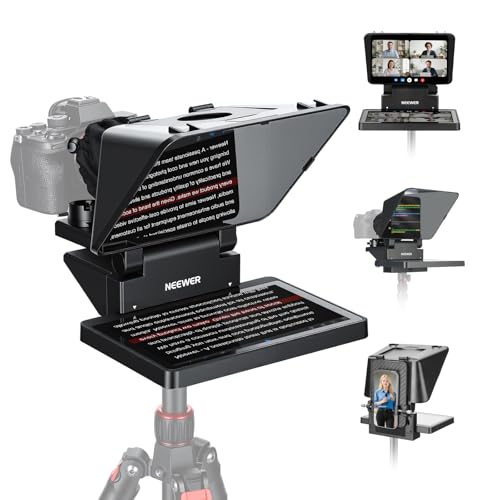
- Built-in 9-inch LCD monitor
- Works with Windows and macOS as a second display
- Supports USB-C computer connection and phone mirroring
Best For: Laptop-based streaming, video calls, and camera presentations
Compact Smartphone Prompting

- Pre-assembled, portable all-metal design
- Works with smartphones, DSLRs, mirrorless cameras, and webcams
- Includes 70/30 glass, hood, carry bag, and 15mm rails
Best For: Portable smartphone-based webcam and camera recording
Large-Screen Remote Control

- 14-inch glass with a 10-foot reading range
- Includes RT113 Bluetooth remote and app control
- Fits phones and tablets up to 8.7 inches wide
Best For: Courses, presentations, broadcasts, and tablet-based prompting
Integrated Laptop Display

- Built-in display works like an additional monitor
- Includes 1080p60 HDR webcam for PC and Mac
- Camera Hub manages scripts, camera controls, and customization
Best For: Computer-based streaming, video calls, and presentations
Premium Large-Screen Pick

- 17-inch beamsplitter with 45° viewing angle
- Included Bluetooth remote and app control
- Assembly-free design with heavy-duty camera mount
Best For: Studio recording, streaming, courses, and presentations
Portable Smartphone Pick
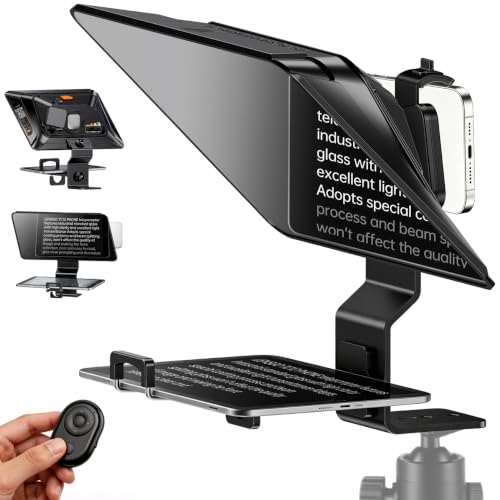
- 14.5-inch HD glass for easier script reading
- Bluetooth remote with TCQI app support
- Quick setup for horizontal or vertical shooting
Best For: Walk-and-talk videos, Zoom, TikTok, and smartphone vlogging
Compact Versatile Pick

- Foldable 9.7-inch teleprompter design
- Works with phones, tablets, and cameras
- TCQI app supports scrolling and TXT scripts
Best For: Portable teaching, interviews, livestreaming, and mixed-device setups
All-in-One Choice – Elgato Prompter
For shoppers comparing teleprompters for laptops, the Elgato Prompter stands out because its built-in 9-inch display works like an additional monitor. You can move scripts, chat, or other windows onto it from a PC or Mac without relying on a separate tablet or phone screen.
Best For: Streamers, remote presenters, and video creators who want a computer-controlled teleprompter with a built-in display.
Pros:
- Built-in FHD display eliminates the need for a separate prompting device.
- Supports laptops, webcams, smartphones, DSLR cameras, and a wide range of lenses.
- Camera Hub provides controls for text and chat appearance, and it works with Stream Deck.
- Designed for straightforward desktop setup through USB on PC or Mac.
Cons:
- Mac users need free DisplayLink software.
- Android users need free DisplayLink Presenter software.
- Its compact 9-inch screen may be less suitable for speakers positioned far away.
The Elgato is the most streamlined option here for laptop-based workflows. Its monitor-style operation and broad camera compatibility make it particularly practical for streaming and video calls, provided your computer meets the software requirements.
Professional Presentation Pick – Proaim Speech Teleprompter
The Proaim Professional Speech Teleprompter is a substantial choice for teleprompters for laptops, supporting laptops, tablets, and monitors up to 17 inches. Its 60/40 beam splitter glass is intended to keep scripts visible while preserving a natural line of sight during presentations or broadcasts.
Best For: Conferences, speeches, corporate events, studios, houses of worship, and other professional presentation environments.
Pros:
- Accommodates displays up to 17 inches, including laptops and monitors.
- 60/40 beam splitter glass supports clear script visibility and eye contact.
- Included telescopic stand allows height adjustment for different presentation setups.
- Designed for both studio and on-location professional use.
Cons:
- At 18.5 pounds, it is considerably less portable than compact teleprompters.
- Its large footprint may require a dedicated table or production area.
- The supplied notes do not indicate a built-in display or electronic control system.
Choose the Proaim when screen size, stand adjustability, and professional presentation positioning matter more than portability. It is better suited to organized production environments than casual laptop recording.
Portable Budget Option – NEEWER Basics X12B
The NEEWER Basics X12B offers a practical, portable approach to teleprompters for laptops and other recording setups. It uses a tablet as the script source, reflects text through 12-inch beam splitter glass, and folds into its included carry case for storage and transport.
Best For: Creators recording online courses, tutorials, presentations, and streams with an iPad or compatible tablet.
Pros:
- No-assembly design simplifies setup.
- 12-inch HD prompting surface can display reflected text from up to 10 feet away.
- Included remote and NEEWER app control scrolling, page changes, and font size.
- Foldable construction and carry case make it convenient to transport.
Cons:
- It requires a separate tablet or smartphone to display the script.
- It is not a monitor and does not provide direct on-screen self-viewing during recording.
- The notes specify that it is not for phone shooting.
The X12B is a sensible value pick if you already own an iPad or tablet and want a lightweight prompting accessory. Its main limitation is that it reflects a device’s screen rather than functioning as a standalone laptop monitor.
Built-In Monitor Choice – NEEWER X11 Teleprompter
The NEEWER X11 is a flexible option among teleprompters for laptops, combining an 11-inch beam splitter setup with a built-in LCD monitor. It can serve as a second display for Windows or macOS computers, while also supporting screen mirroring from compatible smartphones.
Best For: Laptop users, streamers, and video-call presenters who want computer display functionality without using a separate tablet for prompts.
Pros:
- Built-in 9-inch LCD monitor can work as a Windows or macOS second display.
- Supports direct USB-C computer connection, with additional connection options available.
- 11-inch multi-coated beam splitter glass is designed to reduce ghosting and preserve readability.
- Adjustable camera holder supports lenses up to 72 mm and focal lengths from 35 to 200 mm.
Cons:
- Some computer connection methods require a driver.
- Phone mirroring is limited to compatible devices with DP protocol support.
- The supplied notes state that voice sync is not supported.
The X11 is a strong middle ground for users who want a laptop-connected monitor and a conventional camera teleprompter in one unit. Check your computer ports, operating system, and phone compatibility before buying.
Compact Smartphone Prompting – Glide Gear TMP 75
Glide Gear TMP 75 Teleprompter - Laptop, DSLR, Smartphone - Carry Case, No Assembly
Check Price On AmazonThe Glide Gear TMP 75 is a compact option for shoppers comparing teleprompters for laptops, webcams, DSLR cameras, and mirrorless setups. It arrives pre-assembled, uses a smartphone as the script display, and includes a protective hood and carry bag for portable recording.
Best For: Creators who want a lightweight smartphone-based teleprompter for webcam recordings, DSLR shoots, or mobile presentations.
Pros:
- Supports smartphones, DSLR cameras, mirrorless cameras, and webcams.
- Pre-assembled design with 5 x 5.4-inch 70/30 beam-splitting glass.
- All-metal construction, 15mm rails, protective hood, and carry bag.
- Compact 2-pound design for easier transport.
Cons:
- Does not support iPad tablets.
- A teleprompter app is not included.
- Its maximum recommended load is 2 pounds.
The TMP 75 is a practical fit when portability and smartphone compatibility matter more than a large reading screen. Confirm that your camera setup stays within the weight limit and that your chosen app supports mirrored text.
Large-Screen Remote Control – NEEWER Teleprompter X14 III
The NEEWER X14 III is a larger teleprompter for laptops and tablets when you want a longer reading range and hands-on script control. Its 14-inch beamsplitter, included RT113 remote, adjustable camera plate, and fold-flat carry case suit presentations, courses, tutorials, and broadcasts.
Best For: Users needing a tablet-compatible teleprompter with a 10-foot reading range and remote-controlled scrolling.
Pros:
- 14-inch HD beamsplitter offers a 3-meter/10-foot reading range.
- Included Bluetooth remote controls scrolling, page turns, playback, and font size through the NEEWER app.
- Supports phones and tablets up to 8.7 inches wide, including iPad and Android models.
- Folds flat and includes a carry case; no assembly is required.
Cons:
- At 5.2 pounds, it is less lightweight than compact models.
- Requires the NEEWER Teleprompter app for remote script control.
- The large frame may be more equipment than casual webcam users need.
Choose the X14 III if viewing distance, tablet compatibility, and remote operation are priorities. Its 45-degree tilt, tripod threads, cold shoes, and 10-kilogram maximum load also make it suitable for more expandable recording rigs.
Integrated Laptop Display – Elgato Prompter Camera Set
The Elgato Prompter Camera Set takes a computer-first approach to teleprompters for laptops. Its built-in display works like an additional monitor, allowing you to drag windows or apps onto the prompter without relying on a separate phone or tablet. The set also includes a Full HD HDR webcam for video calls, streaming, and presentations.
Best For: PC and Mac users who want an integrated desktop teleprompter and webcam for Zoom, Teams, OBS, streaming, or presenting.
Pros:
- Built-in display eliminates the need for an extra phone or tablet screen.
- Desktop-controlled setup works with a PC or Mac and supports drag-and-drop window placement.
- Includes a Full HD 1080p60 HDR-enabled webcam.
- Camera Hub supports script management, chat customization, contrast controls, AI tracking, and camera settings.
Cons:
- DisplayLink software is required for Mac.
- It is a tabletop system rather than a compact travel-focused teleprompter.
- Some advanced controls depend on Camera Hub software.
This set is the most streamlined choice for computer-based recording because the display and webcam are integrated into a desktop workflow. It is especially compelling for users who prefer controlling scripts and camera features from their computer rather than a mobile app.
Premium Large-Screen Pick – NEEWER X17 II
If you need teleprompters for laptops or larger tablet-based setups, the NEEWER X17 II is built for clear, comfortable script viewing. Its 17-inch beamsplitter, integrated design, and included remote make it a strong choice for studio recording, courses, streaming, and presentations.
Best For: Creators who want a large reading area and camera-focused teleprompter with remote app control.
Pros:
- 17-inch beamsplitter reflects scripts clearly from up to 13 feet and tilts 45 degrees.
- Integrated, assembly-free design includes sun hoods to help prevent light leakage.
- RT113 remote and NEEWER app support pausing, page turns, and scroll-speed adjustments.
- Upgraded QR camera mount supports Manfrotto 501PL and loads up to 44 pounds.
Cons:
- At 6.6 pounds, it is less convenient for highly portable setups.
- The tablet holder supports devices up to 9.3 inches wide, so laptop compatibility depends on the laptop’s dimensions.
The X17 II prioritizes viewing comfort, mounting flexibility, and a fast setup. It is a substantial option for fixed or semi-permanent recording spaces rather than lightweight travel.
Portable Smartphone Pick – LENSGO TC12P
For shoppers comparing teleprompters for laptops with mobile-friendly alternatives, the LENSGO TC12P offers a portable setup for phones and tablets. Its 14.5-inch glass, quick assembly, and Bluetooth remote suit walk-and-talk videos, Zoom calls, TikTok, and vlogging.
Best For: Mobile creators who primarily shoot with a smartphone and want a larger script display.
Pros:
- 14.5-inch HD beamsplitter helps make scripts easier to read during longer recordings.
- Supports smartphones and iPads or tablets up to 7.3 inches in landscape orientation.
- Bluetooth remote works with the TCQI app for play, pause, speed control, and mirrored scripts.
- Quick horizontal-to-vertical switching and one-click panel opening support on-the-go shooting.
Cons:
- It is designed around smartphone shooting rather than a full camera-mounted workflow.
- The listed device limit may exclude many laptops and larger tablets.
The TC12P is a practical mobile teleprompter with useful glare and light-sealing features. Choose it when portability and smartphone compatibility matter more than broad laptop support.
Compact Versatile Pick – LENSGO TC7
The LENSGO TC7 is a compact option for buyers considering teleprompters for laptops, phones, tablets, and cameras. Its 9.7-inch format folds in one second, supports multiple device types, and includes app-based script control for teaching, interviews, livestreams, and presentations.
Best For: Creators who want a foldable teleprompter that can accommodate phones, tablets, and camera setups.
Pros:
- Coated beamsplitter glass provides clear script reflection and high transmission.
- Supports smartphones, tablets below 9.7 inches, and DSLR or other camera shooting setups.
- TCQI app supports script entry, TXT imports, scrolling, speed adjustments, and font or background changes.
- Folds in one second and includes cold shoes for accessories such as microphones or lights.
Cons:
- The smaller 9.7-inch format offers less reading area than larger teleprompters.
- Tablets must be below 9.7 inches, and laptop fit is not specifically confirmed.
The TC7 stands out for flexibility and portability. Its broad device and shooting compatibility makes it a useful all-around choice, provided your laptop or tablet fits the stated size limits.
How We Picked the Best Teleprompters for Laptops
We evaluated these teleprompters based on screen compatibility, viewing area, camera placement, portability, setup complexity, control options, and suitability for common laptop-based workflows. We also considered whether each model is designed for a laptop, tablet, monitor, smartphone, DSLR, webcam, or a combination of devices.
Because “laptop teleprompter” can describe several different designs, this list includes both dedicated units with built-in displays and optical hoods that reflect text from a laptop, tablet, or external monitor. The best choice depends on where your script will appear and how much equipment you already own.
Quick Comparison
- Built-in screen: Elgato Prompter models provide an integrated display and are convenient for webcam, streaming, and video-call setups.
- Large reading area: The NEEWER X14 III and X17 II suit presenters who need larger text or greater camera-to-subject distance.
- Tablet and laptop flexibility: Proaim, Glide Gear, and several NEEWER and LENSGO models accommodate external screens or tablets.
- Portable setups: Compact tablet and smartphone-compatible models are useful for travel, teaching, and smaller desks.
- Remote control: Models bundled with a remote or app support hands-free script scrolling and speed adjustments.
Key Buying Factors for Teleprompters for Laptops
Screen and Device Compatibility
Confirm the supported screen size before buying. Some units reflect text from a laptop or tablet placed below or behind the glass, while others include their own monitor. Check whether your laptop’s display can sit at the required angle and whether the teleprompter supports your webcam, DSLR, mirrorless camera, or smartphone.
Glass Size and Reading Distance
A larger beamsplitter generally makes text easier to read from farther away, but it also adds weight and desk space. Smaller models work well for close-up calls and compact cameras; larger 14- or 17-inch designs are better for standing presentations, wider framing, and longer scripts.
Mounting and Camera Clearance
Look for a stable base, adjustable camera platform, and enough clearance for your lens or webcam. Verify weight limits and mounting threads, especially when using a heavier camera, long lens, microphone, or lighting accessories.
Scrolling Control and Software
App compatibility, remote controls, mirroring, and adjustable scrolling speed can significantly improve usability. If you present frequently, prioritize a system that lets you pause, reverse, resize text, and control the script without reaching toward the laptop.
Portability and Setup
Foldable designs and included carrying cases are valuable for mobile presenters. For a permanent studio, prioritize optical quality, screen size, and rigidity over the smallest folded footprint.
Who Should Buy Which Teleprompters for Laptops?
Choose an Elgato Prompter if you want an integrated, polished solution for streaming, presenting, or video calls. Choose a larger NEEWER model if readability from a greater distance is your priority. Choose Proaim or Glide Gear for flexible laptop, monitor, tablet, and camera arrangements. Choose LENSGO or a compact NEEWER model if you need portability or primarily use a tablet or smartphone.
Before ordering, measure your laptop or tablet, camera, desk space, and intended speaking distance. Matching those dimensions is more important than choosing the largest teleprompter available.