
Digitizing printed photos is easier when you choose a scanner matched to your collection. The right model can quickly process batches of snapshots, capture fine detail from film and prints, or handle everyday documents alongside family memories.
We selected 10 high-resolution photo scanners spanning fast sheet-fed designs, compact flatbeds, and professional photo-focused models. Use the guide below to compare resolution, workflow, connectivity, and the features that matter most before buying.
Best 10 High Resolution Photo Scanners Picks for 2026
Fast Batch Scanning

- Scans up to 36 photos per batch
- Duplex capture preserves notes on backs
- Up to 1200 dpi with restoration tools
Best For: Large photo collections and family archives
High-Resolution Flatbed Value

- 2400 x 2400 dpi optical resolution
- Auto Scan Mode detects scan types
- Handles photos and everyday documents
Best For: Occasional home photo and document scanning
Simple Photo Feeder

- Scans 4 x 6 photos in about two seconds
- Supports photos up to 8 x 10 inches
- Includes enhancement tools for faded images
Best For: Fast home scanning of standard-size photo prints
Professional Archival Detail
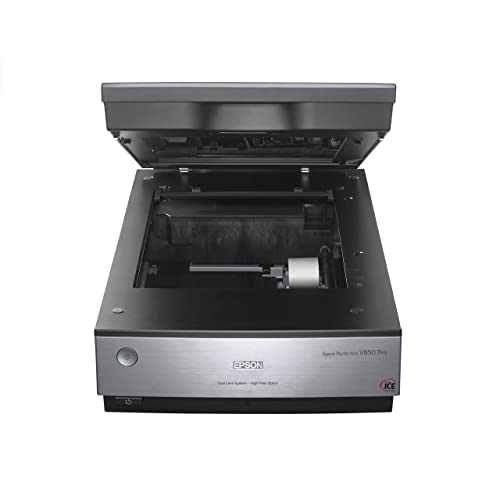
- 6400 dpi resolution for detailed scans
- Dual-lens system optimizes scan results
- 4.0 Dmax supports tonal and shadow detail
Best For: Professional and enthusiast archival scanning
Best Flatbed Detail

- 4800 dpi optical resolution
- One-click faded-photo restoration
- Removable lid for thicker originals
Best For: Detailed scans of individual photos and artwork
Best Compact Value

- 4800 x 4800 dpi resolution
- Slim flatbed scans in up to 8 seconds
- USB Type-C power and data connection
Best For: Compact desks and individual photo scans
Best for Film and High-Detail Enlargements

- 6400 x 9600 dpi scanning
- Built-in slide and film holders
- Restoration software included
Best For: Slides, negatives, medium-format film, and detailed photo enlargements
Best for Fast Photo Organization

- 300 or 600 dpi scanning
- Handles multiple photo sizes
- Cleaning kit and organization software
Best For: Quickly digitizing and organizing varied print-photo collections
Best Compact All-Purpose Choice

- 4800 dpi optical resolution
- Compact USB-powered flatbed
- Restores faded photos
Best For: Home users scanning photos, documents, artwork, and books
Fast Batch Scanning – Epson FastFoto FF-680W
For families digitizing large collections, the Epson FastFoto FF-680W is a practical choice among high resolution photo scanners. It can batch-scan up to 36 photos, scan at up to 1 photo per second at 300 dpi, and handle photos up to 8 x 10 inches, along with documents.
Best For: Quickly digitizing large photo collections while preserving handwritten notes on photo backs.
Pros:
- Batch-scans up to 36 photos and supports duplex scanning.
- Offers 300 dpi, 600 dpi TIFF, and 1200 dpi options for sharing, archiving, and enlarging.
- Includes auto enhancement, color restoration, red-eye reduction, cropping, rotation, and de-skew tools.
- Supports Wi-Fi, USB, OCR document scanning, and cloud backup to Dropbox and Google Drive.
Cons:
- Its 8.2-pound body and 11.7-inch-square footprint require dedicated space.
- The standard sheet capacity is listed as 10 despite its large photo batch capability.
- Some advanced features depend on the Epson FastFoto app or included software.
The FF-680W is the most productivity-focused option here. Its feed-through design, duplex capture, and restoration tools make it well suited to large archives, while wireless connectivity adds flexibility for sharing and backup.
High-Resolution Flatbed Value – Canon CanoScan LiDE 300
The Canon CanoScan LiDE 300 is a compact flatbed option for shoppers seeking high resolution photo scanners without a high-power, high-throughput setup. Its optical resolution reaches 2400 x 2400 dpi, and Auto Scan Mode detects what you place on the scanner.
Best For: Home users scanning individual photos, documents, receipts, and business cards at high optical resolution.
Pros:
- Provides 2400 x 2400 dpi optical resolution.
- Auto Scan Mode automatically detects the type of material being scanned.
- Supports photos, receipts, business cards, and paper.
- Compact 1.7-inch height and USB connectivity suit simple desktop setups.
Cons:
- The standard sheet capacity is one, so it is not designed for batch photo scanning.
- USB is the listed connection type; wireless connectivity is not provided in the notes.
- It is a document-style flatbed rather than a dedicated high-volume photo feeder.
The LiDE 300 favors straightforward individual scans over speed. Its high optical resolution and automatic scan detection make it a sensible fit for occasional home digitizing and mixed media.
Simple Photo Feeder – Plustek ePhoto Z300
The Plustek ePhoto Z300 offers an easy feed-through approach for people comparing high resolution photo scanners. It scans a 4 x 6 photo in about two seconds at 300 dpi, supports several common photo sizes, and includes image enhancement tools for older pictures.
Best For: Efficiently scanning batches of standard-size photos without using a traditional flatbed workflow.
Pros:
- Scans 4 x 6 photos in about two seconds at 300 dpi.
- Supports 3 x 5, 4 x 6, 5 x 7, and 8 x 10 photos, plus letter and A4 paper.
- Uses a CCD sensor with selectable 300 dpi and 600 dpi settings.
- Includes image enhancement functions for restoring faded photos.
Cons:
- Photos must be inserted one at a time.
- USB is the listed connection type, with no wireless option noted.
- Its 600 dpi maximum is lower than some flatbed and professional models.
The ePhoto Z300 is a useful middle ground: faster and more convenient than placing every photo on a flatbed, but simpler than a high-end archival scanner. Its supported sizes and enhancement features cover common home collections.
Professional Archival Detail – Epson Perfection V850 Pro
The Epson Perfection V850 Pro is aimed at demanding archival and professional work. Among these high resolution photo scanners, it stands out with a 6400 dpi resolution claim, a dual-lens system, Digital ICE, and a 4.0 Dmax rating for tonal range and shadow detail.
Best For: Professionals and serious enthusiasts who prioritize fine detail, tonal gradation, and advanced photo scanning.
Pros:
- Offers 6400 dpi resolution for detailed scans.
- Uses a dual-lens system that selects the appropriate lens for the scan.
- Provides a 4.0 Dmax rating for smooth gradations and fine shadow detail.
- Includes Digital ICE and supports Windows and Mac operating systems listed in the notes.
Cons:
- At 20.9 pounds, it is substantially heavier than the other listed models.
- Its USB connection and desktop-oriented design offer less placement flexibility than a wireless scanner.
- Professional features may be more than casual photo digitizing requires.
The V850 Pro is the strongest fit when scan quality matters more than speed or portability. Its dual-lens design and tonal-range specifications support detailed archival work, though its size and specialized feature set suit a dedicated workspace.
Best High-Volume Choice – Canon imageFORMULA RS40
For shoppers seeking high resolution photo scanners that can handle batches efficiently, the Canon imageFORMULA RS40 combines an automatic feeder with flexible media support. It scans photos and documents at up to 40 items per minute and supports resolutions up to 600 dpi, with 1200 dpi available through interpolation.
Best For: Families and home users digitizing large collections of mixed-size photos and documents.
Pros:
- Automatic feeder holds up to 60 sheets and scans both sides at once.
- Handles photos, Polaroids, receipts, cards, IDs, and documents in varying sizes.
- Includes photo enhancement features such as color adjustment, red-eye correction, and face smoothing.
- Works with Windows and Mac and saves to formats including JPG, TIFF, PNG, and PDF.
Cons:
- The 1200 dpi setting is interpolated rather than optical.
- Its automatic document-feeder design may be less suited to delicate or unusually thick originals.
The RS40 is a practical pick when speed and versatility matter more than maximum flatbed detail. Its feeder and bundled restoration tools make it especially useful for large digitizing projects.
Best Flatbed Detail – Epson Perfection V19 II
The Epson Perfection V19 II is one of the more detail-focused high resolution photo scanners, offering 4800 dpi optical resolution in a compact flatbed design. It scans photos, artwork, books, and documents up to 8.5 by 11.7 inches and includes one-touch controls for straightforward operation.
Best For: Users who prioritize detailed flatbed scans of photos, artwork, and individual documents.
Pros:
- 4800 dpi optical resolution is designed for detailed photo scans and enlargements.
- Easy Photo Fix restores color to faded photos with one click.
- USB-powered body is compact and lightweight at 3.1 pounds.
- High-rise removable lid accommodates thicker materials and pages.
Cons:
- Its one-sheet flatbed design is slower for large photo collections.
- It connects through USB rather than wirelessly.
Choose the V19 II when image detail and gentle flatbed handling are more important than batch speed. It is a strong fit for enlarging favorite prints and refreshing faded memories.
Best Compact Value – Canon CanoScan LiDE 400
Canon CanoScan LiDE 400 Slim Scanner, 7.7" x 14.5" x 0.4", Document & Photo Scanner, Black
Check Price On AmazonThe Canon CanoScan LiDE 400 offers high resolution photo scanning in a slim, space-saving flatbed design. Its 4800 x 4800 dpi resolution, color-restoration and dust-removal tools, and USB Type-C connection make it a convenient option for individual photos and everyday documents.
Best For: Space-conscious users who want detailed scans without a bulky scanner.
Pros:
- 4800 x 4800 dpi resolution preserves detailed photos and images.
- Scans in as fast as 8 seconds for quick individual jobs.
- EZ buttons and auto scan mode simplify routine scanning.
- Built-in PDF buttons support multi-page, editable, and searchable PDFs.
Cons:
- The flatbed accepts one item at a time, so it is not designed for high-volume batches.
- Its slim body supports letter-size and photo media but offers less flexibility for oversized originals.
The LiDE 400 is a sensible choice for desks where space is limited. It delivers strong resolution and useful enhancement features while keeping everyday scanning simple and fast.
Best for Film and High-Detail Enlargements – Epson Perfection V600
For shoppers comparing high resolution photo scanners, the Epson Perfection V600 stands out when detailed film and print scanning are priorities. Its 6400 x 9600 dpi maximum resolution, built-in transparency unit, and support for 35mm, medium-format film, photos, and documents make it a versatile choice for serious home archiving.
Best For: Digitizing slides, negatives, medium-format film, and prints for detailed enlargements.
Pros:
- 6400 x 9600 dpi resolution supports enlargements up to 17 x 22 inches.
- Built-in transparency unit scans mounted slides, negatives, and medium-format film.
- DIGITAL ICE, Easy Photo Fix, and ArcSoft PhotoStudio support cleanup and restoration.
- ReadyScan LED technology avoids warm-up time and helps reduce power consumption.
Cons:
- Uses a wired USB 2.0 connection rather than wireless connectivity.
- The flatbed design is larger and heavier than compact photo-focused scanners.
The V600 is a strong fit for archival projects that include film as well as photographs. Choose it when maximum detail and film-handling flexibility matter more than portability.
Best for Fast Photo Organization – AMBIR Photo Scanner Bundle
The AMBIR Photo Scanner is a practical option for shoppers who want high resolution photo scanners with a quick, streamlined workflow. It scans at 300 or 600 dpi, supports several print sizes and panoramas up to 12 inches, and includes software for organizing, enhancing, and restoring images.
Best For: Quickly digitizing varied print sizes while cleaning and organizing a photo collection.
Pros:
- Offers 300 and 600 dpi scanning options for everyday and archival-style copies.
- Supports prints from 1 x 1 inch through 8 x 10 inches, plus panoramas up to 12 inches.
- Auto-crop and deskew features help simplify the scanning process.
- Includes a cleaning kit, protective carrier sheet, editing tools, and a two-year warranty.
Cons:
- Its maximum listed resolution is lower than dedicated film-oriented flatbed models.
- It is designed for photos rather than slides, negatives, or medium-format film.
The AMBIR is especially appealing for family-photo projects where speed, size flexibility, and organization are important. Its bundled cleaning tools and software make it a convenient all-in-one setup.
Best Compact All-Purpose Choice – Epson Perfection V39 II
The Epson Perfection V39 II is a compact flatbed option for shoppers seeking high resolution photo scanners that can also handle everyday documents and artwork. Its 4800 dpi optical resolution, USB power, one-touch controls, and restoration features suit home offices and memory-preservation projects.
Best For: Scanning photos, artwork, books, and documents in a compact home or office setup.
Pros:
- 4800 dpi optical resolution captures detailed photo scans and supports enlargements.
- Compact, lightweight design includes a high-rise removable lid for thicker materials.
- Easy Photo Fix restores color to faded photos with one click.
- Epson ScanSmart supports oversized-image stitching and cloud-storage workflows.
Cons:
- It does not list dedicated slide or negative scanning hardware.
- USB-powered operation may require a nearby compatible computer setup.
The V39 II balances photo quality with general scanning flexibility while taking up little space. It is a sensible choice for users who want one straightforward scanner for photos, documents, and creative materials.
How We Picked the Best High Resolution Photo Scanners
We focused on scanners suited to real photo-digitizing projects rather than general office use alone. Our comparison considers optical resolution, scanning speed, paper handling, color and detail preservation, software features, connectivity, and compatibility with different photo sizes. Models with automatic feeding are particularly useful for large collections, while flatbed scanners generally provide more control for delicate, irregular, or bound originals.
We also included options at several price and performance levels, from compact USB flatbeds to advanced models designed for enlargements, negatives, and professional archival work. Manufacturer-stated resolution and features can vary by mode, so buyers should distinguish true optical resolution from interpolated resolution.
Quick Comparison
| Best For | Scanner Type | Standout Consideration |
|---|---|---|
| Large photo collections | Sheet-fed | Automatic feeding and batch scanning |
| Maximum image detail | Professional flatbed | High optical resolution and advanced color control |
| Everyday photo and document use | Compact flatbed | Simple USB operation and small footprint |
| Fragile or unusual originals | Flatbed | Gentler handling and flexible placement |
| Quick snapshot digitizing | Dedicated photo scanner | Fast scanning with automatic cropping or deskewing |
Key Buying Factors for High-Resolution Photo Scanners
Optical Resolution
For standard prints, 300 to 600 dpi is often sufficient for sharing and ordinary reprints. Choose a higher true optical resolution when you plan to crop heavily, create large enlargements, scan small originals, or preserve maximum detail. Very high settings also create larger files and can increase scanning time.
Flatbed Versus Automatic Feeding
A sheet-fed scanner is usually the fastest choice for hundreds of loose, similarly sized prints. A flatbed is better for delicate photos, mixed sizes, curled prints, artwork, and originals that could be damaged by rollers. Some automatic models can handle varied photo sizes, but always follow the manufacturer’s loading guidance.
Color, Dust, and Restoration Tools
Look for accurate color capture, adjustable settings, and software for cropping, deskewing, dust removal, or correction. Hardware-based restoration features can be useful for film and aging prints, though no automatic tool replaces careful editing when an image is badly faded or damaged.
Workflow and Connectivity
Check Windows and macOS support, USB requirements, included software, file formats, and whether the scanner can send files directly to cloud or other destinations. Automatic naming and batch separation can save considerable time during large projects.
Who Should Buy Which High Resolution Photo Scanners?
- Choose a sheet-fed model if your priority is digitizing a large stack of standard photos quickly.
- Choose a professional flatbed if you need the finest detail, large enlargements, or advanced control over color and restoration.
- Choose a compact flatbed for occasional photo scanning, schoolwork, receipts, and general home use.
- Choose a dedicated quick-scan photo model if automatic cropping, deskewing, and simple operation matter more than extensive manual control.
- Choose a film-capable or advanced photo scanner if your collection includes negatives, slides, or originals requiring careful archival treatment.
Before ordering, measure your workspace, confirm operating-system compatibility, and estimate your collection size. The best scanner is the one whose feeding method and software match the way you will actually digitize, organize, and preserve your photos.