
Choosing the right HDMI splitter for a projector depends on more than the number of outputs. Resolution, refresh rate, HDCP compatibility, power, cable distance, and mirror-only limitations can all affect whether your setup works reliably.
We selected 10 HDMI splitters for projectors suited to different needs, from simple two-screen mirroring to distributing one source across four or eight displays.
Best 10 Hdmi Splitters for Projectors Picks for 2026
Best 4K/60Hz Pick
OREI UltraHD 1x4 HDMI Splitter

- 4K at 60Hz with 18Gbps bandwidth
- Mirrors one source to four displays
- Supports advanced surround audio formats
Best For: Four-display 4K projector and presentation setups
Best Powered Budget Option

- Includes a 5V/2A power adapter
- Supports 4K/30Hz, 1080p/60Hz, and 3D
- Amplifier supports up to 100 feet total transmission
Best For: Powered four-display projector and signage systems
Best Compact Value
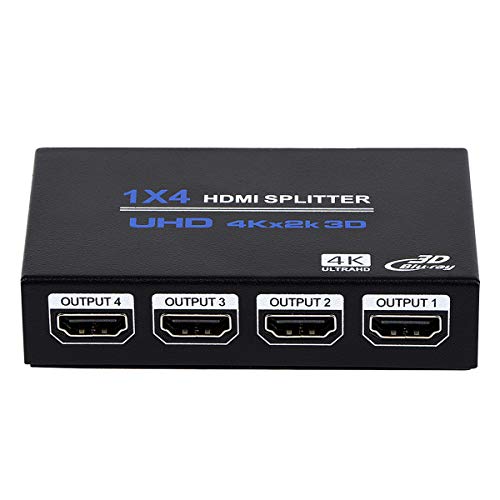
- Compact four-output mirror splitter
- Supports 4K/30Hz, 2K/60Hz, and 1080p/120Hz
- Includes power supply and broad audio support
Best For: Basic four-display projector and classroom setups
Best for Eight Displays

- Sends one source to eight displays
- Supports 4K/30Hz, 1080p, 3D, and deep color
- Powered design supports long cable runs
Best For: Large mirrored projector, classroom, church, and retail systems
Best 4K 1x2 Pick

- 4K@60Hz and 18 Gbps support
- Mirrors one source to two displays
- Broad audio and device compatibility
Best For: Two-display home theaters and presentations
Best 4K/60Hz 1x2 Value

- 4K@60Hz with 18.5 Gbps bandwidth
- Supports select mixed 4K/1080p outputs
- Includes power adapter and HDMI cable
Best For: Two-display 4K entertainment and presentations
Best for Straightforward 4K Mirroring

- Mirrors one HDMI source to two displays
- Supports up to 4K and 10.2 Gbps bandwidth
- Requires USB power; adapter and HDMI cable excluded
Best For: Simple projector-and-display mirroring
Best Cable-Included Option

- Includes a 4-foot HDMI cable
- Mirrors one source to two displays
- Supports 4K at 30Hz; power adapter sold separately
Best For: Convenient short-run projector mirroring
Best 4K/60Hz Pick – OREI UltraHD 1×4 HDMI Splitter
For shoppers comparing hdmi splitters for projectors, the OREI UHDS-104 is a strong choice when one source needs to mirror across four displays. It supports up to 4K at 60Hz, uses HDMI 2.0 bandwidth, and is designed for plug-and-play distribution.
Best For: Home theaters, classrooms, presentations, and installations needing four synchronized 4K displays.
Pros:
- Supports 4K at 60Hz and 18Gbps bandwidth.
- Distributes one HDMI source to four displays simultaneously.
- Supports multiple advanced audio formats, including Dolby TrueHD and DTS-HD Master Audio.
- Metal enclosure aids durability and heat dissipation.
Cons:
- Mirrors the source rather than extending separate desktops.
- Works best with HDMI cables up to 30 feet.
The OREI stands out for projector setups where smooth 4K/60Hz playback and broader audio compatibility matter. It is less suitable if you need independent content on each screen.
Best Powered Budget Option – MT-ViKI 4K HDMI Splitter 1×4
The MT-ViKI 1×4 is a practical option among hdmi splitters for projectors when stable powered operation is more important than 4K/60Hz performance. Its included 5V/2A adapter supports consistent signal transmission to four mirrored displays.
Best For: Conference rooms, classrooms, retail displays, and home theaters using 4K/30Hz or 1080p sources.
Pros:
- Splits one HDMI input to four identical outputs.
- Supports 4K at 30Hz, 1080p at 60Hz, and 3D video.
- Includes a dedicated 5V/2A AC power adapter.
- Metal housing provides heat dissipation and EMI protection.
Cons:
- Does not support extended display mode.
- Limited to 4K at 30Hz.
- Requires speakers in the connected display or another audio solution.
Its powered design and signal amplifier make this a sensible choice for longer cable runs, while the 4K/30Hz limit makes it better suited to presentations and signage than high-frame-rate 4K video.
Best Compact Value – ENBUER 1×4 HDMI Splitter
The ENBUER 1×4 offers a compact way to distribute one source to four projectors, TVs, or monitors. For buyers seeking affordable hdmi splitters for projectors, it provides plug-and-play mirroring with support for 4K at 30Hz, 3D, and several multichannel audio formats.
Best For: Compact home entertainment, classroom, and basic projector distribution setups.
Pros:
- Mirrors one HDMI input to four outputs.
- Supports 4K at 30Hz, 2K at 60Hz, and 1080p at 120Hz.
- Includes a 5V DC power supply.
- Supports DTS-HD, Dolby TrueHD, DTS, Dolby-AC3, and DSD audio.
Cons:
- Does not support extended mode, HDR, VRR, or CEC.
- 4K at 60Hz is supported only in YCbCr.
- Uses HDMI 1.4 HDCP 1.4 output compatibility.
This is a useful budget-minded distributor when mirrored content and a small footprint are the priorities. Check your source and projector requirements carefully if HDR, VRR, or unrestricted 4K/60Hz playback is important.
Best for Eight Displays – MT-ViKI 1×8 HDMI Splitter
When a projector or display system needs more than four outputs, the MT-ViKI 1×8 provides a straightforward solution. It is one of the more useful hdmi splitters for projectors for conference rooms, churches, classrooms, retail spaces, and other multi-screen installations.
Best For: Large mirrored-display systems with up to eight projectors, TVs, or monitors.
Pros:
- Distributes one HDMI source to eight displays simultaneously.
- Supports 4K at 30Hz, 1080p, 3D video, and deep color.
- Powered operation supports cable runs up to 50 feet on the input and output sides.
- Works with gaming consoles, media players, Blu-ray players, PCs, cable boxes, and DVR systems.
Cons:
- Only mirrors the source and cannot extend separate content.
- Limited to 4K at 30Hz.
- Larger enclosure may require more installation space.
The eight-output configuration makes this the natural choice for larger synchronized displays. Its 4K/30Hz ceiling is adequate for signage and presentations, but it is not the best fit for high-refresh 4K video.
Best 4K 1×2 Pick – OREI UltraHD 4K Splitter
For shoppers comparing hdmi splitters for projectors, the OREI UHDS-102 is a practical 1×2 option for duplicating one HDMI source on two displays. It supports 4K at 60Hz, 18 Gbps bandwidth, 4:4:4 8-bit video, and a broad range of audio formats.
Best For: Home theaters, conference rooms, classrooms, and presentations using one source with two displays or projectors.
Pros:
- Supports 4K@60Hz, 18 Gbps, 3D, and 4:4:4 8-bit video.
- Works with projectors, TVs, streaming devices, game consoles, PCs, and Blu-ray players.
- Supports stereo, Dolby-AC3, DTS 7.1, Dolby TrueHD, and DTS-HD Master Audio.
- Includes a 100–240V auto-switching power supply and a one-year warranty.
Cons:
- Mirrors one source rather than extending the desktop into separate screens.
- HDMI cable runs longer than 30 feet may not work reliably.
- Does not bypass HDCP.
The OREI is a strong choice when 4K/60Hz performance and wide device compatibility matter. Just plan for shorter HDMI runs and mirrored output rather than independent projector content.
Best 1×3 Budget Option – NEWCARE 4K HDMI Splitter
The NEWCARE 1×3 is a useful choice among hdmi splitters for projectors when one source needs to mirror to three screens. It supports 4K@30Hz, 1080p@60Hz, 3D video, and includes both a 4-foot HDMI cable and power adapter.
Best For: Retail displays, office presentations, classrooms, and home setups that need one HDMI source mirrored to three projectors or screens.
Pros:
- Mirrors one HDMI source to three TVs, monitors, or projectors simultaneously.
- Supports 4K@30Hz, 1080p@60Hz, 3D, and Dolby TrueHD/DTS-HD audio.
- Includes a 4-foot HDMI 2.0 cable, 5V/1A adapter, and one-year warranty.
- Plug-and-play setup requires no drivers.
Cons:
- Supports mirroring only and cannot extend displays.
- Does not extract audio or support ARC/eARC.
- Its 4K refresh rate is limited to 30Hz.
This NEWCARE splitter stands out for affordable three-screen mirroring and a complete accessory bundle. It is better suited to presentation and signage use than to high-refresh-rate 4K viewing.
Best 4K/60Hz 1×2 Value – avedio links HDMI Splitter
The avedio links 1×2 is a capable option for hdmi splitters for projectors when smooth 4K output is a priority. It mirrors one HDMI source to two displays, supports 4K@60Hz RGB 4:4:4, and can mix 4K and 1080p outputs with automatic or forced downscaling in supported formats.
Best For: Home entertainment, presentations, education, events, and digital signage using two HDMI displays or projectors.
Pros:
- Supports 4K@60Hz, 18.5 Gbps bandwidth, and 1080p at 60Hz or 120Hz.
- Can support mixed 4K and 1080p displays with downscaling in supported modes.
- Includes a USB power cable with adapter and a 4-foot HDMI 2.0 cable.
- Compatible with projectors, TVs, monitors, consoles, PCs, streaming devices, and disc players.
Cons:
- Mirrors only and cannot extend separate content to two monitors.
- Does not function as an HDMI switcher or audio extractor.
- Does not support ARC/eARC or CEC.
With its 4K/60Hz capability and included accessories, the avedio links model is a versatile two-display splitter. Use HDMI 2.0 cables and keep runs within the stated limits for the most dependable results.
Best for Straightforward 4K Mirroring – Compact 1-to-2 HDMI Splitter
For shoppers comparing HDMI splitters for projectors, this NEWCARE model is a compact option for sending one HDMI source to two displays showing the same content. It supports up to 4K, but it requires USB power and does not include a power adapter or HDMI cable.
Best For: Mirroring a laptop, game console, or other HDMI source to a projector and a second display.
Pros:
- Duplicates one HDMI input to two displays without extending the desktop.
- Supports up to 4K, 3D, 1080p, and 10.2 Gbps bandwidth.
- Compact design with support for several HDMI audio formats.
Cons:
- Does not support extended displays, switching between multiple inputs, ARC/eARC, or speaker connections.
- USB power adapter and HDMI cable are not included.
This is a practical pick when your projector setup needs simple same-content mirroring. Confirm that duplication—not independent screens or audio extraction—is what you need before buying.
Best Cable-Included Option – avedio links 4K HDMI Splitter
This avedio links model is one of the more convenient HDMI splitters for projectors because it includes a 4-foot HDMI cable. It mirrors one source to two displays, supports 4K at 30Hz, and needs a separate 5V/1A power adapter for stable operation.
Best For: Projector users who want a ready-to-connect 1-in-2 mirroring splitter for compatible HDMI devices.
Pros:
- Includes a 4-foot high-speed HDMI cable.
- Supports 4K at 30Hz and is backward compatible with lower resolutions.
- Works with projectors, gaming consoles, laptops, televisions, and other HDMI devices.
Cons:
- Mirrors only; it cannot extend different content to two screens.
- Not a switcher or audio extractor, and it is not compatible with HDCP 2.2.
- Power adapter is not included.
The included cable adds convenience, especially for a short projector connection. Its 4K support is limited to 30Hz, so check your source and display requirements before choosing it for high-frame-rate video.
Best for Basic 1080p Setups – Simple HDMI Mirror Splitter
For a basic projector arrangement, this Sorthol HDMI splitter routes one source to one or two HDMI displays showing the same image. It is designed around 720p, 1080i, and 1080p use, includes a short 11.8-inch HDMI cable, and has no power plug.
Best For: Simple 1080p projector or TV mirroring from a Blu-ray player, Xbox, DVD player, or similar HDMI source.
Pros:
- Supports common HD resolutions up to 1080p.
- Can send one source to two visual outputs.
- Includes an 11.8-inch HDMI cable and has a lightweight design.
Cons:
- Does not extend displays, switch between multiple inputs, or provide switcher functionality.
- Both displays may need to be the same model for simultaneous output.
- Offers no 4K support and includes no power plug.
This is a low-complexity choice for older or 1080p projector systems. It makes the most sense when your displays are closely matched and you only need duplicated content rather than flexible routing.
How We Picked the Best Hdmi Splitters for Projectors
We focused on practical compatibility and setup requirements rather than output count alone. The selection includes powered 1×2, 1×3, 1×4, and 1×8 splitters, with options supporting 4K resolution, higher refresh rates, 3D video, EDID management, and extended transmission distances.
We also considered whether each unit is designed for reliable continuous use, whether it includes a power adapter or HDMI cable, and how clearly it handles common limitations such as mirror-only output. These factors matter when connecting projectors to laptops, streaming devices, game consoles, Blu-ray players, or conference-room equipment.
Quick Comparison
- Best for four 4K displays: OREI UltraHD 1×4 and MT-ViKI 1×4 models.
- Best for larger installations: The MT-ViKI 1×8 splitter offers eight outputs for conference rooms and presentation spaces.
- Best for two displays: OREI, avedio links, and other 1×2 splitters provide straightforward mirrored output.
- Best for convenient setup: Models bundled with a power adapter or HDMI cable can reduce extra purchases.
- Best for high-refresh 4K: Look for 18Gbps bandwidth and explicit 4K at 60Hz support.
Key Buying Factors for Hdmi Splitters for Projectors
Resolution, Refresh Rate, and Bandwidth
Match the splitter to the highest specification in your system. A model rated for 4K at 60Hz and 18Gbps is generally more flexible for modern sources, while 4K at 30Hz may be sufficient for presentations, signage, and video playback. The projector, source device, cables, and splitter must all support the desired signal.
HDCP and EDID Compatibility
HDCP support helps the splitter pass protected content from compatible sources. EDID management can help the source negotiate a usable resolution when the connected projector and display have different capabilities. This is especially useful in mixed-display installations.
Output Count and Mirroring
HDMI splitters duplicate one input across multiple outputs; they do not create separate extended desktop screens. Confirm that mirror-only operation meets your needs. Choose a 1×2 unit for one projector and one additional display, a 1×4 for classrooms or small venues, and a 1×8 for larger distribution systems.
Power, Distance, and Installation
Powered splitters are usually the safer choice for multiple outputs and longer cable runs. Check the included adapter, HDMI cable requirements, enclosure design, and stated transmission distance. Use quality cables and avoid assuming that a splitter’s maximum distance applies equally to every resolution.
Who Should Buy Which Hdmi Splitters for Projectors?
Home theater users and presenters who need one source on two screens should choose a compact 1×2 splitter, preferably with 4K at 60Hz support if their equipment allows it. Classrooms, training rooms, and small event spaces are better served by a powered 1×4 model. Conference rooms, digital signage systems, and larger venues should consider the 1×8 option, while verifying cable lengths and display compatibility before installation.
If you only need basic mirrored video and use 1080p equipment, a simpler splitter may provide better value. For newer 4K projectors, gaming systems, or streaming devices, prioritize bandwidth, HDCP support, and documented refresh-rate compatibility over the lowest price.