
A capable capture card can make the difference between a smooth stream and dropped frames, especially when you are recording gameplay while running demanding software. The best models balance image quality, latency, passthrough performance, and straightforward setup.
This roundup compares 10 options for streamers, creators, and gamers, including cards designed for hardware-assisted encoding, 1080p60 capture, and 4K passthrough.
Best 10 Capture Card with Hardware Encoder Picks for 2026
Best PCIe Hardware Encoder

- H.264 hardware encoding helps reduce CPU use
- 1080p capture with HDMI pass-through
- Includes TimeShift and streaming software support
Best For: Windows desktop streamers seeking an internal PCIe capture card
Best 4K High-Refresh Capture Card

- 4K60 capture and 4K60 HDMI pass-through
- Supports 1440p120 and 1080p120 inputs
- Includes audio input and microphone output
Best For: Multi-platform creators needing 4K and high-refresh support
Best Console Capture Card

- 1080p60 capture with 4K60 HDR pass-through
- Supports high-refresh pass-through up to 1080p240
- Driver-free USB-C setup for consoles and cameras
Best For: Console streamers wanting smooth Full HD capture with 4K display output
Best Budget USB Capture Card

- 1080p60 USB capture with low-latency transmission
- Plug-and-play support for Windows, Mac, Linux, and Android
- Includes USB-A/USB-C connectivity and 18-month warranty
Best For: Beginners seeking affordable Full HD console and PC capture
Low-Latency Acer Pick

- 4K input with 1080p at 60Hz capture
- Built-in mic-in for commentary
- Plug-and-play USB Type-A and Type-C
Best For: Gamers and creators seeking simple 1080p capture with broad device support
Feature-Rich Streaming Pick
Fifine AmpliGame V3 Capture Card

- 1080p at 60fps USB 3.0 capture
- 4K at 30fps HDMI loop-out
- Headset, line-in, and RGB lighting
Best For: Console streamers building an audio-equipped, low-latency gaming setup
Portable Compatibility Pick
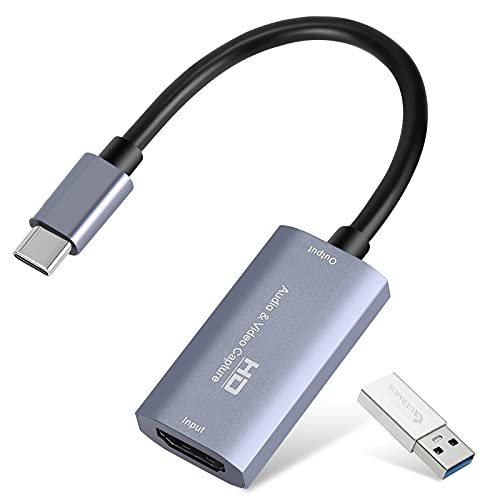
- 4K30 input and 1080p60 capture
- Compact aluminum-alloy housing
- USB-C and USB 3.0 compatibility
Best For: Portable streaming, recording, meetings, and mixed-device capture setups
Premium 4K Performance

- 4K60 capture with high-refresh passthrough
- VRR, HDR, and ultra-low latency support
- Windows, macOS, and Linux compatible
Best For: High-refresh gaming and advanced streaming setups
Versatile Streaming Value

- 1080p capture with 4K input support
- HDMI loop-out for low-delay gameplay
- Plug-and-play with microphone input
Best For: Simple console, camera, and OBS streaming
Simple Zero-Latency Capture
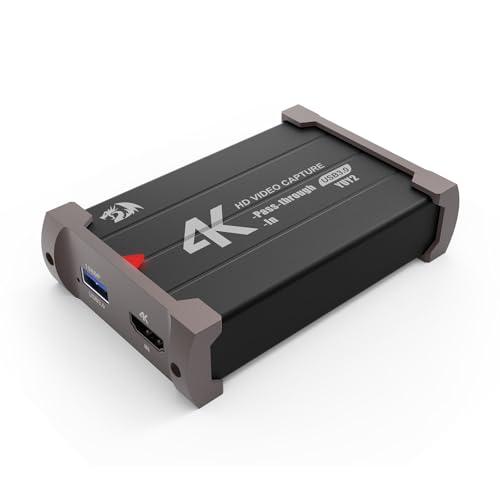
- 1080p60 capture from 4K30 input
- Zero-latency HDMI passthrough
- Plug-and-play Windows and macOS support
Best For: Easy console and camera streaming at 1080p60
Best PCIe Hardware Encoder – Live Gamer HD C985
The AVerMedia Live Gamer HD C985 is a capture card with hardware encoder designed for Windows desktop streaming and recording. Its H.264 encoding helps reduce CPU usage while capturing gameplay at up to 1080p, and HDMI pass-through supports low-latency monitoring.
Best For: Windows PC gamers who want an internal PCIe card with H.264 hardware encoding, TimeShift recording, and compatibility with popular streaming software.
Pros:
- H.264 hardware encoding reduces CPU usage during capture.
- Captures gameplay in full HD 1080p with ultra-low-latency streaming and recording.
- Supports HDMI pass-through, 3.5mm stereo pass-through, and TimeShift recording.
- Works with consoles and PC gameplay through RECentral and Stream Engine.
Cons:
- Requires a desktop with a PCIe x1 slot and a compatible VGA card.
- Supplied requirements specify Windows 8, limiting its stated platform coverage.
- Does not offer the newer 4K capture specifications found on some external models.
The C985 remains a practical choice when reduced CPU load matters more than 4K resolution. Confirm your desktop expansion slot, graphics support, and Windows setup before buying.
Best 4K High-Refresh Capture Card – Guermok GM-72A
The Guermok GM-72A is a capture card with hardware encoder features aimed at 4K streaming, recording, and high-refresh gameplay. It supports up to 4K60 capture through USB 3.0, 4K60 pass-through, and high-frame-rate inputs up to 1440p120 or 1080p120.
Best For: Creators and gamers who need 4K60 capture or pass-through, broad device compatibility, and flexible audio connections without installing drivers.
Pros:
- Supports up to 4K@60FPS capture and 4K@60Hz HDMI pass-through.
- Handles 1440p@120FPS and 1080p@120FPS input for high-refresh gameplay.
- Includes 3.5mm audio input and microphone output for commentary.
- Works with Windows, macOS, Linux, Android, and PadOS, plus major streaming software.
Cons:
- USB 2.0 ports are limited to up to 1080p resolution.
- 4K capture requires a USB 3.0 or higher connection and compatible system hardware.
- Its listed capture formats vary by resolution, including MJPEG, YUY2, NV12, and XRGB.
With 4K60 capture, high-refresh support, and built-in audio connectivity, the GM-72A is one of the more versatile options here. Use a USB 3.0 port to access its higher-resolution capabilities.
Best Console Capture Card – AVerMedia GC311G2
The AVerMedia GC311G2 is a compact capture card with hardware encoder support for 1080p60 recording and streaming. It lets you play through 4K60 HDR pass-through while sending Full HD video to a Windows, Mac, or compatible USB-C iPad setup.
Best For: Console and PC streamers who want smooth 1080p60 capture, 4K60 HDR pass-through, and high-refresh gameplay with a driver-free USB-C connection.
Pros:
- Captures up to 1080p60 while passing through 4K60 HDR.
- Supports high-refresh pass-through up to 1440p144 HDR or 1080p240 HDR.
- Works with PS5, PS5 Pro, Xbox Series X/S, Switch, PCs, cameras, and compatible iPads.
- Driver-free operation supports OBS, Camo Studio, and AVerMedia Streaming Center.
Cons:
- Captured video is limited to 1080p60 SDR; HDR applies to pass-through.
- Requires a compatible USB 3.0 connection and suitable computer or iPad hardware.
- Its listed macOS and iPadOS requirements are relatively specific.
The GC311G2 balances simple setup with smooth gameplay pass-through. It is a strong fit for streamers who prioritize 1080p60 output while retaining a 4K HDR display experience.
Best Budget USB Capture Card – BENFEI 1080p60
The BENFEI 1080p60 is a portable capture card with hardware encoder-style processing for low-latency video transmission. It captures HDMI sources at up to 1080p60, connects through USB Type-A or Type-C, and works with common streaming and recording software.
Best For: Beginners and mobile creators who need an inexpensive, plug-and-play option for Switch, PlayStation, Xbox, PC, or Mac recording.
Pros:
- Captures USB output video up to 1080p at 60Hz.
- Plug-and-play operation works across Windows, Linux, Android, and Mac OS.
- Two-in-one USB Type-A/Type-C cable supports a variety of host devices.
- Compact aluminum design, braided cable, and an 18-month warranty add practical value.
Cons:
- Does not capture 4K; 4K support applies to HDMI input up to 30Hz.
- PS4 and PS5 require HDCP to be turned off.
- iPhone is not supported, and iPadOS devices need version 17 or later.
The BENFEI is a straightforward choice for Full HD streaming without driver installation. Its broad OS support and dual USB connector are useful, but buyers should check HDCP and mobile-device compatibility first.
Low-Latency Acer Pick – 4K HDMI Capture Card
If you need a capture card with hardware encoder features for straightforward streaming and recording, the Acer OCB5B0 offers 4K HDMI input, 1080p at 60Hz capture, and USB 3.0 connectivity. Its mic-in supports direct commentary, while USB Type-A and Type-C options make it practical for consoles, cameras, and computers.
Best For: Gamers and creators who want plug-and-play 1080p capture with 4K input and direct microphone support.
Pros:
- Supports 4K input and 1080p at 60Hz output with YUY2 video.
- Includes mic-in for synced gaming commentary, classes, and vlogs.
- Works without extra drivers or external power and supports USB Type-A and Type-C.
- Compatible with OBS, VLC, YouTube, Facebook, Switch, PS5/PS4, Xbox, cameras, Windows, macOS, and Linux.
Cons:
- Requires a USB 3.0 port for USB 3.0 operation.
- Capture resolution is listed up to 1080p, despite the 4K input support.
The Acer is a flexible option for users prioritizing simple setup, broad compatibility, and convenient voice input. It is best understood as a 1080p capture device with 4K input rather than a 4K capture solution.
Feature-Rich Streaming Pick – Fifine AmpliGame V3 Capture Card
The Fifine AmpliGame V3 is a capture card with hardware encoder appeal for gaming setups that need smooth 1080p at 60fps capture and HDMI pass-through. It adds 4K at 30fps output, headset and line-in connections, and RGB lighting, making it more feature-focused than a basic capture dongle.
Best For: Console streamers who want 1080p60 capture, low-latency 4K pass-through, and integrated audio connections.
Pros:
- Captures 1080p at 60fps over USB 3.0 for smooth streaming.
- Provides 4K at 30fps HDMI loop-out for delay-free gameplay viewing.
- Includes HDMI output, line-in, and headset ports for a more complete gaming setup.
- Offers plug-and-play operation, OBS/YouTube/Discord/Twitch compatibility, and nine RGB modes.
Cons:
- Requires USB 3.0 and HDMI input/output for the intended setup.
- The product notes include troubleshooting guidance for occasional no-display issues.
- Best performance depends on using the supplied original USB cable.
Choose the AmpliGame V3 if pass-through, audio connectivity, and desk aesthetics matter alongside capture quality. Its 4K capability is for HDMI output, while the capture stream itself is designed for 1080p60.
Portable Compatibility Pick – Guermok USB 3.0 Capture Card
For shoppers comparing a capture card with hardware encoder features for mobile or mixed-device use, the Guermok provides 4K at 30Hz input and up to 1080p at 60Hz capture through USB 3.0. Its compact aluminum-alloy body, USB-C and USB connectivity, and wide software support suit basic streaming, recording, meetings, and online teaching.
Best For: Users who need a compact HDMI-to-USB capture device for consoles, cameras, computers, and portable setups.
Pros:
- Supports up to 4K at 30Hz input and 1080p at 60Hz output, plus 2K at 30Hz.
- Uses an aluminum-alloy design intended to aid heat dissipation and low-latency operation.
- Requires no additional drivers or external power and includes a USB 3.0-to-USB-C adapter.
- Works with Windows, macOS, Linux, Android, OBS, VLC, Zoom, consoles, cameras, and set-top boxes.
Cons:
- It is for capture use only and cannot directly cast to a monitor or TV without capture software.
- Transmission is one-way from HDMI to USB-C; USB-C-to-HDMI conversion is not supported reliably.
- Adapter or software setup may require troubleshooting, including restarting OBS after audio configuration.
The Guermok is a practical travel-friendly choice when compatibility and portability are more important than advanced onboard features. Use a USB 3.0 port and capture software to get the advertised bandwidth and functionality.
Premium 4K Performance – PORTTA DX20R
The PORTTA DX20R is a strong choice if you want a capture card with hardware encoder-style convenience for high-refresh gaming setups. It captures up to 4K at 60Hz and supports passthrough for 1080p at 240Hz, 2K at 144Hz, and 2K at 120Hz, with VRR, HDR, and ultra-low latency support.
Best For: Gamers and streamers who want 4K capture, high-refresh passthrough, and advanced VRR/HDR controls.
Pros:
- Captures 4K at 60Hz and supports high-refresh passthrough up to 1080p at 240Hz.
- Supports VRR, HDR, and multiple video formats, including YUY2, NV12, and RGB24.
- Works with Windows, macOS, and Linux without driver installation.
- CapHub software enables video, audio, EDID, VRR, and firmware management.
Cons:
- Advanced settings require downloading the CapHub utility.
- Its feature set may be more than needed for basic 1080p streaming.
The DX20R stands out for its combination of 4K60 capture, high-refresh passthrough, and configurable VRR/HDR features. It is particularly well suited to modern console and PC gaming systems where display smoothness matters.
Versatile Streaming Value – VIXLW V316B-FR
The VIXLW V316B-FR is a practical capture card with hardware encoder-style plug-and-play operation for everyday streaming. It captures up to 1080p video, accepts 4K input at 30Hz or 60Hz, and includes HDMI loop-out plus microphone input for commentary.
Best For: Budget-conscious streamers who need broad HDMI compatibility, loop-out, and simple USB 3.0 setup.
Pros:
- Captures up to 1080p and supports 4K30/60Hz input.
- HDMI loop-out supports gameplay without added delay.
- Plug-and-play design requires no drivers or external power.
- Includes microphone input for external commentary using a 3.5mm TRS headset.
Cons:
- Capture output is limited to 1080p.
- Does not support 4K at 120Hz or 144Hz.
- Warranty coverage is listed as 60 days.
This model focuses on accessible streaming rather than maximum capture resolution. Its loop-out, mic input, and compatibility with consoles, cameras, OBS, and other software make it a flexible option for straightforward setups.
Simple Zero-Latency Capture – Redragon VC321
The Redragon VC321 is a straightforward capture card with hardware encoder-style ease of use for streaming and recording. It accepts up to 4K at 30FPS and captures 1080p at 60FPS, while HDMI passthrough is designed for zero-latency gameplay monitoring.
Best For: Console gamers and creators seeking simple 1080p60 capture with 4K passthrough.
Pros:
- Captures 1080p at 60FPS from up to 4K30 input.
- Provides zero-latency HDMI passthrough for real-time gameplay.
- Plug-and-play setup needs no additional drivers or power source.
- Captures video and audio simultaneously and works with Windows and macOS.
Cons:
- Capture resolution is limited to 1080p.
- 4K input is supported only up to 30FPS.
- It lacks the higher-refresh capture and advanced VRR/HDR features of premium models.
The VC321 keeps the setup uncomplicated while covering common console, camera, and DSLR use cases. Its 1080p60 capture and zero-latency passthrough make it a sensible fit for creators who prioritize easy operation over high-end capture specifications.
How We Picked the Best Capture Card with Hardware Encoder
We focused on the features that matter most in real streaming and recording setups: capture resolution and frame rate, HDMI passthrough, connection type, latency, operating-system compatibility, and the effect on your computer’s CPU. We also considered whether each model suits consoles, PCs, cameras, or mixed-source workflows.
A true Capture Card with Hardware Encoder can process video more efficiently than a basic USB capture device, but product listings do not always use encoding terminology consistently. Check the specifications for explicit H.264 or other onboard encoding support rather than assuming every capture card includes it.
Quick Comparison
- Best for hardware-assisted streaming: Choose a model that explicitly lists onboard H.264 encoding and reduced CPU usage.
- Best for console gaming: Prioritize 1080p60 capture, HDR support where needed, and low-latency passthrough.
- Best for high-refresh monitors: Look for passthrough support at 120Hz or 240Hz, even if the captured stream is limited to 1080p60.
- Best for flexible setups: USB 3.0 and USB-C models are easier to move between computers than internal PCIe cards.
Key Buying Factors for a Capture Card with Hardware Encoder
Encoding and CPU Load
Hardware encoding is useful when your computer is already handling a game, webcam, overlays, and streaming software. It can reduce processor demand, though final performance still depends on the encoder, software, bitrate, and host system.
Capture Resolution and Frame Rate
For most streaming, 1080p at 60 frames per second is the practical target. A 4K input or passthrough specification does not always mean the card records 4K, so distinguish between capture resolution and passthrough resolution.
Passthrough, HDR, and Refresh Rate
Passthrough lets you play on a monitor or television without viewing the delayed capture feed. Competitive gamers should verify support for their desired 1080p, 1440p, or 4K refresh rate. HDR compatibility is also important if you want to preserve a console’s HDR output.
Ports, Compatibility, and Setup
USB 3.0 is generally preferable for high-bandwidth video, while USB-C can provide a convenient modern connection. Confirm that your computer has the required port, that your console uses a compatible HDMI signal, and that your software supports the card without proprietary drivers.
Who Should Buy Which Capture Card with Hardware Encoder?
Streamers with limited CPU headroom should favor a clearly documented Capture Card with Hardware Encoder. Console creators should prioritize 1080p60 capture, reliable passthrough, and compatibility with PlayStation, Xbox, or Switch setups. Competitive PC gamers should choose based on passthrough refresh rate and latency first. Beginners and occasional creators will usually be best served by a plug-and-play USB 3.0 model with 1080p60 capture and broad software support.
Before buying, match the card’s maximum capture specification to your actual publishing platform. If you stream at 1080p, paying extra for 4K capture may offer little benefit unless you also need 4K recording, HDR, or high-resolution passthrough.