
Turning a DSLR into a high-quality webcam or streaming camera requires more than an HDMI cable. A capture card converts the camera’s HDMI output into a video signal your computer can recognize for streaming, recording, video calls, and live production.
We’ve gathered 10 popular options, from established models such as the Elgato Cam Link 4K and AVerMedia CamStream 4K to budget-friendly USB capture devices. The right choice depends on your camera’s output, desired resolution, frame rate, connectivity, and whether you need HDMI pass-through.
Best 10 Capture Card for Dslr Camera Picks for 2026
Premium DSLR Streaming Pick

- 1080p60 and compatible 4K60 capture
- Ultra-low latency HDMI-to-USB 3.0 design
- Works with PC, Mac, iPad, OBS, and Zoom
Best For: Creators building a polished DSLR streaming setup
Value HDMI Capture Pick

- 1080p capture with 4K30/60 input support
- Plug-and-play with no external power
- HDMI loop-out and 3.5mm mic input
Best For: Beginners needing flexible HDMI capture on a budget
Professional 4K60 Choice

- 4K60 RGB24 capture for detailed video
- Plug-and-play DSLR and camcorder support
- Ultra-low latency with a 3-year warranty
Best For: Professional creators and live broadcasters
Portable Multi-Device Pick

- 4K30 input with 1080p60 recording
- USB 3.0 and USB-C plug-and-play design
- Compact support for cameras, consoles, and tablets
Best For: Mobile streamers and mixed-device setups
Versatile 2K Capture
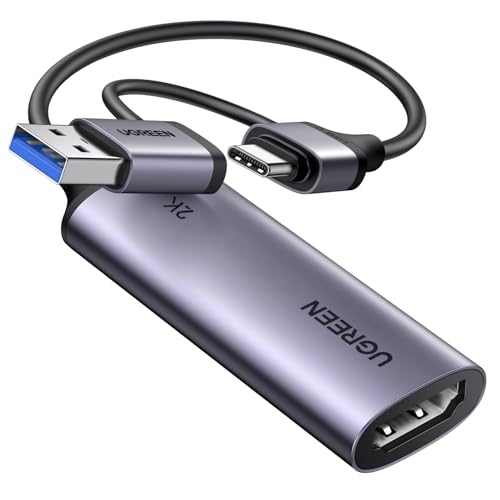
- 4K input with 2K output
- 1080p at 60FPS support
- USB-A and USB-C connectivity
Best For: Creators needing flexible camera, console, and mobile capture
Affordable 4K Camera Link

- 4K30 camera capture
- 1080p120 and 1440p60 support
- Driver-free USB 3.0 setup
Best For: Budget-minded DSLR and camcorder streamers
Low-Latency Full HD
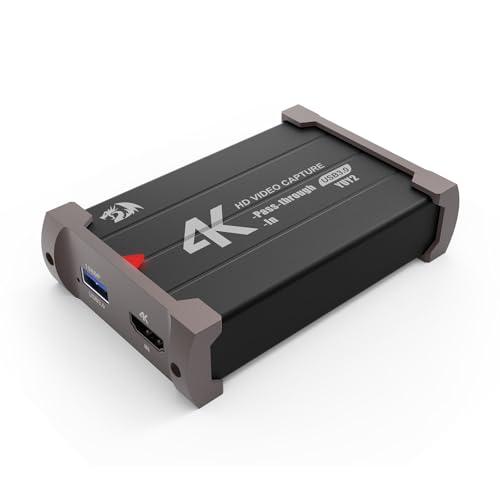
- 1080p at 60FPS capture
- 4K HDMI input support
- Zero-latency HDMI pass-through
Best For: Camera streamers prioritizing smooth real-time monitoring
Best Overall 4K Pick
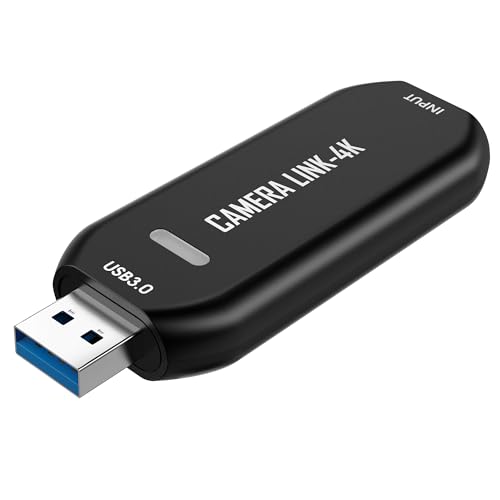
- Up to 4K60 or 1080p120 capture
- Low-latency USB 3.0 connection
- Works with Windows, macOS, and many HDMI devices
Best For: Creators seeking high-resolution, versatile capture
Best Budget Option
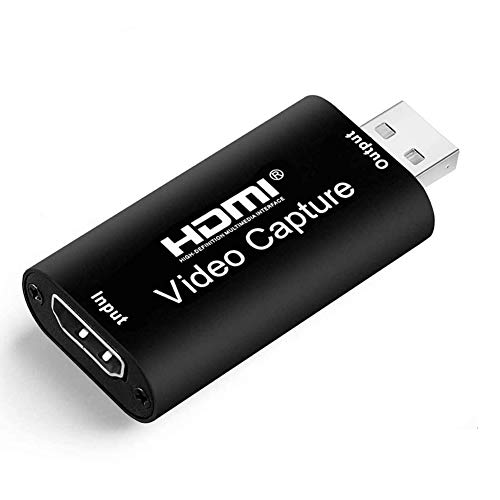
- Accepts 4K HDMI input
- Outputs 1080p at 30fps
- Compatible with Windows, Mac, and Linux
Best For: Affordable basic streaming and recording
Best 1080p60 Value
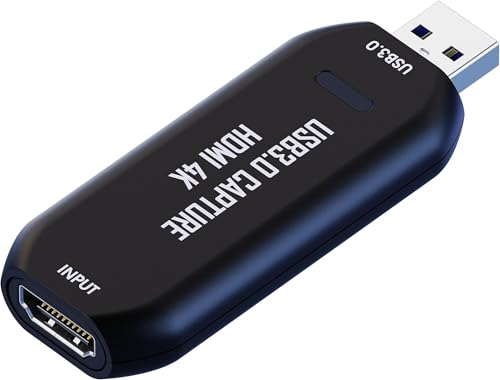
- Captures 1080p60 or up to 2K50
- USB 3.0 low-latency connection
- Includes HDMI cable and user manual
Best For: Smooth Full HD streaming and video calls
Premium DSLR Streaming Pick – Elgato Cam Link 4K
If you want a dependable capture card for DSLR camera streaming, the Elgato Cam Link 4K is built around high-quality HDMI-to-USB 3.0 performance. It supports 1080p60 and, with compatible equipment and the latest model, up to 4K60 capture, while working with popular computer and video-call setups.
Best For: Creators who want a polished DSLR, mirrorless, camcorder, or action-camera streaming setup.
Pros:
- Supports 1080p60 and 4K60 capture with compatible equipment.
- Ultra-low latency helps keep video and audio synchronized.
- Works with PC, Mac, iPad, OBS, Zoom, and Discord.
- Compact design and included USB 3.0 extension cable simplify setup.
Cons:
- 4K60 performance depends on camera compatibility and the latest Cam Link 4K model.
- Requires an HDMI-output camera and a compatible computer or tablet.
The Cam Link 4K is a strong choice when image quality, low latency, and broad software compatibility matter more than finding the lowest-cost option.
Value HDMI Capture Pick – VIXLW 1080p60 Capture Card
This budget-friendly capture card for DSLR camera use accepts HDMI video from cameras and many other devices, then presents it to a Windows or Mac computer through USB 3.0. It is a practical option for streaming, recording, and commentary without requiring drivers or an external power supply.
Best For: Beginners and multi-device users who need HDMI capture with pass-through and microphone input.
Pros:
- Supports up to 1080p capture output and accepts 4K30/60 input.
- Plug-and-play operation requires no driver or external power supply.
- HDMI loop-out supports a low-delay monitoring or gaming setup.
- Includes microphone input for 3.5mm TRS commentary headsets.
Cons:
- Output is limited to up to 2K30Hz according to the supplied specifications.
- Microphone input accepts 3.5mm TRS standard headsets only.
- The listed warranty is 60 days.
With broad HDMI compatibility and useful pass-through and audio features, this VIXLW model offers flexible functionality for a modest streaming setup, though its output and warranty are more limited than premium alternatives.
Professional 4K60 Choice – AVerMedia CamStream 4K
The AVerMedia CamStream 4K is a capture card for DSLR camera streaming that emphasizes high-resolution capture, accurate color, and real-time performance. Its plug-and-play design supports DSLR and mirrorless cameras, camcorders, and GoPros for use with OBS, Zoom, Twitch, YouTube Live, and other supported applications.
Best For: Professional creators, broadcasters, and presenters who prioritize 4K60 RGB24 capture and low-latency operation.
Pros:
- Captures 4K60 video with RGB24 color, according to the supplied notes.
- Plug-and-play setup requires no drivers or extra power.
- Designed for synchronized audio and video with ultra-low latency.
- Includes a USB Type-C to Type-A cable and 1/4-inch cold/hot shoe adapter.
Cons:
- Its advanced 4K60 capabilities may exceed the needs of basic webcam users.
- Actual compatibility depends on the camera, computer, and supported application.
The CamStream 4K stands out for creators who need a more professional capture workflow, combining high-resolution output with a long listed manufacturer warranty and included mounting accessories.
Portable Multi-Device Pick – VIXLW USB-C HDMI Capture Card
This compact capture card for DSLR camera setups accepts up to 4K30 HDMI input and records at 2K30 or 1080p60. Its USB 3.0 and USB-C connectivity, broad operating-system support, and portable aluminum-alloy design make it suitable for cameras, consoles, mobile devices, and online meetings.
Best For: Mobile streamers and users who need a compact capture device for cameras, tablets, computers, and consoles.
Pros:
- Accepts 4K30 HDMI input and records at 1080p60 or 2K30.
- Supports USB 3.0 and USB-C connections with no external power required.
- Works with Windows, macOS, Linux, Android, OBS, Zoom, VLC, and Twitch Studio.
- Compact aluminum-alloy design is suited to portable streaming setups.
Cons:
- Recording output does not reach 4K; maximum listed output is 2K30 or 1080p60.
- Tablet users may need to enable OTG before connecting.
- The supplied notes advise testing the HDMI device with a monitor first.
This VIXLW model is a practical travel-friendly choice for mixed-device capture, especially when USB-C access and portability are more important than 4K recording output.
Versatile 2K Capture – UGREEN HDMI Capture Card
If you need a capture card for DSLR camera footage plus console or mobile sources, the UGREEN HDMI Capture Card offers a flexible setup. It accepts up to 4K at 30Hz, outputs up to 2K at 30Hz, and also supports 1080p at 60FPS through USB 3.0.
Best For: Creators who want broad device compatibility, 2K output, and both USB-A and USB-C connectivity.
Pros:
- Supports 4K input, 2K output, and 1080p at 60FPS.
- Includes USB-A and USB-C connectivity for modern computers, tablets, and phones.
- Works with Windows, macOS, Linux, and supported iPadOS devices without extra drivers.
- Aluminum housing and 5 Gbps USB 3.0 transfer help support stable, low-delay capture.
Cons:
- HDMI input is unidirectional; it cannot send USB video back to an HDMI display.
- iPad compatibility requires iPadOS 17 or later.
- Connected consoles may require HDCP to be disabled.
This is a strong all-purpose choice when a DSLR capture card must also handle gaming, mobile devices, and multiple operating systems. Its 2K output is useful when you want more detail than 1080p while retaining wide compatibility.
Affordable 4K Camera Link – Mwin Cam Link 4K
The Mwin Cam Link 4K is a straightforward capture card for DSLR camera streaming, recording, conferencing, and real-time previews. It supports capture up to 4K30, along with 1080p120 and 1440p60 modes, over a USB 3.0 connection.
Best For: Budget-conscious streamers and creators connecting a DSLR, camcorder, or action camera to a Windows or Mac computer.
Pros:
- Supports 4K30 capture, 1080p120, and 1440p60 modes.
- USB 3.0 provides high-speed transfer for streaming and video conferencing.
- Plug-and-play design requires no driver or external power.
- Compatible with DSLR cameras, camcorders, action cameras, consoles, OBS, VLC, and Amcap.
Cons:
- An HDMI cable is not included.
- Compatibility is listed for Windows and Mac rather than Linux or mobile devices.
- It requires a computer with a USB 3.0 interface.
The Mwin stands out for combining high-resolution capture with a simple, portable design and a lower-cost positioning. It is a practical pick for users who want to connect a camera quickly without adding drivers or a separate power supply.
Low-Latency Full HD – Redragon VC321 Capture Card
The Redragon VC321 is a practical capture card for DSLR camera streaming when smooth monitoring matters. It accepts 4K HDMI input and captures up to 1080p at 60FPS, while its HDMI pass-through is designed for zero-latency viewing.
Best For: Streamers and creators who want 1080p60 capture with real-time HDMI pass-through for cameras or consoles.
Pros:
- Captures up to 1080p at 60FPS from a 4K30 HDMI input.
- Zero-latency HDMI pass-through supports real-time monitoring.
- Plug-and-play operation needs no additional drivers or power source.
- Captures video and audio simultaneously and supports Windows and newer macOS versions.
Cons:
- Capture resolution is limited to 1080p, despite accepting 4K input.
- Operating-system support starts at Windows 7 and macOS 10.15.
- The supplied notes do not indicate USB-C connectivity.
Choose the VC321 if dependable 1080p60 capture and immediate pass-through are more important than recording in 4K. Its simple setup also makes it approachable for first-time camera streamers.
Best Overall 4K Pick – VIXLW Cam Link 4K
If you want a versatile capture card for DSLR camera setups, the VIXLW Cam Link 4K combines high-resolution capture, low latency, and broad device support. It connects through USB 3.0 and works with Windows and macOS without requiring drivers or external power.
Best For: DSLR owners, streamers, educators, and creators who want up to 4K capture or high-frame-rate 1080p video.
Pros:
- Supports up to 4K60 capture or 1080p120, depending on format.
- Designed for low-latency streaming, calls, teaching, and recording.
- Works with DSLRs, camcorders, action cameras, consoles, microscopes, and other HDMI devices.
- Plug-and-play setup with Windows and macOS; no external power required.
Cons:
- Actual resolution and frame rate depend on the selected video format and connected equipment.
- Requires a camera or other HDMI source with compatible output.
The VIXLW Cam Link 4K is the strongest all-around option here for creators who value both high resolution and flexible compatibility. Its USB 3.0 connection and low-latency design make it a practical choice for demanding live or recorded content.
Best Budget Option – HDMI Video Capture Card
This compact capture card for DSLR camera use accepts a 4K HDMI input and outputs Full HD 1080p at 30fps over USB 2.0. It is a straightforward choice for live streaming, gaming, teaching, and video conferencing on Windows, Mac, or Linux.
Best For: Budget-conscious users who need basic 1080p capture from a DSLR, camcorder, action camera, or gaming console.
Pros:
- Accepts up to 4K input while providing 1080p30 output.
- Supports Windows, macOS, and Linux systems.
- Plug-and-play design requires no external driver or power supply.
- Includes a lifetime replacement or refund guarantee for quality issues, according to the supplied notes.
Cons:
- Output is limited to 1080p at 30fps.
- Uses USB 2.0 rather than USB 3.0.
- Listed computer requirements may be restrictive for older or lower-powered systems.
This model focuses on simple, affordable Full HD capture rather than maximum frame rates. It is a sensible fit when your DSLR workflow, streaming platform, or conference setup does not require 4K output or 60fps video.
Best 1080p60 Value – VIXLW Cam Link 4K
The VIXLW Cam Link 4K is a practical capture card for DSLR camera users who prioritize smooth 1080p60 streaming. It connects a camera or other HDMI source to a Windows or Mac computer through USB 3.0 and supports up to 2K50 capture.
Best For: Streamers and video-call users who want smooth Full HD footage with a driverless setup.
Pros:
- Supports 1080p60 capture and up to 2K50.
- USB 3.0 connection is designed for real-time, low-latency video.
- Compatible with Windows, Mac, Linux, cameras, consoles, computers, and other HDMI devices.
- Includes an HDMI cable and user manual.
Cons:
- Windows 11 users may need to manually install compatibility patches.
- Requires acquisition software; the supplied notes recommend OBS for Windows and QuickTime Player for Mac.
- Does not provide the 4K capture performance of the other VIXLW model listed here.
For most live broadcasts, 1080p60 offers a useful balance of smooth motion and manageable file sizes. This VIXLW model is worth considering if you want USB 3.0 performance and included accessories, provided you are prepared to follow the Windows 11 setup instructions if needed.
How We Picked the Best Capture Card for Dslr Camera
We compared these models by looking at the features that matter most in real-world camera setups: supported input and output resolutions, maximum frame rates, USB connectivity, compatibility with common streaming software, latency, pass-through support, portability, and overall value. We also considered whether each device is better suited to basic video calls, live streaming, gaming, or higher-quality recording.
Specifications can vary by computer, camera, cable, and software. Before buying, confirm that your DSLR provides a clean HDMI output and that the capture card’s USB connection is compatible with your system.
Quick Comparison
| Best For | What to Look For |
|---|---|
| Reliable everyday streaming | 1080p at 60fps, UVC compatibility, and stable USB 3.0 performance |
| Detailed 4K workflows | 4K input support and software that can use the desired resolution |
| Gaming or live production | HDMI pass-through and low-latency monitoring |
| Portable setups | Compact construction, bus-powered USB, and minimal drivers |
| Budget video calls | 1080p support, plug-and-play operation, and dependable compatibility |
Key Buying Factors for a Capture Card for Dslr Camera
Resolution and Frame Rate
Many capture cards accept a 4K HDMI signal but output or record at 1080p. That can still be ideal for streaming, since 1080p60 offers smooth motion and broad software compatibility. If you want genuine 4K capture, check both the input and USB output specifications rather than relying only on “4K” in the product name.
Clean HDMI Output
Your DSLR must be able to send a clean HDMI feed without menus, focus boxes, or battery warnings. Some cameras also stop recording or limit output quality during extended use, so check the camera manual before purchasing.
USB Connection and Compatibility
USB 3.0 is generally preferable for higher-bandwidth video. USB-C describes the connector, not necessarily the speed, so verify the actual data standard. Most UVC-compatible devices work with applications such as OBS Studio, Zoom, Teams, and video-conferencing software without special drivers.
Pass-Through and Latency
HDMI pass-through lets you send the signal to a monitor or television while the computer captures it. This is useful for gaming, studio monitoring, and live production. Low latency is especially important when monitoring audio or interacting with an audience in real time.
Who Should Buy Which Capture Card for Dslr Camera?
Choose the Elgato or AVerMedia option if you prioritize an established brand, straightforward setup, and dependable streaming performance. Consider models from UGREEN, Redragon, or VIXLW if you want useful features at a lower price and can verify the specifications that matter to your workflow.
For DSLR video calls and occasional streaming, a compact 1080p USB capture card is usually sufficient. Creators recording polished content should prioritize 4K input support, stable USB 3.0 connectivity, and a camera with clean HDMI. Gamers and live producers should favor a model with HDMI pass-through and low-latency monitoring.