
Digitizing bound books is easier when your scanner can correct curved pages, hide fingers, and capture both pages in a single pass. The best book scanners with automatic page flattening combine these features with dependable OCR and efficient software.
We compare 10 options for home archiving, research, libraries, classrooms, and professional document workflows, covering compact A4 models, larger A3 and A2 scanners, and high-resolution document cameras.
Best 10 Book Scanners with Automatic Page Flattening Picks for 2026
Best Overall A3 Pick

- AI flattening and finger hiding
- A3 scanning with 21MP extrapolated sensor
- OCR for 138+ languages
Best For: Books, large documents, and document-camera use
Best Large-Format Option

- A2 capture area with 23MP resolution
- Automatic page-turn scanning
- OCR and fingerprint removal
Best For: Large journals, maps, newspapers, and manuscripts
Best High-Resolution Choice

- 38MP sensor with 410 DPI
- Patented curve-flattening technology
- OCR supports 180+ languages
Best For: Detailed digitization and high-volume scanning
Best Compact A4 Pick

- AI page flattening and finger erasing
- Sub-one-second page scanning
- OCR for 138+ languages
Best For: Everyday A4 and letter-size book scanning
Best Overall

- Automatically corrects curved book pages
- Detects page turns for continuous scanning
- Scans books without cutting or damaging them
Best For: Home offices, archives, and hands-free overhead scanning
Best for OCR and Large Formats
XueFulxion Auto-Flatten Scanner

- Captures documents up to A2 size at 23MP
- Supports page-turn detection and continuous shooting
- Converts scans into searchable and editable files
Best For: Large books, maps, manuscripts, and OCR-heavy workflows
Best for Fast Scanning

- Scans pages in about two seconds
- Uses laser lines to flatten curved pages
- Offers OCR in more than 180 languages
Best For: Fast book digitization with integrated lighting and OCR
Professional Detail Pick
- 48MP sensor and 600 DPI capture
- AI flattening with shadow removal
- Automatic page turning and OCR
Best For: High-detail archives and high-volume digitization
Fast Scanning Value

- Patented curved-page flattening
- 1.5-second-per-page scanning speed
- 180-plus-language OCR support
Best For: Rapid book scanning and mixed document types
Large-Format Flexibility Pick

- Switches between A2 and A3 formats
- Auto-flattens pages and removes fingerprints
- Foldable design with 180-plus-language OCR
Best For: Oversized maps, newspapers, and portable scanning
Best Overall A3 Pick – IRIScan Desk 6 Pro
The IRIScan Desk 6 Pro is a versatile choice among book scanners with automatic page flattening, combining AI curve correction, finger hiding, fast sub-one-second scanning, and A3 support. Its Readiris software also handles OCR, searchable PDFs, Word, Excel, and other formats.
Best For: Users scanning books, large documents, architectural plans, and mixed office materials on Windows or macOS.
Pros:
- AI-powered page flattening and automatic finger hiding.
- Supports A3 documents with a 21MP extrapolated CMOS sensor.
- OCR supports more than 138 languages and multiple output formats.
- Works as both a scanner and USB document camera.
Cons:
- USB-powered operation requires a computer connection.
- Its larger A3 capability may be more than needed for standard letter-size scanning.
Choose this model if you want broad format support and document-camera features alongside automatic flattening. The included Readiris PDF software adds useful editing, signing, and OCR tools.
Best Large-Format Option – A2 Auto-Flatten Book Scanner
This large-format model stands out among book scanners with automatic page flattening for its A2 capture area, automatic page-turn detection, and fingerprint removal. Its 23MP camera and built-in OCR are suited to oversized books, maps, newspapers, and manuscripts.
Best For: Scanning A2-size materials and large bound documents where automatic capture and page correction are priorities.
Pros:
- Supports A2 scanning with a 23MP, 5504 × 4128 resolution.
- Automatically flattens curved pages and removes fingers digitally.
- Page-turn detection and continuous scanning can improve workflow efficiency.
- OCR supports more than 100 languages and editable output formats.
Cons:
- The supplied notes do not identify a specific operating-system compatibility range.
- Its large-format design may be excessive for routine A4 scanning.
Consider this scanner when capture size matters more than compactness. Its combination of A2 coverage, automatic scanning, and AI image processing makes it particularly practical for oversized source material.
Best High-Resolution Choice – CZUR ET MAX
The CZUR ET MAX is a high-resolution option among book scanners with automatic page flattening, using a 38MP CMOS sensor and patented curve-flattening technology. It scans up to A3, supports OCR in more than 180 languages, and can output directly through HDMI for demonstrations.
Best For: High-detail book digitization, bulk scanning, and users who need Windows, macOS, or supported Ubuntu compatibility.
Pros:
- 38MP sensor delivers 7168 × 5376 resolution and 410 DPI.
- Automatically flattens bound-book curves and corrects distortion.
- OCR supports more than 180 languages, with editable and searchable formats.
- Supports A3 documents and HDMI output for live display.
Cons:
- Not recommended for glossy or highly reflective materials.
- Some OCR languages and operating-system combinations have limitations.
The ET MAX is a strong fit when image detail and broad OCR support outweigh portability concerns. Its A3 area and HDMI output also make it useful for demonstrations and professional workflows.
Best Compact A4 Pick – IRIScan Desk 6
The IRIScan Desk 6 is a practical A4-focused choice among book scanners with automatic page flattening. It combines AI curve correction and finger erasing with sub-one-second scanning, OCR for more than 138 languages, and compatibility with Windows and Mac.
Best For: Home offices, students, and users primarily scanning books and documents up to A4 or letter size.
Pros:
- AI automatically flattens curved pages and hides fingers.
- Scans pages in less than one second according to the supplied notes.
- OCR supports more than 138 languages and common editable formats.
- Lightweight, foldable design also works as a USB document camera.
Cons:
- Designed for A4 rather than A3 scanning.
- Uses an 8MP–12MP extrapolated camera, below the resolution of the higher-end models listed here.
This is the sensible choice for everyday book and document scanning when A4 coverage is sufficient. It offers the core flattening and OCR features without emphasizing large-format capture.
Best Overall – ScanSnap SV600
For shoppers comparing book scanners with automatic page flattening, the ScanSnap SV600 is a strong all-around option for scanning books, newspapers, magazines, and loose documents without cutting or damaging them. Its automatic book correction addresses curved pages, while page-turn detection can streamline continuous scanning.
Best For: Home offices, archives, and users who want hands-free overhead scanning with dependable book-page correction.
Pros:
- Automatically flattens and corrects curved book pages.
- Page Turning Detection starts scans as pages are turned.
- Multi Document Detection can crop and rotate several items in one scan.
- Point Retouch can remove captured fingers from scanned images.
Cons:
- Requires a USB connection and compatible Windows or macOS system.
- Its 6.6-pound design is less portable than compact camera-style scanners.
The SV600 is a practical choice when automatic page flattening and low-contact book scanning matter more than portability. Its specialized correction and scanning modes make it particularly useful for larger scanning projects.
Best for OCR and Large Formats – XueFulxion Auto-Flatten Scanner
This XueFulxion model is designed for buyers seeking book scanners with automatic page flattening plus broad document-processing features. It digitally flattens warped pages, supports double-page smoothing and splitting, and combines continuous shooting with OCR for searchable and editable files.
Best For: Users digitizing large books, maps, manuscripts, or teaching materials who need OCR and A2-size capture.
Pros:
- 23MP camera captures documents up to A2 size.
- Automatically detects page turns for continuous scanning.
- OCR supports more than 100 languages and exports editable formats.
- Can remove fingerprints and repair document edges digitally.
Cons:
- The supplied notes do not specify computer operating-system compatibility.
- As a camera-style scanner with adjustable height, it may require more setup space than a compact document scanner.
Choose this model if OCR, large-format capture, and automated page handling are central to your workflow. Its feature set is especially suited to mixed media and high-volume educational or archival projects.
Best for Fast Scanning – CZUR Aura Pro
The CZUR Aura Pro is a compelling option among book scanners with automatic page flattening, using three laser lines to reproduce curved pages accurately. It scans at a stated two seconds per page and adds OCR, multi-format output, and integrated lighting for both scanning and reading.
Best For: Fast book digitization, multilingual OCR, and users who want an overhead scanner that doubles as a smart lamp.
Pros:
- Uses three laser lines to flatten and reproduce curved pages.
- Scans at approximately two seconds per page.
- OCR supports more than 180 languages and searchable PDFs.
- Includes glare-free lighting with four color-temperature settings.
Cons:
- Thai, Hebrew, and Arabic are not currently supported for OCR.
- Requires USB and compatible Windows or macOS software.
The Aura Pro stands out when speed and page-flattening accuracy are priorities. Its lighting and OCR features broaden its usefulness, although buyers needing the listed unsupported languages should consider another model.
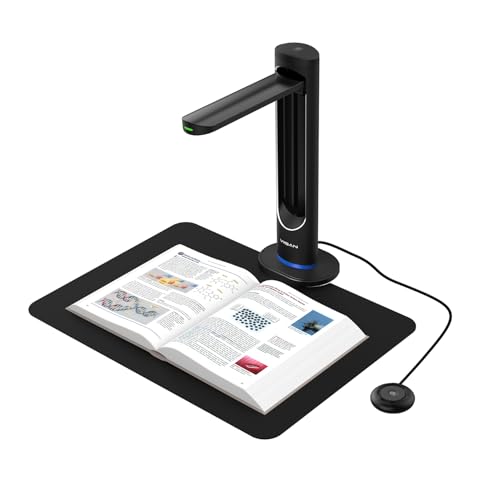
Professional Detail Pick – VIISAN K48 48MP Book Scanner
For shoppers comparing book scanners with automatic page flattening, the VIISAN K48 stands out with a 48MP Sony CMOS sensor, 600 DPI capture, and AI-assisted correction for curved pages, finger shadows, and background interference. It also automatically splits double-page spreads and can begin scanning when it detects a page turn.
Best For: High-volume book digitization, archival work, OCR, and users who want exceptionally detailed A3 captures.
Pros:
- True 48MP sensor with up to 600 DPI capture for detailed scans
- AI page smoothing removes curvature, finger shadows, and background interference
- Automatic page-turn scanning and double-page splitting improve workflow speed
- OCR supports searchable and editable files, plus text-to-speech output
Cons:
- Requires Windows 10/11 or macOS 10.15 and later
- USB-connected operation may be less convenient for mobile setups
The K48 is the strongest choice here for users who prioritize image detail and automated digitization. Its 4K live view and USB 3.0 connection also make it useful for presentations and document review.
Fast Scanning Value – CZUR ET16 Plus Book Scanner
The CZUR ET16 Plus is a practical option among book scanners with automatic page flattening, using patented software to correct the 3D curve of bound pages. Its 16MP camera and stated 1.5-second-per-page speed are designed for quickly processing books, while the included lighting helps produce shadowless captures.
Best For: Users scanning complete books quickly, along with occasional business cards, vouchers, binders, and physical objects.
Pros:
- Patented technology flattens curved book pages after image capture
- Can scan a 300-page book in about 10 minutes according to the supplied notes
- Supports books, binders, business cards, vouchers, and physical objects
- OCR recognizes more than 180 languages
Cons:
- Very glossy paper is not recommended
- Thai and Hebrew OCR are not supported; Arabic support varies by operating system
- Its 16MP camera offers less stated resolution than the higher-resolution alternatives here
The ET16 Plus makes the most sense when scanning speed and broad media support matter more than maximum camera resolution. Check the operating-system and OCR-language limitations before buying.
Large-Format Flexibility Pick – VIISAN S21 Pro A2/A3 Scanner
For buyers seeking book scanners with automatic page flattening that can handle oversized materials, this foldable model switches between A2 and A3 formats. Its software can flatten curved pages, remove fingerprints, repair page edges, and split double-page spreads, while the 26MP sensor provides 600 DPI software-enhanced output.
Best For: Large newspapers, maps, books, engineering drawings, and portable home, classroom, or library scanning.
Pros:
- A2/A3 interchangeable format accommodates large materials and standard books
- Automatic flattening, fingerprint removal, edge repair, and page splitting
- OCR supports more than 180 languages and exports to several editable formats
- Foldable, lightweight design with adjustable height and integrated LED lighting
Cons:
- 600 DPI output is software-enhanced; the supplied notes rate the sensor at 320 DPI optical equivalent
- Highly glossy or glare-prone paper is not recommended
- Not compatible with ARM-based devices such as Surface Pro X
The S21 Pro is the most versatile choice for oversized documents and users who need a scanner that stores compactly. Its Gemini integration adds translation and summarization possibilities, though it requires the VisualCam Lite web interface and Chrome.
How We Picked the Best Book Scanners with Automatic Page Flattening
We focused on scanners designed specifically for bound books and oversized documents rather than ordinary flatbed models. Our comparison considers page-flattening performance, finger removal, capture area, optical or camera resolution, OCR support, scanning speed, software compatibility, and ease of setup. We also included a range of form factors, from portable overhead scanners to professional large-format systems.
Because specifications and software features can vary by computer and operating system, verify current compatibility before buying. Some models rely heavily on their bundled software for automatic flattening, page splitting, deskewing, and OCR.
Quick Comparison
| Best For | What to Prioritize | Recommended Type |
|---|---|---|
| Home book archiving | Simple setup and automatic correction | Compact A4 or A3 scanner |
| Large books and artwork | Wide capture area and adjustable height | A3 or A2 overhead scanner |
| Frequent research scanning | Fast two-page capture and reliable OCR | High-resolution overhead model |
| Travel or shared workspaces | Low weight and USB operation | Portable folding or adjustable scanner |
Key Buying Factors for Book Scanners with Automatic Page Flattening
Capture Size and Working Distance
A4 coverage is sufficient for most novels, textbooks, and office documents. Choose A3 or A2 coverage for oversized art books, newspapers, maps, and archival material. Adjustable camera height can help accommodate thick books and different page sizes.
Flattening, Finger Removal, and Page Handling
Automatic flattening should correct the distortion near a book’s spine without requiring extensive manual editing. Finger hiding or fingerprint removal is useful when you must hold pages open, but performance depends on lighting, hand position, and software processing. Look for automatic page splitting, deskewing, and blank-page detection if you scan entire books.
Resolution and OCR
Higher megapixel ratings can preserve small print and illustrations, but lighting and image processing matter just as much. OCR language support is important for searchable archives and multilingual documents. If you need accurate text extraction, check supported languages and export formats rather than relying on resolution alone.
Software and Connectivity
Confirm support for your operating system, USB requirements, and preferred file formats. PDF, searchable PDF, JPEG, TIFF, and editable text exports cover most workflows. A polished scanning application can save more time than a small difference in camera resolution.
Who Should Buy Which Book Scanners with Automatic Page Flattening?
Choose a compact A4 or A3 scanner if you want an accessible home digitization setup for standard books and paperwork. A higher-resolution professional model is a better fit for researchers, libraries, sellers, and users who need detailed images or frequent OCR. Select an A2 large-format scanner for oversized books and documents, provided you have adequate desk space.
For occasional scanning or mobile work, prioritize portability, USB power, and quick setup. For large projects, prioritize automatic page correction, batch controls, reliable OCR, and software that exports searchable files efficiently. The best choice is the model that matches your typical book size and workflow—not necessarily the one with the highest camera specification.