
Finding the right book scanner under $500 means balancing image quality, page-turning speed, portability, and the software features that make captured pages genuinely useful.
This roundup compares 10 budget-friendly scanners and book-scanning cameras for home archives, research, teaching, business documents, and occasional digitization projects.
Best 10 Book Scanners Under 500 Picks for 2026
Best Overall

- Scans pages in about two seconds
- Corrects curved book pages with laser lines
- OCR exports to Word, PDF, and searchable PDF
Best For: Fast book and document scanning with page flattening
Best Portable Pick

- Lightweight, battery-powered handheld design
- Stores JPEG or PDF files on included 16GB card
- Selectable resolution up to 900 dpi
Best For: Travel and occasional scanning away from a computer
Best for Teaching

- Captures A3 and A4 documents
- Includes live projection and video recording
- OCR exports editable Word or text files
Best For: Teaching, presentations, and versatile document capture
Best for Office Work

- Scans up to 30 pages per minute duplex
- Supports USB, Wi-Fi, mobile, and cloud workflows
- Handles documents, photos, receipts, and cards
Best For: Fast mixed-document scanning in compact workspaces
Best Portable Book Scanner

- About one-second page scanning
- A3/A4 support with 13MP camera
- OCR and document-camera functionality
Best For: Portable scanning of thinner books and documents
Best Compact Document Scanner

- Up to 16 pages per minute
- USB-powered and about 1.5 pounds
- Works with Windows, Mac, and Linux
Best For: Portable scanning of loose documents, cards, and receipts
Best High-Resolution Book Scanner
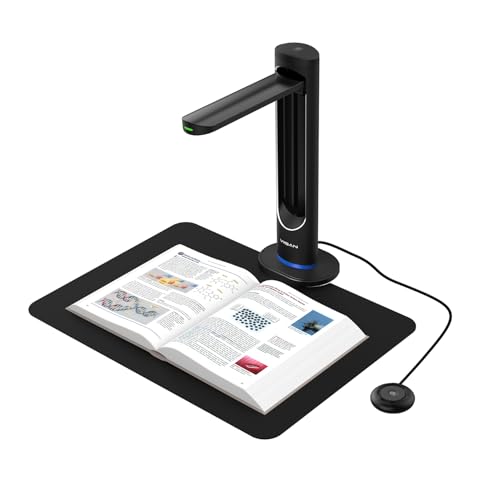
- 48MP capture with up to 600 DPI
- AI page smoothing and auto page splitting
- OCR, laser positioning, and page-turn detection
Best For: High-detail book digitization and archival scanning
Best A3 Book Scanner

- Laser-assisted flattening for curved pages
- About two seconds per page
- A3 scanning with multilingual OCR
Best For: Frequent book and large-document scanning at a desk
Best Document-Camera Scanner

- 8MP sensor with autofocus and LED lighting
- OCR with automatic image correction
- Works with Windows, Mac, and Linux
Best For: Scanning, OCR, and live document presentation
Best Portable Handheld Scanner

- Handheld design with rechargeable battery
- Scans to microSD or USB
- Includes OCR and PDF editing software
Best For: Travel and off-desk document or book scanning
Best Overall – CZUR Aura Pro
For shoppers comparing book scanners under 500, the CZUR Aura Pro is a strong all-purpose option for curved books, documents, and reading materials. It scans a page in about two seconds, supports A3 and A4 capture, and exports to JPG, Word, PDF, and searchable PDF formats.
Best For: Home archivists, students, and users who want fast book scanning with curved-page correction and broad OCR support.
Pros:
- Three laser lines help flatten and reproduce curved book pages accurately.
- OCR supports more than 180 languages and multiple editable output formats.
- Built-in glare-free lighting includes four color-temperature settings and supplemental side lights.
- Compatible with current Mac systems and Windows XP through Windows 11.
Cons:
- Thai, Hebrew, and Arabic are not supported by the listed OCR functionality.
- Requires a USB connection rather than Wi-Fi or Bluetooth.
The Aura Pro is a particularly capable choice when book-page quality matters more than wireless convenience. Its lighting and page-flattening features make it more specialized for books than a conventional document feeder.
Best Portable Pick – Hczrc Portable Scanner
Among book scanners under 500, this handheld model stands out for simple, battery-powered portability. It saves scans directly to the included 16GB Micro SD card, requires no software installation, and supports JPEG or PDF output at 300, 600, or 900 dpi.
Best For: Travelers, students, business users, and anyone who needs occasional scans away from a desk.
Pros:
- Compact 9.6-ounce design works well for travel and field use.
- Operates with two AA batteries and stores files on a Micro SD card.
- Offers three selectable resolutions up to 900 dpi.
- Works with Windows XP and Mac OS 10.4 or later, according to the supplied specifications.
Cons:
- Two AA batteries are required and are not included.
- Scanning is performed by moving the handheld unit across the page, which requires steady handling.
- Output is limited to JPEG and PDF rather than editable OCR formats.
This scanner is best viewed as a lightweight capture tool rather than a high-volume book digitization system. Its direct-to-card workflow is convenient when portability and privacy are more important than automation.
Best for Teaching – NetumScan 13MP Book Scanner
For book scanners under 500 that can also support instruction, the NetumScan 13MP Book Document Camera combines A3/A4 capture with live projection and video recording. Its software offers automatic correction, batch scanning with manual page turning, and OCR export to Word or text.
Best For: Teachers, distance learning, meetings, and users who need both document capture and real-time display.
Pros:
- Captures documents up to A3/A4 size with a 13MP CMOS sensor.
- Automatic correction helps fix skewed images, while mass scanning reduces repetitive work.
- OCR is rated at 98% or more accuracy in the supplied notes and supports multiple languages, symbols, and numbers.
- Foldable aluminum-alloy body and adjustable bracket improve portability and positioning.
Cons:
- Requires a USB connection and software installation to begin scanning.
- Its 800 dpi specification is lower than some dedicated high-resolution scanners.
- Live projection and video features depend on a connected computer.
The NetumScan is more versatile than a standard book scanner because it can function as a document camera. It makes the most sense for educators or presenters who value live display capabilities alongside OCR and batch capture.
Best for Office Work – ScanSnap iX1300
For buyers seeking book scanners under 500 with strong everyday office performance, the ScanSnap iX1300 offers compact duplex document scanning over USB or Wi-Fi. It handles documents, photos, receipts, cards, and thicker items, with automatic de-skew, color optimization, and blank-page removal.
Best For: Small offices and home workspaces that need fast, organized scanning of mixed paper documents.
Pros:
- Scans up to 30 pages per minute in duplex mode.
- Wi-Fi and USB connectivity support computers, mobile devices, cloud services, and Chromebook workflows.
- Compact design helps conserve desk space.
- ScanSnap Home organizes and manages documents, receipts, business cards, and photos.
Cons:
- Its 600 dpi resolution is lower than the maximum listed for some portable or specialized scanners.
- The 20-sheet standard capacity is suited to moderate batches rather than large archives.
- It is primarily a document scanner and does not list specialized curved-book flattening.
The iX1300 is the practical choice when your scanning needs extend beyond books to receipts, cards, photos, and office paperwork. Its duplex speed and wireless workflow make it especially convenient for routine document management.
Best Portable Book Scanner – CZUR Shine Ultra
For shoppers comparing book scanners under 500, the CZUR Shine Ultra is a flexible USB model for digitizing thinner books and flat documents. It scans roughly one page per second, supports A3 and A4 materials, and includes OCR and document-camera functions for compatible Windows and macOS computers.
Best For: Users who want a portable overhead scanner for thinner books, documents, remote teaching, and multilingual OCR.
Pros:
- Scans pages in about one second and handles materials up to A3 size.
- 13MP camera with automatic cropping, smart paging, side combining, and multiple color modes.
- OCR supports more than 180 languages, while the device can also function as a document camera.
- Lightweight, foldable design with a height-adjustable neck and foot pedal.
Cons:
- The curved-page flattening technology is intended for thinner books; CZUR recommends its ET series for thicker books.
- Not compatible with Android or iOS.
- OCR currently does not support Thai, Hebrew, or Arabic.
The Shine Ultra is a strong choice when speed, portability, and overhead book scanning matter more than mobile-device compatibility. Its feature set is especially useful for home offices, classrooms, and light book digitization.
Best Compact Document Scanner – Brother DS-640
Among book scanners under 500, the Brother DS-640 is better suited to loose pages, receipts, cards, and everyday documents than bound books. This slim mobile scanner reaches up to 16 pages per minute, connects through USB, and can run from a computer without a separate power outlet.
Best For: Travelers, students, and home-office users who primarily scan loose documents and need a lightweight, compact device.
Pros:
- Scans color and black-and-white documents at up to 16 pages per minute.
- Compact design measures less than one foot long and weighs about 1.5 pounds.
- USB-powered operation works where there is no outlet available.
- Supports Windows, Mac, and Linux, with OCR and image-enhancement software included.
Cons:
- Its single-sheet capacity requires feeding pages individually.
- Designed for documents and cards rather than bound-book scanning.
- USB connection is required for operation.
The DS-640 is a practical pick for portable paperwork rather than true book digitization. Its small footprint and broad operating-system support make it convenient for scanning receipts, forms, and cards on the go.
Best High-Resolution Book Scanner – VIISAN K48 Book Scanner
For shoppers seeking book scanners under 500 with detailed image capture, the VIISAN K48 combines a 48MP Sony CMOS sensor with 600 DPI output. Its AI-assisted page smoothing, laser positioning, automatic page-turn detection, and OCR features are designed for book digitization, archiving, and document-camera use.
Best For: Users digitizing books, magazines, and archival materials who want high resolution, automated page handling, and searchable or accessible output.
Pros:
- True 48MP sensor captures up to 600 DPI, including A3-sized materials.
- AI software smooths curved pages, removes finger shadows, and splits double pages automatically.
- Laser positioning and page-turn detection support efficient batch digitization.
- OCR can create searchable PDFs, editable files, and MP3 audio; USB 3.0 also supports 4K live view.
Cons:
- Requires Windows 10/11 or macOS 10.15 and later.
- Its professional-grade features may be more than casual document scanners need.
- At 1.5 kg, it is less lightweight than the most portable models.
The K48 stands out for users who prioritize image detail and automated book-processing tools. It is a compelling option for archives, libraries, education, and serious home digitization projects.
Best A3 Book Scanner – CZUR Aura Pro
For shoppers comparing book scanners under 500, the CZUR Aura Pro is a versatile desktop option for curved books, double-page spreads, and materials smaller than A3. Its laser-based page flattening, automatic page detection, and supplemental side lights are designed to make frequent scanning more efficient.
Best For: Home offices, libraries, and users scanning books or larger documents who want automatic page handling and built-in lighting.
Pros:
- Three laser lines help flatten and reproduce curved book pages.
- Scans single sheets and double pages in about two seconds per page.
- OCR supports more than 180 languages, with Thai, Hebrew, and Arabic excluded.
- Includes a foot pedal, auto page-turn detection, and a multifunction desk lamp.
Cons:
- At 3 kg, it is less portable than handheld scanners.
- Requires a USB connection and supported Windows or macOS versions.
- Smart sound control can be affected by background noise and distance.
The Aura Pro stands out when page flattening, A3-size flexibility, and hands-free scanning matter more than compact travel design. Its one-year manufacturer warranty adds some basic coverage.
Best Document-Camera Scanner – NetumScan 4K Book Scanner
Among book scanners under 500, the NetumScan 4K is a flexible document-camera design for users who want scanning, OCR, and live presentation features in one foldable unit. Its 8MP CMOS sensor, automatic correction, and built-in lighting support everyday document capture up to A4 size.
Best For: Students, teachers, remote presenters, and home-office users who need both document scanning and real-time video display.
Pros:
- Automatic correction can straighten skewed images and form pages quickly.
- 8MP CMOS imaging, autofocus, and built-in LED lighting support clearer captures.
- OCR converts scans into editable Word or TXT files and supports multiple languages.
- Works with Windows, macOS, and Linux and folds for portability.
Cons:
- Captures documents up to A4 rather than larger A3 materials.
- Requires USB connection and software installation to operate.
- Its 800 dpi resolution is lower than some dedicated high-resolution scanners.
This model is a practical hybrid for scanning and teaching or meeting presentations. Choose it if live video and cross-platform compatibility are as important as converting pages into editable text.
Best Portable Handheld Scanner – IRIScan Book 7
For mobile scanning on a budget, the IRIScan Book 7 is a compact handheld choice among book scanners under 500. It can save JPEG or PDF files to the included microSD card, scan through USB, and use bundled Readiris software to create editable documents.
Best For: Travelers, students, researchers, and anyone who needs to scan pages away from a desk.
Pros:
- Handheld, rechargeable, and designed for portable use.
- Offers 300, 600, and 1050 dpi scanning modes.
- Includes a microSD card, Readiris OCR, and Readiris PDF editing software.
- Can scan to microSD or computer and works with Windows and Mac.
Cons:
- It does not support Wi-Fi.
- Scanning is slower at higher resolution, taking up to 11 seconds per A4 page at 1050 dpi.
- An AC adapter is not included, though USB power and a cable are provided.
The IRIScan Book 7 prioritizes portability and direct storage over automated desktop page handling. Its rechargeable battery, LCD status display, and included OCR software make it a convenient option for scanning on the move.
How We Picked the Best Book Scanners Under 500
We focused on scanners and document cameras priced below $500 that are designed for books, documents, photos, receipts, or mixed media. The selection includes overhead book scanners, portable wand-style models, compact sheet-fed scanners, and versatile camera-based systems.
We compared capture size, stated resolution, OCR support, file formats, connectivity, portability, page-handling features, and compatibility with common computers. Because scanning needs vary widely, we also considered whether each type is better suited to bound books, loose pages, photographs, or high-volume office work.
Quick Comparison
| Scanner type | Best for | Main advantage | Potential limitation |
|---|---|---|---|
| Overhead book scanner | Bound books and archives | Scans pages without removing bindings | Needs desk space and careful positioning |
| Book scanner camera | Teachers, researchers, and digitization | Large capture areas and flexible positioning | May require software setup and lighting control |
| Sheet-fed scanner | Loose documents and receipts | Fast, automatic page feeding | Not designed for bound books |
| Handheld scanner | Travel and occasional scans | Lightweight and cable-free options | Scan quality depends more on user technique |
Key Buying Factors for Book Scanners Under 500
Book Size and Scanning Method
Check whether the scanner supports A4, A3, or larger pages. Overhead models are generally the easiest choice for bound books because they capture pages from above, while sheet-fed models work best when pages can be separated. Handheld scanners are convenient but require a steady, even pass across the page.
Resolution and Image Quality
Higher advertised megapixels or DPI can help with small text, illustrations, and archival work, but lighting, lens quality, software processing, and page alignment matter just as much. For ordinary text, a well-lit 300-DPI scan is often sufficient; detailed photos and preservation projects may benefit from higher-resolution capture.
OCR and File Formats
OCR converts photographed or scanned pages into searchable, editable text. If you plan to research notes or create searchable archives, prioritize reliable OCR software and support for searchable PDF. JPG and standard PDF export are useful for sharing, while editable formats can simplify document reuse.
Connectivity and Compatibility
USB is common and dependable, while wireless connectivity improves flexibility. Confirm operating-system support before buying, especially for Mac users, and check whether required scanning software is included or downloaded separately.
Lighting, Page Flattening, and Speed
Built-in lighting, automatic page detection, curve correction, and finger-removal features can save substantial editing time. For occasional scans, manual correction may be acceptable; for hundreds of pages, automation is worth prioritizing.
Who Should Buy Which Book Scanners Under 500?
Choose an overhead CZUR or similar book-focused scanner if you mainly digitize bound books, magazines, notebooks, or archival material. A camera-style model is a strong fit for teachers, researchers, and anyone who needs a large A3 capture area for demonstrations or irregular documents.
For offices handling stacks of loose pages, a compact sheet-fed option such as the ScanSnap or Brother is usually faster and easier than a book scanner. Travelers and students who need occasional scans should consider a portable handheld model with onboard storage or wireless transfer.
Before ordering, measure your typical pages, estimate your weekly scan volume, and decide whether searchable text is essential. Those three answers will usually narrow the field more effectively than resolution claims alone.