
Choosing among the best book scanners for archival projects means balancing image quality, page handling, format support, and workflow speed. The right scanner can help preserve fragile books and records while reducing the strain of pressing pages against a flatbed.
This roundup compares 10 options ranging from compact portable scanners to A2-capable overhead systems. Use the guide below to match your collection size, document dimensions, and preferred digitization workflow.
Best 10 Book Scanners for Archival Projects Picks for 2026
Best All-Around Book Scanner

- Laser-assisted curved-page flattening
- About two seconds per page
- 180+ language OCR support
Best For: Fast digitization of books and documents smaller than A3
Best Flat-Document Large-Format Scanner

- 2400 DPI optical resolution
- Four-second A3 scans at 200 DPI
- Frameless edge-to-edge glass
Best For: Flat A3 documents, newspapers, maps, and archival records
Best Portable Book Scanner

- About one-second-per-page scanning
- Foldable design weighs about four pounds
- Smart paging, cropping, and OCR
Best For: Portable scanning of thinner books and A3-size materials
Best for Oversized Bound Volumes
VIISAN S48 Duo Overhead Scanner

- Gentle overhead A2 book scanning
- Dual 48MP cameras up to 600 DPI
- AI page cleanup and OCR
Best For: Large, delicate, and bound archival materials
Best Portable Pick

- 8MP overhead camera scans A4 pages in about one second.
- Contact-free, foldable design protects documents and travels easily.
- OCR exports to editable formats and supports 180+ languages.
Best For: Portable A4 archival scanning
Best Large-Format Choice

- Captures A2/A3 journals, maps, newspapers, and manuscripts.
- Software flattens pages, removes fingers, repairs edges, and splits spreads.
- 26MP imaging with OCR export to PDF, Word, Excel, EPUB, and text.
Best For: Oversized and bound archival materials
Best Flatbed Detail
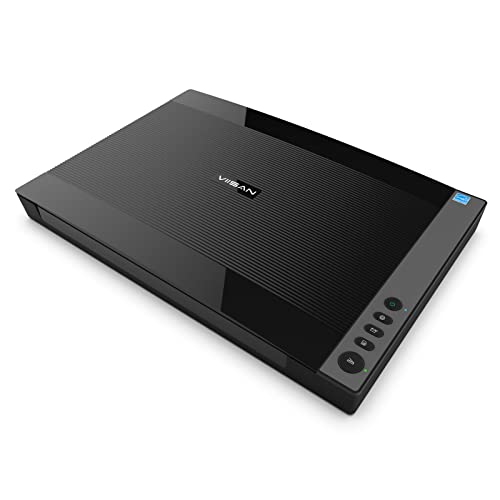
- A3 flatbed captures books, albums, artwork, and documents up to 1200 dpi.
- 48-bit color delivers detailed gradients for images and illustrations.
- Auto-scan and eight-second A3 scans support repeatable archival workflows.
Best For: High-detail scanning of flat A3 materials
Best with Extra Features

- Handheld, rechargeable design with microSD storage
- Scans up to 1050 dpi and supports JPEG/PDF
- Includes OCR and PDF editing software
Best For: Mobile and home archival scanning
Best High-Detail Setup
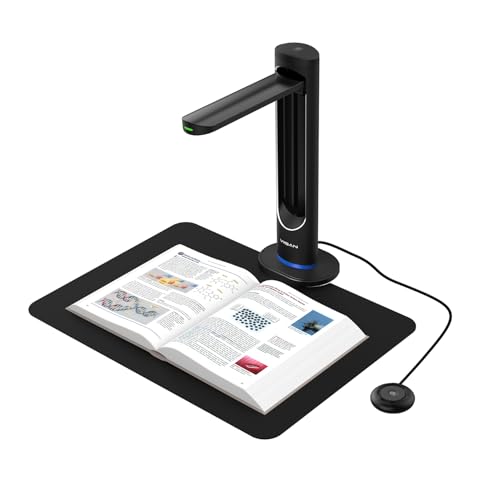
- 48MP sensor with up to 600 dpi capture
- AI page flattening and automatic page splitting
- Page-turn detection plus searchable OCR output
Best For: High-volume book digitization and detailed archives
Best A3 Overhead Option

- Overhead A3 capture for books and large documents
- 16MP camera with up to 300 dpi resolution
- Anti-glare lighting and automatic page flattening
Best For: Large-format materials and bound-book archiving
Best All-Around Book Scanner – CZUR Aura Pro
For book scanners for archival projects, the CZUR Aura Pro offers a practical balance of speed, page handling, and OCR. Its laser-based flattening technology is designed to replicate curved book pages, while automatic page detection and optional foot-pedal control can streamline longer scanning sessions.
Best For: Digitizing books, documents, and other materials smaller than A3 when fast scanning and searchable OCR are priorities.
Pros:
- Laser technology helps flatten curved pages for clearer scans.
- Scans single sheets and double-page books in about two seconds per page.
- OCR supports more than 180 languages, with stated language limitations.
- Includes supplemental side lights and a foot pedal for easier workflows.
Cons:
- Thai, Hebrew, and Arabic are not supported by the listed OCR.
- Sound-controlled lamp functionality can be affected by noise and distance.
- Materials must be smaller than A3.
The Aura Pro is a strong general-purpose choice for home, office, or small archival workflows, especially when curved-page correction and rapid OCR-enabled capture matter more than oversized formats.
Best Flat-Document Large-Format Scanner – VIISAN VF3240 A3 Scanner
The VIISAN VF3240 is a flatbed-style option for book scanners for archival projects involving loose pages, newspapers, maps, and other flat materials. Its A3 scanning area, frameless glass, and high-resolution output make it useful when edge-to-edge capture and detailed reproduction are more important than scanning bound books directly.
Best For: Flat archival documents, newspapers, blueprints, magazines, legal-size materials, and other oversized originals up to A3.
Pros:
- Supports up to 2400 DPI optical resolution and 48-bit color.
- Scans A3 color documents in as little as four seconds at 200 DPI under stated conditions.
- Frameless glass supports edge-to-edge scanning of large materials.
- Auto-Scan starts when the lid closes for repetitive workflows.
Cons:
- Designed for flat materials rather than bound, three-dimensional, or irregular objects.
- Windows users are limited to 1200 DPI for A3 through ViiScan and 600 DPI with the WIA driver.
- High-resolution speeds vary with resolution, size, and scan settings.
Choose the VF3240 when your archival collection consists primarily of flat, oversized originals. It is less suited to fragile bound volumes, but its large scan area and detailed output are valuable for loose archival material.
Best Portable Book Scanner – CZUR Shine Ultra
The CZUR Shine Ultra is a compact choice among book scanners for archival projects, combining a foldable design with rapid overhead capture. Its page-flattening technology is intended for thinner books, while smart paging, auto-cropping, and OCR reduce the amount of manual processing needed after scanning.
Best For: Portable digitization of thinner books, flat documents, and materials up to A3 in home, classroom, or office settings.
Pros:
- Scans at about one second per page for fast capture.
- Foldable, height-adjustable design weighs about four pounds.
- OCR supports more than 180 languages, with stated language limitations.
- Can also function as a USB document camera for supported video platforms.
Cons:
- Curved-page flattening is suitable for thinner books; thicker books are directed to another CZUR series.
- Not compatible with Android or iOS.
- Designed for flat papers and objects smaller than A3.
The Shine Ultra makes sense for users who need a scanner that can be moved between workspaces. Its speed and portability are appealing, but archival projects involving thick bindings or especially delicate volumes may require a more specialized setup.
Best for Oversized Bound Volumes – VIISAN S48 Duo Overhead Scanner
The VIISAN S48 Duo is built for book scanners for archival projects that involve oversized or delicate bound materials. Its overhead design avoids pressing down on bindings, while dual cameras, AI image processing, and OCR support cleaner digital records from books, manuscripts, maps, and other large originals.
Best For: Libraries, schools, offices, and archives digitizing oversized books and bound materials up to A2.
Pros:
- Overhead capture scans A2 materials without pressing on pages or bindings.
- Dual 48MP cameras provide up to 600 DPI capture.
- AI processing can flatten pages, remove finger marks, correct edge distortion, and clean backgrounds.
- OCR and text-to-speech features support searchable and accessible digital content.
Cons:
- Requires a computer with at least 4GB RAM and 20GB of available hard-drive space.
- Uses a USB connection and requires a USB 2.0 port.
- Its listed maximum resolution is 600 DPI, below the VF3240’s maximum optical resolution.
The S48 Duo is the most purpose-built option here for large, bound, or delicate originals. Its gentle overhead approach and automated cleanup make it particularly compelling for institutional digitization, provided the required computer setup is available.
Best Portable Pick – CZUR Lens800 Pro
For lightweight book scanners for archival projects, the CZUR Lens800 Pro is a convenient choice for A4 documents and smaller materials. Its overhead, contact-free design scans a page in about one second, while the foldable body makes it practical for mobile or occasional archival work.
Best For: Portable digitization of letters, certificates, forms, business cards, and other A4-size materials.
Pros:
- 8MP camera with 3264 × 2448 resolution and software-enhanced document processing.
- Contact-free scanning helps avoid feeding, jamming, or physically handling fragile pages.
- OCR can export to Word, Excel, PDF, editable PDF, and more than 180 languages, excluding Thai, Hebrew, and Arabic.
- Compact, foldable design weighs about 0.93 lb and uses a single USB connection for power and data.
Cons:
- Maximum capture size is A4, so it is unsuitable for oversized books, maps, or newspapers.
- The product notes do not recommend very glossy paper.
- It requires compatible Windows or macOS systems and the CZUR software for its full feature set.
The Lens800 Pro prioritizes portability and speed over large-format coverage. It is a sensible fit when your archive consists mainly of standard-size documents and you want OCR and image-processing tools without using a conventional flatbed.
Best Large-Format Choice – VIISAN S21 A2 Book Scanner
Among book scanners for archival projects, the VIISAN S21 stands out for oversized material. Its adjustable overhead design supports A2 and A3 capture, while the bundled software can flatten curved pages, remove fingers, repair damaged edges, and separate two-page spreads.
Best For: Large journals, manuscripts, newspapers, maps, books, and other oversized archival materials.
Pros:
- Captures up to A2-size material at 594 × 420 mm with a 26MP resolution.
- Software can digitally flatten curved pages, remove fingers, repair edges, and split double-page spreads.
- Built-in OCR converts scans into PDF, Word, Excel, EPUB, or text files.
- Foldable 90-degree hinge, adjustable height, LED lighting, and UVC/UAC support add flexibility.
Cons:
- Bundled OfficeCam software is not compatible with ARM-based devices such as the Surface Pro X.
- Very glossy paper is not recommended, and the built-in LEDs are not recommended in bright light.
- Its overhead setup requires more workspace than a compact A4 scanner.
The S21 is the most capable option here for large and curved source material. Its correction tools are especially useful for bound books, although buyers should confirm computer compatibility before starting a large digitization project.
Best Flatbed Detail – VIISAN VF3120 A3 Scanner
For archival projects that call for detailed, stable flatbed scans, the VIISAN VF3120 provides A3 coverage and up to 1200 × 1200 dpi optical resolution. Its frameless design accommodates books, albums, artwork, and other large flat materials while auto-scan supports more efficient batch work.
Best For: Flat books, photo albums, artwork, magazines, and large documents where high-resolution image capture matters.
Pros:
- Scans materials up to 304 × 426 mm, with a maximum optical resolution of 1200 dpi.
- 48-bit color depth supports detailed color gradients for photos, artwork, and illustrations.
- A3 color scans can take about eight seconds at 200 dpi, and auto-scan starts when the lid closes.
- Frameless construction and four-panel controls support books, thick items, email, printing, and multipage PDFs.
Cons:
- The CIS sensor is intended for flat paper images and is not suitable for three-dimensional objects.
- Full-size 1200 dpi scanning requires the supplied software; WIA is limited to 600 dpi.
- Compared with an overhead scanner, a flatbed workflow may be less convenient for delicate or tightly bound books.
The VF3120 is a strong match for archives centered on flat, oversized pages and image quality. It offers a more traditional scanning workflow than the overhead models, but its A3 bed and high resolution make it useful for photographs, artwork, and flattened book pages.
Best with Extra Features – IRIScan Book 7
For lightweight book scanners for archival projects, the IRIScan Book 7 is designed for mobile, occasional, and space-conscious digitization. It scans at 300, 600, or 1050 dpi, saves JPEG or PDF files to the included microSD card, and can also connect to Windows or Mac by USB.
Best For: Amateur archivists, travelers, and home users who need a handheld scanner for documents, photos, and smaller archival tasks.
Pros:
- Compact, battery-powered design for scanning away from a desk
- Up to 1050 dpi with a color LCD preview and scanning-status display
- Includes microSD storage, OCR software, and PDF editing software
- Supports Windows and Mac, with scanning to USB or microSD
Cons:
- Handheld operation may require more careful alignment than an overhead scanner
- Does not support Wi-Fi
- AC adapter is not included
The IRIScan Book 7 is a practical choice when portability matters more than automated page handling. Its built-in rechargeable battery and included OCR tools make it convenient for smaller collections, while USB and microSD workflows provide flexible file storage.
Best High-Detail Setup – VIISAN K48 Book Scanner
Among book scanners for archival projects, the VIISAN K48 is built for detailed, repeatable capture of books, magazines, and other materials. Its 48MP Sony sensor captures at up to 600 dpi, while AI-assisted page smoothing, automatic page splitting, and page-turn detection support faster digitization.
Best For: High-volume book digitization, libraries, and archival workflows that need detailed captures and automated page processing.
Pros:
- True 48MP sensor with up to 600 dpi capture, including A3-sized materials
- AI-assisted flattening helps address page curvature, finger shadows, and background interference
- Automatic page-turn detection and laser positioning support efficient scanning
- OCR can create searchable PDFs, editable Word/Excel files, and MP3 audio
Cons:
- USB-connected design requires a Windows or Mac computer
- At 1.5 kg, it is less portable than a handheld scanner
- Its advanced setup may be more than occasional users need
The K48 is the strongest fit here for users prioritizing image detail and workflow automation. Its USB 3.0 connection, 4K live view, and multi-format OCR make it suitable for organized digitization projects rather than quick, casual scans.
Best A3 Overhead Option – VIISAN DL16
The VIISAN DL16 is one of the more practical book scanners for archival projects involving bound books, artwork, sheet music, and oversized documents. Its A3 overhead format avoids the constraints of a standard flatbed, while anti-glare LED lighting and automatic page flattening help produce cleaner captures.
Best For: Libraries, offices, educators, and home archivists digitizing A3 materials, bound books, artwork, or large documents.
Pros:
- A3 overhead design accommodates large pages and bound materials
- 16MP camera provides up to 300 dpi document capture
- Automatic page flattening helps with curved book pages
- Anti-glare LED lighting helps reduce glare and uneven shadows
Cons:
- USB connection requires a Windows or Mac computer
- 300 dpi is lower than the resolution offered by the K48
- Desktop overhead design is not intended for mobile scanning
The DL16 offers a sensible middle ground for archival collections that need large-format overhead capture without the higher resolution and automation of the K48. Its lighting and page-flattening features are particularly useful for books and reflective or uneven materials.
How We Picked These Book Scanners for Archival Projects
We focused on scanners designed for books, bound materials, photographs, and oversized documents rather than ordinary sheet-fed office scanners. The selection considers capture size, stated resolution, camera quality, page-flattening features, OCR support, portability, scanning speed, and connection options.
Because archival needs vary widely, this list includes flatbed, overhead, portable, and document-camera-style designs. Published specifications are useful starting points, but real-world results also depend on lighting, page curvature, software, and the condition of the original material.
Quick Comparison
| Best For | What to Prioritize | Ideal Scanner Type |
|---|---|---|
| Rare or fragile bound books | Non-contact capture and gentle page handling | Overhead book scanner |
| Large atlases, maps, and ledgers | A2 or A3 capture area | Large-format overhead scanner |
| High-detail photographs and illustrations | High optical resolution and even lighting | Flatbed or high-resolution camera scanner |
| Frequent travel or field work | Compact design, USB power, and portable software | Portable scanner |
| Searchable digital archives | Reliable OCR and export tools | Scanner with OCR software |
Key Buying Factors for Book Scanners for Archival Projects
Capture Size and Book Clearance
Check whether the scanner accommodates A4, A3, or A2 pages, and account for the book’s open width, binding, and overhang. A larger scanning area is valuable for oversized volumes, newspapers, maps, and archival folders.
Resolution and Image Quality
Higher resolution helps preserve small type, line art, and photographic detail, but it also creates larger files and slower workflows. For text-heavy materials, consistent lighting and sharp focus may matter more than the headline DPI figure.
Page Flattening and Lighting
Automatic page flattening, curve correction, finger removal, and glare reduction can significantly improve results from bound books. These features are especially useful when you want to avoid forcing a fragile spine flat.
Speed, Software, and File Handling
Look for automatic page detection, timed capture, duplex or dual-page workflows, OCR, PDF and image export, and compatibility with your computer. Confirm whether required software supports your operating system and desired archival file formats.
Portability and Setup
Portable models suit occasional projects and limited workspaces, while overhead systems generally provide better control for extensive collections. Consider stand stability, lighting position, USB requirements, storage, and how easily the scanner can be packed away.
Who Should Buy Which Book Scanners for Archival Projects?
Choose a portable scanner if you need to digitize receipts, notes, small books, or records in multiple locations. Choose an overhead A3 or A2 model for fragile books, oversized pages, and repeated archival work where non-contact capture is important. Choose a flatbed when maximum contact with the page, photographic detail, and consistent placement matter more than speed. Choose a camera-style scanner with OCR if you want a flexible setup for books, documents, presentations, and searchable files.
Before buying, measure your largest source material, estimate your weekly scanning volume, and decide whether preservation-quality images or fast searchable PDFs are the main goal. Those three decisions usually narrow the field faster than resolution alone.